
MarkMindCkm/obsidian-markmind
MarkMindCkm/obsidian-markmind has 1,076 GitHub stars and 46 forks. GitHot measured 0 stars in 24 hours, +1 in 7 days, and +3 in 15 days. Last checked 2026-11-24 05:47 UTC. Last push 2026-11-03.
What you can do
- Inline text styles
- Katex - $x = {-b \pm \sqrt{b^2-4ac} \over 2a}$
측정된 스타 증가
- in 24h
- 0
- in 7 days
- +1
- in 15 days
- +3
- in 1 month
- 기록 수집 중
서로 겹치는 기간의 순증가량이며 일별 합계가 아닙니다. 측정값이 없으면 비워 둡니다. 스타는 관심도를 나타내며 품질을 보장하지 않습니다.
소개
Obsidian용 마인드맵 및 아웃라이너로, 모바일과 데스크톱을 지원합니다.
웹 및 앱README.md
OriginalObsidian MarkMind
Notice
This project have pass automated review by obsidian . #1049
Feature Comparison
| Free | Catalyst |
|---|---|
Basic mode of MindMap |
Advanced features in Rich mode of MindMap |
Most features in Rich mode of MindMap |
PDF annotate |
| List mode | Support development |
| PC and Mobile support | PC and Mobile support |
| Not support | Export mindmap as pdf file |
| $0 | $16 (forever) Buy here |
You can try it for 30 days for free. After 30 days, you can purchase a code on the website
MarkMind docs navigation
Youtube Vedio
- How to use basic mode of MindMap
- How to use markdown mode of MindMap
- How to use rich mode of MindMap
- How to import and export mindmap as a pdf
- How to use presentation mode of markmind
- How to annotate pdf with pdf++ plugin
MarkMind
- Create basic mode of MindMap
- Display basic mode to outline
- Display basic mode to table
- Create rich mode of MindMap ----- youtube vedio
- Get markdown text from rich mode of MindMap
- Copy and paste node of MindMap
- Embed MindMap in other markdown file
- Common operations of MindMap
- Drag image from desktop to rich mode of MindMap
- Copy text from browser to MindMap
- Drag multiple nodes
PDF annotation
Introduction
Obsidian MarkMind is a mind map, outline, and PDF annotate tool based on Obsidian API
Features:
- Links
- Inline text styles
Multiline
textinline code- Katex - $x = {-b \pm \sqrt{b^2-4ac} \over 2a}$
Links:
- GitHub: https://github.com/MarkMindCkm/obsidian-MarkMind
- Changelog: Here
- Web site: https://www.MarkMind.net
- Join our Discord: https://discord.gg/8653ZWX649
- Chinese Readme: 中文手册
Related:
Creating a MindMap file
- It contains two modes:
BasicandRich - You can create a MindMap file by either:
- Right clicking a folder and selecting
New MindMap Board - Add the YAML code by hand:
- Right clicking a folder and selecting
---

mindmap-plugin: basic (or rich)

---
Modes
Basic
You can use the basic mind map function in conjunction with the outline or table mode. It works similar to the obsidian-enhancing-MindMap plugin. All of these modes are available in rich mode as well
Outline
To access the Outline mode you can either:
- Click
More optionson the note and thenOpen outline - Add the YAML code by hand:
---

mindmap-plugin: basic
display-mode: outline

---
MindMap Outline short cuts
| Feature | Short Cut |
|---|---|
| New Mind Map | CTRL/CMD + P |
| New Child Node | Enter |
| Indent | Tab |
| Unindent | Shift + Tab |
| Zoom in | CTRL/CMD + ] or Double click bullet point |
| Zoom out | CTRL/CMD + [ |
| Zoom in/out | CTRL + Mouse wheel |
| Mind map to center | CTRL/CMD + E |
| Move Up Or Down Node | CTRL/CMD + Up/Down |
| Delete node | Delete/Backspace |
| Edit node | Space/Double click node |
| Undo | CTRL/CMD + Z |
| Redo | CTRL/CMD + Y |
| Expand/Collapse node | CTRL/CMD + / |
| Move node to another node | Drag and drop node |
| Tab node | Up/Down/Left/Right |
| Change MindMap layout | Select node, CTRL/CMD + U/D/L/R/M/J/K/T/Q |
| Delete summary/boundary/related link | Delete/Backspace |
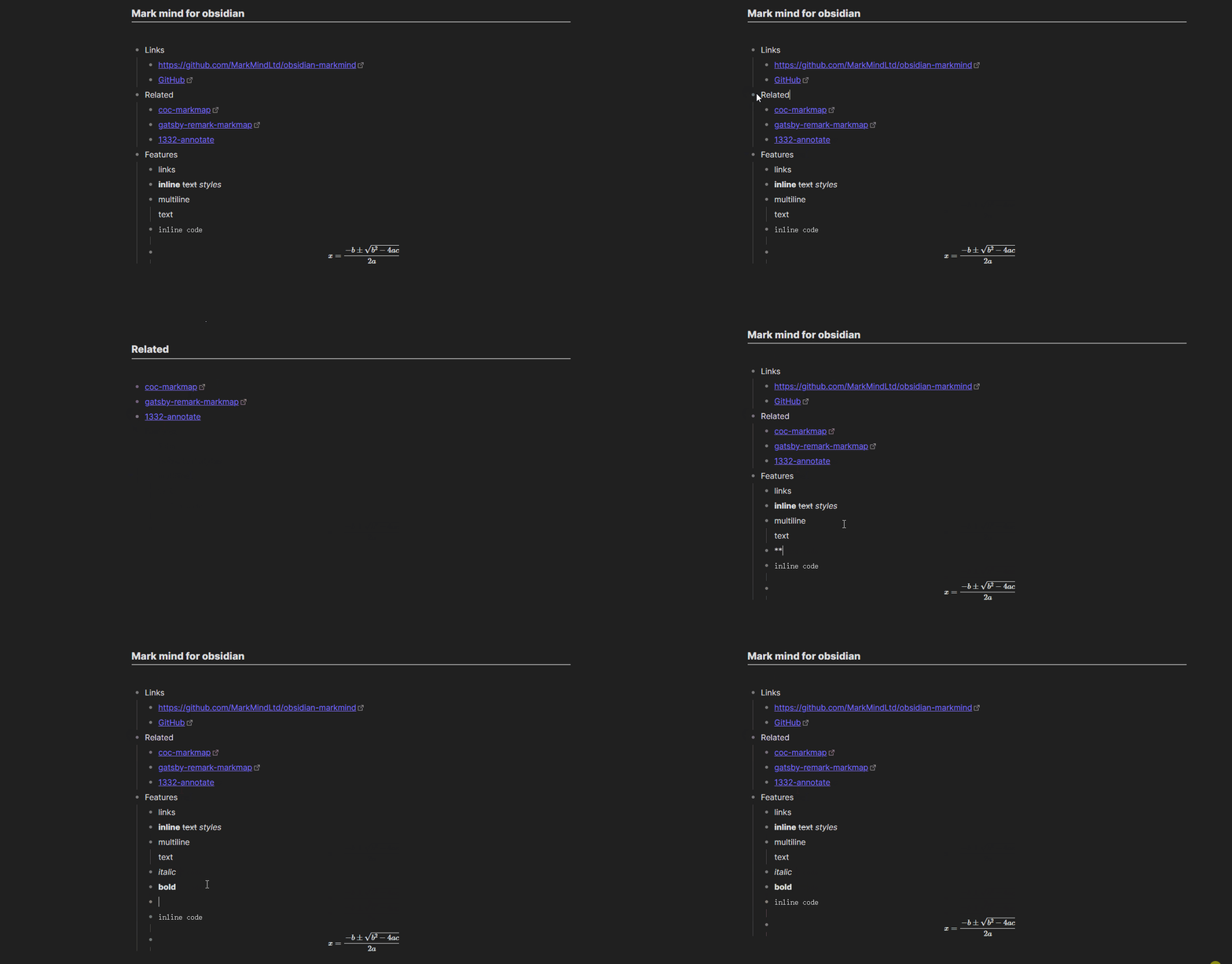
Table
To access the Table mode you can either:
- Click
More optionson the note and thenOpen as table - Add the YAML code by hand:
---

mindmap-plugin: basic
display-mode: table

---
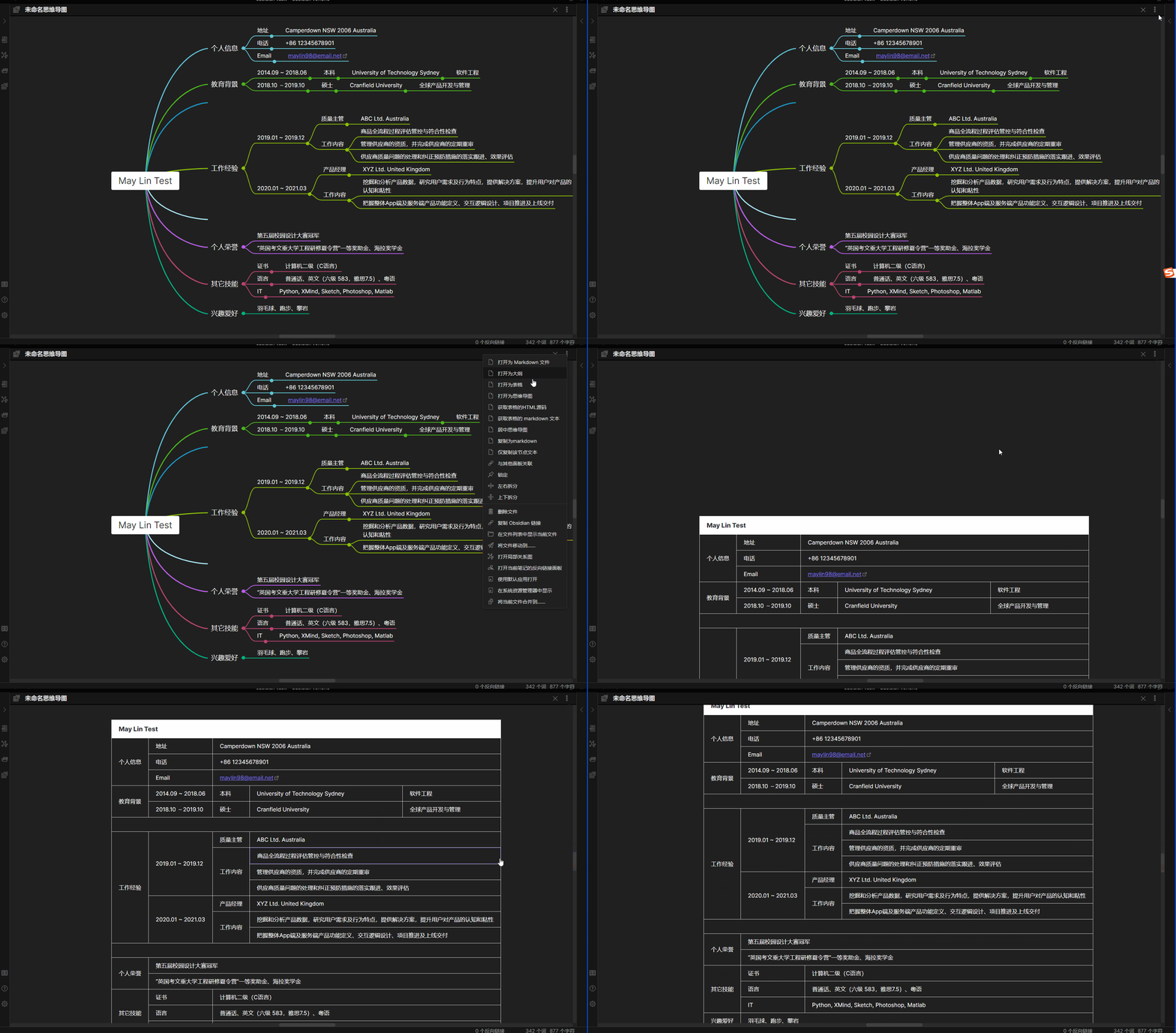
Rich
In Rich mode you can use all the functions of basic mode. In addition you can:
- Add a summary
- Add a boundary
- Add a node related link
- Add a free node
Rich mode markdown format:
---

mindmap-plugin: rich

---

# md

{JSON Data}
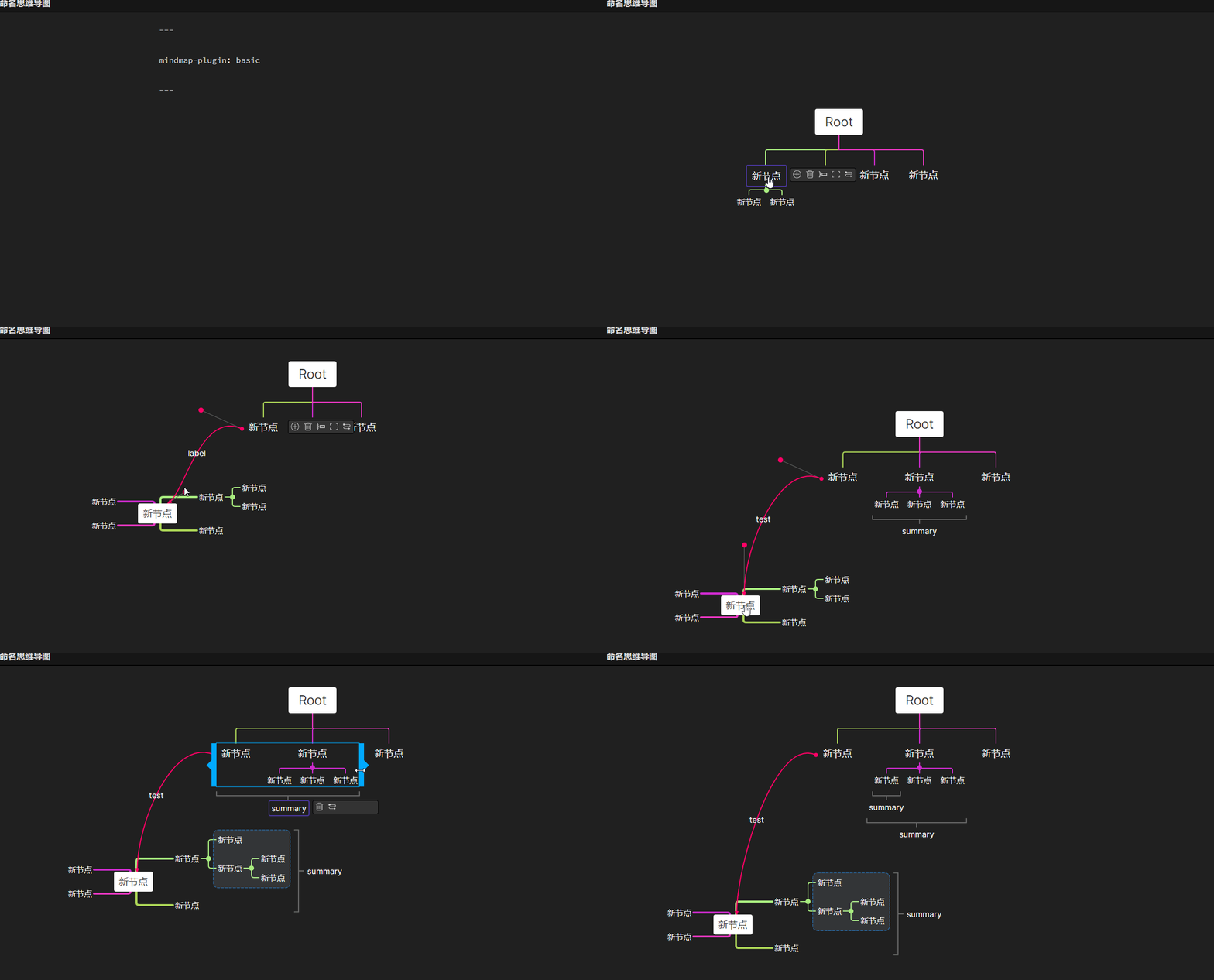
Other functions
- Exporting MindMap to image
- Use
CTRL + Pand clickExport to HTMLcommand
- Use
- Getting markdown in
richmode- You can find
Copy as markdownmenu inMore options
- You can find
- Exporting MindMap to pdf
- download lasted obsidian,open a mind map in a independ window
- Use
CTRL + Pand clickExport mindmap as a pdf filecommand
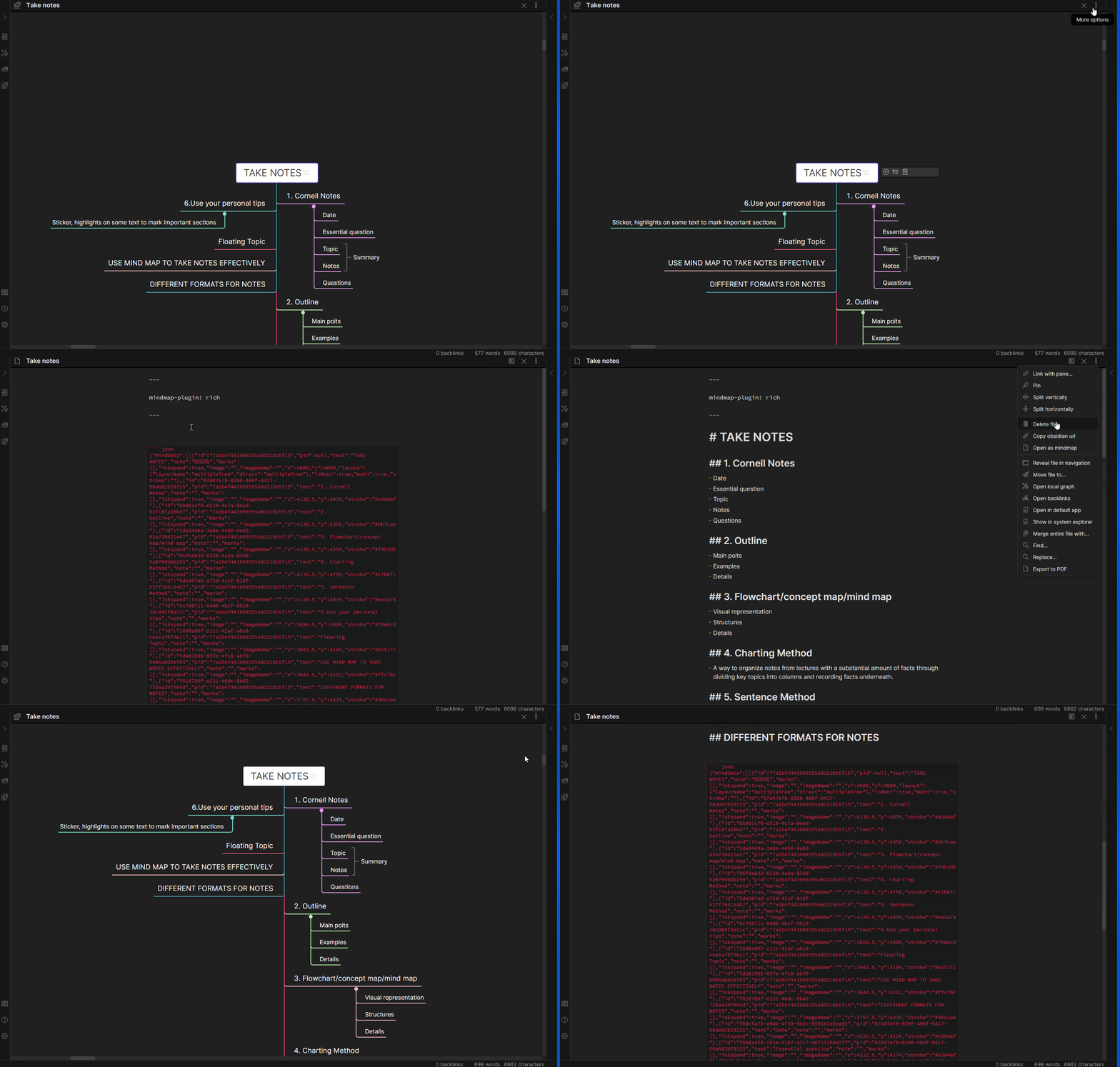
Notice
At present, pdf annotation only supports obsidian 1.4 version (issue). If you use obsidian 1.5 or later, please use markmind software(Download) version, which can be used with obsidian and is compatible with this plug-in.
PDF annotate
- use PDF++ plugin
- highlight annotate
- rect annotate
- Relate MindMap node and annotate
How to use PDF annotate
download PDF++ plugin
if open annotate support in markmind setting tab , please close it
open a pdf
make a hihlight or rect annotate
paste (ctrl v) in a node of mindmap
annotate vedio
https://github.com/user-attachments/assets/464a8db5-7d47-4dae-9a74-96107687525e
https://github.com/user-attachments/assets/8436d83e-3dae-4745-b478-71ffa6822ca1
Donating

관련 프로젝트 살펴보기
불러오는 중…