
JamieLivingstone/ArchStudio
JamieLivingstone/ArchStudio has 33 GitHub stars and 2 forks. GitHot measured 0 stars in 24 hours. Last checked 2026-11-09 13:59 UTC. Last push 2026-11-07.
The architecture editor that understands what you're designing.
What you can do
- A canvas that gets out of your way: drag in components, snap to alignment, copy and paste, zoom with a minimap, and undo anything
- 29 real components: clients, services, workers, edge, data, messaging, identity, observability and AI
- Boundaries that mean something: nest services, teams, domains, trust zones and regions
- AI that understands your system: it reads your real components and their options, not a picture, so it can answer questions and review your design for risks and gaps
측정된 스타 증가
- in 24h
- 0
- in 7 days
- 업데이트 지연
- in 15 days
- 업데이트 지연
- in 1 month
- 업데이트 지연
서로 겹치는 기간의 순증가량이며 일별 합계가 아닙니다. 측정값이 없으면 비워 둡니다. 스타는 관심도를 나타내며 품질을 보장하지 않습니다.
README.md
Original
ArchStudio
The architecture editor that understands what you're designing.
Design systems from real components, and review AI changes like a pull request.
Free, open source and no account needed.




Features
- A canvas that gets out of your way: drag in components, snap to alignment, copy and paste, zoom with a minimap, and undo anything
- 29 real components: clients, services, workers, edge, data, messaging, identity, observability and AI
- Boundaries that mean something: nest services, teams, domains, trust zones and regions
- AI that understands your system: it reads your real components and their options, not a picture, so it can answer questions and review your design for risks and gaps
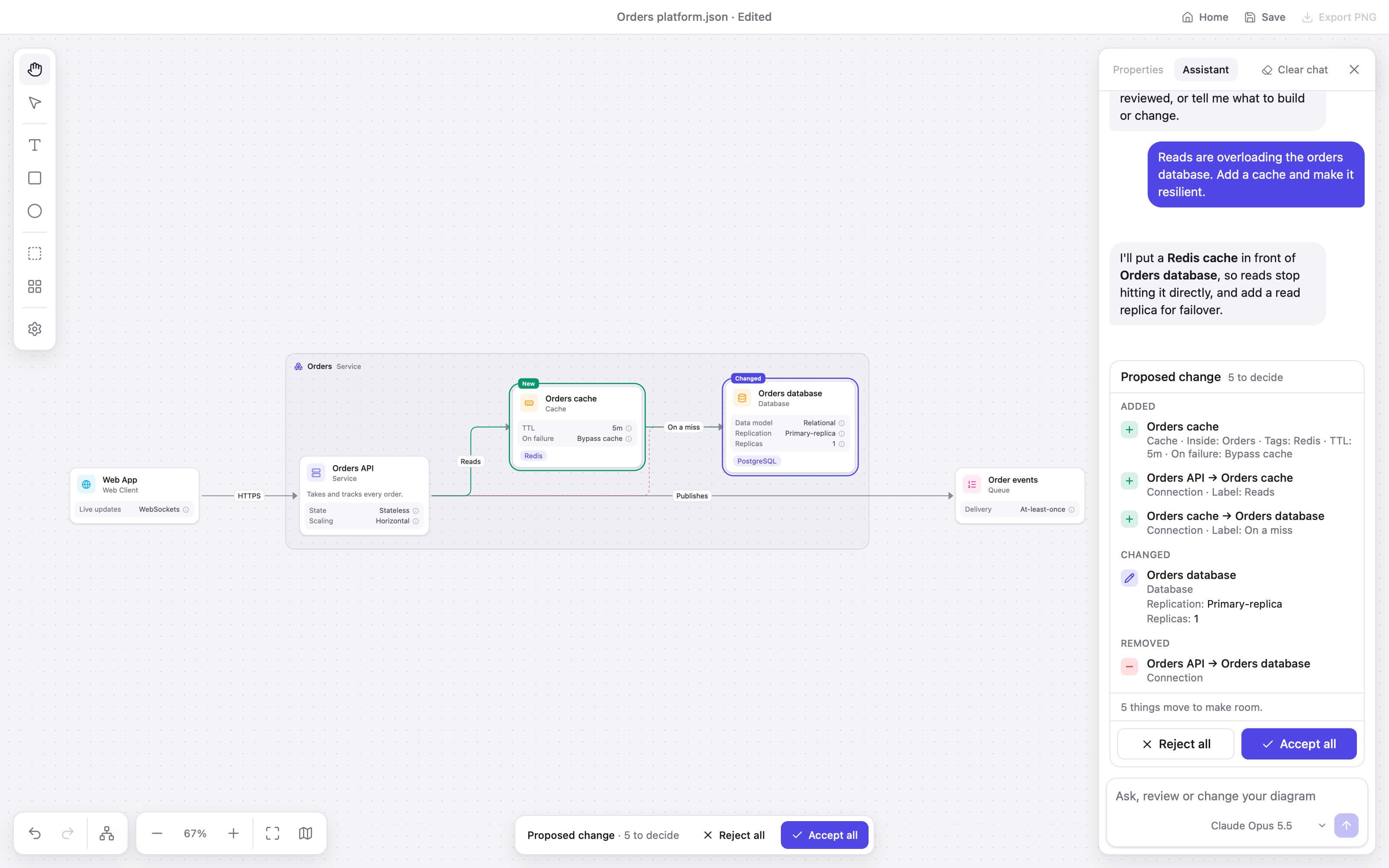
- AI changes you stay in control of: describe a change, then review it like a pull request and accept or reject each part
- Lines that keep themselves tidy: right-angled and routed around whatever is in the way
- One-click Format: arrange the whole diagram when it gets messy
- Templates: start from a URL shortener, e-commerce platform, real-time chat or AI assistant with retrieval
- Plain JSON files: readable, diffable and easy to keep in git
- Private by default: no accounts or cloud sync, and your diagram only goes to the provider you chose, when you send a message
- PNG export: drop a diagram straight into a doc or slide
More than boxes and lines
In most diagramming tools, a database is a rectangle with the word "database" in it. In ArchStudio, it's a database.
Each component knows what matters about it, and every option explains its trade-offs as you go. Your diagram ends up describing how the system actually works, not just how it looks.
| Component | Details you can set |
|---|---|
| Database | Data model, replication, partitioning, consistency, failover, tables or collections |
| Queue | Delivery guarantees, ordering, retries, dead-letter handling, retention |
| Cache | Strategy, TTL, invalidation, eviction, what happens on failure |
Everything stays generic, so "PostgreSQL" is a tag. You describe the design, not the vendor.
Review AI changes like a pull request
ArchStudio is a complete editor without AI. Connect your own Anthropic or OpenAI key, and the assistant never touches your diagram until you say so:
- See it on the canvas: new and changed components are marked in place, and removed lines stay visible until you decide
- Read a real diff: added, changed and removed, down to details like
Replication: Primary-replica - Decide change by change: accept or reject each part or all of it, and undo it in one step
- Trust what you're shown: every proposal is checked against the diagram's rules before you see it
Get started
In your browser: open archstudio.app. There is nothing to install and no sign-up.
On your desktop: download it for macOS, Windows or Linux from Releases. It updates itself and keeps your API keys in your system keychain.
The desktop app isn't signed with a paid certificate, so your system will warn you the first time:
- macOS: move the app to Applications, then run
xattr -cr /Applications/ArchStudio.appin Terminal. - Windows: on the SmartScreen warning, choose More info, then Run anyway.
ArchStudio is in beta, so expect rough edges. Your files are safe: a diagram you save today will keep opening in later versions.
API key best practices
ArchStudio only ever sends your key to the provider you chose. These habits are good practice for any app that uses an API key, and protect you from things outside the app, such as a rogue browser extension.
- Use a key just for ArchStudio, so you can revoke it without touching your other projects.
- Set a spending limit. On Anthropic, use a separate workspace with its own limit. On OpenAI, use a separate project with a limit, and check it stops requests rather than only alerting you.
- Replace it regularly, or set an expiry if your provider offers one, and delete it when you stop using ArchStudio.
- Use the desktop app for regular work, where your key stays in your system keychain.
Roadmap
- Interview mode
- More templates
- Local models through Ollama
- More model providers
- Whiteboard import
Contributing
Found a bug or have an idea? Open an issue, or see CONTRIBUTING.md. ArchStudio is MIT licensed.