
GJR787878/DeviceResetSpoofer
GJR787878/DeviceResetSpoofer has 51 GitHub stars and 6 forks. GitHot measured 0 stars in 24 hours, 0 in 7 days, and +1 in 15 days. Last checked 2026-11-19 18:15 UTC. Last push 2026-10-22.
What you can do
- Auto-detection of both branches: header shows "Connected to LSPosed / Vector" with version; the correct scheme is picked automatically
- No framework manager needed: enable the module once, then add/remove targets and write identities entirely in this app
- Applies instantly / a few seconds: Vector applies instantly; official restarts only the daemon for a few seconds — no phone reboot
- Manual trigger: adding a target to the list is NOT applying — tap Random / Customize → Save in its detail dialog
측정된 스타 증가
- in 24h
- 0
- in 7 days
- 0
- in 15 days
- +1
- in 1 month
- 기록 수집 중
서로 겹치는 기간의 순증가량이며 일별 합계가 아닙니다. 측정값이 없으면 비워 둡니다. 스타는 관심도를 나타내며 품질을 보장하지 않습니다.
소개
清除应用数据后自动生成全新设备标识(Android ID / 广告ID / IMEI / 设备型号 / MAC / GSF / 运营商)/ Auto-generate a fresh device identity (Android ID, Ad ID, IMEI, model, MAC, GSF, carrier) after clearing app data.
보안README.md
OriginalDeviceResetSpoofer
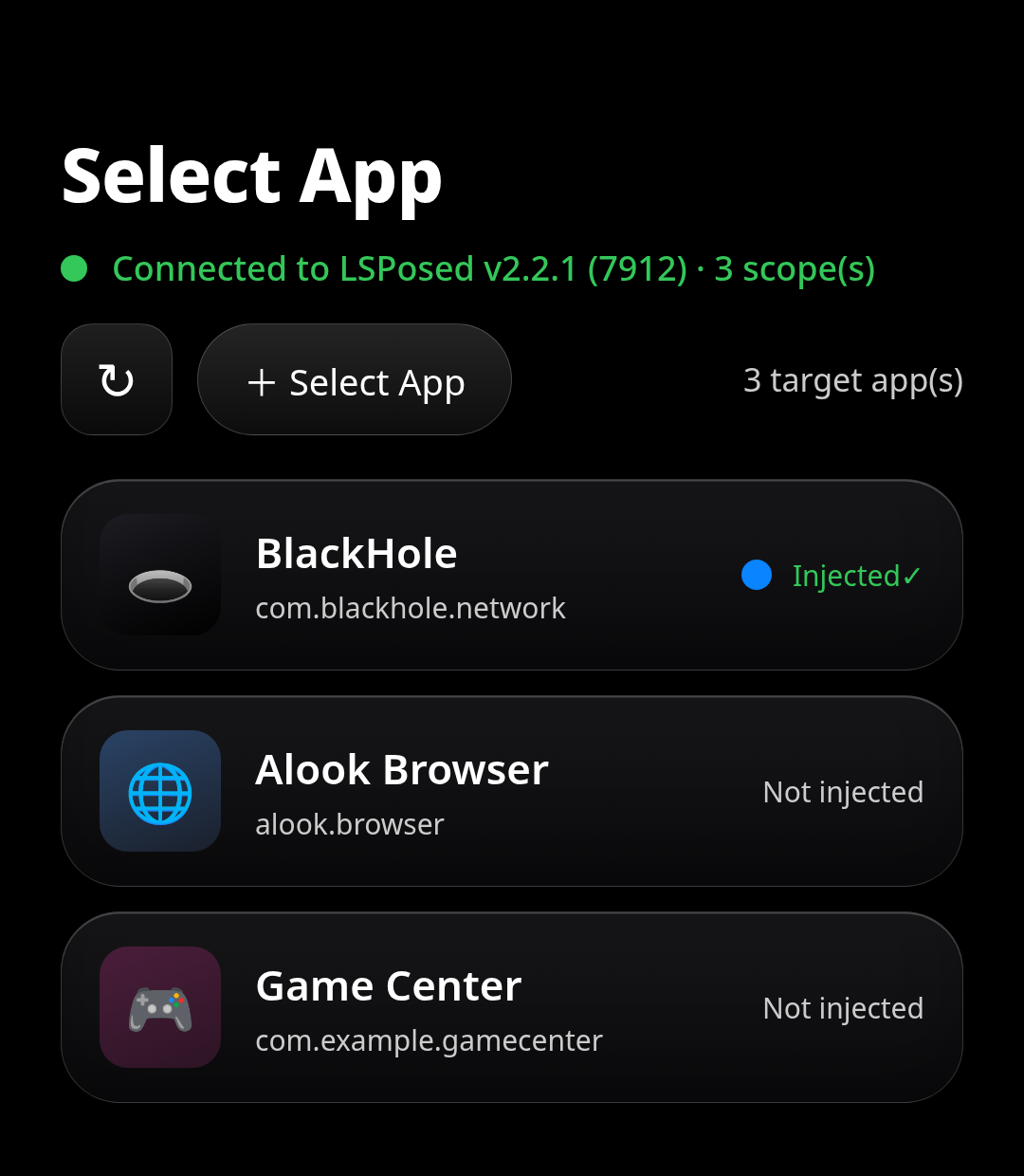
自动识别 官方 LSPosed 与 JingMatrix/Vector 双分支的设备伪装模块:主页额头显示「已连接 XX」,应用内勾选目标 → 随机/自定义 → 保存即生效 Device-spoofing module that auto-detects official LSPosed and JingMatrix/Vector: the home header shows "Connected to XX"; pick targets in-app → Random / Customize → Save, done




📱 Screenshots / 界面预览
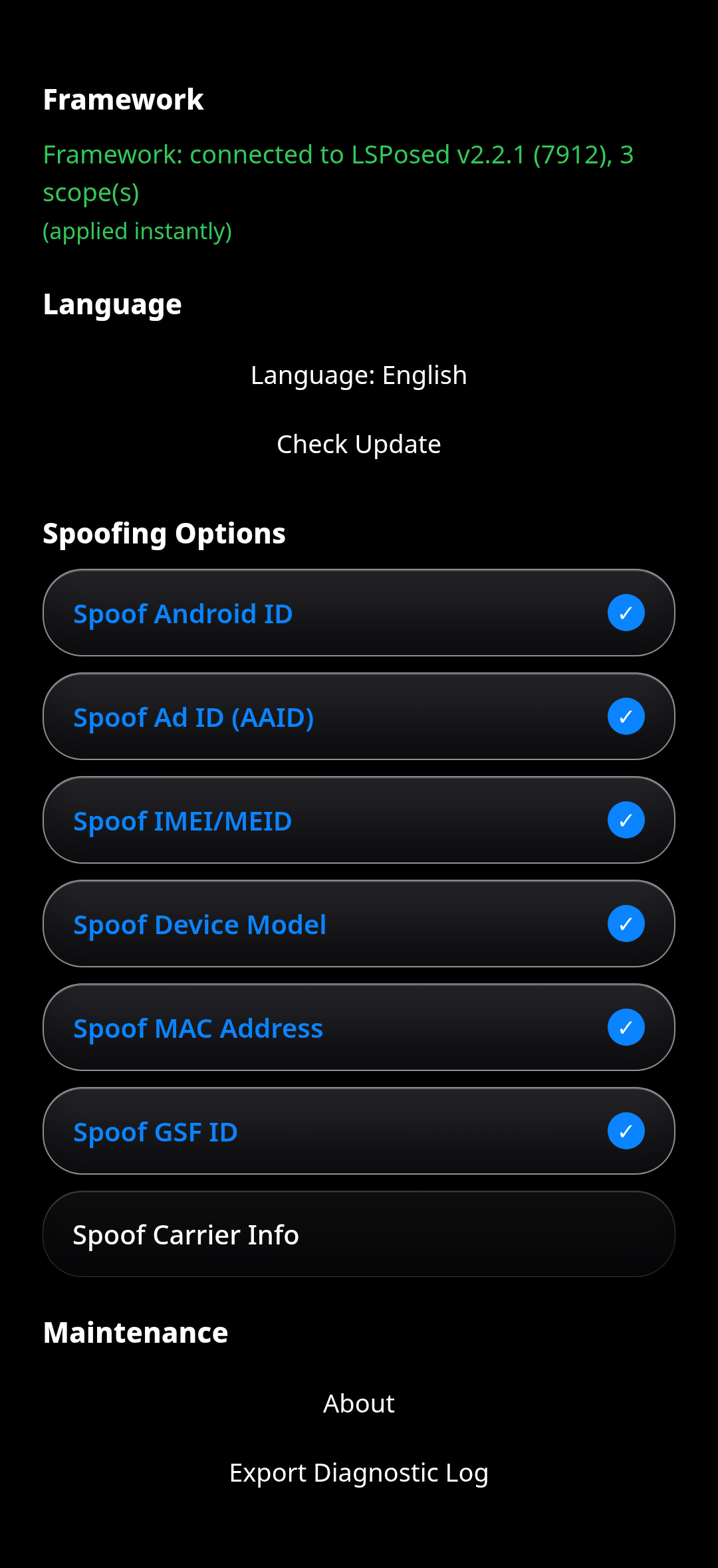
| 主界面 / Main(额头显示已连接框架) | 设置界面 / Settings |
|---|---|
 |
 |
🇬🇧 English
Table of Contents
- Introduction
- Dual-framework auto-detection
- Features
- Requirements
- Installation
- Usage
- How It Works
- Spoofed Identifiers
- FAQ
- Warnings
- License
Introduction
An LSPosed/Vector module that spoofs a fresh device identity for the apps you pick, right from inside this app. It automatically detects which framework you installed (official LSPosed or JingMatrix/Vector), shows "Connected to XX" in the home header, and chooses the right scope-writing method. Select a target, tap Random / Customize, Save, and reopen the app: the new identity is applied — no need to open the framework manager.
🔀 Dual-framework auto-detection
The two branches share the same directories, process name and database (/data/adb/lspd, pidof lspd, modules_config.db); they differ only in the manager package, CLI and authorization. The module detects all three signals precisely:
| Framework | Manager package | Module id | CLI | Scope write |
|---|---|---|---|---|
| Official LSPosed (e.g. v2.2.1-7912) | org.lsposed.manager |
zygisk_lsposed |
lspctl |
Direct DB write + restart daemon (a few seconds) |
| Vector / JingMatrix (e.g. v2.2-3080) | org.matrix.vector.manager |
zygisk_vector |
cli |
Instant via cli (no restart) |
Why official LSPosed needs a daemon restart:
lspctlwrite commands are gated by developer mode plus a CLI-origin verifier that requires an ADB ancestor process — an unattended app oversucannot pass. So the module writes the DB directly and restarts only thelspddaemon (not the phone). The readiness poll is extended to ~90 s to cover first-time dex2oat; on failure the previous DB is restored automatically so the framework is never left half-activated.
✨ Features
- Auto-detection of both branches: header shows "Connected to LSPosed / Vector" with version; the correct scheme is picked automatically
- No framework manager needed: enable the module once, then add/remove targets and write identities entirely in this app
- Applies instantly / a few seconds: Vector applies instantly; official restarts only the daemon for a few seconds — no phone reboot
- Manual trigger: adding a target to the list is NOT applying — tap Random / Customize → Save in its detail dialog
- Reliable uncheck: scope is fully overwritten; removing every target disables the module. Only this module's own rows are touched — other modules are unaffected
- Sentinel-driven injection: only processes whose private dir contains a readable
.identity_sentinelget hooked; everything else is skipped - Multi-dimensional spoofing: Android ID, Advertising ID, IMEI/MEID, IMSI/ICCID, device model, MAC, GSF ID, serial, carrier info — permission-gated methods are short-circuited before the original throws
- Independent toggles: each hook item can be enabled/disabled independently
- Trilingual UI: Chinese / English / Русский, switch anytime
- Glass UI: frosted-glass capsule style, filters, long-press to remove targets
📋 Requirements
| Item | Requirement |
|---|---|
| Android Version | Android 8.0 ~ Android 16 (API 26 ~ 36) |
| Root Access | Required |
| Framework | Official LSPosed or JingMatrix/Vector (auto-detected) |
| Architecture | arm64-v8a, armeabi-v7a, x86, x86_64 |
| Storage | ~6MB |
📦 Installation
- Download the latest APK from the Releases page and install it
- Open your framework manager (LSPosed or Vector) → Modules → enable DeviceResetSpoofer
- Open DeviceResetSpoofer — the header confirms the connected framework (e.g. "Connected to LSPosed v2.2.1 (7912)")
- No phone reboot is required
🚀 Usage
- On the Apps tab, tap + Select App to pick targets
- Tap a target row → Random or Customize → Save
- Reopen the target app — the new identity is applied
- If the app still reports old values, open its detail → Clear Data → reopen directly
Tip: A green "Injected ✓" status means the target is in scope. The list auto-refreshes when apps are installed/uninstalled.
🔧 How It Works
- Vector: the module calls the bundled
cliover root; the daemon writes the DB and refreshes its in-memory ConfigCache itself — instant, no restart. - Official LSPosed: the module copies the DB out (root → private dir), edits it with the in-app SQLite, then stops the old daemon, writes the DB back, and starts a new daemon via
daemon --force(mirroring the officialservice.sh), polling until ready. The system framework is stored assystem(the package name isandroidat load time). - In the target process, hooks are installed only when a readable
.identity_sentinelexists; Save is the manual trigger that writes the values and sentinel.
🎭 Spoofed Identifiers
- Android ID (SSAID)
- Advertising ID (AAID) / AppSet ID
- IMEI / MEID / IMSI / ICCID
- Serial number / MAC address (incl.
NetworkInterface.getHardwareAddress()) - GSF ID
- Device info: Brand, Model, Manufacturer, Build fingerprint, bootloader, radio
- Carrier info: Code, Name, Country
❓ FAQ
Q: Do I need to reboot when I check a new app?
A: No. With Vector it applies instantly; with official LSPosed only the lspd daemon restarts for a few seconds (the phone itself does not reboot). Then reopen the target.
Q: Will other modules be affected? A: No. The module only edits its own rows. On official LSPosed, apps launched during the few-seconds restart may briefly skip injection; already-running apps are unaffected.
Q: I added the app but nothing changed? A: Adding a target only manages the list. Open its detail and tap Random / Customize → Save to write the identity.
Q: The app still reads the old identity? A: Some apps cache identity on first launch. Use Clear Data in the detail dialog, then reopen directly.
⚠️ Warnings
- For personal privacy protection and technical testing only
- Some apps detect Xposed/Root traces — account ban risk exists
- Clear Data wipes the target app's own data — use it only when the identity doesn't refresh
- Apps reading system properties directly at the native layer cannot be intercepted by Java hooks
- Test on non-critical apps first; use Export Log in Settings to troubleshoot
📄 License
🇨🇳 中文
目录
简介
一个 LSPosed/Vector 模块:自动识别你装的是官方 LSPosed 还是 JingMatrix/Vector,主页额头显示「已连接 XX」,并自动选择对应方案。在本应用内选择目标,随机/自定义,保存后重新打开目标即生效,无需再打开框架管理器。
🔀 双框架自动检测
两个分支的目录、进程名、数据库完全相同(/data/adb/lspd、pidof lspd、modules_config.db),区别只在管理器包名、CLI 和鉴权。模块会精确检测三路信号:
| 框架 | 管理器包名 | 模块 id | CLI | 作用域写入 |
|---|---|---|---|---|
| 官方 LSPosed(如 v2.2.1-7912) | org.lsposed.manager |
zygisk_lsposed |
lspctl |
直写库 + 重启守护进程(几秒) |
| Vector / JingMatrix(如 v2.2-3080) | org.matrix.vector.manager |
zygisk_vector |
cli |
经 cli 即时生效(无重启) |
为什么官方需要重启守护进程:
lspctl的写命令被开发者模式 + CLI 来源校验(要求进程祖先链含 adbd、有 ADB 连接)挡住,App 经 su 无人值守无法通过。因此模块直写库后只重启lspd守护进程(不是重启手机);就绪轮询放宽到约 90 秒以覆盖首次 dex2oat,失败时自动恢复旧库,绝不把框架留在半激活状态。
✨ 功能特性
- 双分支自动检测:额头显示「已连接 LSPosed / Vector」及版本,自动选择对应方案
- 免开框架管理器:仅启用一次模块,之后增删目标、写伪装值全部在本应用内完成
- 即时 / 几秒生效:Vector 即时;官方只重启几秒守护进程,不重启手机
- 手动触发:把应用加入目标列表 ≠ 生效;需在详情弹窗点击随机/自定义 → 保存
- 取消勾选可靠:作用域全量覆盖,一个目标都不剩则禁用模块;只操作本模块自己的行,其他模块不受影响
- 哨兵驱动注入:只有私有目录存在可读
.identity_sentinel的进程才注入 Hook,其余跳过 - 多维度伪装:Android ID、广告 ID、IMEI/MEID、IMSI/ICCID、设备型号、MAC、GSF ID、序列号、运营商;受权限门限制的方法在原方法抛异常前短路
- 独立开关:各 Hook 项可独立开启/关闭
- 三语界面:中文 / English / Русский
- 玻璃胶囊 UI:毛玻璃风格,支持筛选、长按删除目标
📋 系统要求
| 项目 | 要求 |
|---|---|
| Android 版本 | Android 8.0 ~ Android 16(API 26 ~ 36) |
| Root 权限 | 必须 |
| 框架 | 官方 LSPosed 或 JingMatrix/Vector(自动检测) |
| 架构 | arm64-v8a, armeabi-v7a, x86, x86_64 |
| 存储空间 | 约 6MB |
📦 安装方法
- 前往 Releases 下载最新版 APK 并安装
- 打开框架管理器(LSPosed 或 Vector)→ 模块 → 启用 DeviceResetSpoofer
- 打开 DeviceResetSpoofer,额头会确认已连接框架(如「已连接 LSPosed v2.2.1 (7912)」)
- 无需重启手机
🚀 使用方法
- 在 Apps 页点击 + Select App 选择目标
- 点击目标行 → 随机 或 自定义 → 保存
- 重新打开目标应用即生效
- 若仍读到旧值,打开详情 → 清空数据 → 直接重新打开
提示:绿色「已注入✓」表示目标已在作用域;系统有新装/卸载时列表自动更新。
🔧 工作原理
- Vector:模块经 root 调用自带
cli,由守护进程自己写库并刷新内存 ConfigCache——即时、无重启。 - 官方 LSPosed:模块把库拷出(root → 私有目录),用应用内 SQLite 编辑,然后停旧守护、写回库、用
daemon --force(复刻官方service.sh)拉起新守护并轮询就绪。系统框架存为system(加载时包名才是android)。 - 在目标进程内,只有存在可读
.identity_sentinel才装 Hook;保存是手动触发,写入值并落哨兵。
🎭 伪装的识别码
- Android ID(SSAID)
- 广告 ID(AAID)/ AppSet ID
- IMEI / MEID / IMSI / ICCID
- 序列号 / MAC 地址(含
NetworkInterface.getHardwareAddress()) - GSF ID
- 设备信息:品牌、型号、厂商、Build 指纹、bootloader、radio
- 运营商信息:代码、名称、国家
❓ 常见问题
Q:每次勾选新应用都要重启吗?
A:不用。Vector 即时生效;官方 LSPosed 只重启 lspd 守护进程几秒(手机本身不重启),然后重新打开目标即可。
Q:手机里的其他模块会受影响吗? A:不会。模块只改自己的行。官方 LSPosed 重启的几秒内,新启动的应用可能短暂不注入;已运行的应用不受影响。
Q:把应用加入列表了,为什么没生效? A:加入目标只是管理列表。打开详情点击随机/自定义 → 保存才会写入身份。
Q:保存后仍读到旧值? A:部分应用首次启动缓存身份。在详情弹窗使用清空数据,然后直接重新打开。
⚠️ 注意事项
- 本模块仅用于个人隐私保护和技术测试
- 部分应用会检测 Xposed/Root 痕迹,存在账号封禁风险
- 清空数据会清除目标应用自身数据,仅在身份刷新不了时使用
- native 层直接读取系统属性的应用,Java 层 Hook 无法拦截
- 建议先在不重要的应用上测试;设置页可用「导出日志」排查
📄 许可证
🇷🇺 Русский
Содержание
- Введение
- Автоопределение двух фреймворков
- Возможности
- Требования
- Установка
- Использование
- Как это работает
- Подделываемые идентификаторы
- Часто задаваемые вопросы
- Предупреждения
- Лицензия
Введение
Модуль LSPosed/Vector, который подделывает идентичность устройства для выбранных приложений прямо из этого приложения. Он автоматически определяет установленный фреймворк (официальный LSPosed или JingMatrix/Vector), показывает «Подключено к XX» в шапке и выбирает нужный способ записи области. Выберите цель, нажмите «Случайно»/«Настроить», сохраните и снова откройте приложение — менеджер фреймворка открывать не нужно.
🔀 Автоопределение двух фреймворков
Обе ветки используют одинаковые каталоги, имя процесса и базу (/data/adb/lspd, pidof lspd, modules_config.db); различия — только в пакете менеджера, CLI и авторизации. Модуль точно определяет все три сигнала:
| Фреймворк | Пакет менеджера | id модуля | CLI | Запись области |
|---|---|---|---|---|
| Официальный LSPosed (напр. v2.2.1-7912) | org.lsposed.manager |
zygisk_lsposed |
lspctl |
Прямая запись БД + перезапуск демона (несколько секунд) |
| Vector / JingMatrix (напр. v2.2-3080) | org.matrix.vector.manager |
zygisk_vector |
cli |
Мгновенно через cli (без перезапуска) |
Почему официальному LSPosed нужен перезапуск демона: команды записи
lspctlзащищены режимом разработчика и проверкой источника CLI, требующей процесс-предок adbd — приложение без участия пользователя черезsuпройти не может. Поэтому модуль пишет БД напрямую и перезапускает только демонlspd(не телефон). Опрос готовности продлён до ~90 с для покрытия первого dex2oat; при сбое прежняя БД восстанавливается автоматически.
✨ Возможности
- Автоопределение обеих веток: в шапке «Подключено к LSPosed / Vector» с версией, схема выбирается автоматически
- Без менеджера фреймворка: включите модуль один раз, затем добавление/удаление целей и запись идентичности — в этом приложении
- Мгновенно / несколько секунд: Vector мгновенно; официальный перезапускает только демон на несколько секунд — без перезагрузки телефона
- Ручной запуск: добавление в список ≠ применение — нажмите «Случайно»/«Настроить» → Сохранить
- Надёжное снятие отметки: область полностью перезаписывается; при отсутствии целей модуль отключается. Затрагиваются только строки этого модуля
- Инъекция по сторожевому файлу: хуки ставятся только при наличии читаемого
.identity_sentinel - Многомерная подделка: Android ID, рекламный ID, IMEI/MEID, IMSI/ICCID, модель, MAC, GSF ID, серийный номер, оператор — методы с правами перехватываются до исключения
- Независимые переключатели, трёхъязычный интерфейс, стеклянный UI
📋 Требования
| Пункт | Требование |
|---|---|
| Версия Android | Android 8.0 ~ Android 16 (API 26 ~ 36) |
| Root | Обязателен |
| Фреймворк | Официальный LSPosed или JingMatrix/Vector (автоопределение) |
| Архитектура | arm64-v8a, armeabi-v7a, x86, x86_64 |
| Хранилище | ~6 МБ |
📦 Установка
- Скачайте последний APK со страницы Releases и установите
- Откройте менеджер фреймворка (LSPosed или Vector) → Модули → включите DeviceResetSpoofer
- Откройте DeviceResetSpoofer — шапка подтвердит подключённый фреймворк
- Перезагрузка телефона не требуется
🚀 Использование
- На вкладке Apps нажмите + Select App и выберите цели
- Нажмите на строку → «Случайно» или «Настроить» → Сохранить
- Снова откройте целевое приложение
- При старых значениях откройте детали → Очистить данные → откройте напрямую
Совет: Зелёное «Внедрено✓» означает, что цель в области.
🔧 Как это работает
- Vector: модуль вызывает
cliчерез root; демон сам пишет БД и обновляет ConfigCache — мгновенно. - Официальный LSPosed: БД копируется (root → личный каталог), редактируется встроенным SQLite, затем старый демон останавливается, БД записывается, новый демон запускается через
daemon --force(по образцуservice.sh) с опросом готовности. Системный фреймворк хранится какsystem. - В процессе цели хуки ставятся только при наличии читаемого
.identity_sentinel; Сохранить — ручной запуск.
🎭 Подделываемые идентификаторы
- Android ID (SSAID)
- Рекламный ID (AAID) / AppSet ID
- IMEI / MEID / IMSI / ICCID
- Серийный номер / MAC (включая
NetworkInterface.getHardwareAddress()) - GSF ID
- Устройство: бренд, модель, производитель, отпечаток, bootloader, radio
- Оператор: код, название, страна
❓ Часто задаваемые вопросы
Q: Нужно ли перезагружаться при выборе нового приложения?
A: Нет. Vector применяет мгновенно; официальный LSPosed перезапускает только демон lspd на несколько секунд (телефон не перезагружается), затем откройте цель.
Q: Повлияют ли другие модули? A: Нет. Редактируются только строки этого модуля. На официальном LSPosed приложения, запущенные в течение нескольких секунд перезапуска, могут кратко пропустить инъекцию; уже запущенные не затрагиваются.
Q: Добавил приложение, но ничего не изменилось? A: Добавление только управляет списком. Откройте детали и нажмите «Случайно»/«Настроить» → Сохранить.
Q: Приложение читает старую идентичность? A: Используйте Очистить данные в диалоге деталей, затем откройте напрямую.
⚠️ Предупреждения
- Только для защиты конфиденциальности и технического тестирования
- Часть приложений обнаруживает Xposed/Root — риск блокировки аккаунта
- Очистка данных удаляет данные приложения — используйте только при необходимости
- Нативное чтение системных свойств не перехватывается Java-хуками
- Сначала тестируйте на некритичных приложениях; используйте «Экспорт журнала»
📄 Лицензия
⭐ Support
If this project helps you, please give it a Star ⭐
For issues or suggestions, please submit an Issue.