
CodeDaraW/Hacker
CodeDaraW/Hacker has 667 GitHub stars and 133 forks. GitHot measured 0 stars in 24 hours and +1 in 7 days. Last checked 2026-11-23 04:01 UTC. Last push 2024-07-03.
측정된 스타 증가
- in 24h
- 0
- in 7 days
- +1
- in 15 days
- 기록 수집 중
- in 1 month
- 기록 수집 중
서로 겹치는 기간의 순증가량이며 일별 합계가 아닙니다. 측정값이 없으면 비워 둡니다. 스타는 관심도를 나타내며 품질을 보장하지 않습니다.
소개
❤️ A simple theme for Hexo
개발 도구README.md
OriginalHacker | 中文版文档


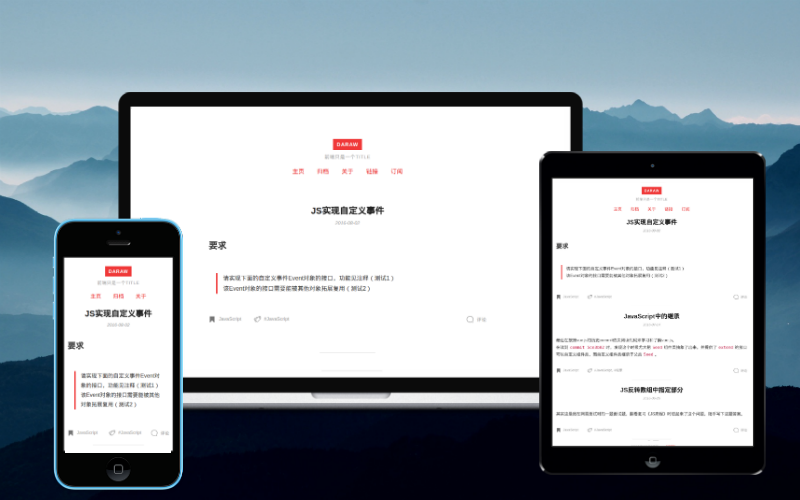
Hacker is a simple blog theme focused on writing. In such a trend of complex typography, choose the return to origins, focusing on writing this matter.
The beginning is moyo created a theme of Wordpress , by DaraW transplanted to Hexo.
Demo
You can refer to my blog: DaraW.
Also, you can try auto-deployment with TravisCI, refer to CodeDaraW/Blog。
Installation
Firstly get the theme files, git clone or download zip both are ok.
Create a folder named Hacker in the folder themes, and copy all the theme files to the folder Hacker.
Then apply the theme in the hexo global configuration file _config.yml:
theme: Hacker
Now all are in order, just enjoy~
Notice: After every update, you'd better run command hexo clean to clean cache files before Hexo generating, in case of some problems cache files bring.
Configure
Enable comments and Google Analytics
Refering to the example configuration file _config.example.yml,
create the theme configuration file _config.yml and edit it:
# gitment
gitment: false
gitment_owner:
gitment_repo:
gitment_client_id:
gitment_client_secret:

# gitalk
gitalk: false
gitalk_owner:
gitalk_admin: []
gitalk_repo:
gitalk_client_id:
gitalk_client_secret:

# valine comment
valine: false
leancloud_id:
leancloud_key:

# disqus comment
disqus: false
disqus_shortname:

# utterances comment
utterances: false
utterances_repo:

# livere city comment
livere: false
livere_data_uid:

# giscus comment
giscus: false
data_repo:
data_repo_id:
data_category:
data_category_id:
data_mapping:
#data_term:
data_strict: 0
data_reactions_enabled: 0
data_emit_metadata: 0
data_input_position: bottom
data_loading:
data_lang:

# google analytics
googleTrackId:

# baidu analytics
baiduTrackId:
gitment: boolean,use gitment or notgitment_owner: string,your GitHub IDgitment_repo: string,the repo to store comment datagitment_client_id: string,your client IDgitment_client_secret: string,your client secret
gitalk: boolean,use gitalk or notgitalk_owner: string,your GitHub IDgitalk_admin: array,all the admin GitHub IDsgitalk_repo: string,the repo to store comment data
gitalk_client_id: string,your client ID
gitalk_client_secret: string,your client secret
valine: boolean, use Valine or notleancloud_id: string, your leancloud IDleancloud_key: string, your leancloud Key
disqus: boolean, use disqus or not
disqus_shortname: your disqus site shortname.
utterances: boolean, use utterances or notutterances_repo: string,the repo to store comment data
livere: boolean, use livere city or notlivere_data_uid: string,you can find it here https://livere.com/insight/myCode
giscus: boolean, use giscus or notdata_repo: string,the repo to store comment datadata_repo_id: string,You can get it eaily from https://giscus.appdata_category: When searching for a matching discussion, giscus will only search in this category.data_category_id: string,You can get it eaily from https://giscus.app . It is recommended to use a category with the Announcements type.data_mapping: Enter pathname or URL or title or og:title or specific or numberdata_term: If you choose specific or number in data_mapping , please turn on this option and ENTER TERM or NUMBER HERE.data_strict: boolean, use strict title matching or notdata_reactions_enabled: boolean, enable reactions for the main post or notdata_emit_metadata: boolean, emit discussion metadata or notdata_input_position: Enter "top" or "bottom" to place the comment box above the comments or below the commentsdata_loading: Enter "lazy" to Load the comments lazily or keep blankdata_lang: The language giscus will be displayed in.
googleTrackId: your Google Analytics ID, Hacker will not use Google Analytics if it's empty.
baiduTrackId: your Baidu Analytics ID, Hacker will not use Baidu Analytics if it's empty.
Enable Categories and Tags pages
Categories Page: run hexo new page categories,then modify the generated file source/categories/index.md:
title: categories
date: 2017-01-30 19:16:17
layout: "categories"
---
If you need to close comments of this page , you can add a line comments: false; title corresponds to the title of the page.
Tags Page: run hexo new page tags,then modify the generated file source/tags/index.md:
title: tags
date: 2017-01-30 19:16:17
layout: "tags"
---
Configuration is the same as Categories Page.
Add links to the menu: Edit the _config.yml file of the theme, add Categories: /categories and Tags: /tags in menu like this:
menu:
  Home: /
  Archives: /archives
  Categories: /categories
  Tags: /tags
Automation Deploy
To avoid the conflict, i added _config.xml to gitignore. so if you want to deploy the blog through automated tools, please remove _config.xml from gitignore or add symbolic link.
License
GNU GPL(General Public License) v2.0
관련 프로젝트 살펴보기
불러오는 중…