
BullsEye0/ghost_eye
소개
Ghost Eye 정보 수집, 풋프린팅, 스캐너 및 정찰 도구 릴리스입니다. Ghost Eye는 Python 3로 만든 정보 수집 도구입니다. Ghost Eye를 실행하려면 도메인 또는 IP 주소만 있으면 됩니다. Python 3를 지원하는 모든 Linux 배포판에서 Ghost Eye를 사용할 수 있습니다. 작성자: Jolanda de Koff
보안측정된 스타 증가
- in 24h
- 0
- in 7 days
- +3
- in 15 days
- +2
- in 1 month
- +9
서로 겹치는 기간의 순증가량이며 일별 합계가 아닙니다. 측정값이 없으면 비워 둡니다. 스타는 관심도를 나타내며 품질을 보장하지 않습니다.
README.md
OriginalGhost Eye
Ghost Eye - Information Gathering Tool
Ghost Eye New Release. Ghost Eye is an Information Gathering, Footprinting, Scanner, and Recon Tool I made in Python 3. Since the last release of Ghost Eye, I've tweaked, removed, and added some new features. So that Ghost Eye would become more of a whole. For me, it remains a game of options so that together you get a complete overview of your target.
Here you can read an article i wrote about Ghost Eye https://hackingpassion.com/ghost-eye-informationgathering-footprinting-and-reconnaissance-tool-release/
Ghost Eye gathers information data such as:
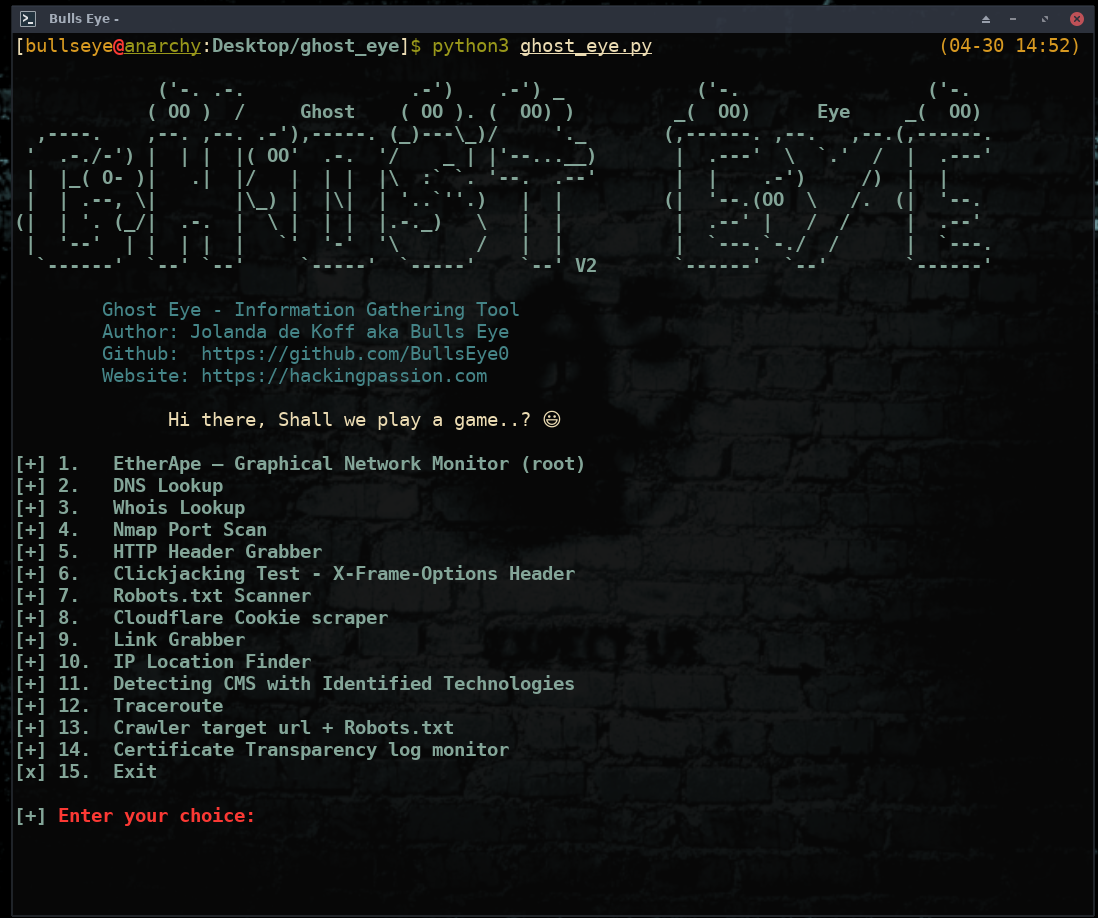
Hi there, Shall we play a game..? 😃 [+] 1. EtherApe – Graphical Network Monitor (root)
[+] 2. DNS Lookup
[+] 3. Whois Lookup
[+] 4. Nmap Port Scan
[+] 5. HTTP Header Grabber
[+] 6. Clickjacking Test - X-Frame-Options Header
[+] 7. Robots.txt Scanner
[+] 8. Cloudflare Cookie scraper
[+] 9. Link Grabber
[+] 10. IP Location Finder
[+] 11. Detecting CMS with Identified Technologies
[+] 12. Traceroute
[+] 13. Crawler target url + Robots.txt
[+] 14. Certificate Transparency log monitor
[x] 15. Exit
[+] Enter your choice:
Video demo: Watch on LBRY/Odysee
Install and run on Linux
You have to install Nmap and EtherApe too:
- On Arch Linux and its distros:
sudo pacman -S etherape nmap dnsutils gnome-terminal httpie mtr
- On Debian and its distros (Kali Linux, Parrot Security OS):
sudo apt install etherape nmap dnsutils gnome-terminal httpie mtr
After installing Etherape sometimes a GNOME error can occur, for which you install: (This will solve the common error)
apt install libgnomeui-0:amd64
Installation Steps:
- Clone the repository:
git clone https://github.com/BullsEye0/ghost_eye.git
cd ghost_eye
- Create a virtual environment (recommended):
python3 -m venv venv
source venv/bin/activate  # On Windows: venv\Scripts\activate
- Install dependencies:
pip3 install -r requirements.txt
How to use Ghost Eye
python3 ghost_eye.py
Have fun ..! 😃
Contact to coder
Social Networks - Connect
Website HackingPassion.com
💻 Support this project
If you find this tool useful, consider supporting my work:
❤️ Sponsor BullsEye
Get the full hands-on course:
Ethical Hacking Complete Course – Zero to Expert
(supports me directly as your instructor!)
Professional penetration testing. Zero to Expert.
✅ Kali Linux + Parrot OS
✅ Real-world hacking scenarios
✅ All major tools & techniques
✅ Beginner-friendly
HACKING IS NOT A HOBBY, BUT A WAY OF LIFE 🎯
Donate
I have developed Ghost Eye because I am passionate about this. Donations are one of the many ways to support what I do.
BAT: Use Brave and donate on any of my web pages/profiles

관련 프로젝트 살펴보기
불러오는 중…