프로젝트 GitHub에서 보기
Aspsine/IRecyclerView
소개
IRecyclerView는 당겨서 새로고침, 당겨서 더 불러오기, 새로고침 헤더와 더 불러오기 푸터 사용자 지정, 헤더 뷰와 푸터 뷰 추가를 지원하는 커스텀 RecyclerView입니다.
개발 도구What you can do
- pull-to-refresh
- pull-to-loadmore
- customize refresh header
- customize loadmore footer
측정된 스타 증가
- in 24h
- 0
- in 7 days
- 0
- in 15 days
- 기록 수집 중
- in 1 month
- 기록 수집 중
서로 겹치는 기간의 순증가량이며 일별 합계가 아닙니다. 측정값이 없으면 비워 둡니다. 스타는 관심도를 나타내며 품질을 보장하지 않습니다.
README.md
Original
IRecyclerView
IRecyclerView is a custom RecyclerView that supports pull-to-refresh, pull-to-loadmore, customize refresh header and loadmore footer, add header views and footer views.
Features:
- pull-to-refresh
- pull-to-loadmore
- customize refresh header
- customize loadmore footer
- add multiple header view
- add multiple footer view
- support vertical LinearLayoutManager/GridLayoutManager/StaggeredGridLayoutManager
Demo
Demo ScreenShot
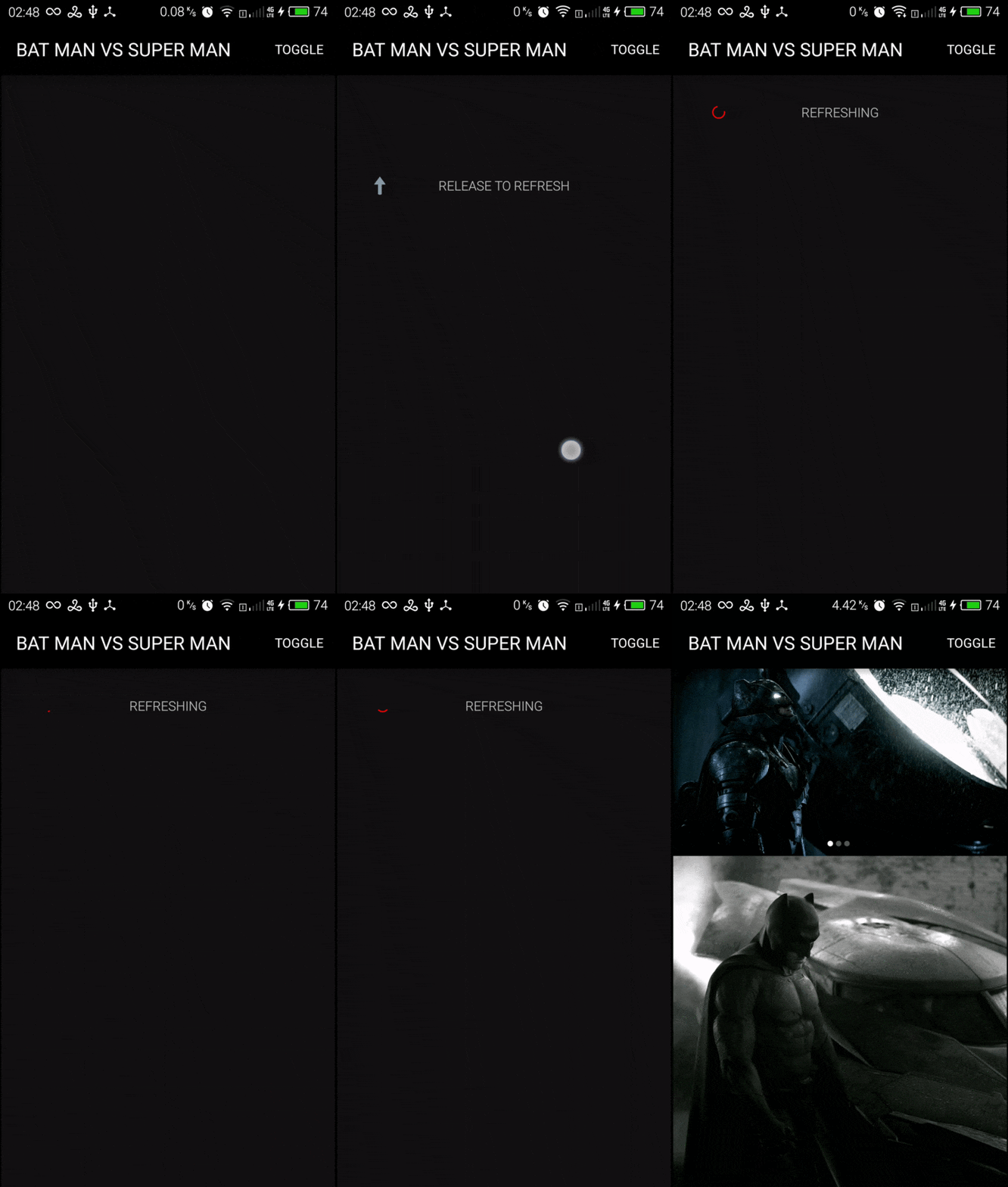
- Bat Man vs Super Man Refresh header

- Classic Refresh header
- Load more footer

How to use
Step 1. Add the JitPack repository to your build file. Add it in your root build.gradle at the end of repositories:
allprojects {
    repositories {
        ...
        maven { url "https://jitpack.io" }
    }
}
Step 2. Add the dependency
dependencies {
    compile 'com.github.Aspsine:IRecyclerView:0.0.7'
}
Step 3. Edit your Activity/Fragment content view layout
<com.aspsine.irecyclerview.IRecyclerView xmlns:android="http://schemas.android.com/apk/res/android"
    xmlns:app="http://schemas.android.com/apk/res-auto"
    android:id="@+id/iRecyclerView"
    android:layout_width="match_parent"
    android:layout_height="match_parent"
    app:loadMoreEnabled="true"
    app:loadMoreFooterLayout="@layout/layout_irecyclerview_load_more_footer"
    app:refreshEnabled="true"
    app:refreshHeaderLayout="@layout/layout_irecyclerview_refresh_header"/>
Available attributes:
<declare-styleable name="IRecyclerView">
    <attr name="refreshHeaderLayout" format="reference" />  <!--refresh header layout res id-->
    <attr name="loadMoreFooterLayout" format="reference" /> <!--loadmore fotter layout res id-->
    <attr name="refreshEnabled" format="boolean" />
    <attr name="loadMoreEnabled" format="boolean" />
    <attr name="refreshFinalMoveOffset" format="dimension" />   <!--refresh header max move distance-->
</declare-styleable>
Then Editor your Activity/Fragment
IRecyclerView iRecyclerView = (IRecyclerView) findViewById(R.id.iRecyclerView);

iRecyclerView.setLayoutManager(new LinearLayoutManager(this));

// an custom load more footer view, you can customize it yourself.
LoadMoreFooterView loadMoreFooterView = (LoadMoreFooterView) iRecyclerView.getLoadMoreFooterView();

// you can also add header and footer like this
// note: header and refresh header are different, footer and load more footer are different too.
iRecyclerView.addHeaderView(headerView);
iRecyclerView.addFooterView(footerView);

// adapter
ImageAdapter mAdapter = new ImageAdapter();
// note: here use setIAdapter(...) method not setAdapter(...)
iRecyclerView.setIAdapter(mAdapter);

iRecyclerView.setOnRefreshListener(new OnRefreshListener() {
    @Override
    public void onRefresh() {

    }
});
iRecyclerView.setOnLoadMoreListener(new OnLoadMoreListener() {
    @Override
    public void onLoadMore(View loadMoreView) {

    }
});

// set auto refreshing
iRecyclerView.post(new Runnable() {
    @Override
   public void run() {
       iRecyclerView.setRefreshing(true);
   }
});

// stop refreshing
iRecyclerView.setRefreshing(false);
Please check out the demo code for more details .
Contact Me
- Github: github.com/aspsine
- Email: [email protected]
- WeiBo: @Aspsine
License
Copyright 2016 Aspsine. All rights reserved.

Licensed under the Apache License, Version 2.0 (the "License");
you may not use this file except in compliance with the License.
You may obtain a copy of the License at

    http://www.apache.org/licenses/LICENSE-2.0

Unless required by applicable law or agreed to in writing, software
distributed under the License is distributed on an "AS IS" BASIS,
WITHOUT WARRANTIES OR CONDITIONS OF ANY KIND, either express or implied.
See the License for the specific language governing permissions and
limitations under the License.
관련 프로젝트 살펴보기
불러오는 중…