
Artikon90/sqffy
Artikon90/sqffy has 37 GitHub stars and 6 forks. Star changes are not measured yet. Last checked 2026-11-12 08:07 UTC. Last push 2026-10-17.
A simple CLI for SQL databases
측정된 스타 증가
- in 24h
- 기록 수집 중
- in 7 days
- 기록 수집 중
- in 15 days
- 기록 수집 중
- in 1 month
- 기록 수집 중
서로 겹치는 기간의 순증가량이며 일별 합계가 아닙니다. 측정값이 없으면 비워 둡니다. 스타는 관심도를 나타내며 품질을 보장하지 않습니다.
README.md
OriginalSQffy
A simple CLI for SQL databases, in the terminal you already have.
Windows · Linux · macOS


SQffy is a simple command-line utility for working with SQL databases from the terminal. Connect, write a query, read the answer.
SQLite, PostgreSQL, MySQL, MariaDB, ClickHouse, and Oracle are built in. Any other database can be added as an adapter: same shell, same commands. The checklist is in docs/DRIVERS.md.
Fast at the keyboard
SQffy is written in Rust, and the shell stays quick. Syntax highlighting paints the query while you type. Autocomplete brings tables and columns onto the line, so you spend the time on the data, not on remembering names.
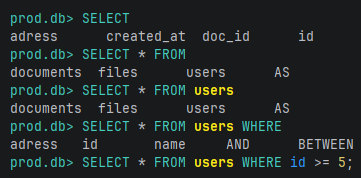
After FROM, the list is tables. After the table name, it is columns.
Tables that are easy to read
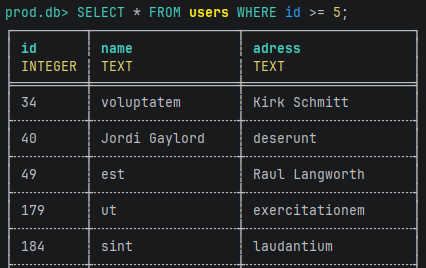
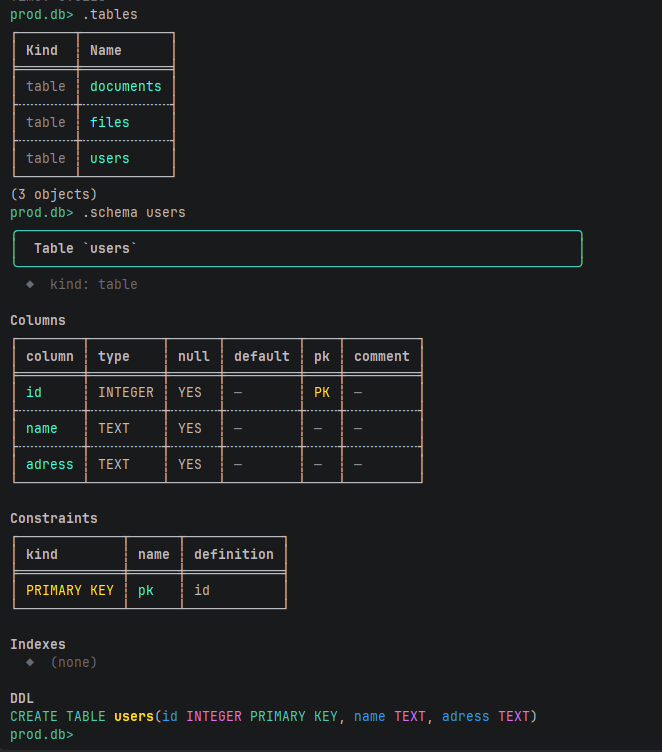
Schema and query results are rendered, not dumped as raw text. The type sits under the column name — the type the engine reported. .schema puts columns, keys, and indexes on one screen, plus the DDL when the engine returns it.
Need rows for a test or a demo? .generate fills a table: data generation for testing and visualization. A preview prints first. --yes inserts. A hundred rows or more without --yes is refused.
Any terminal
Windows, Linux, and macOS. A normal terminal is the whole interface — the one you already have open.
A safe MCP server for AI agents
Modern work often includes an agent in the editor. SQffy speaks MCP, and that server is the safe door.
The agent can inspect the schema and run a read: SELECT, WITH, SHOW, EXPLAIN, PRAGMA. A dangerous statement does not reach the database. INSERT, UPDATE, DELETE, DROP, and the rest of the writes are refused on this server only. At the prompt, the same statements run as you write them. HTTP listens on 127.0.0.1.
sqf mcp                      # stdio, for an editor or agent
sqf mcp --port 8787          # http://127.0.0.1:8787/mcp   ·   GET /health
sqf --mcp-port 8787 ./app.db # the same server, beside the prompt
An easy start
A database comes up in a couple of steps, even when the engine is not installed yet. Run sqf and choose create.
If nothing is listening locally, SQffy offers to pull a Docker image and run it, or to install the package for you (winget on Windows). When neither path fits, it opens the official download page. You do not have to arrive with Postgres already on the machine.
The picker has three moves:
- Connect to a saved database
- Add one you already have
- Create a new one — a file, or a server
sqf                              # picker
sqf ./app.db                     # straight to a SQLite file
sqf postgres://USER:PASSWORD@localhost:5432/app
.tables
.schema users
SELECT id, name FROM users WHERE id >= 5;
.generate users 1000 --dry-run
Connections are remembered in connections.toml. --no-save leaves the file alone.
| OS | Path |
|---|---|
| Linux | ~/.config/sqffy/connections.toml |
| macOS | ~/Library/Application Support/dev.SQffy.sqffy/connections.toml |
| Windows | %APPDATA%\SQffy\sqffy\config\connections.toml |
Tests can point the catalog elsewhere with SQFFY_HOME.
Install
Rust 1.85 or newer. From a checkout of this repository:
cargo install --path .

# or run it without installing
cargo run --release --bin sqf
SQLite ships inside the binary. Oracle needs Instant Client on the machine.
sqf --lang ru                   # en · ru · zh
SQFFY_LANG=zh sqf
Language resolution: --lang, then SQFFY_LANG, then LC_ALL, LC_MESSAGES, LANG, then English. Strings live in docs/I18N.md.
Feature flags
| Feature | Default | |
|---|---|---|
sqlite |
yes | Bundled SQLite |
postgres |
yes | PostgreSQL |
mysql |
yes | MySQL |
mariadb |
yes | MariaDB, including local provisioning |
clickhouse |
yes | ClickHouse over HTTP |
oracle |
yes | Oracle, via Instant Client |
e2e |
no | Only for cargo e2e |
cargo build --release --no-default-features --features sqlite
Reference
Meta commands
| Command | |
|---|---|
.help .h ? |
Command list |
.tables .t |
Tables and views |
.schema .s [table] |
Index of names, or one table in full |
.describe .d <table> |
Columns |
.generate .gen <table> <n> [--yes] [--dry-run] [col=ref.col …] |
Data generation for testing and visualization. --yes is also -y. |
.quit .q .exit |
Leave |
Flags
| Flag | |
|---|---|
-c, --command |
Run SQL or a meta command and exit |
-d, --driver |
Force a driver id |
--limit N |
Rows to print. 0 prints them all. Default is 100. |
--no-pager |
Disable the pager |
--no-save |
Do not write this connection into the catalog |
--mcp-port PORT |
Safe MCP HTTP beside the session |
--lang en|ru|zh |
UI language |
--list-drivers |
Print built-in drivers and exit |
Databases
| Engine | Open | Note |
|---|---|---|
| SQLite | sqf ./app.db · sqf sqlite:./app.db · sqf :memory: |
Bundled. A new file is just a path. |
| PostgreSQL | postgres://USER:PASSWORD@localhost:5432/app |
Docker or installer from the picker |
| MySQL | mysql://USER:PASSWORD@localhost:3306/app |
Docker or installer from the picker |
| MariaDB | mariadb://USER:PASSWORD@localhost:3306/app |
Docker or installer from the picker |
| ClickHouse | clickhouse://USER:PASSWORD@localhost:8123/default |
HTTP. Docker or installer from the picker |
| Oracle | oracle://USER:PASSWORD@localhost:1521/XEPDB1 |
Needs Instant Client. .schema has no CREATE script. |
MCP tools
| Tool | |
|---|---|
list_connections |
Connections open in this session |
list_tables |
Tables and views |
describe_table |
Columns |
inspect_table |
Columns, constraints, indexes |
execute_readonly |
A read query. Writes are refused. |
list_drivers |
Drivers compiled into this build |
Docs
| ARCHITECTURE.md | How the crate is put together |
| docs/DRIVERS.md | Add a database adapter |
| docs/I18N.md | Add a language |
Develop
cargo test       # unit tests
cargo e2e        # CLI end-to-end: SQLite, MCP, meta commands
cargo e2e-all    # plus server adapters — set SQFFY_E2E_* first
| Variable | Example |
|---|---|
SQFFY_E2E_POSTGRES |
postgres://sqffy:[email protected]:5432/sqffy |
SQFFY_E2E_MYSQL |
mysql://sqffy:[email protected]:3306/sqffy |
SQFFY_E2E_MARIADB |
mariadb://sqffy:[email protected]:3307/sqffy |
SQFFY_E2E_CLICKHOUSE |
clickhouse://sqffy:[email protected]:8123/sqffy |
SQFFY_E2E_ORACLE |
oracle://sqffy:[email protected]:1521/XEPDB1 |
Those URLs belong to the Docker test stack.
docker compose -f e2e/docker-compose.yml up --build --abort-on-container-exit
CI runs Test, Build, and E2E as separate jobs. Workflow: .github/workflows/ci.yml.
sqffy/
├── src/        CLI, drivers, REPL, MCP, generate, provision
├── locales/    en.toml · ru.toml · zh.toml
├── docs/       drivers, i18n, screenshots
├── tests/      e2e_*  (feature = e2e)
├── e2e/        Docker Compose
└── .github/    CI


관련 프로젝트 살펴보기
Asabeneh/30-Days-Of-Python
30 Days of Python 프로그래밍 챌린지는 Python 프로그래밍 언어를 30일 동안 배우기 위한 단계별 가이드입니다. 이 챌린지는 100일 이상 걸릴 수 있습니다. 자신의 속도에 맞춰 진행하세요. 다음 동영상도 도움이 될 수 있습니다: https://www.youtube.com/channel/UC7PNRuno1rzYPb1xLa4yktw
78,618 스타grafana/grafana
개방적이고 조합 가능한 옵저버빌리티 및 데이터 시각화 플랫폼입니다. Prometheus, Loki, Elasticsearch, InfluxDB, Postgres 등 여러 소스의 메트릭, 로그, 트레이스를 시각화합니다.
77,859 스타redis/redis
실시간 데이터 기반 애플리케이션을 구축하는 개발자에게 Redis는 가장 선호되고, 가장 빠르며, 기능이 가장 풍부한 캐시, 데이터 구조 서버이자 문서 및 벡터 쿼리 엔진입니다.
77,472 스타apache/superset
Apache Superset는 데이터 시각화 및 데이터 탐색 플랫폼입니다.
75,495 스타