
AmirSolt/Unity-Polytube
AmirSolt/Unity-Polytube has 54 GitHub stars and 1 forks. GitHot measured 0 stars in 24 hours. Last checked 2026-11-12 04:42 UTC. Last push 2025-11-05.
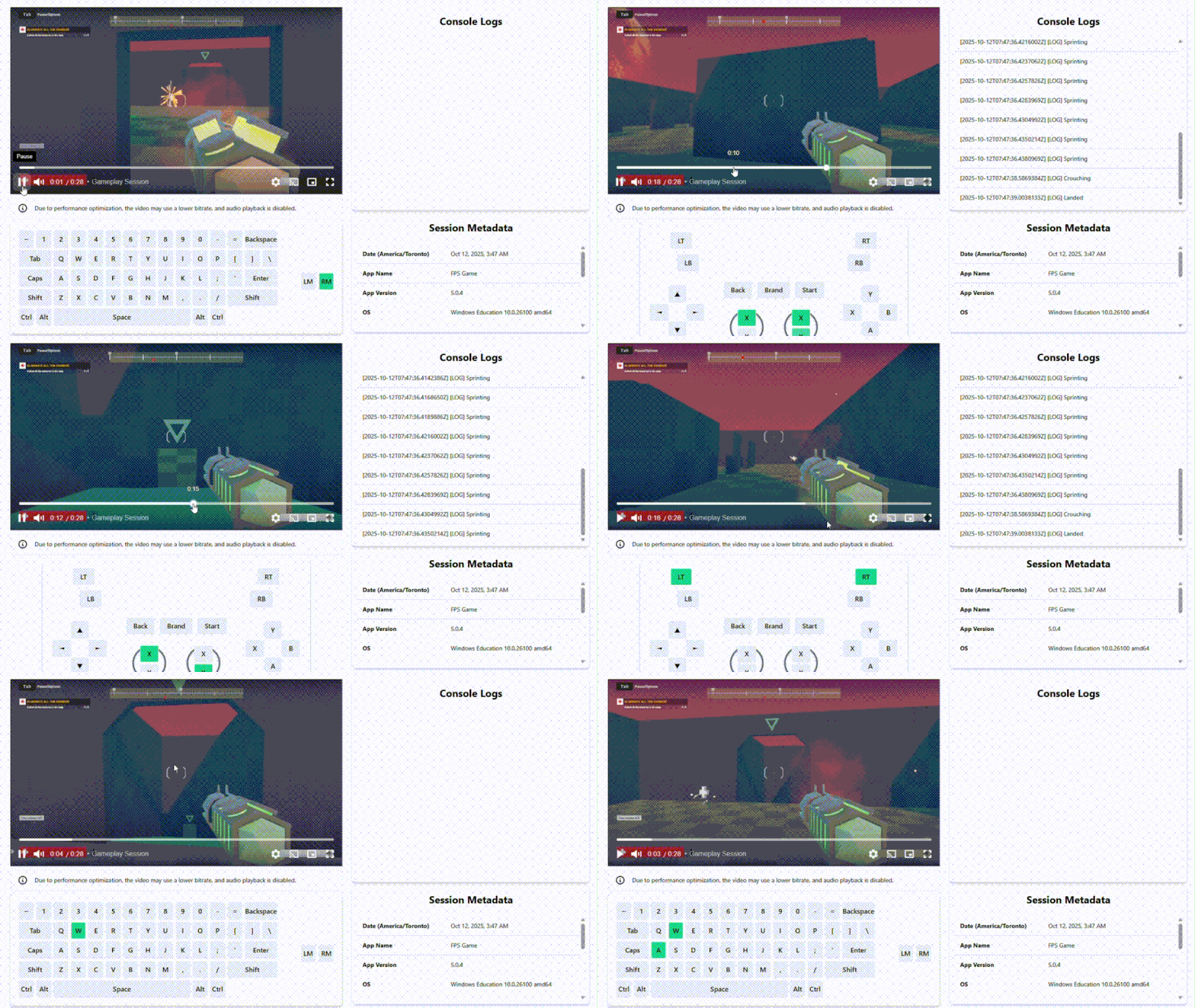
Polytube is an analytics tool that records gameplay sessions for playtesting and debugging. It uses GPU duplication for high performance and minimal impact on system resources, and can automatically upload recordings to the cloud when valid credentials are provided.
What you can do
- Add an option to disable wiping out old sessions.
- A Stop() function to stop the recording manually.
측정된 스타 증가
- in 24h
- 0
- in 7 days
- 업데이트 지연
- in 15 days
- 업데이트 지연
- in 1 month
- 업데이트 지연
서로 겹치는 기간의 순증가량이며 일별 합계가 아닙니다. 측정값이 없으면 비워 둡니다. 스타는 관심도를 나타내며 품질을 보장하지 않습니다.
README.md
Original
Polytube is an analytics tool that records gameplay sessions for playtesting and debugging. It uses GPU duplication for high performance and minimal impact on system resources, and can automatically upload recordings to the cloud when valid credentials are provided. This Unity packge provides an easy to use wrapper around polytube.exe.
Documentation | Polytube core
Unity Instructions (4 Steps)
1. Add the package
Download the project as a ZIP file from GitHub: https://github.com/AmirSolt/Unity-Polytube/archive/refs/heads/main.zip
Extract the ZIP and place the folder named
com.polytube.sessionrecorderinside your Unity project’sPackages/directory.
2. Add the polytube.exe
Download the latest stable polytube.exe: https://github.com/AmirSolt/Polytube/releases
Place the downloaded
polytube.exefile inside your Unity project’sAssets/StreamingAssets/directory.
3. Start recording
Call the following method from your code:
using Polytube.SessionRecorder;

Polytube.SessionRecorder.Main.Start();
This starts recording the game window and saves the files to Application.temporaryCachePath.
The recording will close immediately inside the editor since there's no game window.
🚨 IMPORTANT: Make sure to obtain proper consent agreements before recording. Respect user's privacy,
4. (Discontinued) Enable cloud uploads
If you provide an ApiId and ApiKey, the recordings will automatically upload to the cloud.
Example:
using Polytube.SessionRecorder;

Polytube.SessionRecorder.Main.Start(new Dictionary<string, string>{
  {"--api-id", "<YOUR API ID>"},
  {"--api-key", "<YOUR API KEY>"}
});
5. Stop recording
You can gracefully stop the recording at any time by calling:
using Polytube.SessionRecorder;

Polytube.SessionRecorder.Main.Stop();
Notes
Do not close the program manually
The recorder is designed to shut down automatically when the target window closes. Do not kill the process abruptly.
Proper consent forms
Make sure you comply with privacy laws in every region where your software will be released. If your application uses cloud storage and doesn't meet these regulations, it could be banned or restricted.
It's designed to record till the last momment
Since the recorder, polytube.exe runs in a different process it will keep recording even if your game crashes. Once the game window is closed for any reason it will stop recording and close all services.
Wipes out previous recordings
Currently, the recorder wipes out any previous recordings, so you don't have to worry about storage space.
Documentation
Functions
Start(Dictionary<string, string> userFlags=null)
This function starts recording the game window and saves the files to Application.temporaryCachePath.
It uses Application.productName to find the game window. This function won't work in the editor.
You can add flag parameters to control the behaviour of the recorder. See https://github.com/AmirSolt/Polytube for more information.
Stop()
This gracefully kills the polytube.exe process making sure all recordings and uploads are finalized.
Upcoming features
- Add an option to disable wiping out old sessions.
- A
Stop()function to stop the recording manually.
관련 프로젝트 살펴보기
Asabeneh/30-Days-Of-Python
30 Days of Python 프로그래밍 챌린지는 Python 프로그래밍 언어를 30일 동안 배우기 위한 단계별 가이드입니다. 이 챌린지는 100일 이상 걸릴 수 있습니다. 자신의 속도에 맞춰 진행하세요. 다음 동영상도 도움이 될 수 있습니다: https://www.youtube.com/channel/UC7PNRuno1rzYPb1xLa4yktw
78,618 스타grafana/grafana
개방적이고 조합 가능한 옵저버빌리티 및 데이터 시각화 플랫폼입니다. Prometheus, Loki, Elasticsearch, InfluxDB, Postgres 등 여러 소스의 메트릭, 로그, 트레이스를 시각화합니다.
77,859 스타redis/redis
실시간 데이터 기반 애플리케이션을 구축하는 개발자에게 Redis는 가장 선호되고, 가장 빠르며, 기능이 가장 풍부한 캐시, 데이터 구조 서버이자 문서 및 벡터 쿼리 엔진입니다.
77,472 스타apache/superset
Apache Superset는 데이터 시각화 및 데이터 탐색 플랫폼입니다.
75,495 스타