
younatics/YNExpandableCell has 451 GitHub stars and 35 forks. GitHot measured 0 stars in 24 hours. Last checked 2026-11-17 19:35 UTC. Last push 2026-10-24.
計測したスター増加
- 24時間
- 0
- 7日間
- 履歴を収集中
- 15日間
- 履歴を収集中
- 1か月
- 履歴を収集中
期間ごとの純増数です。期間は重複しており、日別の値ではありません。未計測の値は空欄です。スター数は注目度の指標であり、品質の保証ではありません。
概要
✨ Awesome expandable, collapsible tableview cell for iOS written in Swift 4
学習README.md
オリジナルUSE ExpandableCell. New version of this library.
YNExpandableCell





Updates
See CHANGELOG for details
Intoduction
Easiest usage of expandable & collapsible cell for iOS, written in Swift 6. You can customize expandable UITableViewCell whatever you like. YNExpandableCell is made because insertRows and deleteRows is hard to use. You can just inherit YNTableViewDelegate and add one more method func tableView(_ tableView: YNTableView, expandCellAt indexPath: IndexPath) -> UITableViewCell?
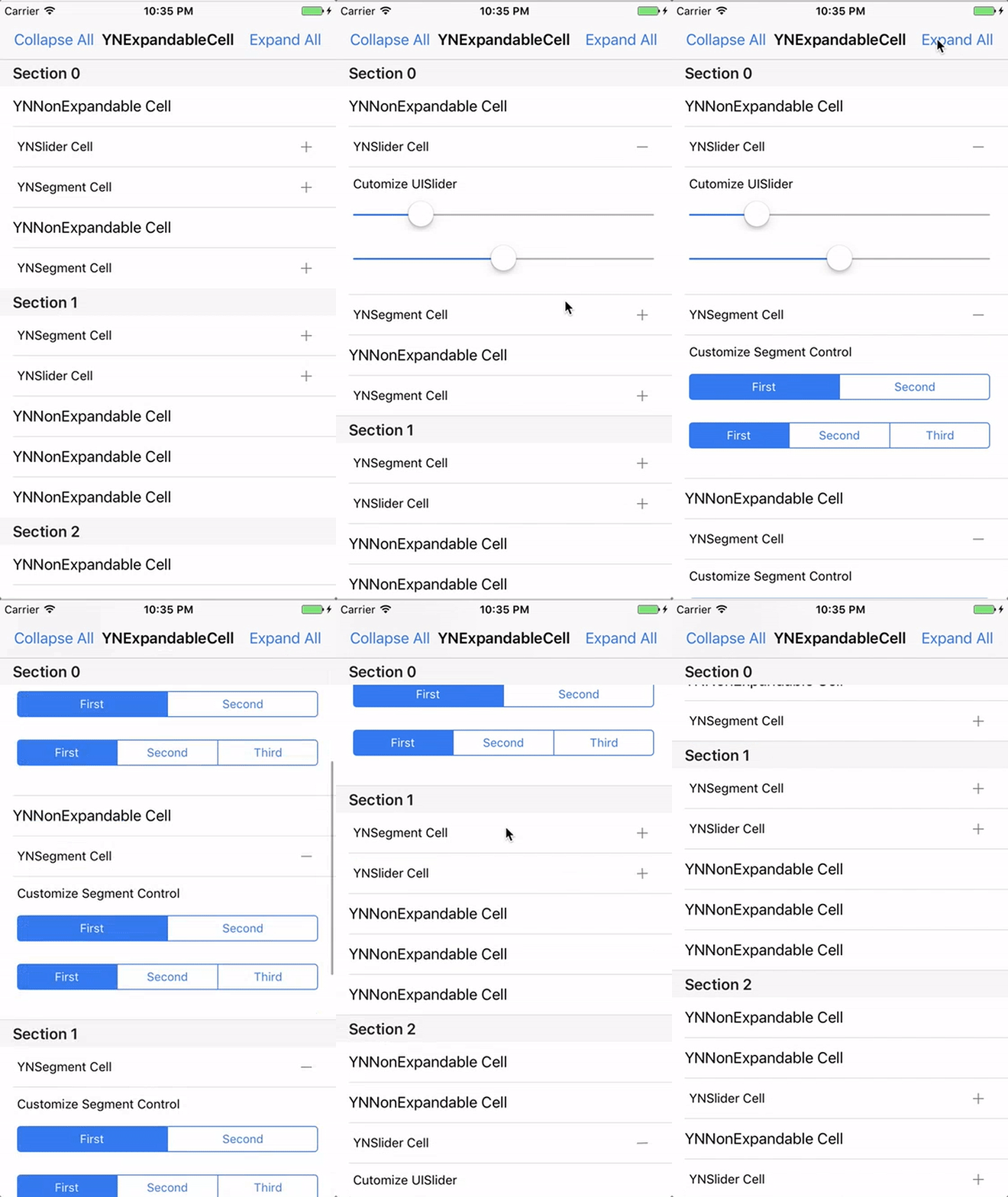
Requirements
YNExpandableCell is written in Swift 6 and uses Swift tools version 6.0. It supports iOS 15.0+ through Swift Package Manager and CocoaPods. The CocoaPods deployment target is also iOS 15.0.
Installation
Swift Package Manager
In Xcode, choose File ▸ Add Package Dependencies… and enter:
https://github.com/younatics/YNExpandableCell.git
Or add it to your Package.swift:
dependencies: [
    .package(url: "https://github.com/younatics/YNExpandableCell.git", from: "2.0.0")
]
CocoaPods
YNExpandableCell 2.0.0 is available through CocoaPods. To install it, simply add the following line to your Podfile:
pod 'YNExpandableCell', '2.0.0'
Usage
import YNExpandableCell
Make YNTableView in Storyboard or in code
@IBOutlet var ynTableView: YNTableView!
Inherit YNTableViewDelegate
class ViewController: UIViewController, YNTableViewDelegate
Set delegate and register cells
self.ynTableView.ynDelegate = self

let cells = ["YNExpandableCellEx","YNSliderCell","YNSegmentCell"]
self.ynTableView.registerCellsWith(nibNames: cells, and: cells)
self.ynTableView.registerCellsWith(cells: [UITableViewCell.self as AnyClass], and: ["YNNonExpandableCell"])
Use one of the expandable-cell methods
Set expandable cell in a YNTableViewDelegate method:
func tableView(_ tableView: YNTableView, expandCellAt indexPath: IndexPath) -> UITableViewCell? {
    let ynSliderCell = tableView.dequeueReusableCell(withIdentifier: YNSliderCell.ID) as! YNSliderCell
    if indexPath.section == 0 && indexPath.row == 1 {
        return ynSliderCell
     }
     return nil
}
Or set an expandable cell with a height using a YNTableViewCell object:
func tableView(_ tableView: YNTableView, expandCellWithHeightAt indexPath: IndexPath) -> YNTableViewCell? {
    let ynSliderCell = YNTableViewCell()
    ynSliderCell.cell = tableView.dequeueReusableCell(withIdentifier: YNSliderCell.ID) as! YNSliderCell
    ynSliderCell.height = 142

    if indexPath.section == 0 && indexPath.row == 1 {
        return ynSliderCell
    }
        return nil
}
Get didSelectRowAt in YNTableViewDelegate method (Optional)
func tableView(_ tableView: YNTableView, didSelectRowAt indexPath: IndexPath, isExpandableCell: Bool, isExpandedCell: Bool) {
    print("Selected Section: \(indexPath.section) Row: \(indexPath.row) isExpandableCell: \(isExpandableCell) isExpandedCell: \(isExpandedCell)")
}
Get didDeselectRowAt in YNTableViewDelegate method (Optional)
func tableView(_ tableView: YNTableView, didDeselectRowAt indexPath: IndexPath, isExpandableCell: Bool, isExpandedCell: Bool) {
    print("Deselected Section: \(indexPath.section) Row: \(indexPath.row) isExpandableCell: \(isExpandableCell) isExpandedCell: \(isExpandedCell)")
}
Set basic UITableViewDataSource, UITableViewDelegate and Done!
Customize
Expand & Collapse All if you want
self.ynTableView.expandAll()
self.ynTableView.collapseAll()
Inherit YNExpandableCell if you want awesome '+' '-' custom accessory type
class YNExpandableCellEx: YNExpandableCell

// Change normalCustomAccessoryType, selectedCustomAccessoryType Images
Cutomize UITableView.RowAnimation
self.ynTableView.ynTableViewRowAnimation = UITableView.RowAnimation.top
Make Extensions for more UITableViewDelegate if you need or make pull request for me :)
References
Please tell me or make pull request if you use this library in your application :)
@zigbang
MotionBook
Author

License
YNExpandableCell is available under the MIT license. See the LICENSE file for more info.