
thousandflowers/Raccoon
thousandflowers/Raccoon has 133 GitHub stars and 2 forks. GitHot measured +1 stars in 24 hours and +4 in 7 days. Last checked 2026-11-13 01:34 UTC. Last push 2026-11-04.
macOS companion toolkit for power users
計測したスター増加
- 24時間
- +1
- 7日間
- +4
- 15日間
- 履歴を収集中
- 1か月
- 履歴を収集中
期間ごとの純増数です。期間は重複しており、日別の値ではありません。未計測の値は空欄です。スター数は注目度の指標であり、品質の保証ではありません。
README.md
オリジナル

🦝 Raccoon
Security audits, system info & SSH fleet management for macOS. For the people who maintain Macs they don't sit in front of - and need to show their work.


The CLI has zero runtime dependencies beyond macOS + git - Go is needed only to build the optional TUI. ~9,300 lines of shellcheck-clean Bash across 22 command scripts, covered by 496 tests in 44 bats files. Runs on the system Bash (3.2 → 5.x) - no Homebrew required.
Why I built this
It started as a PR to Mole: a mo update that bumped brew, pip, npm, and gem in one shot. The maintainer liked it but declined it as out of scope.
So I merged it with the script I already ran on my sisters' Macs - disk space, open ports, startup items - and kept adding commands. It now writes client reports and audits a room of Macs over SSH, but it's still the same tool: just the things I needed.
Contents
- Install
- What you can do
- Fleet management
- All commands
- Why Raccoon is different
- How it compares
- What Raccoon is not
- Is it safe to pipe to
bash? - Go TUI
- Raycast extension
- Shell completion · Man page · Project structure · Contributing
Install
Via Homebrew (recommended):
brew install thousandflowers/tap/rcc
Or grab the single self-contained file - no git, no clone (CLI only; the interactive TUI needs Homebrew or the source install below):
curl -fsSL https://github.com/thousandflowers/Raccoon/releases/latest/download/rcc -o rcc
chmod +x rcc
./rcc audit
Or install from source with the one-file installer - it clones to ~/.raccoon
and symlinks rcc, nothing else (is piping to bash safe?):
curl -fsSL https://raw.githubusercontent.com/thousandflowers/Raccoon/main/install.sh | bash
Run rcc to launch the interactive menu, or rcc <command> for direct access.
Update & uninstall
Update:
brew upgrade rcc                                                                   # Homebrew
curl -fsSL https://raw.githubusercontent.com/thousandflowers/Raccoon/main/install.sh | bash   # curl install
Uninstall:
brew uninstall rcc                          # Homebrew
rm -rf ~/.raccoon && rm "$(which rcc)"      # curl install
Requirements
- macOS on Apple Silicon or Intel, with the built-in
bash(3.2+) - nothing extra to install for the core commands. - git - used by the curl installer and by
rcc git. - Optional, per command:
mas(App Store updates inrcc apps),gpg(rcc ssh --export-gpg),docker(rcc docker), Homebrew (rcc upgrade/apps), and Go (only to build the TUI).
What you can do
🔒 Security audit
rcc audit                 # 30+ security checks (Gatekeeper, firewall, SIP, sharing…)
rcc audit --fix           # apply safe fixes - every change is backed up first
rcc audit --deep          # add slower, deeper checks
rcc audit --json          # machine-readable output (also: --csv, --report file.md)
rcc audit --baseline      # snapshot now; later runs diff against it
rcc audit --verbose       # show the exact command + raw output behind each check
--json is implemented by 21 of the 22 commands; apps is the one that
updates things rather than reporting them. A report never invents a number: a
tool missing from PATH is exit 3 with "Not checked" and no document, and a
figure the system did not give is null, not 0. On audit, --csv still
appends its rows below the boxed report instead of replacing it.
rcc audit --cis           # map checks to the CIS Apple macOS Benchmark + coverage
rcc audit --only core,network   # run only some check groups (--list-checks to list)
rcc audit --report out.html     # auditor-ready self-contained HTML report
Per-client reports with --client, --shop, --tech and reusable profiles
(rcc audit --profile mario-bianchi). --fix backs every change up to
~/.raccoon/fix-backups/<timestamp>/ first, and schedules itself with
rcc audit schedule weekly (LaunchAgent).
Exit codes (for CI/automation, on both rcc audit and rcc fleet audit):
0 all passed · 1 at least one failure · 2 warnings only (or a usage
error). --verbose re-runs each check's documented command live so an auditor
can verify findings instead of trusting the summary; the same command is shown
in --json (the command field) and the HTML report.
$ rcc audit
  Security Audit · 2026-06-26 14:30

  ✓ FileVault            Enabled
  ✓ Gatekeeper           Enabled
  ✓ SIP                  Enabled
  ⚠ Firewall             On - stealth mode off
  ✓ Screen Lock          Locks immediately
  ⚠ Sharing              Remote Login (SSH) enabled
  ✗ Software Updates     3 updates pending
  …
  ────────────────────────────────────────────
  28 passed · 3 warnings · 1 failed
  Run `rcc audit --explain` for the why behind each finding

What gets checked (30+)
- System: FileVault, SIP, Gatekeeper, XProtect, Firewall, Stealth Mode, Software Updates, Screen Lock, Auto-Login
- Network: Sharing, Open Ports, SSH Daemon, DNS Servers, DNS-over-HTTPS, VPN, Bluetooth
- Auth & keys: Keychain, SSH Keys,
.sshpermissions, Authorized Keys, Sudo Access, Sudoers - Persistence: Login Items, Cron Jobs, At Jobs, LaunchDaemons, System & User LaunchAgents, Kernel Extensions
- Privacy: Location Services, Analytics, Quarantined Files
Client-facing report (--report report.md)
rcc audit --client "Jane Doe" --shop "MacFix Pro" --tech "Mario Rossi" --report report.md
produces a branded intervention sheet (also --report report.rtf for Pages/Word):
# Intervention Sheet

**Date:** 2026-06-26
**Technician:** Mario Rossi
**Client:** Jane Doe - MacFix Pro

## Issues found and resolved

| Check            | Before      | After      |
|------------------|-------------|------------|
| Firewall         | Off         | On         |
| Software Updates | 3 pending   | Installed  |
| Remote Login     | Enabled     | Disabled   |

**Hours worked:** 0.5

_Generated by Raccoon_
🛰️ Fleet management
Discover, group, run commands on, and audit every Mac you manage - from one machine, over SSH, in parallel:
rcc fleet scan                         # discover Macs on the LAN (Bonjour + ping-sweep)
rcc fleet add [email protected]       # ...or add hosts by hand
rcc fleet group add office [email protected] [email protected]   # organize into groups
rcc fleet run --group office -- softwareupdate -l                 # run a command in bulk
rcc fleet audit                        # security-audit every host, one aggregate report
rcc fleet audit --group office --report office.md
rcc fleet status                       # quick reachability check
rcc fleet scan classifies each host it finds as ready (key auth works),
setup-needed (SSH up, needs ssh-copy-id), or non-Mac, and can append the
ready ones to your host list. Hosts live in ~/.raccoon/fleet.conf (one
user@host[:port] per line, key auth only). Remote Macs don't need Raccoon
installed - the audit script is streamed over SSH stdin to bash, so they need
only bash, macOS, and an SSH server.
What gets sent, and how to verify it. The streamed bundle is a single
self-contained Bash script built from the exact same auditable source in this
repo - lib/core/common.sh, lib/audit/checks.sh, and lib/core/report.sh
concatenated - run on the remote with --json --quiet. Nothing is installed,
nothing persists, and no third-party code is fetched. Remote results are
redacted by default like any other report (pass --no-redact to opt out). To
see exactly what would be sent - without contacting a single host - print it:
rcc fleet audit --print-bundle              # the exact script, to stdout
rcc fleet audit --print-bundle | shasum -a 256   # pin a checksum to compare across runs
🖥️ System information
rcc disk                  # internal, external & network drives, SMART
rcc disk large            # biggest files (--min SIZE, --top N)
rcc network               # interfaces, Wi-Fi, DNS, routing
rcc wifi                  # active network, known SSIDs, Keychain passwords
rcc memory                # system stats + processes sorted by RAM
rcc ports                 # open ports & listening services
rcc battery               # health %, cycles, charging
rcc backup                # Time Machine status
🧹 Maintenance
rcc env                   # shell environment & PATH breakdown
rcc overlap               # which manager is behind each PATH entry (--json)
rcc startup               # launch agents & login items
rcc startup clean         # remove orphaned launch agents (interactive)
rcc trash                 # trash size & empty
rcc fonts                 # find duplicates & corrupted fonts
rcc history               # shell history analysis
rcc certs                 # SSL certificate expiry report
rcc overlap - who put that binary there
Years of brew, npm -g, cargo install and curl | sh leave a PATH nobody
can account for. overlap resolves every symlink and names the manager behind
each entry:
| NAME               | PATH                               | RESOLVED                                     | MANAGER   |
| ------------------ | ---------------------------------- | -------------------------------------------- | --------- |
| rg                 | /opt/homebrew/bin/rg               | /opt/homebrew/Cellar/ripgrep/15.2.0/bin/rg   | brew      |
| tsc                | /opt/homebrew/bin/tsc              | ...node_modules/typescript/bin/tsc           | npm       |
| gopls              | ~/go/bin/gopls                     | ~/go/bin/gopls                               | go        |
| python             | ~/.local/share/mise/shims/python   | ~/.local/share/mise/shims/python             | shim      |
| ls                 | /bin/ls                            | /bin/ls                                      | system    |
| icloudpd           | /opt/homebrew/bin/icloudpd         | /opt/homebrew/bin/icloudpd                   | orphan    |
Resolving the symlink is the whole point: /opt/homebrew/bin/rg is a relative
link into Cellar, and without following it every brew binary looks unowned.
Two categories exist to keep the result readable. system is Apple's own
binaries under SIP - 1208 of 2448 entries on the Mac this was written on, none
of them installed by a manager and none removable. shim is
mise/asdf/pyenv/rbenv/nvm/volta: shadowing per project is their job, not a
problem. What survives in orphan is the part worth reading - the
curl | sh scripts and stray pip installs that nothing manages any more.
One row per PATH entry, not per executable: broken and circular symlinks are
listed too, and a name shipped by two managers stays two rows. Read-only, and
no binary is ever run - versions belong to manager metadata, so none are
reported. --json for the machine-readable form.
🛠️ Developer tools
rcc upgrade               # update brew formulae, pip, npm, gem… (--dry-run to preview)
rcc upgrade --parallel    # …all at once instead of one after another
rcc apps                  # update GUI apps in 4 layers (see below)
rcc ssh                   # inspect keys, --export, --export-gpg
rcc git                   # status, branches, stash, cleanup
rcc docker                # images, containers, volumes
rcc xcode                 # simulators, derived data, SPM caches
rcc apps updates in four layers, in order: Mac App Store (mas), Homebrew
casks (--greedy), the Homebrew cask catalog (7000+ apps matched to
/Applications by name - no install required, parsed with pure awk), and
Sparkle feeds (apps with a SUFeedURL in their plist). Apps with built-in
auto-updaters are detected and skipped by default; --auto-launch opens them
to trigger their own updater. Skip a layer with --no-catalog / --no-sparkle.
Layer 4 never installs anything. An app with a SUFeedURL ships Sparkle, which
swaps the bundle atomically and verifies its EdDSA signature - neither of which
a shell script can do. rcc reports that an update exists and opens the app so
its own updater applies it. Nothing in rcc apps writes to /Applications.
📸 More command demos
System info






Developer tools


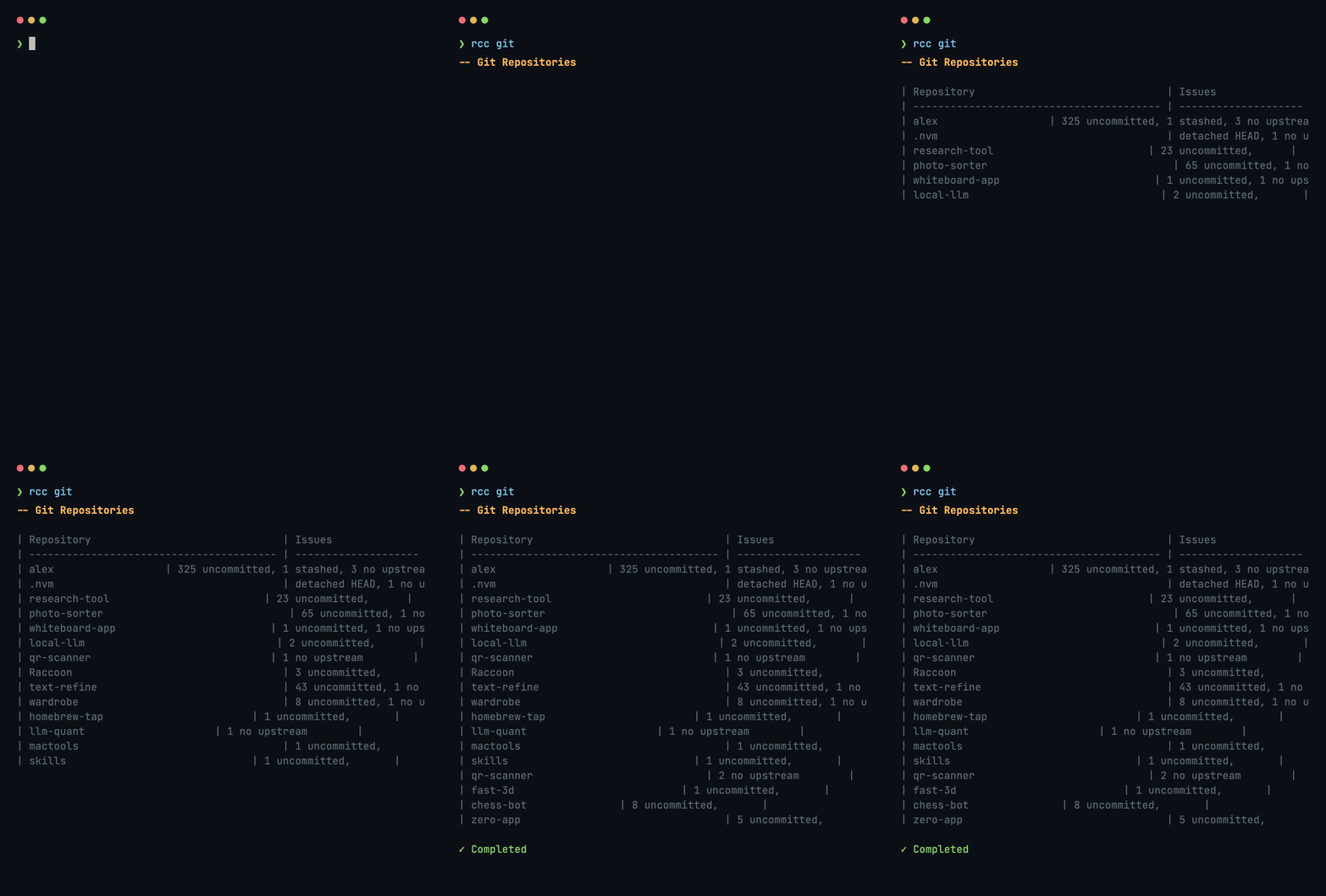


Maintenance




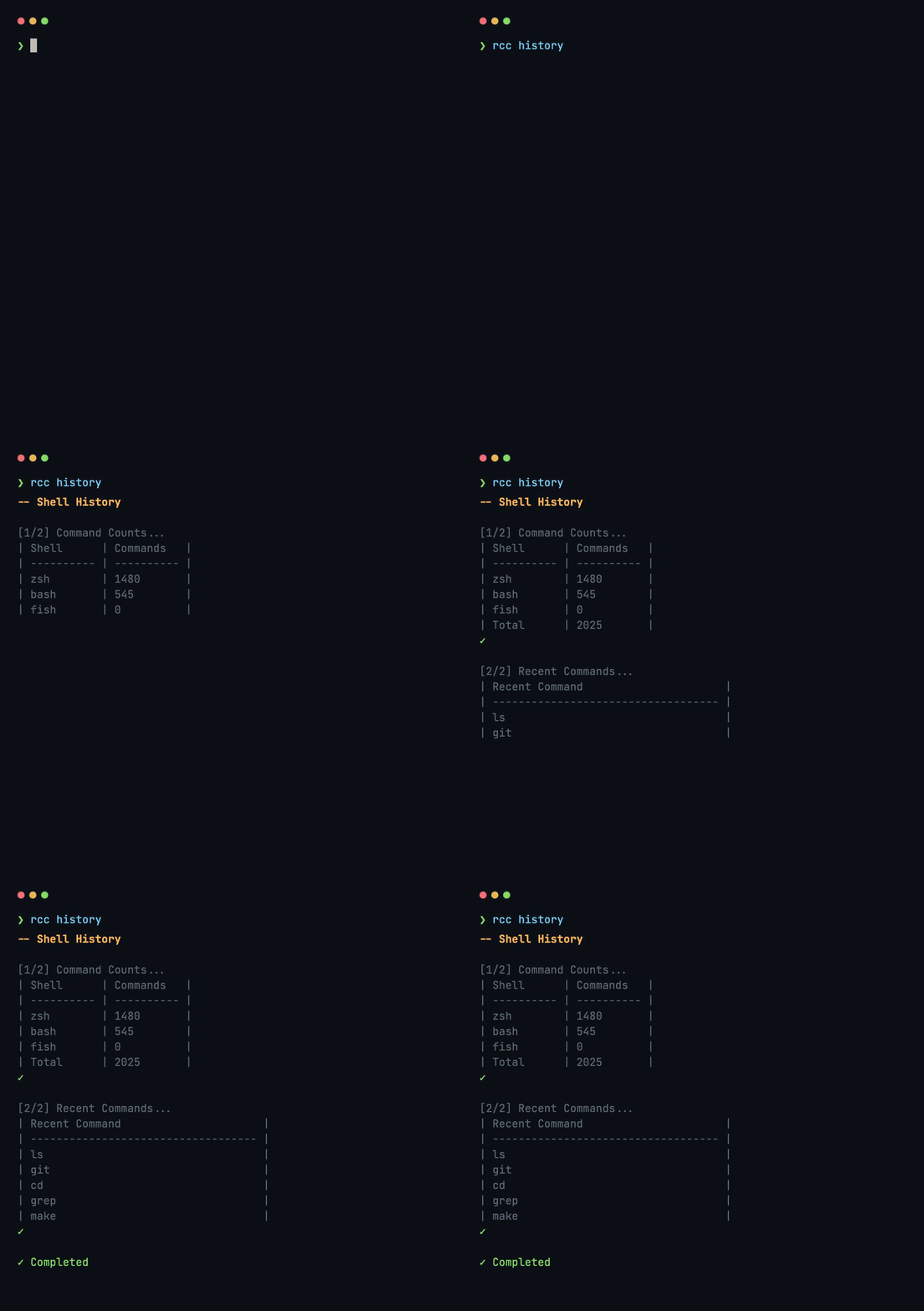
All commands
Full command reference
| Command | What it does |
|---|---|
audit |
30+ security checks; --fix, --deep, --explain, --json/--csv, --report, --remediation, --sheet, --baseline / --baseline-diff / --baseline-reset, --cis, --only, --profile, schedule |
fleet |
scan, add/remove/list, group, run, audit, status across many Macs over SSH |
disk |
Internal/external/network drives, SMART; disk large for biggest files |
network |
Interfaces, Wi-Fi, DNS, routing |
wifi |
Active network, known SSIDs, Keychain passwords |
memory |
System memory + processes by RAM |
ports |
Open ports & listening services |
battery |
Health %, cycles, charging |
backup |
Time Machine status |
env |
Shell environment & PATH breakdown |
overlap |
Maps each PATH entry to the manager behind it (brew, npm, cargo, go, pipx, macports, nix, system, shim); --json |
startup |
Launch agents & login items; startup clean |
trash |
Trash size & empty |
fonts |
Duplicate & corrupted fonts |
history |
Shell history analysis |
certs |
SSL certificate expiry report |
upgrade |
Update brew formulae/pip/npm/gem… (not GUI apps); --dry-run, --parallel |
apps |
Update GUI apps in 4 layers |
ssh |
Inspect/export keys |
git |
Status, branches, stash, cleanup |
docker |
Images, containers, volumes |
xcode |
Simulators, derived data, SPM caches |
Why Raccoon is different
- Safe by default, not silent by default.
--fixbacks up every destructive change to~/.raccoon/fix-backups/<timestamp>/before touching anything - a wrong fix is always recoverable. - No install on the remote Macs. Fleet mode streams the audit over SSH stdin; remote machines need only bash, macOS, and an open SSH server.
- Auditable, not opinionated. It never sets a public DNS resolver or strips Gatekeeper quarantine flags - both would silently weaken a working setup.
- One data model. Text, JSON, CSV, Markdown, RTF, and the fleet aggregate all render from the same
AUDIT_RESULTSarray, so a new check shows up everywhere automatically.
How it compares
| Tool | Platform | Interface | Focus | Auto-fix | Multi-machine |
|---|---|---|---|---|---|
| Raccoon | macOS | CLI + text / Go TUI | Security audit + system info + SSH fleet + client reports | Yes, backed up | SSH, agentless |
| Pareto Security | macOS, Windows, Linux | GUI menubar | Security checklist | One-click | Team cloud dashboard |
| Lynis | Linux, macOS, Unix | CLI | Deep audit + compliance (HIPAA/ISO 27001/PCI) | No (advises) | Enterprise server |
| fort | macOS | CLI (single binary) | Security audit + hardening (CIS/NIST/SOC 2) | Yes | No |
| Mole | macOS | CLI / TUI | Cleanup & maintenance - not security | n/a | No |
Reach for something else when it fits you better:
- Want a GUI menubar app you set once and forget? Use Pareto Security.
- Auditing Linux/servers, or need formal compliance (HIPAA, ISO 27001, PCI DSS)? Use Lynis.
- Just want disk cleanup and app uninstalls on your Mac? Use Mole - Raccoon actually started as a PR to it.
- Want the smallest possible single-binary macOS checker? Use fort.
Raccoon fits when you want to audit - and hand a client a readable report on - a room of Macs from the terminal over SSH, with fixes you can undo.
What Raccoon is not
- Not an MDM, and not a Jamf replacement. It audits and reports; it does not enrol devices, enforce policy, or push configuration.
- Not a certified compliance tool.
--cismaps checks to the CIS macOS Benchmark for orientation - it is not an audited or certified assessment, and a clean run is not a compliance attestation. - Not exhaustive, and not version-proof. Checks are heuristic and macOS-version-sensitive. A pass means "these checks passed on this macOS version," not "this Mac is secure."
- macOS only. No Linux, no Windows.
Is it safe to pipe to bash?
Fair question for a tool that audits security and runs sudo. The honest answer:
- Read it first. The installer is one file -
install.sh. It clones the repo to~/.raccoonand symlinksrcc; nothing else. Prefer Homebrew (brew install thousandflowers/tap/rcc) if you'd rather not pipe to a shell. - No telemetry. Raccoon makes no analytics or "phone-home" calls. Ever.
- Network calls are only the obvious ones:
appsfetches the Homebrew cask catalog and Sparkle appcasts to find updates;audit --share(opt-in only) uploads a report to GitHub;fleetconnects over SSH to your hosts and uses Bonjour/ping on your LAN forscan;upgradetalks to the package managers you already use. Nothing leaves your machine unless you run one of those. sudoonly when it's doing the work - applyingaudit --fixchanges or installing a cask - never just to look around.- Reports redact secrets by default. Every sharable format (
--json,--csv,--html,--report,--share, and the fleet aggregate) scrubs passwords, keys, tokens, and IP/MAC addresses at a single choke point before anything is written - so a report is safe to hand over without hand-checking it first. The live on-screen summary still shows your own machine's real values. Pass--no-redactwhen you deliberately want them verbatim. - Auditable. ~9,300 lines of plain Bash across 22 command scripts,
shellcheck -S warningclean, covered by 496 tests in 44 bats files. Read any command inbin/. Nothing else ships - the interactive TUI is built from source, not committed as a binary.
Go TUI
Raccoon has an optional terminal UI built with Bubble Tea. It is built from source, not committed as a binary: brew install compiles it for you, and the curl | bash installer builds it automatically when Go is present. Without it, bare rcc falls back to a built-in Bash text menu (printing a one-line hint on how to get the TUI) - every command still works.
22 commands in four categories, with fleet collapsed behind its marker:
   n___n  Raccoon
  [ o.o ]  macOS companion toolkit
   > ^ <

── Maintenance ─────────────────────────────────────────────
audit  Security audit + fix
upgrade  Update packages (brew, pip, npm, gem)
apps  Update GUI apps (App Store + casks)
backup  Time Machine status
trash  Trash size + contents
── System ──────────────────────────────────────────────────
disk  Disk space, APFS, SMART status
memory  Processes sorted by RAM usage
battery  Health, cycles, charging
startup  Launch agents, login items
fonts  Dupes, corrupted, catalog
── Network ─────────────────────────────────────────────────
network  Interfaces, Wi-Fi, DNS, routing
wifi  Wi-Fi and saved passwords
ports  Open ports and listeners
certs  SSL certificate overview
ssh  SSH key management
fleet ▸  Audit Mac fleet over SSH
── Development ─────────────────────────────────────────────
git  Repo scan, branches, stash
docker  Images, containers, volumes
xcode  Simulators, derived data, SPM
env  PATH, symlinks, tool versions
overlap  Which manager is behind each PATH entry
history  Shell history analysis

  ↑↓ j/k Navigate · Enter Run · / Search
Build it yourself with cd ui && ./build.sh (needs Go). The binary lands in
bin/rcc-ui (git-ignored) and is auto-detected by rcc. Argument-heavy fleet
subcommands (run, group add, audit --group) stay on the CLI, where you can
pass them.
Raycast extension
Every command that produces a report has a screen in Raycast, in raycast-extension/. Twenty-one of them: disk, memory, ports, battery, audit, trash, Wi-Fi, PATH overlaps, Docker, shell history, certificates, startup items, fonts, environment, network, Xcode, backups, git repositories and SSH keys, plus a launcher that lists every rcc command and a screen for configuring the admin session.
They are not the terminal output in a window. Each reads rcc <command> --json and renders it natively: sections you can search, rows you can act on, and a detail pane where it earns one. audit offers its fixes as confirmed actions rather than as a prompt the terminal would have asked; upgrade shows a row per package manager as it works, instead of thirty lines scrolling past; disk names the local snapshots that are holding on to space you thought you freed.
One rule runs through all of them: opening a screen does not act. apps opens in --dry-run and updating for real is a separate, confirmed action, because it replaces applications you may be using. fleet reads its configuration file and contacts nothing — scanning is an action that first says how many machines it is about to reach over SSH. Pressing Enter on a row in a launcher should never be enough to change a machine.
It is not in the Raycast Store yet. To run it from source:
brew install thousandflowers/tap/rcc   # the extension needs the CLI
cd raycast-extension
npm install
npm run dev
Raycast picks it up while npm run dev is running. If rcc is not in a Homebrew location, point the extension at it: Raycast Settings → Extensions → Raccoon → Raccoon CLI.
The extension ships no copy of Raccoon: it runs the rcc you installed, so the two never disagree about what your Mac looks like.
Shell completion
rcc completion bash >> ~/.bashrc # or: rcc completion zsh >> ~/.zshrc
Man page
man rcc # every command, flag, and example
Project structure
Raccoon/
├── rcc                  # Entry point + dispatcher
├── install.sh           # curl | bash installer
├── lib/core/            # Shared shell library (common.sh, commands.sh)
├── bin/                 # Command scripts (audit, fleet, disk, …)
├── ui/                  # Go Bubble Tea TUI
├── completions/         # bash + zsh autocompletions
├── man/man1/rcc.1       # Man page
├── tests/               # Bats test suite
└── docs/                # Images, GIFs, guides
Contributing
Bug reports and PRs welcome - use the templates.
brew install bats-core shellcheck
bats tests/                              # run tests
shellcheck rcc bin/*.sh lib/core/*.sh    # lint
Also by me
- Stockfish Continue to Play - Chess.com extension: when a game ends, keep playing the final position against Stockfish on the same board.
License
MIT - see LICENSE.