
sysfora/Todobee has 162 GitHub stars and 22 forks. Star changes are not measured yet. Last checked 2026-11-13 19:53 UTC. Last push 2026-11-13.
できること
- Clear Kanban Boards Drag-and-drop cards between sections. Group any board by person, label, priority, or due date, and filter down to the exact work that matters right now. - All Tasks in One Place Checklists, notes, files, priorities, and colored labels. Keep discussions, context, and attachments right on the task card.
- Google Drive Your workspace data belongs to you. Projects, tasks, notes, and files sync directly to a dedicated Todobee folder in the workspace admin's Google Drive. - Focused Team Role-based visibility. Admins oversee the whole workspace; members see only assigned projects. Send invites by email and accept with Google.
計測したスター増加
- 24時間
- 履歴を収集中
- 7日間
- 履歴を収集中
- 15日間
- 履歴を収集中
- 1か月
- 履歴を収集中
期間ごとの純増数です。期間は重複しており、日別の値ではありません。未計測の値は空欄です。スター数は注目度の指標であり、品質の保証ではありません。
概要
Todobee is an open-source project management platform built for teams on Google Workspace.
開発ツールREADME.md
オリジナル



Try Demo
·
Register
·
Report an Issue
Self-host Guide · Tech Stack · Cloud vs Open-source
Built for Google Workspace




Designed for high-productivity teams:





✨ Features
|
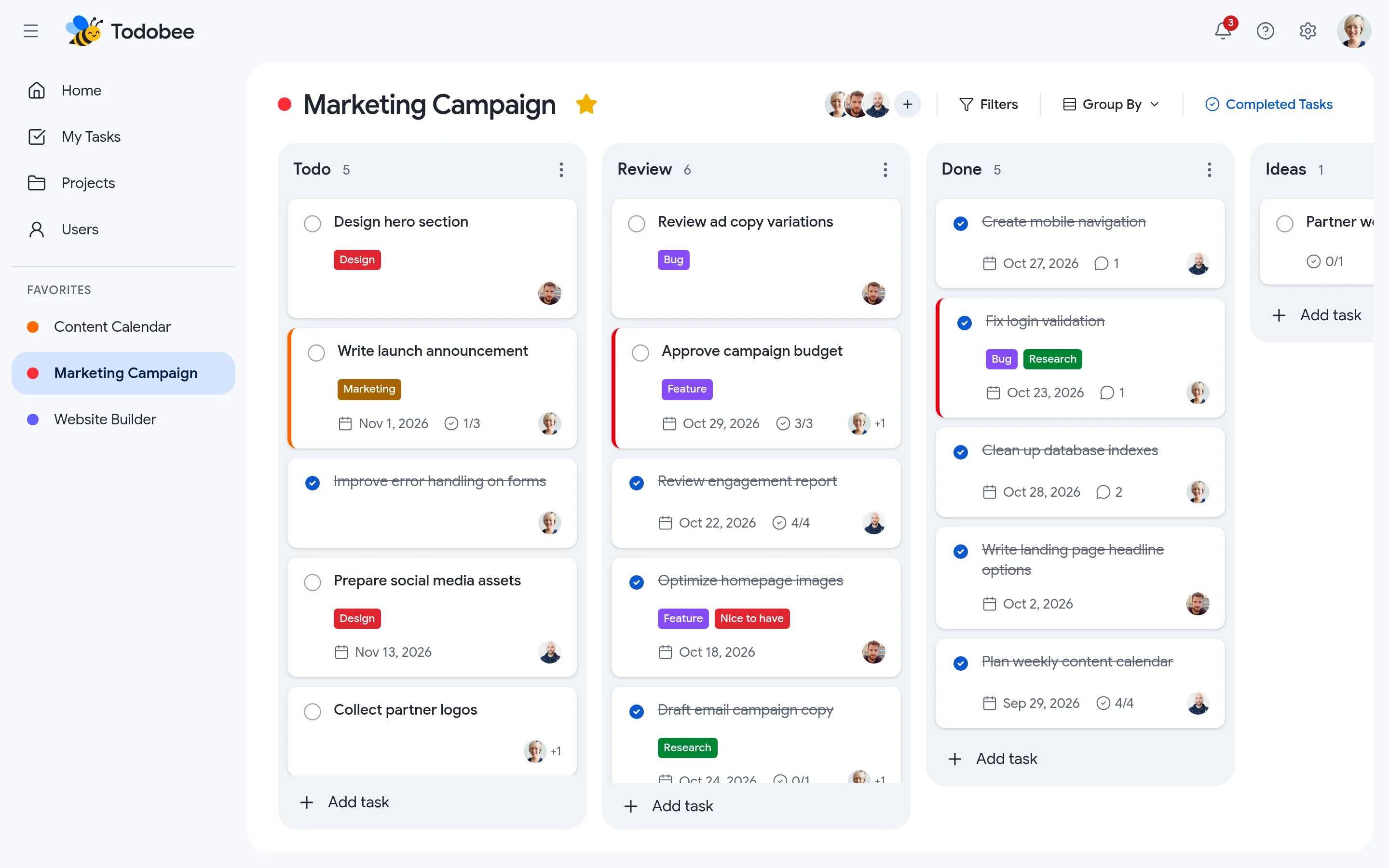
Clear Kanban Boards
Drag-and-drop cards between sections. Group any board by person, label, priority, or due date, and filter down to the exact work that matters right now. |
All Tasks in One Place
Checklists, notes, files, priorities, and colored labels. Keep discussions, context, and attachments right on the task card. |
|
Google Drive
Your workspace data belongs to you. Projects, tasks, notes, and files sync directly to a dedicated Todobee folder in the workspace admin's Google Drive.
|
Focused Team
Role-based visibility. Admins oversee the whole workspace; members see only assigned projects. Send invites by email and accept with Google. |
Intro
- Project Management on Google Workspace: Native Google authentication and direct sync to the administrator's Google Drive.
- Interactive Kanban Boards: Fluid drag-and-drop organization across customizable columns and sections.
- Rich Task Details: Subtask checklists, markdown notes, file attachments, due dates, priority tiers, and color-coded labels.
- Fast Local Caching: Backed by PocketBase for sub-millisecond responses without hitting Drive rate limits on every interaction.
- Email Notifications & Invites: Seamless team onboarding via SMTP invitations and instant Google sign-in.
- Flexible Subscription Model: Built-in Stripe billing with per-seat licensing across Premium, Pro, and Enterprise tiers.
Tech Stack
- Next.js 16 (React 19) - High-performance React application framework
- Hono - Fast and lightweight API server and gateway
- PocketBase - Real-time accounts, RBAC, invites, subscription state, and Drive cache
- Google Drive API - Secure persistence of project assets and attachments
- Stripe - Seat-based subscription checkout, billing portal, and webhooks
- Tailwind CSS 4 & Radix UI - Modern accessible styling and component primitives
- Docker & Docker Compose - Containerized deployment for app and demo environments
Quick Start
To have the project up and running locally, please follow the steps below:
1. Prerequisites
- Node.js 20+ and npm
- A hosted PocketBase instance (e.g. PocketHost, Fly.io, or self-hosted)
- A Google Cloud project with OAuth 2.0 Credentials and Google Drive API enabled
- (Optional) A Stripe account for recurring seat-based billing
2. Setup & Installation
# Clone the repository
git clone https://github.com/Sysfora/todobee.git
cd todobee

# Install dependencies for client and server
npm install

# Copy environment configuration
cp .env.example .env
3. Configure .env
Fill in your credentials in .env (refer to .env.example for details):
APP_URL=http://localhost:3000APP_SECRET=<your-random-32-char-string>PB_URL,PB_ADMIN_EMAIL,PB_ADMIN_PASSWORDGOOGLE_CLIENT_ID,GOOGLE_CLIENT_SECRET- (Optional) Stripe and SMTP credentials
4. Run Development Servers
npm run dev
Open http://localhost:3000 in your browser. The API gateway listens on port 4000.
5. Local Demo Mode (No Login / No Database Required)
npm run demo
Open http://localhost:5000 to explore the full interface with sample mock data.
6. Docker Deployment
docker compose up -d --build
| Port | What it serves |
|---|---|
3000 |
Todobee production app (point your domain here) |
5000 |
Todobee demo interface (e.g., demo.todobee.com) |
Sponsor Todobee
We offer options to support the ongoing open-source development of Todobee:
- Donations: Help us maintain the codebase and add features faster.
- Corporate Sponsorship: Get your company logo and backlink featured in the repository and documentation.
Contact us at [email protected] for sponsorship inquiries.
Todobee Cloud vs. Open-source
Choose Todobee Cloud for a fully managed experience, or deploy Todobee Open-source on your own infrastructure. Both provide the exact same core product and features.
We do not gate essential features or artificially restrict the open-source license.
| Area | Todobee Cloud | Todobee Open-source (self-hosted) |
|---|---|---|
| Cost | Subscription per seat, 14-day free trial | Free forever (AGPL-3.0); you pay only for your infrastructure |
| Setup time | Sign up and create your workspace in minutes | Deploy via Docker / VPS; configure PocketBase, Google OAuth, and env vars |
| Hosting & data | Fully managed cloud; workspace data saved to your Google Drive | Runs on your server; data stays entirely within your environment and Google Drive |
| Google Cloud Setup | Pre-approved, verified Google OAuth app ready to use | You create your own Google Cloud OAuth Client and enable Google Drive API |
| Projects & Boards | Unlimited | Unlimited |
| Tasks, Checklists & Labels | Unlimited | Unlimited |
| Google Drive Sync | Automated background sync and cache management | Automated background sync (configurable DRIVE_SYNC_INTERVAL_MS) |
| Team members & Seats | Per subscribed plan seats | Unlimited seats |
| Email Notifications | Managed out of the box | Requires your own SMTP credentials |
| Dark Mode | Included | Included |
| Multiple Admins | Available on Enterprise | Supported in codebase |
| Billing & Stripe | Handled automatically | Optional; configure your own Stripe keys and webhooks if needed |
| Updates & maintenance | Automatic, zero downtime | You pull new releases and manage updates yourself |
| Backups & Security | Managed infrastructure | Your responsibility |
| Support | Priority support via email | Community support on GitHub Issues and Discussions |
| Source access & customization | SaaS platform | Full source code, fork and modify freely under AGPL-3.0 |
Todobee Compliance
- This GitHub repository contains the open-source, self-hosted edition of Todobee. Todobee is also available as a managed service at todobee.com.
- Todobee uses official Google OAuth 2.0 authentication flows.
- Todobee requests the restricted
drive.filescope, meaning it can only create and access files that it creates within the dedicatedTodobeefolder. It never scans, reads, or accesses the rest of your Google Drive. - Todobee does not sell or share user data with third parties.
- Workspace data remains under your organization's control in your administrator's Google Drive.
License
This repository's source code is available under the AGPL-3.0 license.