
sqls-server/sqls
sqls-server/sqls has 1,347 GitHub stars and 97 forks. GitHot measured 0 stars in 24 hours, +2 in 7 days, and +6 in 15 days. Last checked 2026-11-11 19:40 UTC. Last push 2026-08-20.
SQL language server written in Go.
計測したスター増加
- 24時間
- 0
- 7日間
- +2
- 15日間
- +6
- 1か月
- 更新が遅れています
期間ごとの純増数です。期間は重複しており、日別の値ではありません。未計測の値は空欄です。スター数は注目度の指標であり、品質の保証ではありません。
README.md
オリジナルsqls: SQL Language Server

An implementation of the Language Server Protocol for SQL.
Note
This project is currently under development and there is no stable release. Therefore, destructive interface changes and configuration changes are expected.
Features
sqls aims to provide advanced intelligence for you to edit sql in your own editor.
Support RDBMS
- MySQL(Go-MySQL-Driver)
- PostgreSQL(pgx)
- SQLite3(go-sqlite3)
- MSSQL(go-mssqldb)
- H2(pgx)
- Vertica(vertica-sql-go)
Language Server Features
Auto Completion
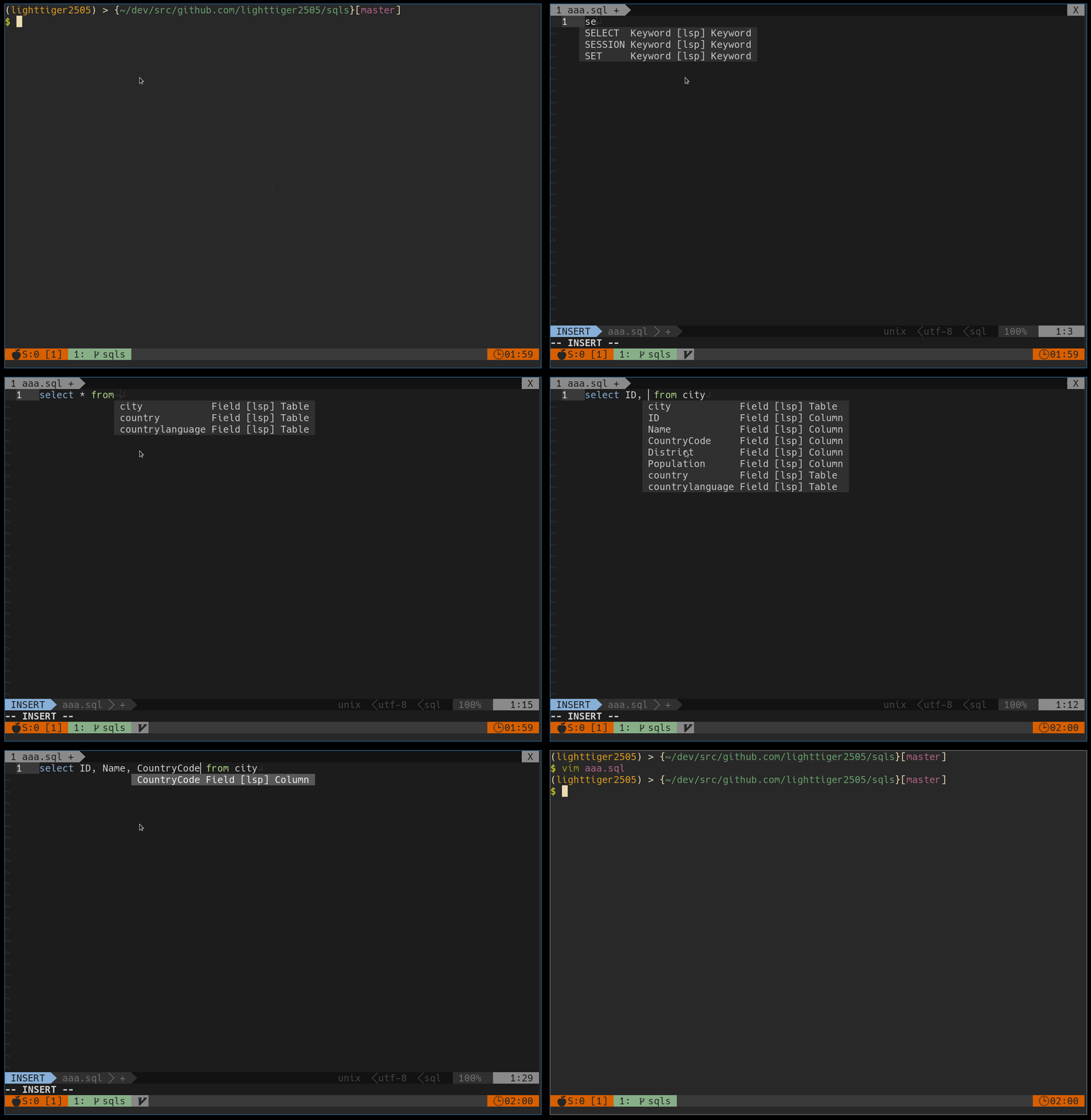
- DML(Data Manipulation Language)
- SELECT
- Sub Query
- INSERT
- UPDATE
- DELETE
- SELECT
- DDL(Data Definition Language)
- CREATE TABLE
- ALTER TABLE
Join completion
If the tables are connected with a foreign key sqls can complete JOIN statements

CodeAction
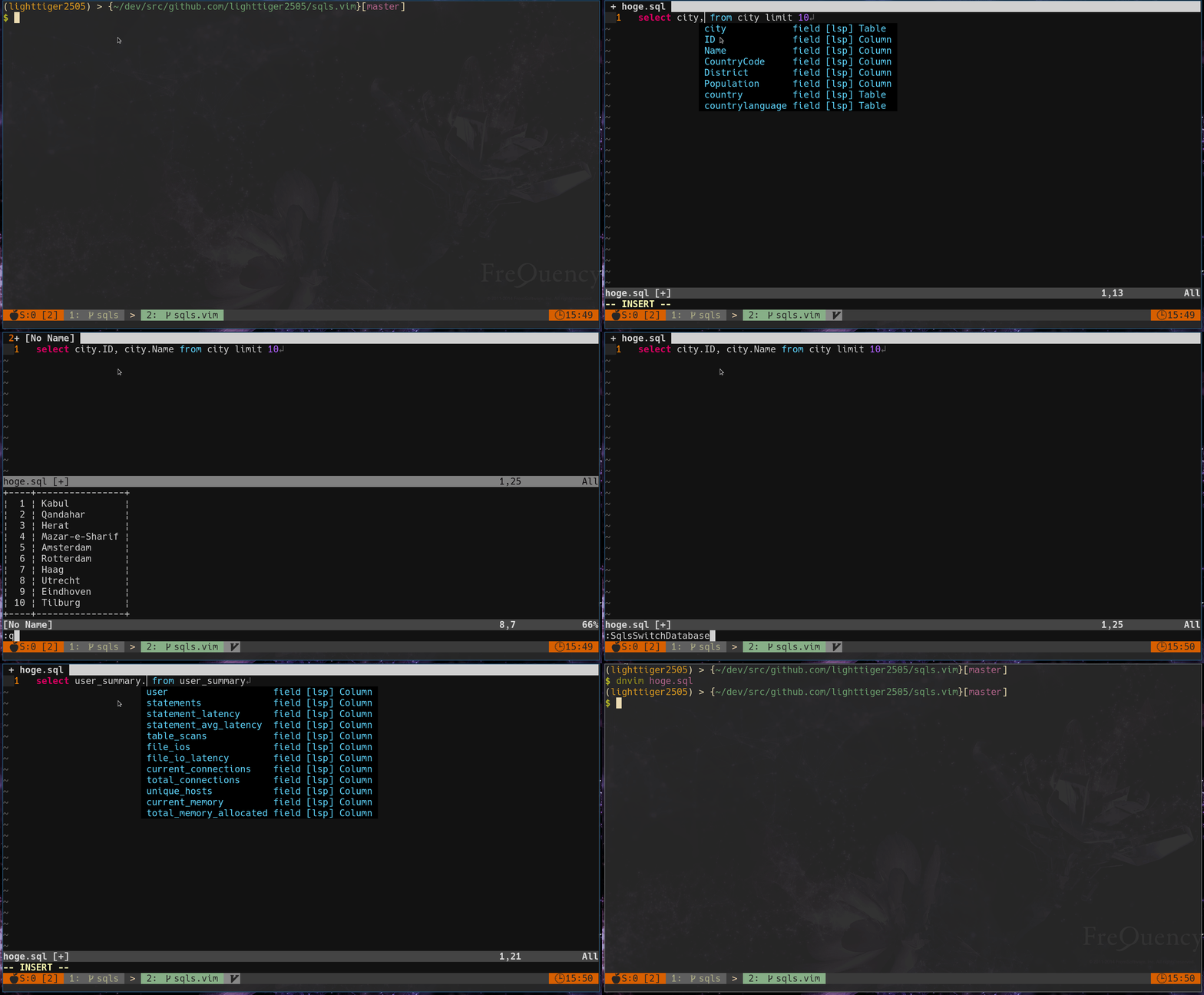
- Execute SQL
- Explain SQL
- Switch Connection(Selected Database Connection)
- Switch Database
Hover
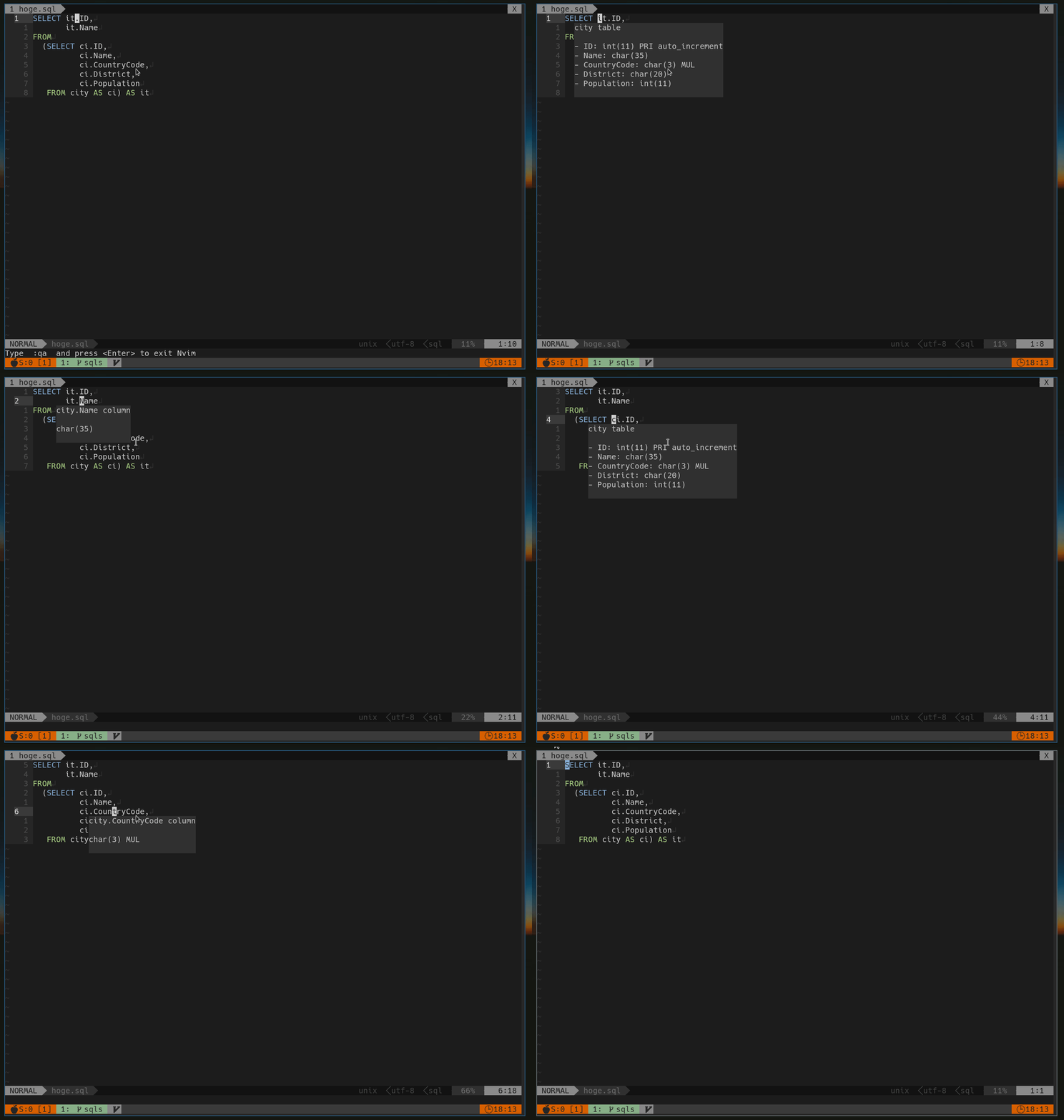
Signature Help
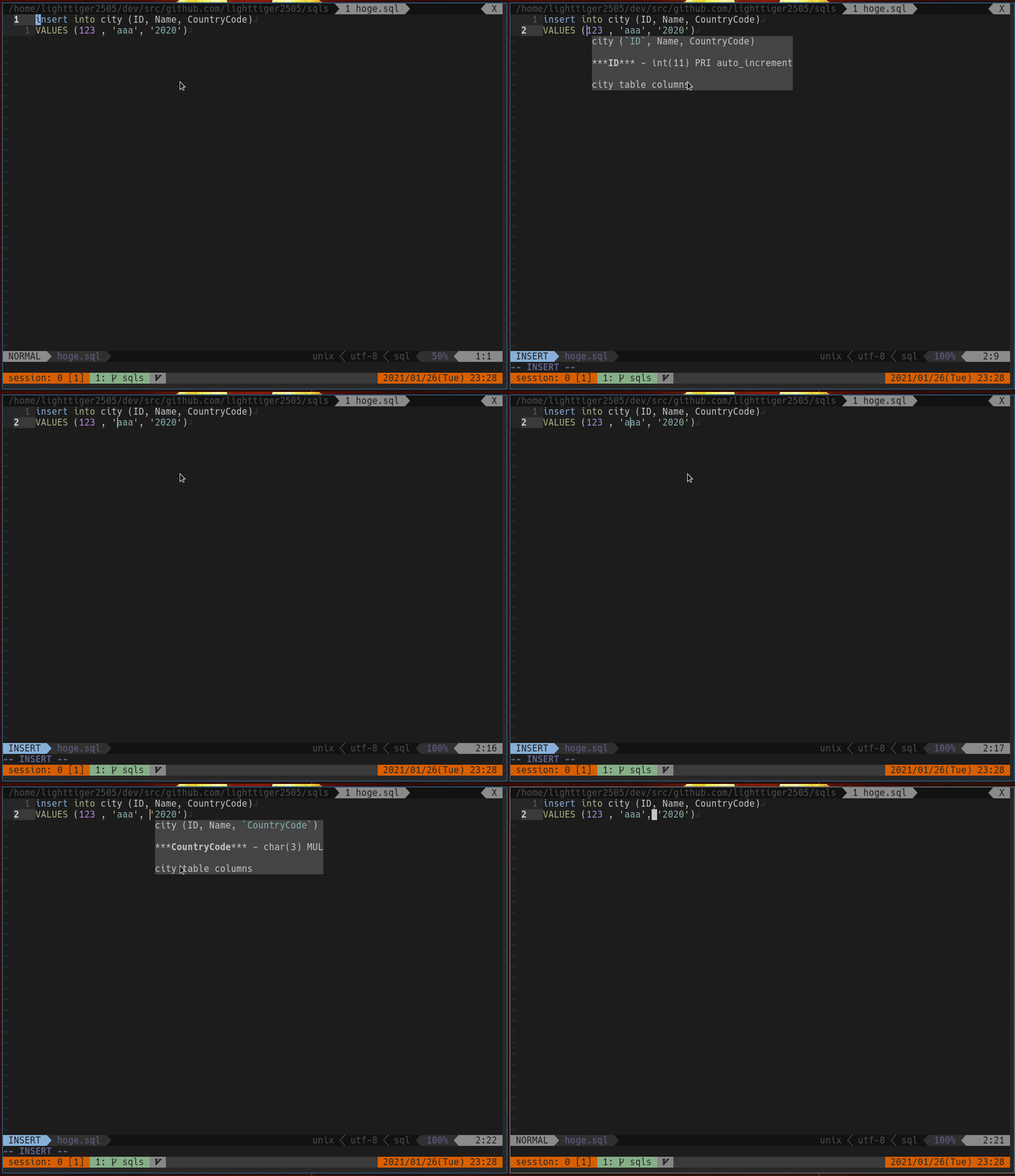
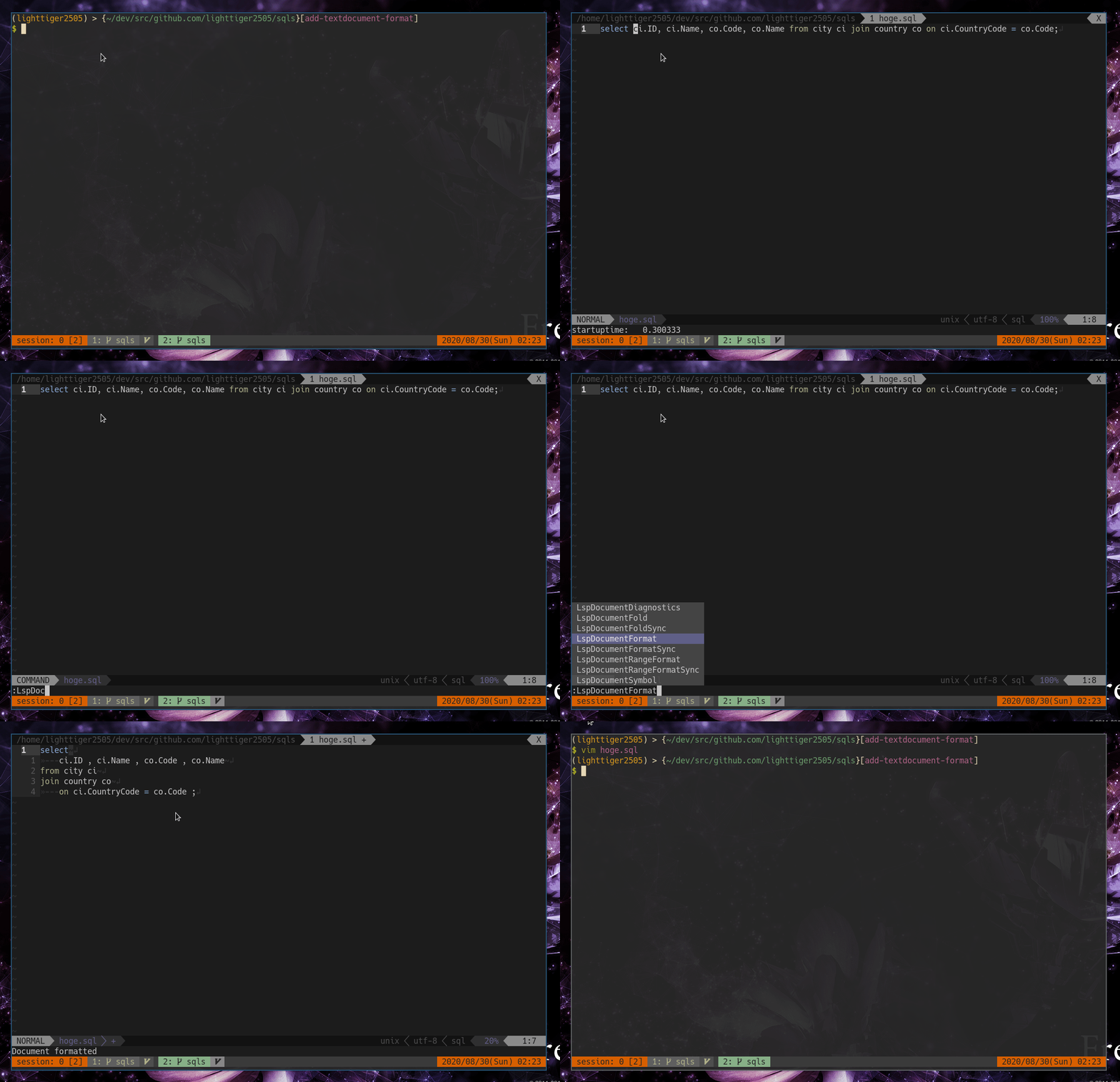
Document Formatting
Installation
go install github.com/sqls-server/sqls@latest
Editor Plugins
DB Configuration
The connection to the RDBMS is essential to take advantage of the functionality provided by sqls.
You need to set the connection to the RDBMS.
Configuration Methods
There are the following methods for RDBMS connection settings, and they are prioritized in order from the top. Whichever method you choose, the settings you make will remain the same.
- Configuration file specified by the
-configflag workspace/configurationset to LSP client- Configuration file located in the following location
$XDG_CONFIG_HOME/sqls/config.yml ("$HOME/.config" is used instead of$XDG_CONFIG_HOMEif it's not set)
Configuration file sample
# Set to true to use lowercase keywords instead of uppercase.
lowercaseKeywords: false
connections:
  - alias: dsn_mysql
    driver: mysql
    dataSourceName: root:root@tcp(127.0.0.1:13306)/world
  - alias: individual_mysql
    driver: mysql
    proto: tcp
    user: root
    passwd: root
    host: 127.0.0.1
    port: 13306
    dbName: world
    params:
      autocommit: "true"
      tls: skip-verify
  - alias: mysql_via_ssh
    driver: mysql
    proto: tcp
    user: admin
    passwd: Q+ACgv12ABx/
    host: 192.168.121.163
    port: 3306
    dbName: world
    sshConfig:
      host: 192.168.121.168
      port: 22
      user: sshuser
      passPhrase: ssspass
      privateKey: /home/sqls-server/.ssh/id_rsa
  - alias: dsn_vertica
    driver: vertica
    dataSourceName: vertica://user:pass@host:5433/dbname
Workspace configuration Sample
- setting example with vim-lsp.
if executable('sqls')
    augroup LspSqls
        autocmd!
        autocmd User lsp_setup call lsp#register_server({
        \   'name': 'sqls',
        \   'cmd': {server_info->['sqls']},
        \   'whitelist': ['sql'],
        \   'workspace_config': {
        \     'sqls': {
        \       'connections': [
        \         {
        \           'driver': 'mysql',
        \           'dataSourceName': 'root:root@tcp(127.0.0.1:13306)/world',
        \         },
        \         {
        \           'driver': 'postgresql',
        \           'dataSourceName': 'host=127.0.0.1 port=15432 user=postgres password=mysecretpassword1234 dbname=dvdrental sslmode=disable',
        \         },
        \       ],
        \     },
        \   },
        \ })
    augroup END
endif
- setting example with coc.nvim.
In coc-settings.json opened by :CocConfig
{
    "languageserver": {
        "sql": {
            "command": "sqls",
            "args": ["-config", "$HOME/.config/sqls/config.yml"],
            "filetypes": ["sql"],
            "shell": true
        }
    }
}
- setting example with nvim-lspconfig.
require'lspconfig'.sqls.setup{
  on_attach = function(client, bufnr)
    require('sqls').on_attach(client, bufnr) -- require sqls.nvim
  end
  settings = {
    sqls = {
      connections = {
        {
          driver = 'mysql',
          dataSourceName = 'root:root@tcp(127.0.0.1:13306)/world',
        },
        {
          driver = 'postgresql',
          dataSourceName = 'host=127.0.0.1 port=15432 user=postgres password=mysecretpassword1234 dbname=dvdrental sslmode=disable',
        },
      },
    },
  },
}
Setting example for Sublime Text 4
Install the LSP Client by Opening the command palette and run
Package Control: Install Package, then selectLSP.Open
Preferences > Package Settings > LSP > Settingsand add the"sqls"client configuration to the"clients":
{
    "show_diagnostics_count_in_view_status": true,
    "clients": {
        "sqls": {
            "enabled": true,
            "command": ["/path/to/sqls binary"],
            "selector": "source.sql"
        }
    }
}
I'm sorry. Please wait a little longer for other editor settings.
Configuration Parameters
The first setting in connections is the default connection.
| Key | Description |
|---|---|
| connections | Database connections |
connections
dataSourceName takes precedence over the value set in proto, user, passwd, host, port, dbName, params.
| Key | Description |
|---|---|
| alias | Connection alias name. Optional. |
| driver | mysql, postgresql, sqlite3, mssql, h2. Required. |
| dataSourceName | Data source name. |
| proto | tcp, udp, unix. |
| user | User name |
| passwd | Password |
| host | Host |
| port | Port |
| path | unix socket path |
| dbName | Database name |
| params | Option params. Optional. |
| sshConfig | ssh config. Optional. |
sshConfig
| Key | Description |
|---|---|
| host | ssh host. Required. |
| port | ssh port. Required. |
| user | ssh user. Optional. |
| privateKey | private key path. Required. |
| passPhrase | passPhrase. Optional. |
DSN (Data Source Name)
See also.
- https://github.com/go-sql-driver/mysql#dsn-data-source-name
- https://pkg.go.dev/github.com/jackc/pgx/v4
- https://github.com/mattn/go-sqlite3#connection-string
Contributors
This project exists thanks to all the people who contribute.
Inspired
I created sqls inspired by the following OSS.
- dbcli Tools
- non-validating SQL parser
関連プロジェクトを探す
Asabeneh/30-Days-Of-Python
30 Days of Python プログラミングチャレンジは、Python プログラミング言語を 30 日で学ぶためのステップバイステップのガイドです。このチャレンジは 100 日以上かかることもあります。自分のペースで進めてください。こちらの動画も役立つかもしれません: https://www.youtube.com/channel/UC7PNRuno1rzYPb1xLa4yktw
78,560 スターgrafana/grafana
オープンで組み合わせ可能なオブザーバビリティおよびデータ可視化プラットフォームです。Prometheus、Loki、Elasticsearch、InfluxDB、Postgres など、複数のソースからメトリクス、ログ、トレースを可視化できます。
77,830 スターredis/redis
リアルタイムのデータ駆動型アプリケーションを構築する開発者にとって、Redis は最も選ばれ、最速で、機能が最も豊富なキャッシュ、データ構造サーバー、ドキュメントおよびベクトルクエリエンジンです。
77,395 スターapache/superset
Apache Superset は、データ可視化とデータ探索のためのプラットフォームです。
75,473 スター