
rezer-bleede/dbt-Workbench
rezer-bleede/dbt-Workbench has 73 GitHub stars and 16 forks. GitHot measured 0 stars in 24 hours. Last checked 2026-11-13 08:38 UTC. Last push 2026-11-01.
Open-source, self-hosted dbt control plane for data lineage, orchestration, and catalog management. Built for local, on-prem, and air-gapped deployments.
計測したスター増加
- 24時間
- 0
- 7日間
- 履歴を収集中
- 15日間
- 履歴を収集中
- 1か月
- 履歴を収集中
期間ごとの純増数です。期間は重複しており、日別の値ではありません。未計測の値は空欄です。スター数は注目度の指標であり、品質の保証ではありません。
README.md
オリジナル
dbt-Workbench: Self-Hosted dbt Control Plane
dbt-Workbench is an open source, self-hosted dbt control plane for lineage visualization, run orchestration, catalog and docs workflows, SQL exploration, and workspace management. It is designed for local, on-prem, and air-gapped deployments where teams need full control.
If your team has outgrown dbt docs, needs an operational UI around dbt Core, or cannot send data
workflows to a managed SaaS platform, start with the Docker demo below.





Documentation: https://rezer-bleede.github.io/dbt-Workbench/
If dbt-Workbench helps your team, please star the repository.
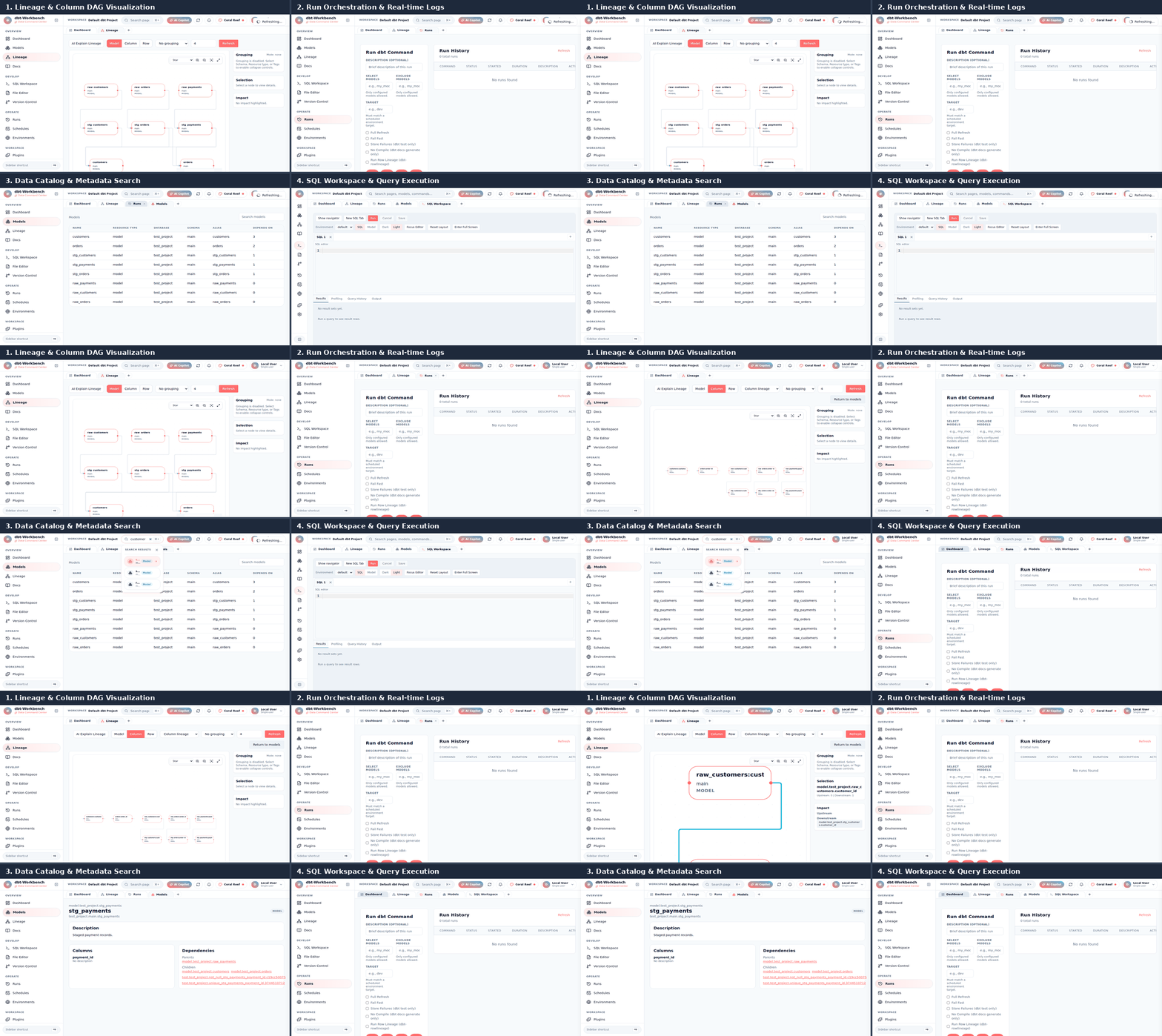
Product Preview
Try It in About a Minute
Prerequisites:
- Docker
- Docker Compose
docker compose up --build
Open:
- UI:
http://localhost:3080 - API:
http://localhost:8080 - API Docs:
http://localhost:8080/docs
The repository includes a ready-to-run demo dbt project in ./dbt_project so you can run models,
inspect lineage, and explore catalog metadata immediately.
Programmatic Access (REST and MCP)
The UI uses the same REST API available to other programs. Browse its OpenAPI reference at
http://localhost:8080/docs; API routes cover projects, runs, lineage, catalog, schedules, SQL,
and artifacts.
When AUTH_ENABLED=true, an admin can create a workspace-scoped API key with
POST /auth/api-keys (the plaintext key is returned only once):
curl -X POST http://localhost:8080/auth/api-keys \
  -H "Authorization: Bearer $ADMIN_ACCESS_TOKEN" \
  -H "Content-Type: application/json" \
  -d '{"name":"automation","role":"developer","workspace_ids":[1]}'
Manage keys with GET /auth/api-keys and revoke with DELETE /auth/api-keys/{id}. Use the
returned key as a Bearer token. With the default AUTH_ENABLED=false, the local API is open and
API-key management is disabled; enable authentication before exposing it to a network.
The optional stdio MCP server proxies the REST API and inherits its workspace checks and role permissions. It provides tools for lineage/catalog/artifacts, run status/history/cancellation, schedule CRUD/triggering, dbt commands, and SQL execution. Install backend dependencies:
cd backend && python3 -m pip install -r requirements.txt
Then add it to an MCP client configuration:
{
  "mcpServers": {
    "dbt-workbench": {
      "command": "python3",
      "args": ["-m", "app.mcp_server", "--api-url", "http://localhost:8080"],
      "env": {
        "PYTHONPATH": "/absolute/path/to/dbt-Workbench/backend",
        "DBT_WORKBENCH_API_KEY": "dbw_your_key"
      }
    }
  }
}
Set DBT_WORKBENCH_WORKSPACE_ID to select a default workspace, or pass workspace_id to a tool.
For an auth-disabled local instance, omit DBT_WORKBENCH_API_KEY.
Who It Is For
- Analytics engineers: Explore lineage, run models, inspect artifacts, and browse documentation without switching between terminal commands and static docs.
- Data platform teams: Provide a governed dbt workspace with RBAC, run history, scheduling, and workspace isolation inside your own infrastructure.
- Regulated teams: Keep dbt workflows local, on-prem, or air-gapped while retaining searchable lineage, catalog, and operational diagnostics.
Why Evaluate It Now
| If you need... | Start here |
|---|---|
| A working dbt UI in under 30 minutes | Docker quickstart |
| A self-hosted dbt Cloud alternative | Migration guide |
| Secure private-network deployment | Air-gapped deployment |
| Faster impact analysis | Lineage and column lineage |
Production Readiness Checklist
Before adopting the tool for a production evaluation, verify the items that matter to your team:
- Docker image and Compose deployment run successfully in the target environment.
- Authentication and Viewer/Developer/Admin RBAC match the team access model.
- dbt artifacts, logs, and project paths are stored according to your retention policy.
- Scheduler notifications, retries, and timezone behavior are tested.
- Backup, upgrade, and rollback procedures are documented.
- Air-gapped or restricted-network dependencies are mirrored and tested if applicable.
See the production deployment guides and open an issue if a checklist item is unclear.
dbt Cloud vs dbt-Workbench (At a Glance)
| Area | dbt-Workbench | dbt Cloud |
|---|---|---|
| Operating model | Self-hosted (local, on-prem, air-gapped) | Managed cloud service |
| License model | MIT open source | Commercial SaaS |
| Data and infra control | Stays in your environment | Managed by vendor environment |
| Lineage and docs | Model and column lineage + docs viewer | Available |
| Run orchestration | Built-in run controls and history | Available |
| Scheduling | Cron scheduler with notifications | Available |
| SQL workspace | Built-in SQL editor and execution controls | Available |
| Auth and RBAC | Optional JWT auth + Viewer/Developer/Admin roles | Available |
| Extensibility | Open plugin system with source access | Vendor extension model |
Detailed comparison: dbt Cloud vs dbt-Workbench
Who Uses dbt-Workbench?
Are you running dbt-Workbench in your team? Open an issue with "Adopter" in the title and we can add you here.
Why Teams Choose dbt-Workbench
- Full control of deployment and data boundaries
- No per-seat or per-run pricing model
- Interactive model and column-level lineage
- Built-in run orchestration with logs and history
- Catalog workflows with search, metadata, and validation
- Workspace-aware Git integration for dbt project workflows
- Optional authentication and role-based access control
- Plugin system and AI copilot support
Core Feature Areas
- Lineage: Deterministic DAG layout, grouping, expand/collapse, upstream/downstream impact analysis
- Execution: Run dbt commands from the UI with real-time logs and artifact capture
- Scheduler: Cron-style runs, environment-specific configs, retries, notifications
- Catalog: Search across dbt entities with enriched metadata and validation reports
- SQL Workspace: Custom SQL and compiled dbt SQL execution with query history
- Workspaces and RBAC: Optional JWT auth, roles, workspace isolation, and switching
- Plugins and AI: Hot-reloadable plugin system and workspace-aware AI copilot flows
Project Structure
dbt-Workbench/
|- backend/                # FastAPI API and execution services
|- frontend/               # React + TypeScript + Vite UI
|- website/                # Docusaurus documentation source
|- dbt_project/            # Demo dbt project for local quickstart
|- sample_artifacts/       # Sample dbt artifacts
|- docker-compose.yml      # Local full stack setup
|- ARCHITECTURE.md         # Architecture and system design
|- ROADMAP.md              # Completed and planned milestones
`- CONTRIBUTING.md         # Contribution guidelines
Documentation
- Quickstart: Quickstart with Docker Compose
- Lineage: Lineage Overview
- Run orchestration: Run Orchestration
- Scheduler: Scheduler
- SQL workspace: SQL Workspace
- Authentication: Auth and RBAC
- Air-gapped and on-prem: Deployment Guide
- Plugin system: Plugin System
- Architecture: ARCHITECTURE.md
- Roadmap: ROADMAP.md
API and Configuration
Use these references for full endpoint and environment variable details:
- API reference:
http://localhost:8080/docswhen running locally - Architecture and deployment guidance: Documentation site
- Runtime settings reference: backend/app/core/config.py
Local Development
Backend:
cd backend
python -m venv .venv
source .venv/bin/activate
pip install -r requirements.txt
uvicorn app.main:app --reload --host 0.0.0.0 --port 8080
Frontend:
cd frontend
npm install
npm run dev -- --host --port 3080
Docs site:
cd website
npm install
npm run start
Testing
Backend:
cd backend
pytest
Frontend:
cd frontend
npm test
npm run test:e2e
Docs site:
cd website
npm test
Contributing
Contributions are welcome. See CONTRIBUTING.md for workflow, style, and PR expectations.
Security
Please review SECURITY.md for responsible vulnerability reporting.
License
MIT License. See LICENSE.
Star History
関連プロジェクトを探す
Asabeneh/30-Days-Of-Python
30 Days of Python プログラミングチャレンジは、Python プログラミング言語を 30 日で学ぶためのステップバイステップのガイドです。このチャレンジは 100 日以上かかることもあります。自分のペースで進めてください。こちらの動画も役立つかもしれません: https://www.youtube.com/channel/UC7PNRuno1rzYPb1xLa4yktw
78,673 スターgrafana/grafana
オープンで組み合わせ可能なオブザーバビリティおよびデータ可視化プラットフォームです。Prometheus、Loki、Elasticsearch、InfluxDB、Postgres など、複数のソースからメトリクス、ログ、トレースを可視化できます。
77,876 スターredis/redis
リアルタイムのデータ駆動型アプリケーションを構築する開発者にとって、Redis は最も選ばれ、最速で、機能が最も豊富なキャッシュ、データ構造サーバー、ドキュメントおよびベクトルクエリエンジンです。
77,485 スターapache/superset
Apache Superset は、データ可視化とデータ探索のためのプラットフォームです。
75,509 スター