
putme-in/putmein has 77 GitHub stars and 4 forks. GitHot measured -1 stars in 24 hours. Last checked 2026-11-12 09:44 UTC. Last push 2026-11-04.
Your AI-powered Autonomous DevOps, Infrastructure Monitoring & Deployment Engine
計測したスター増加
- 24時間
- -1
- 7日間
- 履歴を収集中
- 15日間
- 履歴を収集中
- 1か月
- 履歴を収集中
期間ごとの純増数です。期間は重複しており、日別の値ではありません。未計測の値は空欄です。スター数は注目度の指標であり、品質の保証ではありません。
README.md
オリジナル



Your AI-powered Autonomous DevOps, Infrastructure Monitoring & Deployment Engine
Open source platform to Secure, Build, Fix and Deploy any project with AI. Helps in managing huge servers, docker containers, vps, kubernetes clusters, vm's and much more.
🔒 . 🏗️ . 🛠️ . 🚀
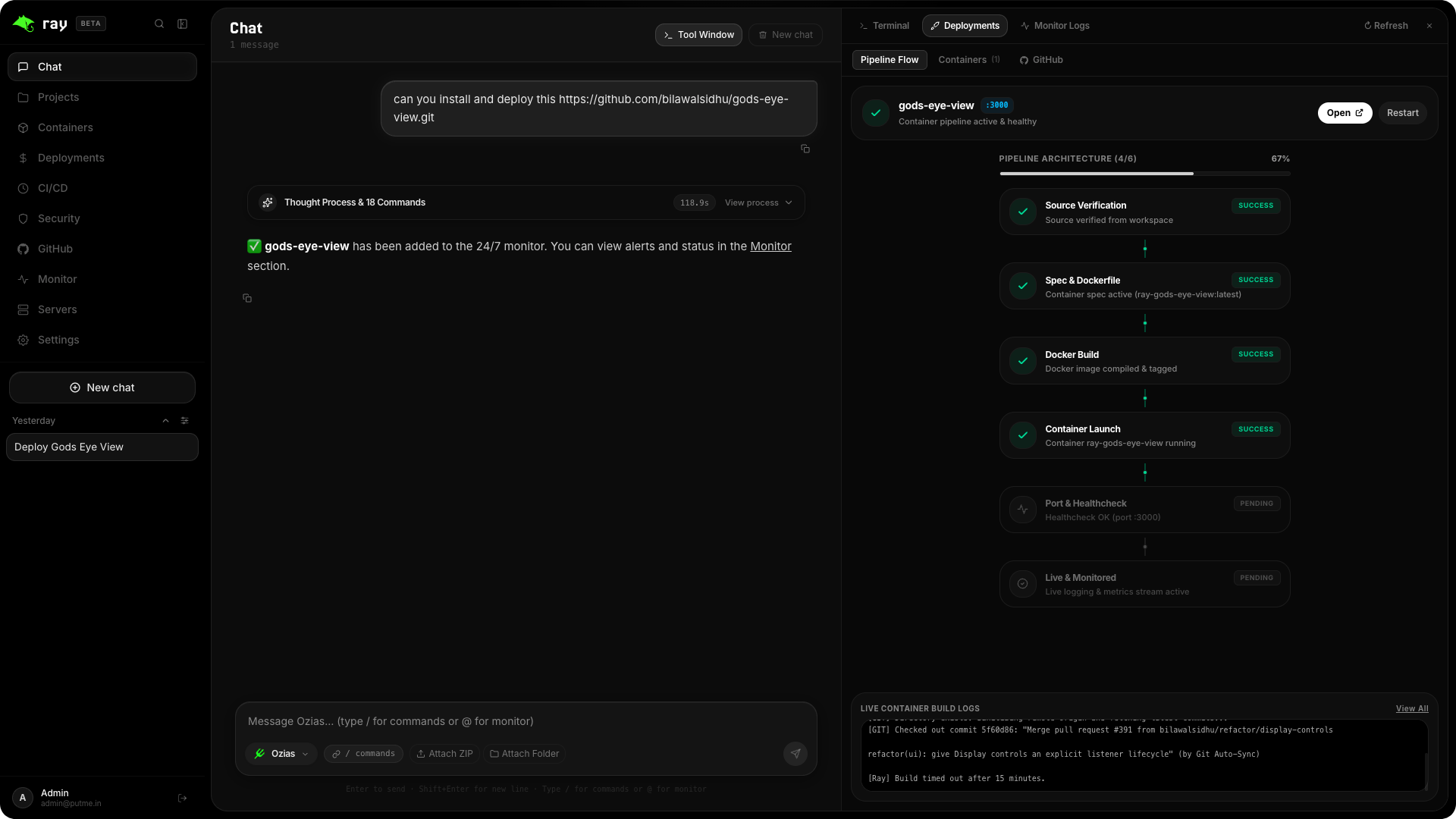
PutmeIn combines Ray (an interactive Next.js web console and management dashboard) with Brain (a high-performance Go AI background daemon and Docker orchestrator) into a unified, daemonized system manager.
Key Features
Autonomous DevOps Engine (Brain)
- Security: Scans your code for vulnerabilities and suggests fixes. Also helps you fix the vulnerabilities in your code and in your projects
- Conversational AI Interface: Chat with your infrastructure using natural language.
- Automated Deployment: Deploy projects (Next.js, Nest.js, static sites, and more) with a single message.
- CI/CD Pipelines: Automatic build, test, and deployment workflows.
- Resource Management: Full container lifecycle management (start, stop, restart, view logs).
- Error Resolution: AI-powered debugging and self-healing capabilities.
Full-Stack Dashboard (Ray)
- Modern UI: Beautiful, responsive interface for managing your infrastructure.
- Live Monitoring: Real-time metrics for CPU, RAM, disk usage, and network traffic.
- Container Orchestration: One-click actions for all your Docker containers.
- Security Center: Built-in security scanning and vulnerability detection.
- Multi-Project Support: Manage multiple projects and deployments from a single dashboard.
Quick Start
Option 1: Automatic One-Line Installation (Recommended)
# Linux / macOS / WSL
curl -fsSL https://putme.in/install.sh | bash
# Windows (PowerShell)
powershell -c "irm https://putme.in/install.ps1 | iex"
Option 2: Global NPM Installation
npm install -g putmein
Once installed, simply run:
ray
PutmeIn will start as a resilient background daemon via PM2 and display your local and network dashboard URLs:
- Web Dashboard (Ray): http://localhost:4567
- API Engine (Brain): http://localhost:4500
Note: If you are running Putmein directly from the source code. The development ports are 3000 for Ray and 3100 for Brain.
Useful Links
CLI Usage & Commands
PutmeIn exposes the ray command globally:
| Command | Description |
|---|---|
ray or ray start |
Starts Ray and Brain in the background via PM2 and displays dashboard URLs. |
ray stop |
Gracefully stops the running background services. |
ray restart |
Restarts all services with fresh state. |
ray status |
Inspects running processes, PIDs, CPU usage, memory consumption, and port status. |
ray logs |
Streams live unified output logs from both Ray and Brain. |
ray starter |
Configures PutmeIn to start automatically on system boot (pm2 startup & pm2 save). |
ray --no-startup |
Disables automatic startup on system boot. |
ray cohen |
Launches the interactive terminal TUI client. |
ray --help |
Displays help menu and command list. |
ray --version |
Prints current installed version. |
Building From Source
Prerequisites
- Node.js:
>=20.0.0(v20 or v22 LTS recommended) - npm:
>=9.0.0 - Go:
>=1.21(for building the Brain backend daemon) - Docker: (for container management and deployments)
Note on npm 10.9+ / 11.x & Peer Dependencies: On npm 10.9+ and npm 11.x, npm's internal dependency resolver (
arborist) can encounter an internal null reference error (edgesOut) when resolving transitive peer dependency trees inray/. The repository includes.npmrcfiles preconfigured withlegacy-peer-deps=true. If you run manual installs or add packages inray/, ensure you use:cd ray && npm install --legacy-peer-deps
# Clone the repository
git clone https://github.com/putme-in/putmein.git
cd putmein

# Install dependencies and build standalone distribution
npm install
npm run build

# Start services locally
npm start
Testing
PutmeIn includes automated unit and integration tests across each component:
# 1. Run root CLI and installer safety tests
npm test
npm run test:installer
npm run test:env-parser

# 2. Run Ray (Next.js) unit and regression tests
cd ray && npm test

# 3. Run Brain (Go) test suite with data race detection
cd brain && go test -v -race ./...
Contributing
If you found a bug, please create an issue with the title "Bug: " and a detailed description.
If you want to contribute to PutmeIn, check out our Developer Guide for prerequisites and local setup instructions. Please fork the repository and create a pull request.
Project Structure
- Brain: Backend of PutmeIn. Written in
Go. Handles AI processing, Docker management, and core automation. - Ray: Frontend of PutmeIn. Written in
Next.js. Handles UI and user interaction. - Cohen: CLI tool of PutmeIn. Written in
Node.js. Handles CLI commands and user interaction. - Landing: Landing page of PutmeIn. Written in
Next.js. Handles landing page and user interaction. - Docs: Documentation of PutmeIn. Written in
Docusaurus. Handles documentation and user interaction.
関連プロジェクトを探す
trimstray/the-book-of-secret-knowledge
インスピレーションを与えるリスト、マニュアル、チートシート、ブログ、ハック、ワンライナー、CLI/Web ツールなどを集めたコレクション。
257,837 スターHack-with-Github/Awesome-Hacking
ハッカー、ペンテスター、セキュリティ研究者向けのさまざまな Awesome リスト集。
125,254 スターswisskyrepo/PayloadsAllTheThings
Web アプリケーションセキュリティおよびペネトレーションテスト/CTF 向けの、実用的なペイロードとバイパスの一覧。
82,583 スターcaddyserver/caddy
高速で拡張しやすい、マルチプラットフォーム対応の HTTP/1-2-3 Web サーバー。自動 HTTPS に対応
78,959 スター