
peterc/trtl has 63 GitHub stars and 4 forks. GitHot measured 0 stars in 24 hours and 0 in 7 days. Last checked 2026-11-25 01:12 UTC. Last push 2026-09-12.
計測したスター増加
- 24時間
- 0
- 7日間
- 0
- 15日間
- 履歴を収集中
- 1か月
- 履歴を収集中
期間ごとの純増数です。期間は重複しており、日別の値ではありません。未計測の値は空欄です。スター数は注目度の指標であり、品質の保証ではありません。
概要
Tk-powered Ruby turtle graphics
制作・メディアREADME.md
オリジナルTrtl - Simple Ruby Turtle Graphics
[!NOTE] Trtl originally drew its graphics with Tk, which shipped with Ruby until Ruby 2.4 moved it out of the standard library and into a separate
tkgem. That gem has to be compiled against a Tcl/Tk installation, which made Trtl a pain to set up, particularly on macOS. In 2026, Trtl was ported to LibUI, whose gem includes a precompiled native library for macOS, Windows and Linux, so on most systemsgem installis all it takes.
Installation
gem install trtl
Description
Trtl is a simple 'turtle' system inspired by Python's turtle.py. It provides simple turtle drawing capabilities in Ruby, even if you're just at an IRB prompt. It draws using LibUI.
Usage
If Trtl detects you're in an IRB or Pry session, it'll automatically make turtle methods available directly at the prompt. For example:
$ irb
> require 'trtl'
> forward 100
# At this point, a window appears with the turtle
If you wish to use Trtl from a regular Ruby script, you have a few options. You can create a Trtl instance and use it directly:
require 'trtl'
t = Trtl.new
10.times { t.left(24); t.forward(30); t.ensure_drawn }
t.wait # keeps the window open until it's closed or Enter is pressed
You can use Trtl's run method to use it in a more interactive fashion:
Trtl.new.run { 10.times { left(24); forward(30); ensure_drawn }; wait }
Or you can include InteractiveTurtle and get a similar effect as if you were in IRB:
include InteractiveTurtle
10.times { left(24); forward(30) }
wait
Note: Using InteractiveTurtle makes drawing slower as it ensures all graphics are drawn after every action (as necessary for IRB use).
Commands
Only a small number of commands are currently implemented, but they're enough for the major actions:
title(title_name)forward(distance)- aliased asfdback(distance)- aliased asbkandbackwardleft(angle)- aliased asltandturnleftright(angle)- aliased asrtandturnrightpen_up- aliased aspuandupandpenuppen_down- aliased aspdanddownandpendowncolor(color_name)- aliased aspencolor. Accepts X11 color names ("darkolivegreen") or hex ("#1e90ff"), and returns the current color if called with no argumentmove(x, y)- aliased asgoto,setposandsetpositionhome- returns to the center of the canvas, facing rightposition- aliased asposcircle(radius, extent = 360, steps = 360)dot(size)- draws a dot, defaults to a sensible size but you can supply if you wantis_drawing?width(width_in_pixels)ensure_drawn- makes sure everything drawn so far is on screen (useful in loops in scripts)wait- keeps the window open until it's closed or Enter is pressed (needed at the end of scripts, not in IRB)
Examples
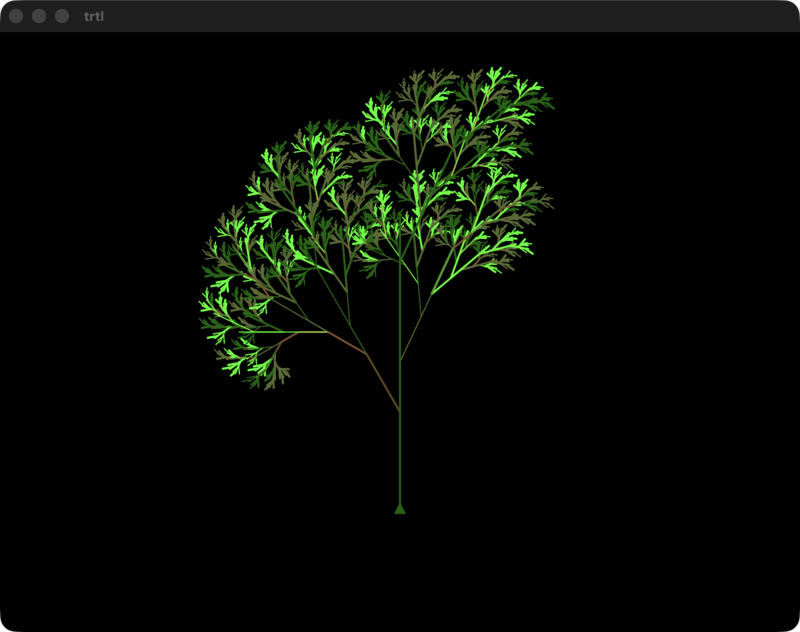
The examples in the examples folder should be reasonably illustrative. If you
try any of them, try example4.rb - it renders an awesome looking tree.
Credits
- turtle.py for inspiration (in the 'Ruby needs this!' sense)
- Some of the examples taken from examples for an earlier Ruby turtle found at http://www.rubyquiz.com/quiz104.html
Copyright and License
Copyright (c) 2012-2026 Peter Cooper (other than minor parts of some samples.)
MIT licensed. See LICENSE.md
関連プロジェクトを探す
読み込み中…