
oligot/go-mod-upgrade has 1,112 GitHub stars and 51 forks. GitHot measured 0 stars in 24 hours and +1 in 7 days. Last checked 2026-11-15 13:13 UTC. Last push 2026-10-18.
計測したスター増加
- 24時間
- 0
- 7日間
- +1
- 15日間
- 履歴を収集中
- 1か月
- 履歴を収集中
期間ごとの純増数です。期間は重複しており、日別の値ではありません。未計測の値は空欄です。スター数は注目度の指標であり、品質の保証ではありません。
概要
Update outdated Go dependencies interactively
開発ツールREADME.md
オリジナルgo-mod-upgrade


Update outdated Go dependencies interactively
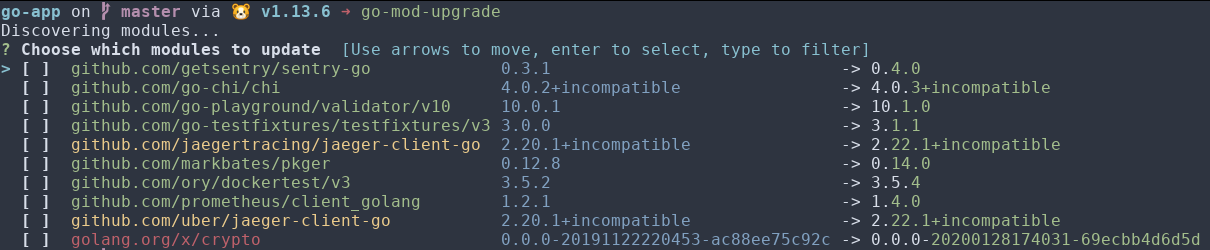
Major version updates are supported by default via the pkg.go.dev API.
Why
The Go wiki has a great section on How to Upgrade and Downgrade Dependencies. One can run the command
go list -u -f '{{if (and (not (or .Main .Indirect)) .Update)}}{{.Path}}: {{.Version}} -> {{.Update.Version}}{{end}}' -m all 2> /dev/null
to view available upgrades for direct dependencies. Unfortunately, the output is not actionable, i.e. we can't easily use it to update multiple dependencies.
This tool is an attempt to make it easier to update multiple dependencies interactively. This is similar to yarn upgrade-interactive, but for Go.
Install
Pre-compiled binaries for Windows, OS X and Linux are available in the releases page.
Alternatively, with the Go toolchain, you can do
go install github.com/oligot/go-mod-upgrade@latest
Usage
In a Go project which uses modules, you can now run
go-mod-upgrade
List available upgrades
To see what upgrades are available without any interactivity, use the --list flag:
go-mod-upgrade --list
This will display all available module upgrades using the same color coding as the interactive mode, making it perfect for CI/CD pipelines or when you just want to check what's available.
Colors in module names help identify the update type:
- magenta for a major update
- yellow for a minor update
- green for a patch update
- red for a prerelease update
Cooldown
To avoid adopting a version the moment it is released, use the --cooldown flag
to require that a version has been published for a given period:
go-mod-upgrade --cooldown 7d
Accepted values, following npm-check-updates:
| Value | Meaning |
|---|---|
7 |
7 days |
7d |
7 days |
12h |
12 hours |
30m |
30 minutes |
When the latest version falls inside the cooldown window, go-mod-upgrade offers the greatest version that is old enough instead, annotating the row with the version it withheld:
github.com/foo/bar 1.2.0 -> 1.3.0 (1.4.0 held, 2d old)
If no version satisfies the window, the module is held back entirely and reported after discovery:
1 module held back by cooldown (7d):
  github.com/only/new 1.0.1 (1d old)
Note that Go reports the VCS tag time of a version, not a server-side publish time as npm does, so someone in control of a repository could backdate a tag. Treat cooldown as a way to let a release settle before adopting it, rather than as a hard guarantee against a compromised release.
Additional options can be specified via the CLI global options:
GLOBAL OPTIONS:
   --pagesize value, -p value  Specify page size (default: 10)
   --force, -f                 Force update all modules in non-interactive mode (default: false)
   --list, -l                  List available module upgrades without interactivity (default: false)
   --verbose, -v               Verbose mode (default: false)
   --hook value                Hook to execute for each updated module
   --ignore value, -i value    Ignore modules matching the given regular expression
   --no-major                  Disable checking for major version updates (default: false)
   --no-cache                  Skip the disk cache when checking for major version updates (default: false)
   --cooldown value, -c value  Only consider versions published at least this long ago (e.g. 7, 7d, 12h, 30m)
   --help, -h                  show help (default: false)
   --version                   print the version (default: false)
Major version lookups are cached on disk for 24 hours in
os.UserCacheDir()/go-mod-upgrade (~/Library/Caches/go-mod-upgrade on macOS,
$XDG_CACHE_HOME/go-mod-upgrade or ~/.cache/go-mod-upgrade on Linux). Set
GOMODUPGRADE_CACHE_DIR to use a different directory.
Changelog
See CHANGELOG.md.
Integration
You may also use go-mod-upgrade with these tools: