
microsoft/sqlsimtools has 49 GitHub stars and 4 forks. Star changes are not measured yet. Last checked 2026-11-14 04:37 UTC. Last push 2026-10-20.
計測したスター増加
- 24時間
- 履歴を収集中
- 7日間
- 履歴を収集中
- 15日間
- 履歴を収集中
- 1か月
- 履歴を収集中
期間ごとの純増数です。期間は重複しており、日別の値ではありません。未計測の値は空欄です。スター数は注目度の指標であり、品質の保証ではありません。
概要
Open-source load testing and benchmarking tools for SQL Server, Azure SQL, and SQL database in Microsoft Fabric: sqlsim, sqlpysim, and sqlsim Studio
データREADME.md
オリジナル

SQL Workload Engineering
Open-source load testing and benchmarking tools for SQL Server, Azure SQL, and SQL database in Microsoft Fabric: native and Python workload engines, a local browser studio, and agent guidance for repeatable performance experiments.
Install | Build from source | Use with agents | Releases



[!NOTE] Preview status. sqlsim and sqlpysim are Public Preview on Windows and Ubuntu x64. Their macOS ARM64 paths are invitation-only Private Preview for customers and testers helping validate platform support. sqlsim Studio is Public Preview on Windows x64. sqlsim Studio on Ubuntu x64, Windows ARM64, and macOS ARM64 remains invitation-only Private Preview while platform testing continues. To ask for access, open a Private Preview request.
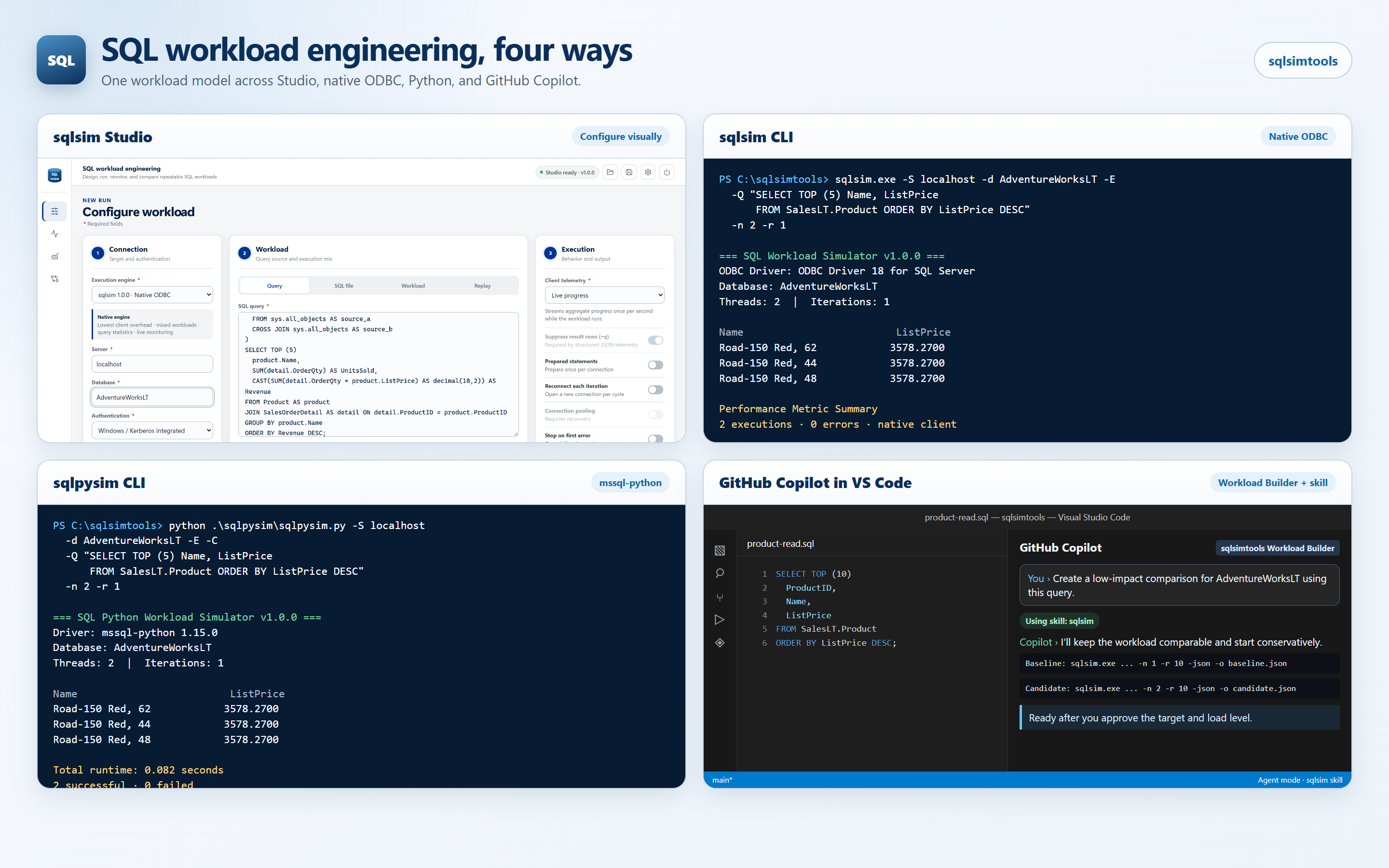
Four Ways to Work
| Configure visually | Native ODBC | mssql-python | Workload Builder + skill |
|---|---|---|---|
| sqlsim Studio configures, runs, monitors, replays, and compares workloads in a self-contained local browser app. | sqlsim is a C++/ODBC workload engine for low-overhead query, script, replay, and concurrent load testing. | sqlpysim is a Public Preview Python port that shares sqlsim's core workload interface, with documented compatibility gaps. | GitHub Copilot and other agents use the bundled skills and the sqlsimtools Workload Builder to design, run, and compare workloads from plain-language requests. |
All four target SQL Server 2019, 2022, and 2025, Azure SQL Database, Azure SQL Managed Instance, and SQL database in Microsoft Fabric.
Get Started
1. Install the prerequisite. Microsoft ODBC Driver 18 for SQL Server is required by sqlsim and sqlsim Studio. sqlpysim also needs Python 3.10 or later.
2. Download one package from the latest release, under Assets:
| You want | Download |
|---|---|
| Everything: sqlsim Studio plus both command-line engines, Windows x64 | sqlsimtools-<version>-win-x64.zip |
| The native command-line tool | sqlsim-<version>-win-x64.zip, sqlsim-<version>-win-arm64.zip, or sqlsim-<version>-linux-x64.tar.gz (Ubuntu) |
| The Python command-line tool, Windows or Ubuntu | sqlpysim-<version>-src.zip |
<version> is the release number, for example 1.0.0. Older versions are on
the Releases page.
[!TIP] On Windows, unblock the ZIP before you extract it. Windows marks downloaded files as coming from the internet, and the tools are not code signed, so a blocked download can trigger a SmartScreen warning for Studio and stop the PowerShell examples from running. If you trust the download, right-click the ZIP, choose Properties, select Unblock, and click OK, or run
Unblock-File .\sqlsimtools-<version>-win-x64.zipin PowerShell. See INSTALL.md if you already extracted it.
3. Run your first workload — choose one of these four paths.
sqlsim Studio: extract the sqlsimtools ZIP and start Studio. It opens in your
browser; examples are in sqlsimstudio\examples\.
.\sqlsimstudio\sqlsimstudio.exe
sqlsim:
.\sqlsim\x64\sqlsim.exe -S localhost -E -Q "SELECT @@VERSION"
sqlpysim:
python -m pip install -r .\sqlpysim\requirements.txt
python .\sqlpysim\sqlpysim.py -S localhost -E -C -Q "SELECT 1" -n 10 -r 100
GitHub Copilot and other agents: open the extracted folder in Visual Studio Code. Copilot discovers the bundled skills and the sqlsimtools Workload Builder agent; choose the agent in chat and describe the experiment, for example "Compare this query on localhost with and without an index." For Copilot CLI, Claude Code, Codex, Cursor, and other clients, see Agent-Ready by Design.
Ubuntu, authentication (Microsoft Entra, access tokens, SQL logins), and installing into an existing project are covered in Install sqlsimtools. To compile the tools yourself, see Build from source; everything else is in the full project guide.
Agent-Ready by Design
sqlsimtools ships portable skills for GitHub Copilot, Claude Code, Codex, Cursor, Grok Build, and other Agent Skills clients. Install the guidance once, then ask for a workload in ordinary language.
copilot plugin marketplace add microsoft/sqlsimtools
copilot plugin install sqlsim@sqlsimtools
copilot plugin install sqlpysim@sqlsimtools
The plugin supplies guidance; the matching executable or Python runtime remains
a separate prerequisite. Release archives already include workspace skills,
portable AGENTS.md guidance, and the sqlsimtools Workload Builder custom
agent. See Using sqlsimtools with agents to choose
between the release-overlay, marketplace plugin, and portable skill paths.
Explore
| Destination | What you will find |
|---|---|
| Install | Release package chooser, prerequisites, extraction, verification, upgrades, and older versions |
| FAQ | Support, privacy and data collection, security reporting, platform status, and how sqlsimtools compares with other tools |
| Driver compatibility | Validated ODBC Driver 18 and mssql-python versions, and what to expect from newer releases |
| Build from source | Supported build scripts, local release-shaped output, RC validation, and version publication |
| Use with agents | Release-embedded skills, Agent Plugins, portable AGENTS.md, and the Workload Builder |
| Full project guide | Project overview: tools, futures, platform support, prerequisites, authentication, HTML reports, plugins, releases, repository layout, and contribution policy, with links to the detailed guides |
| sqlsim manual | Native CLI reference, workload formats, replay, metrics, JSON output, and examples |
| sqlpysim manual | Python CLI compatibility, driver behavior, setup, and examples |
| Studio guide | Browser workflows, configuration profiles, platform status, and local builds |
| Future workloads | Vector search plus independent TPC-inspired transactional and analytical workload ideas |
| Discussions | Questions, design feedback, and new workload proposals |
| Security | Private vulnerability reporting through the Microsoft Security Response Center |
Built in the Open
The code, scripts, tests, documentation, workload agent, and Studio experience were developed with GitHub Copilot in Visual Studio Code and reviewed through repeatable builds, security analysis, and live SQL validation.
During Public Preview, use Issues for reproducible bugs and scoped feature requests. Use Discussions for questions and early ideas. External pull requests are not accepted yet; see CONTRIBUTING.md for the current policy.
[!IMPORTANT] Support notice. sqlsimtools is an open-source project, not an official Microsoft product. It is provided as-is under the MIT license and is not covered by Microsoft commercial support. Help is available only through the documentation, GitHub Issues, and Discussions in this repository. See SUPPORT.md.
関連プロジェクトを探す
Asabeneh/30-Days-Of-Python
30 Days of Python プログラミングチャレンジは、Python プログラミング言語を 30 日で学ぶためのステップバイステップのガイドです。このチャレンジは 100 日以上かかることもあります。自分のペースで進めてください。こちらの動画も役立つかもしれません: https://www.youtube.com/channel/UC7PNRuno1rzYPb1xLa4yktw
78,715 スターgrafana/grafana
オープンで組み合わせ可能なオブザーバビリティおよびデータ可視化プラットフォームです。Prometheus、Loki、Elasticsearch、InfluxDB、Postgres など、複数のソースからメトリクス、ログ、トレースを可視化できます。
77,894 スターredis/redis
リアルタイムのデータ駆動型アプリケーションを構築する開発者にとって、Redis は最も選ばれ、最速で、機能が最も豊富なキャッシュ、データ構造サーバー、ドキュメントおよびベクトルクエリエンジンです。
77,491 スターapache/superset
Apache Superset は、データ可視化とデータ探索のためのプラットフォームです。
75,522 スター