
概要
WebGLを利用して、ブラウザ上でインタラクティブかつ拡張可能なストリート画像マップ体験を実現します。
制作・メディア計測したスター増加
- 24時間
- 0
- 7日間
- +3
- 15日間
- 履歴を収集中
- 1か月
- 履歴を収集中
期間ごとの純増数です。期間は重複しており、日別の値ではありません。未計測の値は空欄です。スター数は注目度の指標であり、品質の保証ではありません。
README.md
オリジナル


MapillaryJS
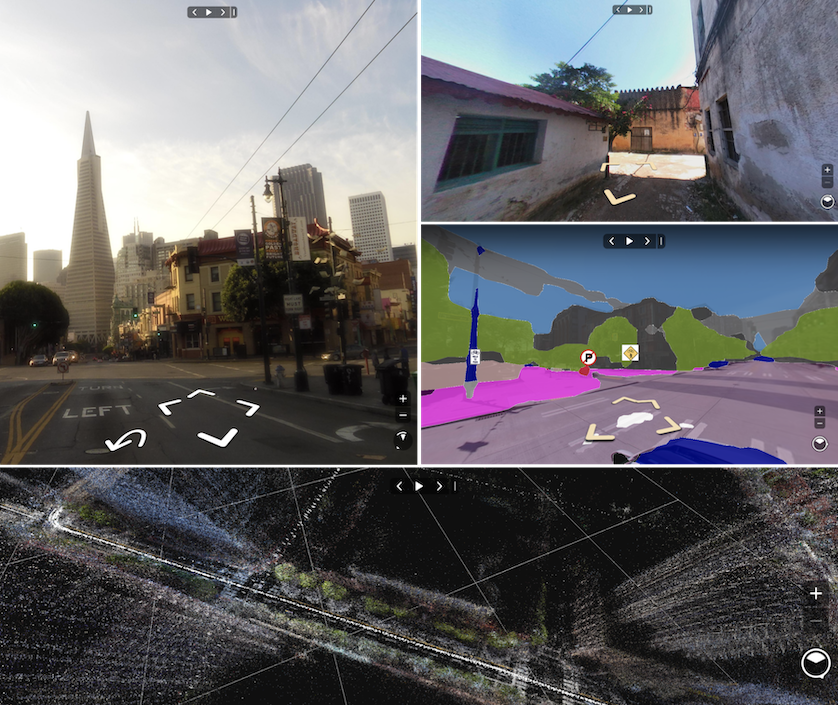
MapillaryJS is a client-side JavaScript library for interactive, extendable street imagery map experiences on the web. It takes spatial, semantic, and texture data and renders it using WebGL. MapillaryJS can be customized with camera controls, user interactivity, and data providers and it can be augmented with geospatial rendering, animation, and content placement.
Installation and Usage
To start using MapillaryJS with data from the Mapillary platform, you need an account. When signed in, you need to register an application to get a client access token. When providing your own data, no access token is needed.
ES6 bundler
Install the package via Yarn (or npm).
yarn add mapillary-js
Use a CSS loader or include the CSS file in the <head> of your HTML file.
<link
  href="https://unpkg.com/[email protected]/dist/mapillary.css"
  rel="stylesheet"
/>
Include the following code in your JavaScript file.
import { Viewer } from "mapillary-js";

const viewer = new Viewer({
  accessToken: "<your access token>",
  container: "<your HTML element ID>",
  imageId: "<your image ID for initializing the viewer>",
});
TypeScript
Install the package via Yarn (or npm).
yarn add mapillary-js
Use a CSS loader or include the CSS file in the <head> of your HTML file.
<link
  href="https://unpkg.com/[email protected]/dist/mapillary.css"
  rel="stylesheet"
/>
Include the following code in your TypeScript file.
import { Viewer, ViewerOptions } from "mapillary-js";

const options: ViewerOptions = {
  accessToken: "<your access token>",
  container: "<your HTML element ID>",
  imageId: "<your image ID for initializing the viewer>",
};
const viewer = new Viewer(options);
CDN
Include the JavaScript and CSS files in the <head> of your HTML file.
<script src="https://unpkg.com/[email protected]/dist/mapillary.js"></script>
<link
  href="https://unpkg.com/[email protected]/dist/mapillary.css"
  rel="stylesheet"
/>
Add a container to the <body> of your HTML file.
<div id="mly" style="width: 400px; height: 300px;"></div>
The global UMD name for MapillaryJS is mapillary. Include the following script in the <body> of your HTML file.
<script>
var { Viewer } = mapillary;

var viewer = new Viewer({
  accessToken: "<your access token>",
  container: "mly",
  imageId: "<your image ID for initializing the viewer>",
});
</script>
Documentation
- Getting Started with MapillaryJS
- Developing Extensions
- Examples
- API Reference
- Migration Guide
- Contribution Guidelines
Code of Conduct
Facebook has adopted the Contributor Covenant as its Code of Conduct, and we expect project participants to adhere to it. Please read the full text so that you can understand what actions will and will not be tolerated.
License
MapillaryJS is MIT licensed.
関連プロジェクトを探す
読み込み中…