
magic-research/magic-animate
magic-research/magic-animate has 10,886 GitHub stars and 1,069 forks. GitHot measured -1 stars in 24 hours and 0 in 7 days. Last checked 2026-11-15 06:25 UTC. Last push 2025-08-29.
計測したスター増加
- 24時間
- -1
- 7日間
- 0
- 15日間
- 履歴を収集中
- 1か月
- 履歴を収集中
期間ごとの純増数です。期間は重複しており、日別の値ではありません。未計測の値は空欄です。スター数は注目度の指標であり、品質の保証ではありません。
概要
[CVPR 2024] Official repository for "MagicAnimate: Temporally Consistent Human Image Animation using Diffusion Model"
制作・メディアREADME.md
オリジナル
MagicAnimate: Temporally Consistent Human Image Animation using Diffusion Model
Zhongcong Xu
·
Jianfeng Zhang
·
Jun Hao Liew
·
Hanshu Yan
·
Jia-Wei Liu
·
Chenxu Zhang
·
Jiashi Feng
·
Mike Zheng Shou



National University of Singapore | ByteDance

|
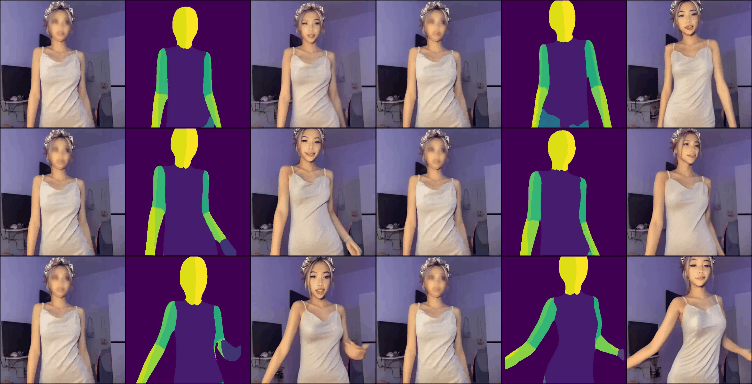
|
📢 News
- [2023.12.4] Release inference code and gradio demo. We are working to improve MagicAnimate, stay tuned!
- [2023.11.23] Release MagicAnimate paper and project page.
🏃♂️ Getting Started
Download the pretrained base models for StableDiffusion V1.5 and MSE-finetuned VAE.
Download our MagicAnimate checkpoints.
Please follow the huggingface download instructions to download the above models and checkpoints, git lfs is recommended.
Place the based models and checkpoints as follows:
magic-animate
|----pretrained_models
  |----MagicAnimate
    |----appearance_encoder
      |----diffusion_pytorch_model.safetensors
      |----config.json
    |----densepose_controlnet
      |----diffusion_pytorch_model.safetensors
      |----config.json
    |----temporal_attention
      |----temporal_attention.ckpt
  |----sd-vae-ft-mse
    |----config.json
    |----diffusion_pytorch_model.safetensors
  |----stable-diffusion-v1-5
    |----scheduler
       |----scheduler_config.json
    |----text_encoder
       |----config.json
       |----pytorch_model.bin
    |----tokenizer (all)
    |----unet
       |----diffusion_pytorch_model.bin
       |----config.json
    |----v1-5-pruned-emaonly.safetensors
|----...
⚒️ Installation
prerequisites: python>=3.8, CUDA>=11.3, and ffmpeg.
Install with conda:
conda env create -f environment.yaml
conda activate manimate
or pip:
pip3 install -r requirements.txt
💃 Inference
Run inference on single GPU:
bash scripts/animate.sh
Run inference with multiple GPUs:
bash scripts/animate_dist.sh
🎨 Gradio Demo
Online Gradio Demo:
Try our online gradio demo quickly.
Local Gradio Demo:
Launch local gradio demo on single GPU:
python3 -m demo.gradio_animate
Launch local gradio demo if you have multiple GPUs:
python3 -m demo.gradio_animate_dist
Then open gradio demo in local browser.
🙏 Acknowledgements
We would like to thank AK(@_akhaliq) and huggingface team for the help of setting up oneline gradio demo.
🎓 Citation
If you find this codebase useful for your research, please use the following entry.
@inproceedings{xu2023magicanimate,
    author    = {Xu, Zhongcong and Zhang, Jianfeng and Liew, Jun Hao and Yan, Hanshu and Liu, Jia-Wei and Zhang, Chenxu and Feng, Jiashi and Shou, Mike Zheng},
    title     = {MagicAnimate: Temporally Consistent Human Image Animation using Diffusion Model},
    booktitle = {arXiv},
    year      = {2023}
}