
概要
Official implentation of "Ghost on the Shell: An Expressive Representation of General 3D Shapes" (ICLR 2024 Oral)
制作・メディア計測したスター増加
- 24時間
- 0
- 7日間
- 0
- 15日間
- 履歴を収集中
- 1か月
- 履歴を収集中
期間ごとの純増数です。期間は重複しており、日別の値ではありません。未計測の値は空欄です。スター数は注目度の指標であり、品質の保証ではありません。
README.md
オリジナル
Ghost on the Shell: An Expressive Representation of General 3D Shapes
Introduction
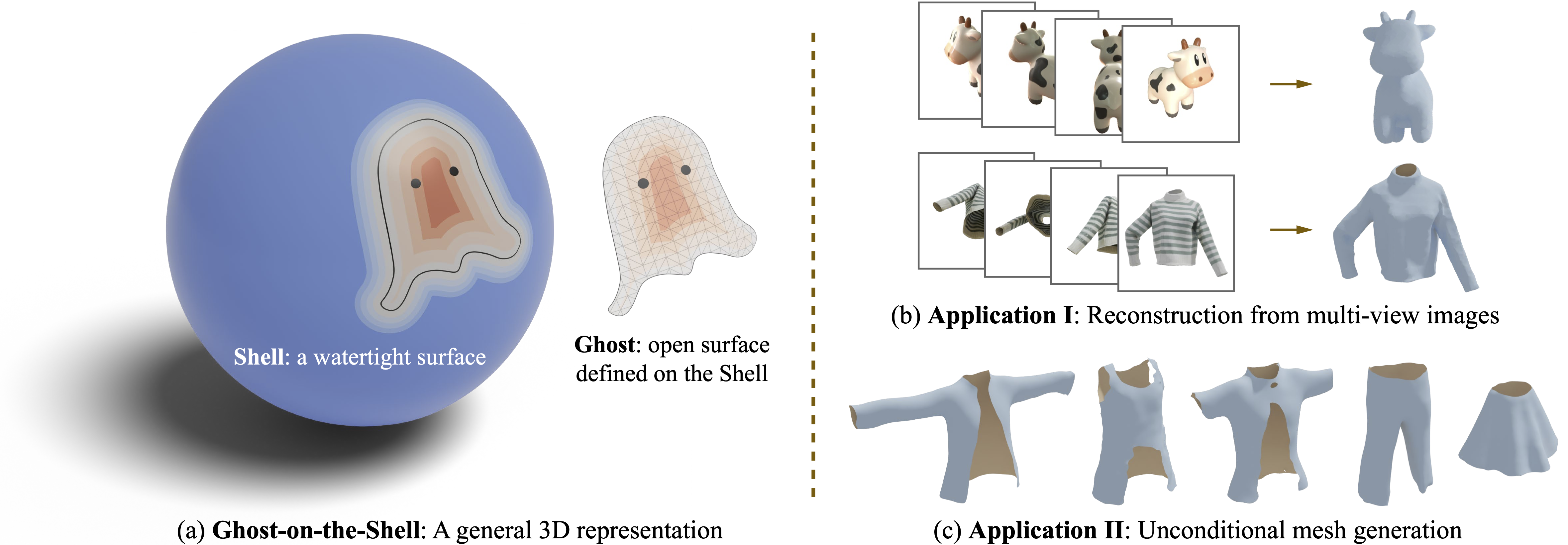
This is the official implementation of our paper (ICLR 2024 oral) "Ghost on the Shell: An Expressive Representation of General 3D Shapes" (G-Shell).
G-Shell is a generic and differentiable representation for both watertight and non-watertight meshes. It enables 1) efficient and robust rasterization-based multiview reconstruction and 2) template-free generation of non-watertight meshes.
Please refer to our project page and our paper for more details.
Getting Started
Requirements
- Python >= 3.8
- CUDA 11.8
- PyTorch == 1.13.1
(Conda installation recommended)
Reconstruction
Run the following
pip install ninja imageio PyOpenGL glfw xatlas gdown
pip install git+https://github.com/NVlabs/nvdiffrast/
pip install --global-option="--no-networks" git+https://github.com/NVlabs/tiny-cuda-nn#subdirectory=bindings/torch
Follow the instructions here to install kaolin.
Download the tet-grid files (res128, res256) & res64 for G-MeshDiffusion to data/tets folder under the root directory. Alternatively, you may follow https://github.com/crawforddoran/quartet and data/tets/generate_tets.py to create the tet-grid files.
Generation
Install the following
- Pytorch3D
- ml_collections
To-dos
- Code for reconstruction
- DeepFashion3D multiview image dataset for metallic surfaces
- Code for generative models
- Code for DeepFashion3D dataset preparation
- Evaluation code for generative models
Reconstruction
Datasets
DeepFashion3D mesh dataset
We provide ground-truth images (rendered under realistic environment light with Blender) for 9 instances in DeepFashion3D-v2 dataset. The download links for the raw meshes can be found in their repo.
non-metallic material: training data, test data
NeRF synthetic dataset
Download the NeRF synthetic dataset archive and unzip it into the data/ folder.
Hat dataset
Download link: https://drive.google.com/file/d/18UmT1NM5wJQ-ZM-rtUXJHXkDc-ba-xVk/view?usp=sharing
RGB images, segmentation masks and the corresponding camera poses are included. Alternatively, you may choose to 1) generate the camera poses with COLMAP and 2) create binary segmentation masks by yourself.
Training
DeepFashion3D-v2 instances
The mesh instances' IDs are [30, 92, 117, 133, 164, 320, 448, 522, 591]. To reconstruct the $INDEX-th mesh (0-8) in the list using tet-based G-Shell, run
python train_gshelltet_deepfashion.py --config config/deepfashion_mc_256.json --index $INDEX --trainset_path $TRAINSET_PATH --testset_path $TESTSET_PATH --o $OUTPUT_PATH
For FlexiCubes + G-Shell, run
python train_gflexicubes_deepfashion.py --config config/deepfashion_mc_80.json --index $INDEX --trainset_path $TRAINSET_PATH --testset_path $TESTSET_PATH --o $OUTPUT_PATH
Synthetic data
python train_gshelltet_synthetic.py --config config/nerf_chair.json --o $OUTPUT_PATH
Hat data
python train_gshelltet_polycam.py --config config/polycam_mc_128.json --trainset_path $TRAINSET_PATH --o $OUTPUT_PATH
python train_gshelltet_polycam.py --config config/polycam_mc_128.json --trainset_path $TRAINSET_PATH --o $OUTPUT_PATH
On config files
You may consider modify the following, depending on your demand:
gshell_grid: the G-Shell grid size. For tet-based G-Shell, please make sure the corresponding tet-grid file exists underdata/tets(e.g.,256_tets.npz). Otherwise, follow https://github.com/crawforddoran/quartet anddata/tets/generate_tets.pyto generate the desired tet-grid file.n_samples: the number of MC samples for light rays per rasterized pixel. The higher the better (at a cost of memory and speed).batch_size: how many views sampled in each iteration.iteration: total number of iterations.kd_min,kd_max, etc: the min/max of the corresponding PBR material parameter.
Generation
Preparation
Download info files for the underlying tet grids and binary masks that indicating which locations store useful values in the cubic grids from tet_info.pt, global_mask_res64.pt, cat_mask_res64.pt and occ_mask_res64.pt. Put these files under GMeshDiffusion/metadata/.
For inference
Download the pretrained model for upper-body garments lower-body garments here.
For training
Download the processed Cloth3D garment dataset (for upper-body & lower-body garments) from link. Alternatively, you may create a grid dataset for your own objects by a) normalize your datapoints by re-center and re-scaling meshes, b) fitting G-Shell representations and c) turn these representations into cubid grids by running
GMeshDiffusion/metadata/tet_to_cubic_grid_dataset.py.Run
GMeshDiffusion/metadata/get_splits_lower.pyand/orGMeshDiffusion/metadata/get_splits_upper.pyto generate lists of training and test datapoints.
Inference
- Modify the batch size in config files in
GMeshDiffusion/diffusion_config/and enter the desired directories and values (for model checkpoints, where to store generated samples, etc.) inGMeshDiffusion/scripts. - Run the eval scripts in
GMeshDiffusion/scripts. - Run
eval_gmeshdiffusion_generated_samples.pyto extract triangular meshes.
Training
- Enter the desired directories (for model checkpoints and where to store generated samples) in
GMeshDiffusion/scripts. - Modify the config files if necessary.
- Run the training scripts in
GMeshDiffusion/scripts.
Citation
If you find our work useful to your research, please consider citing:
@article{liu2024gshell,
    title={Ghost on the Shell: An Expressive Representation of General 3D Shapes},
    author={Liu, Zhen and Feng, Yao and Xiu, Yuliang and Liu, Weiyang and Paull, Liam and Black, Michael J. and Sch{\"o}lkopf, Bernhard},
    booktitle={The Twelfth International Conference on Learning Representations},
    year={2024},
}
Acknowledgement
We sincerely thank the authors of Nvdiffrecmc, FlexiCubes and https://github.com/yang-song/score_sde_pytorch for sharing their codes. Our repo is adapted from MeshDiffusion.
関連プロジェクトを探す
読み込み中…