プロジェクトby default,there are two simple animations,

概要
A custom layout that can easily switch different states(like empty,error,progress,content) with animations.
制作・メディア計測したスター増加
- 24時間
- 0
- 7日間
- 0
- 15日間
- 履歴を収集中
- 1か月
- 履歴を収集中
期間ごとの純増数です。期間は重複しており、日別の値ではありません。未計測の値は空欄です。スター数は注目度の指標であり、品質の保証ではありません。
README.md
オリジナルStateLayout
A custom layout that can easily switch different states(like empty,error,progress,content) with animations.
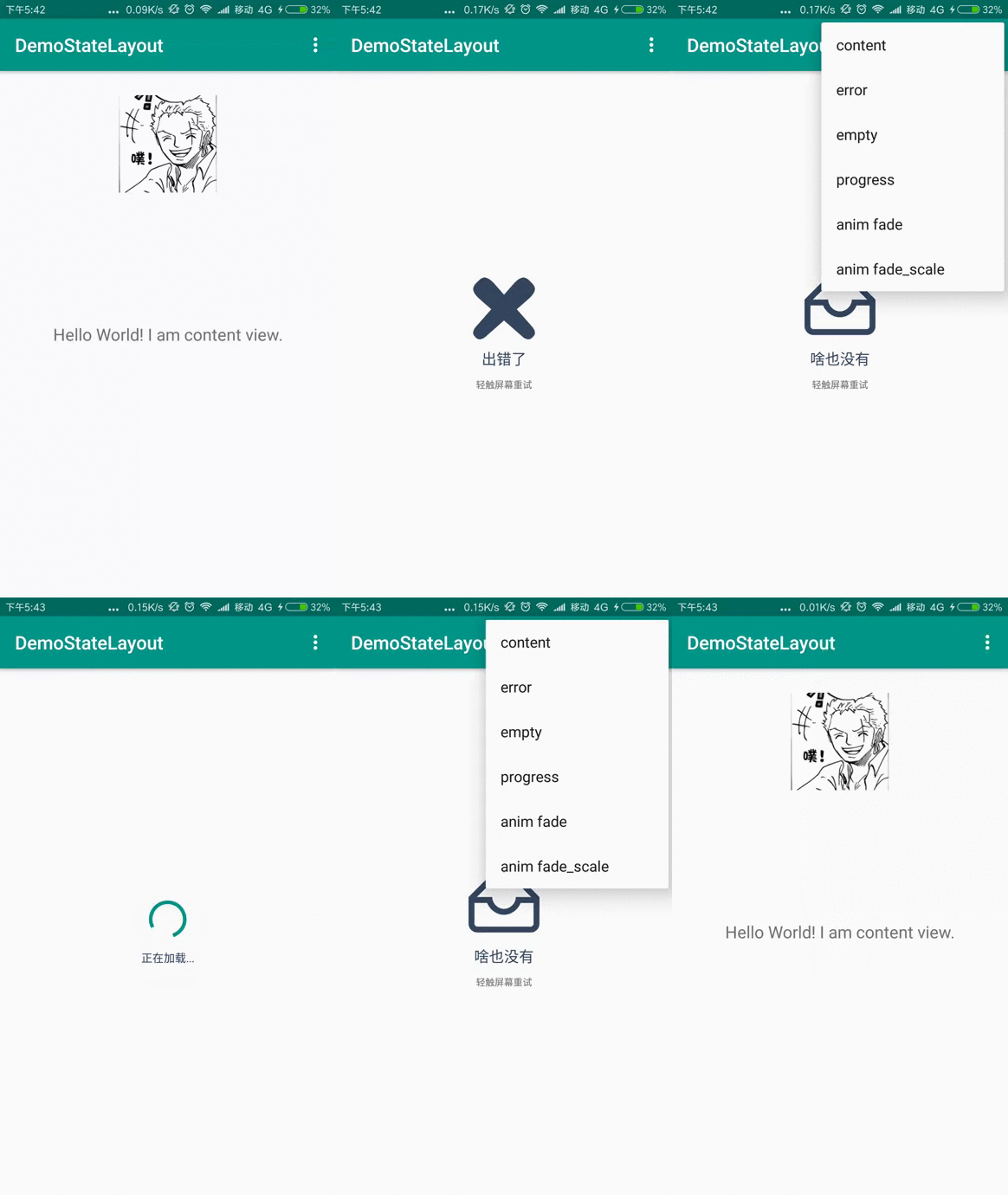
An example usage can be found here lufficc/iShuiHui
Usage
Add the dependencies to your project:
gradle
	dependencies {
    	compile 'com.lufficc:stateLayout:0.1.1'
	}
maven
	<dependency>
      <groupId>com.lufficc</groupId>
      <artifactId>stateLayout</artifactId>
      <version>0.1.1</version>
      <type>pom</type>
    </dependency>
Add StateLayout to your layout file
Remember ,StateLayout can only hold one direct child
    <?xml version="1.0" encoding="utf-8"?>
    <com.lufficc.stateLayout.StateLayout xmlns:android="http://schemas.android.com/apk/res/android"
        xmlns:tools="http://schemas.android.com/tools"
        android:id="@+id/stateLayout"
        android:layout_width="match_parent"
        android:layout_height="match_parent"
        android:paddingBottom="@dimen/activity_vertical_margin"
        android:paddingLeft="@dimen/activity_horizontal_margin"
        android:paddingRight="@dimen/activity_horizontal_margin"
        android:paddingTop="@dimen/activity_vertical_margin"
        tools:context="com.lcc.demo.statelayout.MainActivity">
        <FrameLayout
            android:layout_width="match_parent"
            android:layout_height="match_parent">
            <ImageView
                android:padding="10dp"
                android:layout_gravity="center_horizontal"
                android:layout_width="wrap_content"
                android:layout_height="wrap_content"
                android:src="@mipmap/avatar" />
            <TextView
                android:layout_width="wrap_content"
                android:layout_height="wrap_content"
                android:layout_gravity="center"
                android:textSize="18sp"
                android:text="@string/demo" />
        </FrameLayout>
    </com.lufficc.stateLayout.StateLayout>
operation in java
        stateLayout.showErrorView(); //switch to error view
        stateLayout.showErrorView(msg); //switch to error view with a message

        stateLayout.showEmptyView();  //switch to empty view
        stateLayout.showEmptyView(msg);  //switch to empty view with a message

        stateLayout.showProgressView();  //switch to progress view
        stateLayout.showProgressView(msg);  //switch to progress view with a message

        stateLayout.showContentView();  //switch to your content view
custom
Animation
you can custom your own animation by implements ViewAnimProvider interface,
by default,there are two simple animations, FadeViewAnimProvider and FadeScaleViewAnimProvider
public interface ViewAnimProvider {
    Animation showAnimation();

    Animation hideAnimation();
}

//or

stateLayout.setHideAnimation(yourAnimation);
stateLayout.setShowAnimation(yourAnimation);

stateLayout.setViewSwitchAnimProvider(new FadeViewAnimProvider()); //user it
attrs
| attr | for |
|---|---|
| app:errorDrawable | custom the error drawable |
| app:emptyDrawable | custom the empty drawable |
| app:progressView | custom your own progress view |
listener
    setErrorAction(OnClickListener onErrorButtonClickListener); //set a callback called where error view is clicked,
    // you can tetry load data,for example

    setEmptyAction(OnClickListener onEmptyButtonClickListener); // //set a callback called where empty view is clicked
if you find a bug or have good suggestion ,find me here https://lufficc.com
License
Copyright 2016 Copyright 2016 lufficc

Licensed under the Apache License, Version 2.0 (the "License");
you may not use this file except in compliance with the License.
You may obtain a copy of the License at

	http://www.apache.org/licenses/LICENSE-2.0

Unless required by applicable law or agreed to in writing, software
distributed under the License is distributed on an "AS IS" BASIS,
WITHOUT WARRANTIES OR CONDITIONS OF ANY KIND, either express or implied.
See the License for the specific language governing permissions and
limitations under the License.
関連プロジェクトを探す
読み込み中…