
lachlanchen/OpenHI
lachlanchen/OpenHI has 108 GitHub stars and 32 forks. GitHot measured 0 stars in 24 hours and 0 in 7 days. Last checked 2026-11-20 00:47 UTC. Last push 2026-09-11.
できること
- End-to-end RAW-to-spectrum event processing workflow.
- Auto/manual scan period detection and forward/backward segmentation.
- Multi-window compensation with trainable/fixed parameter modes.
- Parameter save/load in NPZ, JSON, and CSV.
計測したスター増加
- 24時間
- 0
- 7日間
- 0
- 15日間
- 履歴を収集中
- 1か月
- 履歴を収集中
期間ごとの純増数です。期間は重複しており、日別の値ではありません。未計測の値は空欄です。スター数は注目度の指標であり、品質の保証ではありません。
概要
Self‑calibrated neuromorphic hyperspectral imaging pipeline for event cameras with diffractive illumination. Includes end‑to‑end tools for RAW segmentation, multi‑window time‑warping compensation, spectral visualization, and hardware control for synchronized event/frame capture and scanning.
機械学習i18n/README.ja.md
オリジナルEnglish · العربية · Español · Français · 日本語 · 한국어 · Tiếng Việt · 中文 (简体) · 中文(繁體) · Deutsch · Русский
Self-Calibrated Neuromorphic Hyperspectral Imaging (OpenHI)


[!NOTE] このチェックアウトにおける i18n 状態:
ar,es,fr,ja,koがi18n/に存在します。追加言語のリンクは、今後の翻訳拡充との互換性のために維持しています。
回折格子などの分散照明を用いたイベントカメラから、スペクトルを再構成するための包括的パイプラインです。システムは強度変化イベント $e = (x, y, t, p)$ を記録し、$p \in {-1, +1}$ は対数強度変化の極性を表します。さらにイベントストリームから走査タイミングと校正メタデータ("auto info")を自動推定します。
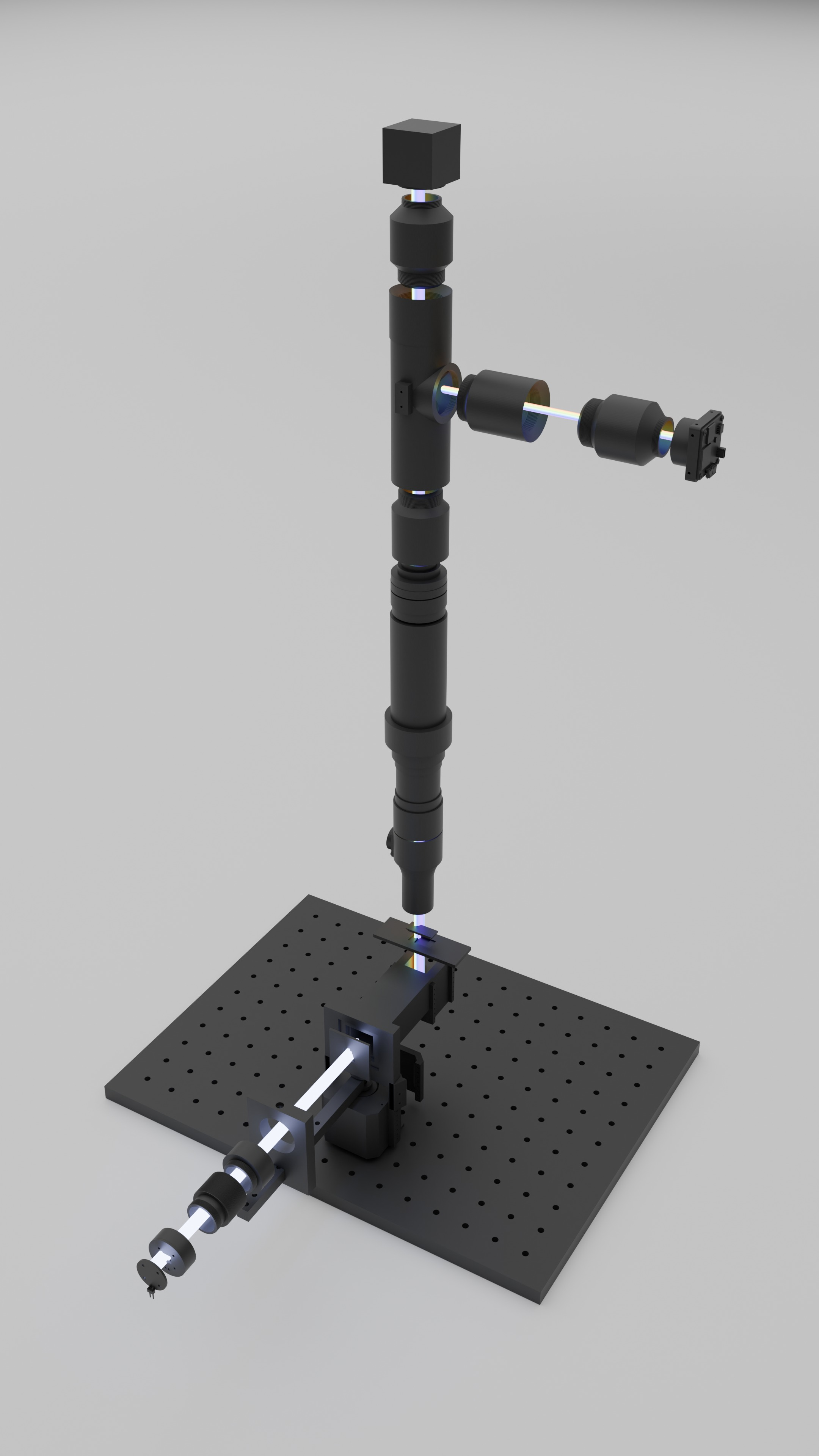
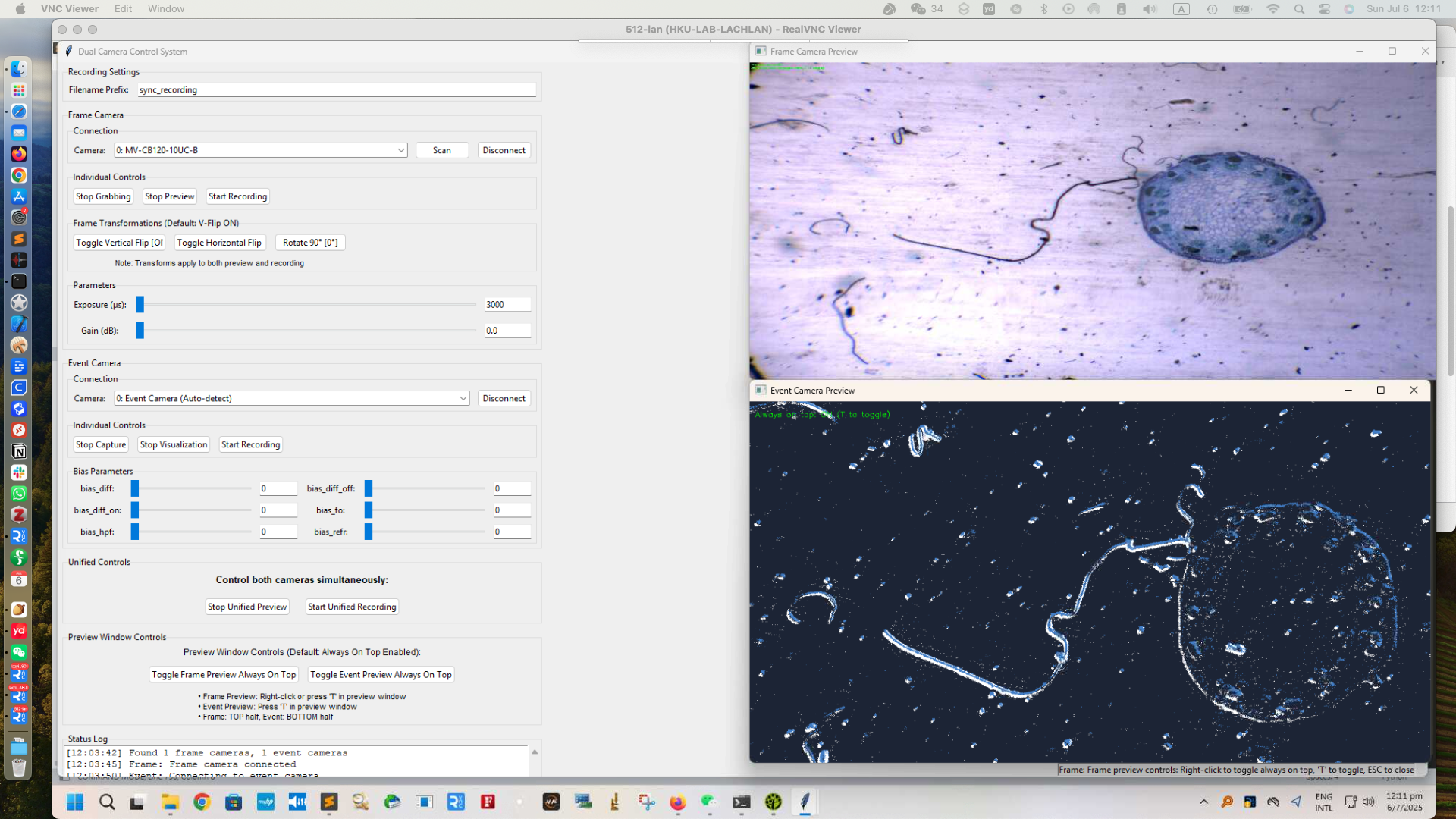
左: モーター駆動の格子照明アームと垂直検出スタックを備えたモジュール式透過顕微鏡。右: セグメンテーション、補償、再構成をリアルタイム監視するデータ取得 GUI。
At a Glance
| Item | Details |
|---|---|
| Core idea | イベントストリームに基づく自己校正型ハイパースペクトル微分イメージング |
| Main stages | segment_robust_fixed.py -> compensate_multiwindow_train_saved_params.py -> 可視化スクリプト群 |
| Hardware docs in repo | 3D/, PCB/, firmware/, BOM/ |
| Desktop tools | scan_compensation_gui_cloud.py, ImagingGUI/DualCamera_separate_transform.py |
| Canonical paper | Optica Open preprint (DOI: 10.1364/opticaopen.30739151) |
| i18n in this checkout | README.ar.md, README.es.md, README.fr.md, README.ja.md, README.ko.md |
[!TIP] Optica Open にプレプリント公開された論文 Self-calibrated neuromorphic hyperspectral imaging のコア開発キット(カメラ、チューブレンズ、光学定盤を除く)は以下から購入できます:
- https://lazying.art/openhi-kit.html
- 30% オフのプロモーションコード:
OPTICA
Contents
- At a Glance 📌
- Overview 🔭
- Features ✨
- Repository Map 🗺️
- Project Structure 📁
- Quick Start (5-Min Path) ⚡
- Prerequisites 🧰
- Installation ⚙️
- Usage 🚀
- Internationalization 🌍
- Configuration 🎛️
- Examples 🧪
- Bill of Materials (Core Module) 🧾
- Core Scripts 🧠
- Additional Tools 🛠️
- Turbo Multi-Scan Compensation ⚡
- Parameter Management 💾
- Memory Optimization 🧱
- Output Structure 📦
- Configuration Examples 🧩
- Wavelength Mapping 🌈
- Tips and Best Practices ✅
- Development Notes 🧭
- Troubleshooting 🩺
- Roadmap 🛣️
- Citation 📎
- Acknowledgements 🙏
- License 📄
- Contributing 🤝
- Support / Sponsor 💖
Overview
照明が時間とともに波長方向へ掃引されると、イベントストリームは分散軸に沿った基礎スペクトルの時間微分を符号化します。
RAW event recording
   -> scan timing segmentation (F/B passes)
   -> multi-window time-warp compensation
   -> frame/cumulative/wavelength diagnostics
このパイプラインは次の 3 段階で構成されます。
| Stage | Purpose | Primary script(s) |
|---|---|---|
| 1. Segment | 走査タイミングを検出し、記録を Forward/Backward パスに分割 | segment_robust_fixed.py |
| 2. Compensate | 走査起因の時間傾きを除去するための区分線形 time-warp を推定 | compensate_multiwindow_train_saved_params.py |
| 3. Visualize | 学習済み境界を重畳し、補償前後の時間ビン化フレームを比較 | visualize_boundaries_and_frames.py, visualize_cumulative_compare.py |
このリポジトリには、ハードウェア資産、取得 GUI コード、versions/ 配下の実験アーカイブ分岐も含まれています。
Features
- RAW からスペクトルまでのイベント処理をエンドツーエンドで実行。
- 走査周期の自動/手動検出と Forward/Backward セグメンテーション。
- 学習可能/固定パラメータモードを備えたマルチウィンドウ補償。
NPZ、JSON、CSV形式でのパラメータ保存/読み込み。- 学習反復を高速化するマルチスキャン統合ワークフロー(
compensate_multiwindow_turbo.py)。 - 境界、ビン化フレーム、累積曲線、重み付き診断の可視化スイート。
- ハードウェア文書: BOM、PCB、3D パーツ、ファームウェアノート。
- イベント/フレームカメラ同期構成の取得ユーティリティ。
| Category | Included capabilities |
|---|---|
| Signal processing | セグメンテーション、周期検出、time-warp 補償 |
| Optimization | 学習可能/固定パラメータ、平滑化制御、チャンク学習 |
| Outputs | 可視化重畳、累積比較、波長マッピング診断 |
| Platform assets | ハードウェア設計ファイル、ファームウェアノート、GUI ツール、履歴アーカイブ |
Repository Map
主要なハードウェア資産は、すぐ参照できるようコードと同じリポジトリに配置しています。
| Area | Path |
|---|---|
| 3D-printed parts | 3D/ |
| PCB layouts | PCB/ |
| Microcontroller firmware | firmware/ |
| Acquisition UI (desktop) | ImagingGUI/ |
| Experiment/data references | reference_spectrum_2835/, reference_spectrum_lumileds/, references/ |
| Alignment analysis | align_background_vs_reference_code/, align_data_vs_filter_code/ |
Project Structure
OpenHI/
├── README.md
├── QUICKSTART.md
├── LICENSE
├── versions.md
├── 3D/
├── BOM/
├── PCB/
├── firmware/
├── ImagingGUI/
├── scripts/
├── segment_robust_fixed.py
├── compensate_multiwindow_train_saved_params.py
├── compensate_multiwindow_turbo.py
├── compensate_multiwindow*.py
├── visualize_boundaries_and_frames.py
├── visualize_cumulative_compare.py
├── visualize_cumulative_weighted.py
├── scan_compensation_gui_cloud.py
├── show_envi_spectrum_gui.py
├── simple_raw_reader.py
├── align_background_vs_reference_code/
├── align_data_vs_filter_code/
├── alignment_configs/
├── archive_code_variants/
├── outputs_root/
├── reference_filters/
├── reference_spectrum_2835/
├── reference_spectrum_lumileds/
├── references/
├── i18n/
└── versions/
Quick Start (5-Min Path)
環境準備が済んでおり、データセットフォルダに *event*.raw がある場合:
scripts/run_scan_pipeline.sh /path/to/dataset_dir
特定の RAW ファイルを強制指定する場合:
scripts/run_scan_pipeline.sh /path/to/dataset_dir /path/to/recording_event.raw
このラッパーは、リポジトリ既定のスクリプトパスと CLI フラグを使って、セグメンテーション、補償学習、可視化をまとめて実行します。
[!TIP] 最初の検証では、まず 1 つのデータセットディレクトリでラッパーを実行し、生成された segment NPZ と可視化出力を確認してから
PIPELINE_*変数を調整してください。
Prerequisites
- Python 3.9+(
ImagingGUI/配下の一部 GUI ツールでは Python 3.10+)。 - コア Python パッケージ:
numpy,torch,matplotlib。 - 任意だが一般的:
opencv-python,pillow,cellpose。 - RAW イベント読み取りワークフロー(
simple_raw_reader.py、RAW からのセグメンテーション)向けの Metavision SDK / Python バインディング。 - 最適化高速化のため CUDA 対応 PyTorch を推奨。
- RAW 記録および/またはセグメント化済み NPZ ファイルがローカルにあること。
Installation
現時点でリポジトリルートに固定された環境定義ファイルはありません。推奨セットアップは以下です。
# create and activate a virtual environment or conda env
python -m venv .venv
source .venv/bin/activate

# install core dependencies
pip install numpy matplotlib torch

# optional tools often used in this repository
pip install opencv-python pillow
# pip install cellpose
大容量ファイル管理向けに Git hooks を使う場合:
bash scripts/setup_hooks.sh
Usage
Basic Workflow (current root scripts)
# 1. Segment RAW into 6 scans (Forward/Backward)
python segment_robust_fixed.py \
  data/recording.raw \
  --segment_events \
  --output_dir data/segments/

# 2. Train multi-window compensation
python compensate_multiwindow_train_saved_params.py \
  data/segments/Scan_1_Forward_events.npz \
  --bin_width 50000 \
  --visualize --plot_params --a_trainable \
  --iterations 1000

# 3. Visualize results with boundaries
python visualize_boundaries_and_frames.py \
  data/segments/Scan_1_Forward_events.npz

# 4. Compare cumulative vs multi-bin means
python visualize_cumulative_compare.py \
  data/segments/Scan_1_Forward_events.npz \
  --sensor_width 1280 --sensor_height 720
One-command convenience wrapper
scripts/run_scan_pipeline.sh /path/to/dataset_dir [raw_file]
scripts/run_scan_pipeline.sh がサポートする環境変数:
| Variable | Default | Purpose |
|---|---|---|
PIPELINE_ACTIVITY_FRACTION |
0.90 |
Active event window fraction |
PIPELINE_BIN_WIDTH |
50000 |
Training bin width in microseconds |
PIPELINE_SENSOR_WIDTH |
1280 |
Sensor width for visualization |
PIPELINE_SENSOR_HEIGHT |
720 |
Sensor height for visualization |
PIPELINE_SAMPLE_RATE |
0.10 |
Event sampling fraction for plotting |
PIPELINE_TIME_BIN_US |
1000 |
Segmentation activity-bin size |
PIPELINE_SEGMENT_PATTERN |
Scan_1_Forward_events.npz |
Segment file pattern for downstream scripts |
Internationalization
リポジトリでは、言語バーの重複を避けるため、各 README の先頭に単一の言語オプション行を配置しています。
i18n/ で現在利用可能な翻訳ファイル:
README.ar.mdREADME.es.mdREADME.fr.mdREADME.ja.mdREADME.ko.md
| Language link in nav | File in i18n/ |
Status |
|---|
将来互換性のため、予定中言語のリンクもトップナビで意図的に保持しています。
Configuration
各スクリプトで共通して重要な CLI 制御:
Segmentation (segment_robust_fixed.py)
--time_bin_us: マイクロ秒単位のアクティビティビンサイズ。--round_trip_period: 手動周期(既定1688bins)。--auto_calculate_period: 自己相関による周期推定。--activity_fraction: アクティブイベント窓の割合。--manual_start_shift_ms: 走査開始の手動オフセット。
Compensation (compensate_multiwindow_train_saved_params.py)
--num_params(既定13),--temperature(既定5000)。--a_trainable/--a_fixed,--b_trainable/--b_fixed,--boundary_trainable。--a_default,--b_default。--iterations,--learning_rate,--smoothness_weight。- メモリ制御用
--chunk_size。 - 学習済みパラメータ再利用用
--load_params。
Visualization
visualize_boundaries_and_frames.py:--sample_rate,--wavelength_min,--wavelength_max, センサーサイズ引数。visualize_cumulative_compare.py: センサーサイズ、--output_dir,--sample_label。visualize_cumulative_weighted.py: polarity スケール、--step_us,--auto_scale,--exp,--no_comp。
Examples
Quick start dataset-style commands (from QUICKSTART.md)
python segment_robust_fixed.py \
  led_12v_no_acc_glass/glass/sync_recording_12v_led_no_acc_blank_event_20250804_232556.raw \
  --segment_events \
  --output_dir led_12v_no_acc_glass/glass/

python compensate_multiwindow_train_saved_params.py \
  led_12v_no_acc_glass/glass/sync_recording_12v_led_no_acc_blank_event_20250804_232556_segments/Scan_1_Forward_events.npz \
  --bin_width 50000 \
  --visualize --plot_params --a_trainable \
  --iterations 1000 \
  --b_default 0 \
  --smoothness_weight 0.001

python visualize_boundaries_and_frames.py \
  led_12v_no_acc_glass/glass/sync_recording_12v_led_no_acc_blank_event_20250804_232556_segments/Scan_1_Forward_events.npz
Legacy helper commands retained from historical workflows
python scanning_alignment_visualization_save.py \
  led_12v_no_acc_glass/glass/sync_recording_12v_led_no_acc_blank_event_20250804_232556_segments/Scan_1_Forward_events.npz \
  --output_dir led_12v_no_acc_glass/glass/sync_recording_12v_led_no_acc_blank_event_20250804_232556_segments/FIXED_visualization

python scanning_alignment_visualization_cumulative_compare.py \
  led_12v_no_acc_glass/glass/sync_recording_12v_led_no_acc_blank_event_20250804_232556_segments/Scan_1_Forward_events.npz \
  --sensor_width 1280 --sensor_height 720 \
  --output_dir led_12v_no_acc_glass/glass/sync_recording_12v_led_no_acc_blank_event_20250804_232556_segments/cumulative_vs_bin2ms \
  --sample_label "led_12v_no_acc_glass Scan_1_Forward"
これらの旧コマンドは互換性コンテキストのため意図的に保持しています。このチェックアウトでは、可能な限り現在のルートスクリプトを使用してください。
Turbo multi-scan training
python compensate_multiwindow_turbo.py \
  --segments-dir path/to/your_segments \
  --include all --sort name \
  --bin-width 5000 \
  -- --a_trainable --iterations 1000 --smoothness_weight 0.001 --chunk_size 250000 --visualize --plot_params
Reuse learned parameters (skip retraining)
python compensate_multiwindow_train_saved_params.py segment.npz \
  --load_params learned_params.npz
Bill of Materials (Core Module)
リンク・注釈付き完全版テーブルは BOM/core_module.md を参照してください。
Table S2. Acquisition Time and Cost Comparison Between the Proposed Event-Driven System and a Reference Hyperspectral Camera
| Parameter | Ours | Reference camera |
|---|---|---|
| Acquisition time | ∼585 ms per scan | 300 s per scan |
| Data volume | 18.5 MB | 138 MB |
| Approx. price | ∼3000 USD | 14 000 USD |
Table S3. Bill of Materials for the Core Scanning Illumination Module
(Excluding event camera and optional 4f validation optics)
| Component | Notes | Cost (USD) | Taobao Link |
|---|---|---|---|
| Motion control | NEMA42 + TB6600 + Arduino Uno | 15.00 | https://e.tb.cn/h.7FHgkEvoo6tpKTo?tk=QYRFUPRqazE |
| Optics (grating) | Diffraction grating (education grade) | 3.47 | https://e.tb.cn/h.7Fhj16MkrSDHNnE?tk=3Q8dUPRouNw |
| Illumination | 2835 LED (6 CNY / 10 pcs; 0.6 CNY used) | 0.08 | https://e.tb.cn/h.7uubHIVL5diILHl?tk=tzTAUPRr14K |
| Reflector | Folding mirror | 6.25 | https://e.tb.cn/h.7uu1rNNSbgVdS31?tk=PqsxUPRHb32 |
| Electronics | LED PCB (CNY/board; min order 5 pcs) | 1.67 | |
| Limit switches | Optional, 2 × 8.07 CNY | 2.24 | https://e.tb.cn/h.7FHEKbcgJmc2Ll1?tk=I4FRUP8diRE |
| 3D printing | One-third PLA filament spool (covers all printed parts) | 5.09 | https://e.tb.cn/h.7FhOVWX7SLHvNNf?tk=kOcQUPRJsbo |
| Lens | Plano-convex lens (25.4 mm, 350–700 nm AR) | https://e.tb.cn/h.7FSePNYhqt7ITbh?tk=tH8ZUP8i3cC | |
| Total | core module | 33.99 |
Core Scripts
1. Segmentation: segment_robust_fixed.py
Goal: 生イベントから走査タイミングを抽出し、6 本の片道スキャン(F, B, F, B, F, B)に分割する。
Mathematical Description:
Activity signal (events binned with $\Delta t = 1000~\mu\text{s}$): $$a[n] = \left|{ i \mid t_{\min} + n\Delta t \le t_i < t_{\min} + (n+1)\Delta t }\right|.$$
Active window detection: イベントの $80%$ を含む最小連続ウィンドウを見つける。
Period estimation: 自己相関、または手動周期(既定: $1688$ bins)。
Reverse-correlation (timing structure): $$R[k] = \sum_{n} a[n], a_{\text{rev}}[n+k]$$ with $$a_{\text{rev}}[n] = a[N-1-n].$$
Usage:
# Automatic period detection
python segment_robust_fixed.py recording.raw --segment_events --output_dir segments/

# Manual period (fixed 1688 bins)
python segment_robust_fixed.py recording.raw --segment_events --round_trip_period 1688
Arguments:
--segment_events: 各スキャンセグメントを NPZ として保存。--round_trip_period 1688: 手動周期を使用(既定)。--auto_calculate_period: 手動周期を自己相関推定で上書き。--activity_fraction 0.80: アクティブ領域として扱うイベント割合。--max_iterations 2: リファイン反復回数。
2. Compensation: compensate_multiwindow_train_saved_params.py
Goal: マルチウィンドウ区分線形補償により、走査起因の時間せん断を除去する time-warp パラメータを学習する。
Mathematical Description:
Boundary surfaces: $$T_i(x, y) = a_i x + b_i y + c_i,\quad i=0,\ldots,M-1.$$
Soft window memberships: $$m_i = \sigma!\Big(\frac{t - T_i}{\tau}\Big),\sigma!\Big(\frac{T_{i+1} - t}{\tau}\Big),\qquad w_i = \frac{m_i}{\sum_j m_j + \varepsilon}.$$
Interpolated slopes (optional): $$\alpha_i = \frac{t - T_i}{T_{i+1} - T_i},\quad a_i' = (1-\alpha_i)a_i + \alpha_i a_{i+1},\quad b_i' = (1-\alpha_i)b_i + \alpha_i b_{i+1}.$$
Time warp: $$\Delta t(x,y,t) = \sum_i w_i (\tilde{a}_i x + \tilde{b}_i y),\qquad t' = t - \Delta t(x,y,t).$$
Loss: time-binned frame の分散最小化 + パラメータ平滑化正則化。
Usage:
# Train with a-parameters trainable, b fixed
python compensate_multiwindow_train_saved_params.py segment.npz \
  --bin_width 50000 --a_trainable --b_default -76.0 \
  --iterations 1000 --smoothness_weight 0.001

# Load pre-trained parameters
python compensate_multiwindow_train_saved_params.py segment.npz \
  --load_params learned_params.npz
Key Arguments:
--a_trainable/--a_fixed: a パラメータの学習可否(既定: fixed)。--b_trainable/--b_fixed: b パラメータの学習可否(既定: trainable)。--num_params 13: 境界パラメータ数。--temperature 5000: soft window 用シグモイド温度。--smoothness_weight 0.001: 正則化重み。--load_params file.npz: 保存済みパラメータを読み込み。--chunk_size 250000: メモリ効率のための処理チャンクサイズ。
3. Visualization: visualize_boundaries_and_frames.py
Goal: 学習済みパラメータを表示し、品質改善を定性的に確認する。
Features:
- $x\text{–}t$ と $y\text{–}t$ 投影へのパラメータ重畳。
- 時間ビン化フレーム比較(補償前 vs 補償後)。
- スライディングウィンドウ解析(50 ms と 2 ms ビン)。
- スペクトル可視化のための波長マッピング。
Usage:
python visualize_boundaries_and_frames.py segment.npz \
  --sample_rate 0.1 --wavelength_min 380 --wavelength_max 680
4. Cumulative Comparison: visualize_cumulative_compare.py
Goal: 累積 2 ms ステップ平均とスライディングビン平均を比較する。
Mathematical Description:
Cumulative means: $$F(T) = \frac{1}{HW}\sum_{t < T}\text{events}(t).$$
Sliding means: $[T-\Delta,,T)$ のイベント数を $H \times W$ で除算。
Relationship (finite-difference derivative): $$\Delta F(T) \approx \frac{F(T) - F(T-\Delta)}{\Delta}.$$
Usage:
python visualize_cumulative_compare.py segment.npz \
  --sensor_width 1280 --sensor_height 720 \
  --sample_label "My Dataset"
Additional Tools
GUI Application: scan_compensation_gui_cloud.py
3D スペクトル可視化を備えた、走査補償用のフル GUI アプリケーションです。
Features:
- 対話的パラメータ調整。
- 最適化進行のリアルタイム表示。
- 3D 波長マップ可視化。
- 結果とパラメータのエクスポート。
Usage:
python scan_compensation_gui_cloud.py
Dual Camera System (current path)
イベントカメラとフレームカメラの同期記録システム:
ImagingGUI/DualCamera_separate_transform.py
Features:
- イベント/フレームの同時記録。
- 変換付きリアルタイムプレビュー。
- 最前面固定ウィンドウ制御。
- 記録中のパラメータ調整。
Arduino Motor Control (legacy path reference retained)
元の README では以下のファームウェアスケッチパスを参照していました:
rotor/step42_with_key_int/step42_with_key_int.ino
現在のリポジトリ構成では、ファームウェア注記は以下にあります:
firmware/README.md
このパス差異は意図的に保持しています。別ブランチ/ローカルチェックアウトに rotor スケッチフォルダがある場合は、そのパスを継続して使用してください。
このスケッチの旧ドキュメント上の機能は以下です:
- マイクロステップによる高精度角度制御。
- 加減速プロファイル。
- リミットスイッチ統合。
- 自動センタリング機能。
Turbo Multi-Scan Compensation
同一スイープの片道スキャン(Forward/Backward)が複数ある場合、compensate_multiwindow_turbo.py で統合し、単一の結合イベントストリームとして既存トレーナーを実行できます。
What it does
- 単一セグメント、明示リスト、またはセグメントディレクトリ全体を入力可能。
- Backward スキャンでは、極性反転と時間反転を行ってから統合:
- 極性が
p ∈ {0,1}の場合:p := 1 − p; その後スキャン内時間を反転。 - 極性が
p ∈ {−1,1}の場合:p := −p; その後スキャン内時間を反転。 - 連続タイムライン上でスキャンを連結(スキャン間ギャップ
1 μs)し、内部でcompensate_multiwindow_train_saved_params.pyを呼び出します。
Usage
# Merge all scans (Forward+Backward) from a segments folder and train at 5 ms
python compensate_multiwindow_turbo.py \
  --segments-dir path/to/.../_segments \
  --include all --sort name \
  --bin-width 5000 \
  -- --a_trainable --iterations 1000 --smoothness_weight 0.001 --chunk_size 250000 --visualize --plot_params

# Reuse learned params and just render at 10 ms (fast, no training)
python compensate_multiwindow_turbo.py \
  --segments-dir path/to/.../_segments \
  --include all --sort time \
  --bin-width 10000 \
  --load-params path/to/learned_params.npz \
  -- --visualize --plot_params

# Only Forward scans
python compensate_multiwindow_turbo.py \
  --segments-dir path/to/.../_segments \
  --include forward --sort time \
  --bin-width 5000 \
  -- --a_trainable --iterations 1000 --smoothness_weight 0.001 --chunk_size 250000
Options
--segment,--segments,--segments-dir: 入力セットを選択。--include {all|forward|backward}: スキャン方向でフィルタ。--sort {name|time}: 自然ファイル名順、または NPZstart_time順。--bin-width <μs>: ベーストレーナーにそのまま転送。--load-params: 保存済みパラメータを再利用(再学習をスキップし、新しいビン幅で高速再生成)。--extra ...after--: 追加フラグをベーストレーナーへ転送。
Speed scaling tip
スキャン速度が基準の N× の場合、--bin-width も同率で縮小してください(例: 基準 50 ms -> 10× 高速 -> 5 ms: --bin-width 5000)。一度学習(例: 5 ms)した後は、--load-params を使って 10 ms 出力を再学習なしで高速再生成できます。
Parameter Management
このシステムは包括的なパラメータ保存/読み込み機能をサポートします。
Save Formats
- NPZ: 高速読み込み向けバイナリ形式。
- JSON: メタデータを含む人間可読形式。
- CSV: 手動確認向けの Excel 互換形式。
Parameter Loading
# Load any supported format
python compensate_multiwindow_train_saved_params.py segment.npz \
  --load_params learned_params.npz
# or --load_params learned_params.json
# or --load_params learned_params.csv
Parameter Files
ファイル名には自動でパラメータ数が含まれます(例: *_learned_params_n13.*)。
Memory Optimization
システム全体でチャンク処理を採用しています。
| Item | Detail |
|---|---|
| Chunk Size | 既定 250000 events(変更可) |
| Memory Efficient | 大規模データセットを GPU オーバーフローなしで処理 |
| Unified Variance | 学習のための適切な勾配フローを維持 |
| Progress Tracking | リアルタイム処理進捗 |
Output Structure
project/
├── data/
│   ├── recording.raw                    # Original RAW file
│   ├── recording_segments/              # Segmented scans
│   │   ├── Scan_1_Forward_events.npz
│   │   ├── Scan_2_Backward_events.npz
│   │   └── ...
│   ├── learned_params_n13.npz          # Trained parameters
│   ├── learned_params_n13.json
│   ├── learned_params_n13.csv
│   └── visualization_20240115_143022/  # Results
│       ├── events_with_params.png
│       ├── sliding_frames_*.npz
│       ├── frame_means_wavelength.png
│       └── time_binned_frames/         # Individual frames
Configuration Examples
High-Precision Compensation
python compensate_multiwindow_train_saved_params.py segment.npz \
  --num_params 21 --temperature 3000 --iterations 2000 \
  --a_trainable --b_trainable --boundary_trainable \
  --smoothness_weight 0.0001 --chunk_size 100000
Fast Processing
python compensate_multiwindow_train_saved_params.py segment.npz \
  --num_params 7 --iterations 500 --chunk_size 500000 \
  --a_fixed --b_default -76.0
Memory Constrained
python compensate_multiwindow_train_saved_params.py segment.npz \
  --chunk_size 50000 --bin_width 100000
Wavelength Mapping
本システムは、時間変化を波長へ写像することでスペクトル可視化を行います。
# Linear mapping: time -> wavelength
wavelength = wavelength_min + (t_normalized / t_max) * (wavelength_max - wavelength_min)
Default Range: $380\text{–}680~\text{nm}$(変更可能)。
Tips and Best Practices
Parameter Selection
- Microstepping: 滑らかな駆動には
32×を使用(Arduino)。 - Bin Width: 最適化は
50 msから開始、解析は2 msを推奨。 - Temperature: 境界を滑らかにするには高め(約
5000)。 - Smoothness:
0.001は良好な正則化を提供。
Memory Management
- GPU Memory: 適切なチャンクサイズでチャンク処理を利用。
- Event Count: 安定学習には
> 10^6events を推奨。 - Iterations: 通常は
1000反復で十分。
File Organization
- RAW ファイルとセグメントは同一ディレクトリに保持。
- パラメータファイルは命名規則により自動検出。
- 出力整理のため、説明的なファイル名プレフィックスを使用。
Development Notes
versions.mdはプロジェクトの歴史的フェーズと移行理由を記述。.githooks/pre-commitは過大/バイナリコミットや非コード/非ドキュメント形式をブロック。scripts/setup_hooks.shはcore.hooksPathを.githooksに設定。archive_code_variants/は旧スクリプト変種を保存し、ルートツールを集中化。
既知のドキュメント差分(後方互換コンテキストのため意図的に保持):
- 旧ドキュメントの一部には
sync_image_system/やdual_camera_gui.pyへの言及がありますが、現在のチェックアウトにはImagingGUI/DualCamera_separate_transform.pyと SDK ディレクトリがあります。 ImagingGUI/README.mdはpip install -r requirements.txtを参照していますが、このチェックアウトにはルートrequirements.txtがありません。firmware/README.mdは、このチェックアウトに存在しない複数の Arduino スケッチサブフォルダを参照しています。versions.mdは、現在のルートスクリプト名と異なる旧スクリプト名を記載しています。i18n/は存在し、現在README.ar.md,README.es.md,README.fr.md,README.ja.md,README.ko.mdを含みます。追加言語リンクは計画対象として保持されています。
Troubleshooting
| Symptom | Likely cause | Action |
|---|---|---|
| Parameter loading errors | Parameter count mismatch | --num_params と保存ファイルを一致させる |
| OOM / memory pressure | Chunk too large or bins too fine | --chunk_size を下げる、または --bin_width を上げる |
| Weak compensation quality | Under-trained or poor segmentation | --iterations 増加、学習可能パラメータ有効化、セグメンテーション確認 |
| No segment files produced | RAW/SDK/flag issue | RAW パス、Metavision 設定、--segment_events 指定を確認 |
| Turbo wrapper args ignored | Incorrect forwarding syntax | -- 以降にトレーナー引数を指定(または --extra) |
| GUI issues | Tkinter/backend or SDK mismatch | GUI バックエンドとカメラ SDK 利用可否を確認 |
- Parameter loading errors:
--num_paramsが読み込みパラメータファイルと互換か確認してください。 - OOM / memory pressure:
--chunk_sizeを減らす、または--bin_widthを増やしてください。 - Weak compensation quality:
--iterationsを増やし、学習可能パラメータ(--a_trainable,--b_trainable, 必要なら--boundary_trainable)を有効化し、セグメンテーション品質を確認してください。 - No segment files produced: RAW パス、Metavision リーダー可用性、
--segment_events指定の有無を確認してください。 - Turbo wrapper argument passing: トレーナー引数は
--の後ろに置くか、--extraを使ってください。 - GUI issues: 利用環境で Tkinter バックエンドとカメラ SDK が使えるか確認してください。
Roadmap
- 依存関係/ブートストラップ再現性の改善(
requirements.txtまたは環境 lockfile)。 - ドキュメント全体で旧スクリプト名とパス参照を整理。
- データセットスキーマと想定 NPZ フィールド規約の文書化を拡充。
- 小規模 fixture データでの segmentation/compensation 回帰テストを追加。
align_*パイプライン由来の出版品質解析出力を継続統合。i18n/配下の残り言語 README を追加/更新し、先頭ナビリンクを完全対応に近づける。
Citation
このリポジトリが研究に有用であれば、Optica Open プレプリントを引用してください。
@article{chen2025selfcalibrated,
  title   = {Self-calibrated neuromorphic hyperspectral derivative imaging},
  author  = {Chen, Rongzhou and Wang, Chutian and Li, Yuxing and Cao, Yuqing and Zhu, Shuo and Lam, Edmund},
  year    = {2025},
  journal = {Optica Open},
  note    = {Preprint},
  doi     = {10.1364/opticaopen.30739151}
}
Acknowledgements
- Optica Open プレプリントおよび関連プロジェクト発信資料。
versions/とアーカイブ済みツール群に記録された、リポジトリ進化全体のハードウェア/ソフトウェア貢献者。- GitHub Sponsors と関連プロジェクトチャネルを通じたコミュニティ支援。
License
このプロジェクトは MIT License で公開されています。詳細は LICENSE を参照してください。
Contributing
コントリビューション歓迎です。
- 既存スクリプトとドキュメントスタイルに合わせてください。
- 可能な限り、リポジトリパスで再現可能な CLI 例を維持してください。
- 大きなデータセット/出力を追加する場合は、
.githooks/pre-commitポリシーを遵守してください。
注: このチェックアウトには専用の CONTRIBUTING.md はありません。必要であれば issue を立てるか、提案する貢献フローを含む PR を送ってください。
Support / Sponsor
| Channel | Link | Use |
|---|---|---|
| GitHub Sponsors | https://github.com/sponsors/lachlanchen | 継続的なプロジェクト支援 |
| Project site | https://lazying.art | プロジェクト更新とエコシステムリンク |
| Community chat | https://chat.lazying.art | コミュニティディスカッション |
| Additional creator page | https://onlyideas.art | 関連クリエイター/研究コンテンツ |
| Core kit purchase page | https://lazying.art/openhi-kit.html | OpenHI ワークフロー向けハードウェアスターターキット |
| Promotion code | OPTICA |
30% off(上記記載どおり) |
Notes
- 📌 この README は、リポジトリ進化による命名/レイアウト差分に関する旧パス注記を保持しています。
- 🔒 古い参照先に不確実性がある場合、削除せず意図的に本文を保持しています。