
juanibiapina/gob has 76 GitHub stars and 5 forks. GitHot measured 0 stars in 24 hours. Last checked 2026-11-15 00:00 UTC. Last push 2026-11-12.
計測したスター増加
- 24時間
- 0
- 7日間
- 履歴を収集中
- 15日間
- 履歴を収集中
- 1か月
- 履歴を収集中
期間ごとの純増数です。期間は重複しており、日別の値ではありません。未計測の値は空欄です。スター数は注目度の指標であり、品質の保証ではありません。
概要
Process manager for AI agents (and humans)
開発ツールREADME.md
オリジナルgob


Process manager for AI agents (and humans).
gob lets your AI coding agent start background processes and inspect them later. The agent starts a dev server or a build, then reads its logs, status, and ports on a later turn. (Pronounced job, of course.) You can also start and inspect backgroud jobs yourself.
Why gob
gob replaces ad-hoc backgrounding (&, nohup, stray tmux panes, scrollback) with a managed job store that you and your agent both read and control. That single idea buys:
- Shared view - You and your coding agent see the same processes, logs, and status.
- Real-time log streaming - Follow stdout/stderr from CLI, TUI, or agent without copying output.
- Real-time sync - Changes from the CLI appear instantly in the TUI, and vice-versa.
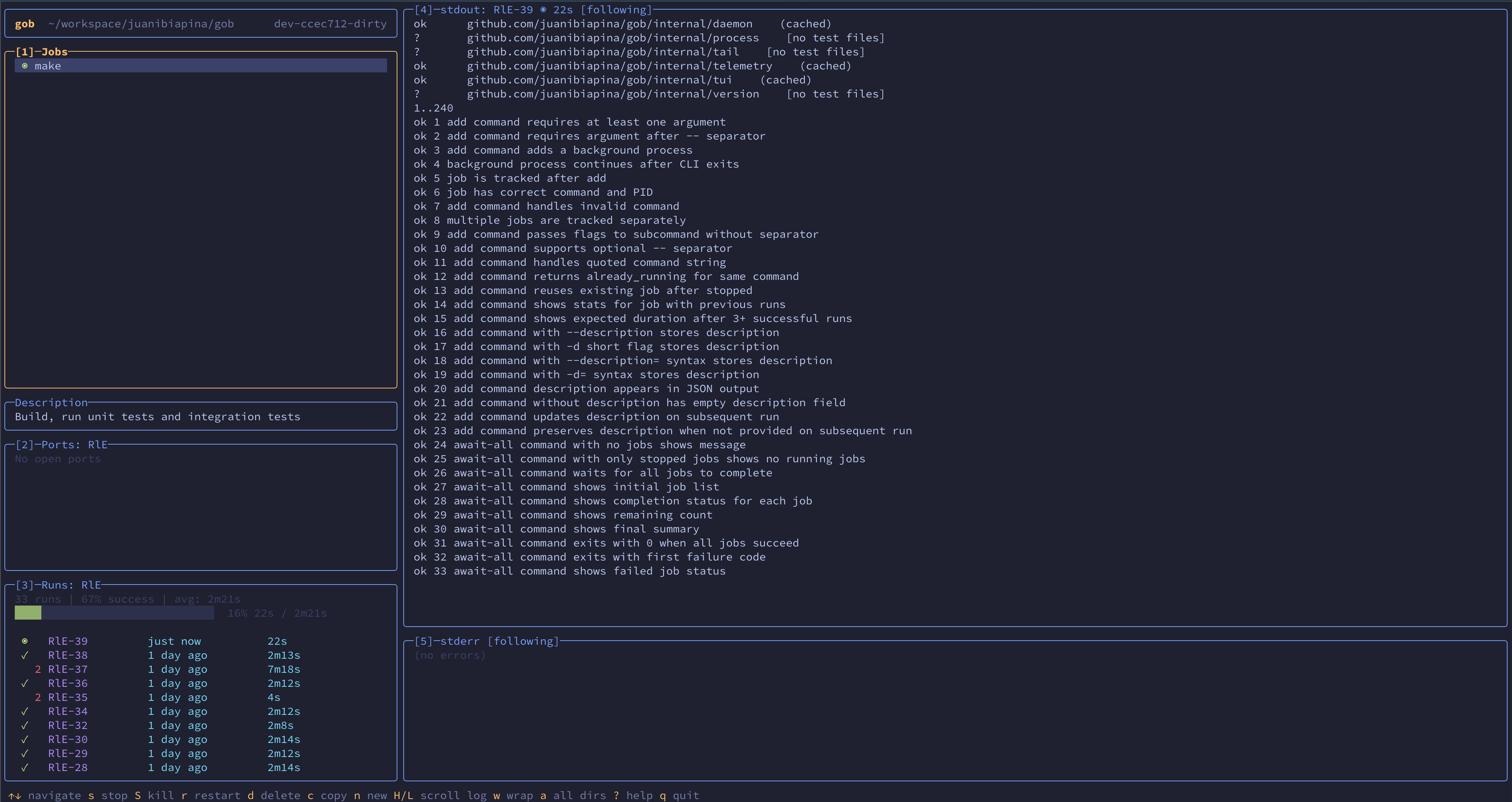
- Interactive TUI - Full-screen terminal interface with live job status.
- Per-directory jobs - Jobs are scoped to directories, keeping projects organized.
- Process lifecycle control - Start, stop, restart, and signal any job.
- Port monitoring - Inspect listening ports across a job's entire process tree.
- Reliable shutdowns - Stop, restart, and shutdown verify every child in the tree is gone.
- Job persistence - Jobs survive daemon restarts with SQLite-backed state.
- Run history - Track execution history, statistics, and progress estimates for repeated commands.
- Stuck detection - Detects jobs that may be stuck and returns early, while the job keeps running.
- Blocked jobs - Prevent agents from accidentally running dangerous commands.
Installation
Install gob with Homebrew, go install, or a pre-built binary.
Homebrew
brew tap juanibiapina/taps
brew install gob
Go Install
go install github.com/juanibiapina/gob@latest
Requirements:
- Go 1.25.4 or later
The binary will be installed to $GOPATH/bin (or $GOBIN if set). Make sure this directory is in your PATH.
Pre-built Binaries
Download the latest release for your platform from the Releases page.
Available platforms: Linux, macOS (both amd64 and arm64)
# Download the appropriate binary for your platform
# For example, macOS Apple Silicon (arm64):
curl -LO https://github.com/juanibiapina/gob/releases/latest/download/gob_VERSION_darwin_arm64.tar.gz

# Extract the archive
tar -xzf gob_VERSION_darwin_arm64.tar.gz

# Move to your PATH
sudo mv gob /usr/local/bin/

# Verify installation
gob --version
Build from Source
See CONTRIBUTING.md for build instructions.
Quick Start
The everyday flow is one of two shapes: run and wait, or add and come back later.
# Usage overview
gob

# Run a command and wait for completion
gob run make test

# Add a background job (returns immediately)
gob add -- make test
gob add -- pnpm --filter web typecheck

# Wait for a job to complete
gob await abc

# List all jobs
gob list

# View stdout and stderr
gob logs abc

# Stop a job
gob stop abc

# Remove a stopped job
gob remove abc
Using with AI Coding Agents
gob ships an agent skill with instructions for AI coding agents. Install it with the skills CLI:
npx skills add juanibiapina/gob
This makes the gob instructions available to your agent (Claude Code, Cursor, Codex, and others). The skill lives at skills/gob/SKILL.md; you can also copy its contents into your agent's configuration file (CLAUDE.md, AGENTS.md, etc.).
Interactive TUI
When you want to watch and control jobs directly, launch the full-screen terminal interface:
gob tui
Layout
The TUI has an info bar and five panels:
- Info bar: Shows working directory and version
- Panel 1 (Jobs): List of all jobs with status (◉ running, ✓ success, ✗ failed)
- Description: Shows job description (only visible when selected job has one)
- Panel 2 (Ports): Listening ports for the selected job
- Panel 3 (Runs): Run history for the selected job
- Panel 4 (stdout): Standard output of selected run
- Panel 5 (stderr): Standard error of selected run
Key Bindings
| Key | Action |
|---|---|
↑/k, ↓/j |
Navigate / scroll |
h/l |
Scroll log horizontally (in log panels) |
H/L |
Scroll log horizontally (from jobs/runs panels) |
g/G |
Go to first/last |
f |
Toggle follow mode |
w |
Toggle line wrap |
s/S |
Stop / kill job |
r |
Restart job |
d |
Delete stopped job/run |
n |
New job |
1/2/3/4/5 |
Switch to panel |
? |
Show all shortcuts |
q |
Quit |
Process-control keys (s/S/r/d) act on the selected job from any panel. The only exception is d in the Runs panel, where it deletes the selected run.
Auto-Start with Gobfile
To start a project's usual jobs automatically when the TUI launches, create a .config/gobfile.toml in the project directory:
[[job]]
command = "npm run dev"
description = "Frontend on http://localhost:3000. Check here for UI errors."

[[job]]
command = "npm run api"
description = "API server on http://localhost:4000. Check logs for request debugging."

[[job]]
command = "npm run storybook"
description = "Component library on http://localhost:6006"
autostart = false  # Add but don't start automatically

[[job]]
command = "npm run db:reset"
description = "DANGER: Drops and recreates the database"
blocked = true  # Prevent accidental execution
Fields:
command(required): The command to rundescription(optional): Context for AI agents (ports, URLs, what to check for)autostart(optional): Whether to start the job when TUI opens (default:true)blocked(optional): Iftrue, the job cannot be started; CLI shows description when attempted (default:false)
Behavior:
- Jobs are started asynchronously when TUI opens (if
autostart = true) - Jobs are stopped when TUI exits (including when terminal is killed)
- Already-running jobs have their descriptions updated if different
- Stopped jobs with matching commands are restarted
- Jobs with
autostart = falseare added but not started
Tip: Add .config/gobfile.toml to .gitignore if you don't want to share it.
CLI Reference
Run gob <command> --help for detailed usage, examples, and flags.
| Command | Description |
|---|---|
run <cmd> |
Run command and wait for completion (--description to add context) |
add <cmd> |
Start background job (--description to add context) |
await <id> |
Wait for job, stream output, show summary |
list |
List jobs (--all for all directories) |
runs <id> |
Show run history for a job |
runs delete <run_id> |
Delete a stopped run and its logs |
stats <id> |
Show statistics for a job |
stdout <id> |
View stdout (--follow for real-time) |
stderr <id> |
View stderr (--follow for real-time) |
logs [id] |
View stdout and stderr (--follow for real-time) |
ports [id] |
List listening ports (--all for all jobs) |
stop <id> |
Stop job (--force for SIGKILL) |
start <id> |
Start stopped job |
restart <id> |
Stop + start job |
signal <id> <sig> |
Send signal (HUP, USR1, etc.) |
remove <id> |
Remove stopped job |
shutdown |
Stop all running jobs, shutdown daemon |
tui |
Launch interactive TUI |
Shell Completion
gob provides live job-ID suggestions with command descriptions as you type.
Homebrew installs completions automatically for Bash, Zsh, and Fish — no setup needed. Just start a new shell.
For manual installs, write the completion script once to a file on your shell's completion path. Don't source <(gob completion ...) from your shell rc: that spawns gob on every new shell and slows startup. Generate the file instead, and regenerate it only when you upgrade gob.
Bash
gob completion bash > "$(brew --prefix 2>/dev/null || echo /usr/local)/etc/bash_completion.d/gob"
Zsh
# Write to a directory on your fpath (must be listed in fpath before compinit runs)
mkdir -p ~/.zsh/completions
gob completion zsh > ~/.zsh/completions/_gob
# In ~/.zshrc, before `compinit`:
#   fpath=(~/.zsh/completions $fpath)
Fish
gob completion fish > ~/.config/fish/completions/gob.fish
Contributing
Interested in contributing? Check out CONTRIBUTING.md for development setup, build instructions, testing instructions, and contribution guidelines.