
jnidzwetzki/planexplorer
jnidzwetzki/planexplorer has 28 GitHub stars and 3 forks. GitHot measured 0 stars in 24 hours. Last checked 2026-11-11 16:15 UTC. Last push 2026-11-06.
Plan Explorer is a web application for visualizing PostgreSQL query plans
できること
- Flexible Search Space: Define one- or two-dimensional parameter spaces (e.g., predicate selectivity, cost parameters) to iterate over.
- Custom SQL Queries: Input your own SQL queries with placeholders for dynamic parameters.
- Plan Fingerprinting: Automatically groups and colors similar query plans for easy visualization.
- No Backend Required (In-Browser Mode): All computation and visualization happen client-side. Uses PGlite, a WebAssembly build of PostgreSQL, to run queries and generate plans directly in your browser. This mode is fully standalone and requires no server or backend—everything runs locally in your browser.
計測したスター増加
- 24時間
- 0
- 7日間
- 更新が遅れています
- 15日間
- 更新が遅れています
- 1か月
- 更新が遅れています
期間ごとの純増数です。期間は重複しており、日別の値ではありません。未計測の値は空欄です。スター数は注目度の指標であり、品質の保証ではありません。
README.md
オリジナル


Explore and visualize how PostgreSQL chooses query plans for your SQL – all in your browser.
Plan Explorer
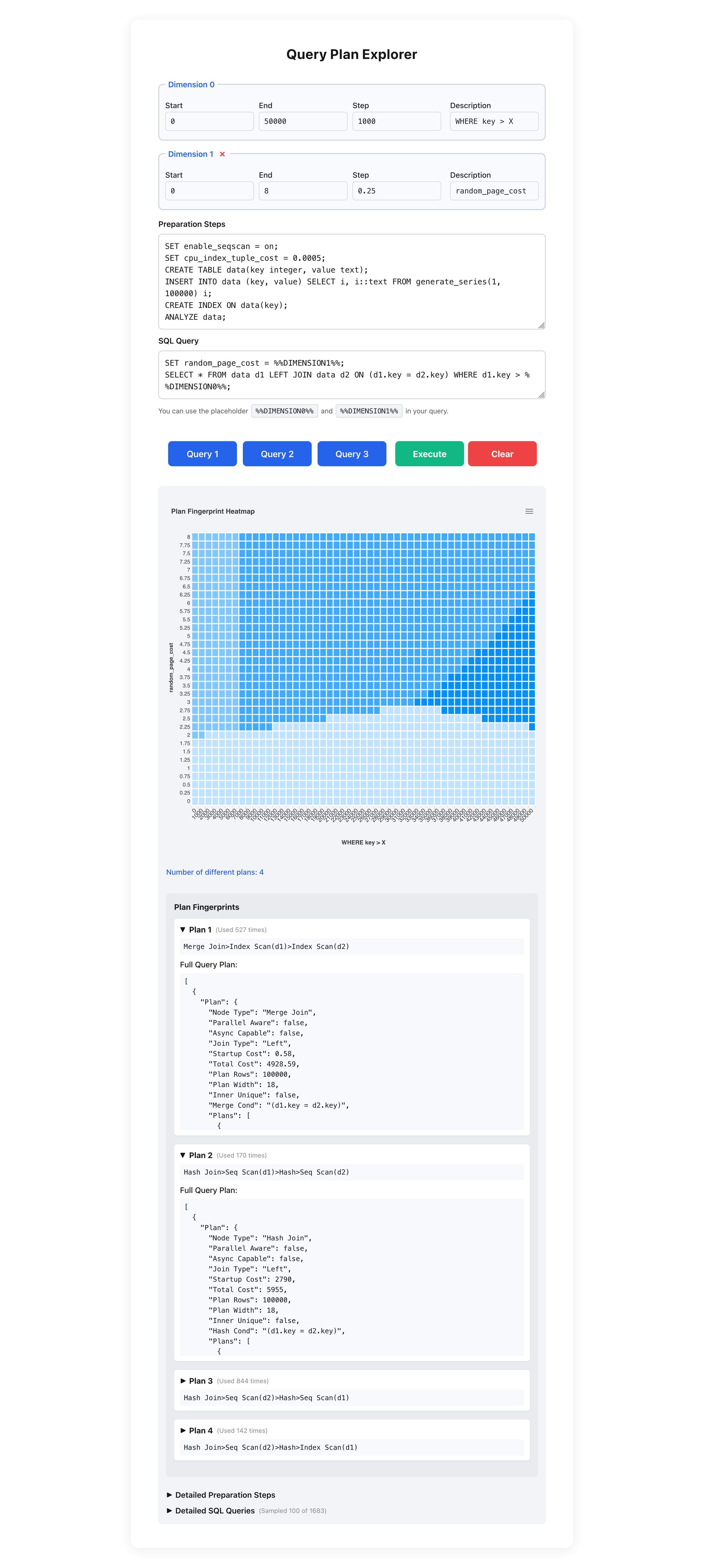
Plan Explorer is a web application for visualizing the different query plans that PostgreSQL generates for a particular query across multi-dimensional parameter spaces.
The tool allows users to explore how PostgreSQL's query planner chooses different execution plans based on query parameters and cost settings—that is, it shows when PostgreSQL selects a different plan due to changing parameters.
All of this runs entirely in the browser, without requiring a separate database server. Plan Explorer is inspired by the Picasso database query optimizer visualizer, which implements similar ideas and functions.
[!NOTE] This project is a research prototype and is purely vibe coded to explore how research tools can be generated with little effort these days. So, it may not always have the most understandable or conventionally structured source code.
Features
- Flexible Search Space: Define one- or two-dimensional parameter spaces (e.g., predicate selectivity, cost parameters) to iterate over.
- Custom SQL Queries: Input your own SQL queries with placeholders for dynamic parameters.
- Plan Fingerprinting: Automatically groups and colors similar query plans for easy visualization.
- No Backend Required (In-Browser Mode): All computation and visualization happen client-side. Uses PGlite, a WebAssembly build of PostgreSQL, to run queries and generate plans directly in your browser. This mode is fully standalone and requires no server or backend—everything runs locally in your browser.
- Optional Proxy Mode: For advanced use cases, you can connect Plan Explorer to a real PostgreSQL database server via a lightweight Node.js proxy. This enables working with large datasets or features not supported by PGlite. See the section "Modes of Operation" below for details.
Example Use Cases
- Visualize when PostgreSQL switches from a table scan to an index scan as selectivity or cost parameters change.
- Explore the impact of
random_page_costand other planner settings on query plan selection. - Analyze complex queries, such as self-joins, and observe how the planner chooses among multiple strategies.
Usage
- Define Search Space: Set up to two dimensions (ranges and steps) for the parameters you want to explore.
- Database Setup: Enter SQL statements to prepare your database (e.g., create tables, insert data).
- Query Input: Write your SQL query using placeholders (
%%DIMENSION0%%,%%DIMENSION1%%) for dynamic parameters. - Run: Execute the analysis and view the resulting plan visualization.
Modes of Operation
Plan Explorer can be used in two modes:
- In-Browser Mode (default): All query execution and plan analysis happen directly in your browser using PGlite, a WebAssembly build of PostgreSQL. No backend or server setup is required.
- Proxy Mode (dev:full): The application connects to a real PostgreSQL database server via a lightweight Node.js proxy. This mode is useful for working with large datasets or features not supported by PGlite. Credentials for the database connection are read from a
.envfile (see below).
Architecture
flowchart LR
    subgraph **Browser**
        UI["WebUI"]
        PGLite["PGlite (WebAssembly PostgreSQL)"]
        UI -- "SQL, Parameters" --> PGLite
        PGLite -- "Query Results, Plans" --> UI
    end
    subgraph "**Proxy Mode** (Optional)"
        Proxy["Proxy Server"]
        PG["PostgreSQL Database"]
        UI -- "HTTP (SQL/Params)" --> Proxy
        Proxy -- "SQL" --> PG
        PG -- "Results" --> Proxy
        Proxy -- "Results" --> UI
    end
- In-Browser Mode: All arrows stay within the "Browser" box. No backend or network required.
- Proxy Mode: The browser app communicates with the proxy server, which forwards queries to a real PostgreSQL database and returns results.
Getting Started
Prerequisites
Installation
- Clone the repository:
git clone https://github.com/jnidzwetzki/planexplorer.git cd planexplorer - Install dependencies:
npm install # or yarn install - Start the development server:
npm run dev # or yarn dev - Open your browser: Visit http://localhost:3000/planexplorer to use the app.
Build for Production
npm run build
npm start
Connecting to a Database Server (dev:full mode)
In addition to running fully in the browser, Plan Explorer supports connecting to a real PostgreSQL database server when running in dev:full mode. In this mode, the application reads database connection credentials from a .env file in the project root.
Usage
- Create a
.envfile in the project root (or copy the provided.env.example):cp .env.example .env - Edit the
.envfile and set your database credentials:PGHOST=localhost PGPORT=5432 PGUSER=your_db_user PGPASSWORD=your_db_password PGDATABASE=your_db_name - Start the app in full server mode:
npm run dev:full
# or
yarn dev:full
When running in this mode, queries and plan analysis are executed against the configured PostgreSQL server instead of the in-browser database.
Security notes
The proxy server is a local development convenience, not a hardened service — keep the following in mind when using dev:full:
- CORS is restricted to
ALLOWED_ORIGIN(defaulthttp://localhost:3000, matching the Next.js dev server), so other websites can't make cross-origin requests to the proxy from inside your browser. PROXY_SHARED_SECRETis optional, defense-in-depth, not real authentication. The frontend has to embed it in aNEXT_PUBLIC_*variable, which gets inlined into the shipped JS bundle and is visible to anyone who opens devtools on the page itself. Setting it only raises the bar against an unrelated webpage or browser tab blindly sending requests to this local proxy — it does not verify who the human using the app is.- The proxy executes arbitrary SQL by design, including DDL/DML in preparation steps (e.g.
CREATE TABLE,INSERT) — this is intentional and needed for the tool to work, so there is no statement-type allow-listing. Because of this, only pointdev:fullat a disposable, non-production database with credentials you're comfortable exposing to anything that can reach the proxy.
Example
To see the tool in action, visit the live demo: https://jnidzwetzki.github.io/planexplorer/
Technologies Used
License
This project is open source. See LICENSE for details.
Acknowledgements
- Inspired by Picasso: The Database Query Optimizer Visualizer
- Built with the help of GitHub Copilot and VS Code agent mode
関連プロジェクトを探す
Asabeneh/30-Days-Of-Python
30 Days of Python プログラミングチャレンジは、Python プログラミング言語を 30 日で学ぶためのステップバイステップのガイドです。このチャレンジは 100 日以上かかることもあります。自分のペースで進めてください。こちらの動画も役立つかもしれません: https://www.youtube.com/channel/UC7PNRuno1rzYPb1xLa4yktw
78,560 スターgrafana/grafana
オープンで組み合わせ可能なオブザーバビリティおよびデータ可視化プラットフォームです。Prometheus、Loki、Elasticsearch、InfluxDB、Postgres など、複数のソースからメトリクス、ログ、トレースを可視化できます。
77,830 スターredis/redis
リアルタイムのデータ駆動型アプリケーションを構築する開発者にとって、Redis は最も選ばれ、最速で、機能が最も豊富なキャッシュ、データ構造サーバー、ドキュメントおよびベクトルクエリエンジンです。
77,395 スターapache/superset
Apache Superset は、データ可視化とデータ探索のためのプラットフォームです。
75,473 スター