
hometrix/SplashMonitor has 32 GitHub stars and 7 forks. GitHot measured +1 stars in 24 hours, +1 in 7 days, and +2 in 15 days. Last checked 2026-11-23 17:48 UTC. Last push 2026-11-17.
計測したスター増加
- 24時間
- +1
- 7日間
- +1
- 15日間
- +2
- 1か月
- 履歴を収集中
期間ごとの純増数です。期間は重複しており、日別の値ではありません。未計測の値は空欄です。スター数は注目度の指標であり、品質の保証ではありません。
概要
First native macOS desktop app and menu bar monitor for Inco AI's Splash local inference engine on Apple Silicon
機械学習README.md
オリジナル
🌊 Splash Monitor
The first native macOS desktop app for Inco AI's Splash local inference engine
El primer app de escritorio nativo de macOS para el motor de inferencia local Splash de Inco AI








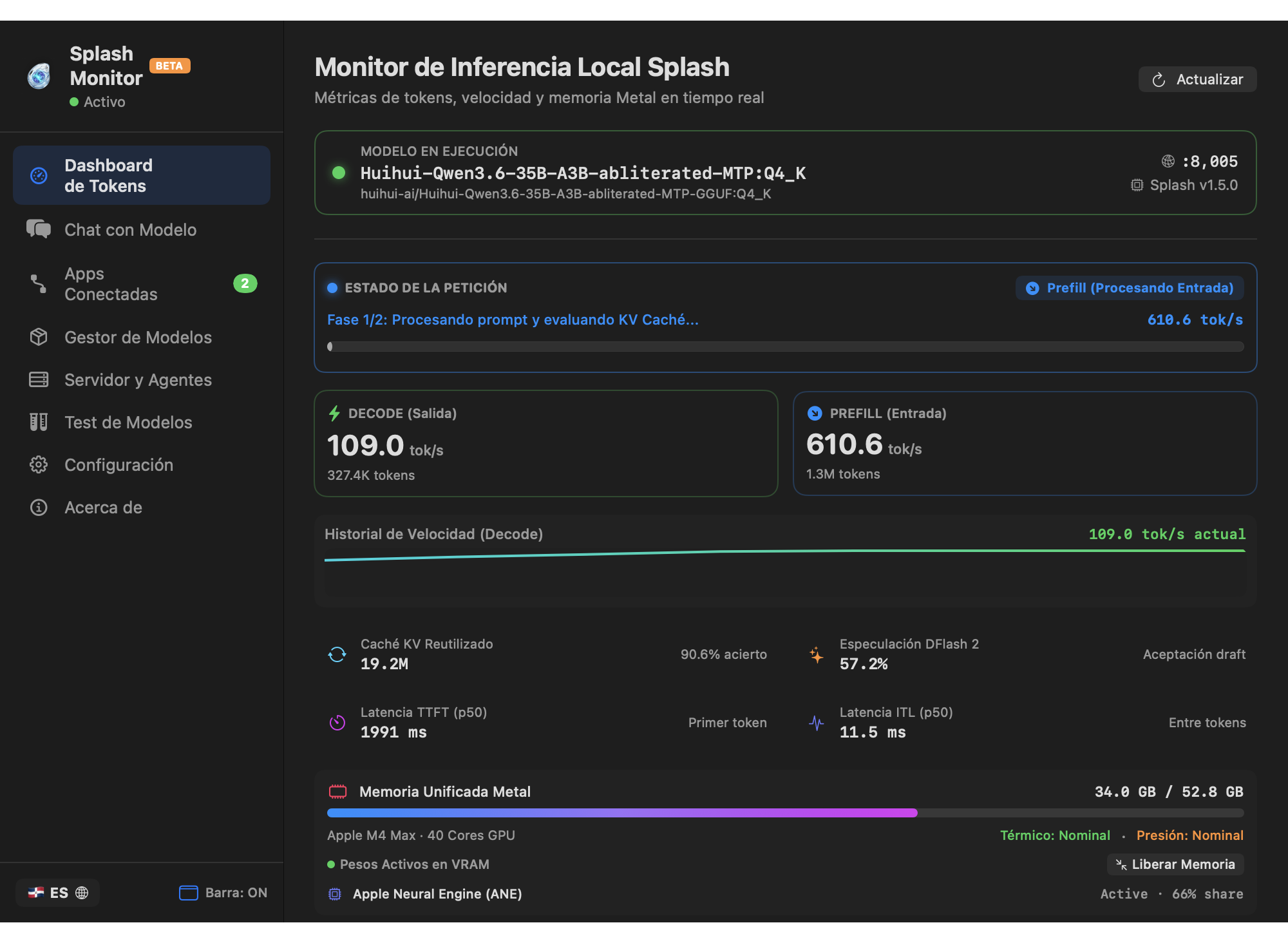
⚡ Monitor de Inferencia Local Splash en Apple Silicon (M3/M4/M5) con Métricas en Vivo de Tokens, Velocidad y Memoria Metal
🇩🇴 Español
¿Por qué Splash Monitor?
Hasta ahora, Splash solo podía operarse desde la línea de comandos. Splash Monitor transforma esa experiencia en una suite visual completa para macOS: monitoreo de métricas en tiempo real, gestión de modelos de Hugging Face con un solo clic, y lanzadores de agentes de código — todo desde un ícono en la barra de menú o una ventana de escritorio nativa.
🚀 Novedades de la Versión 1.1.0-beta
- 🌐 100% Internacionalización Bilingüe (Español / Inglés — Resuelve #5): Cobertura total y natural en ambas lenguas para toda la app: controles del servidor, validadores de identificadores de modelos (
ModelIDValidator), alertas de rechazo accionables, modales de confirmación y notificaciones. - ⚡ Monitor en Vivo del Ciclo de Vida de Inferencia (Resuelve #6): Visualización en tiempo real en el Dashboard de las fases del motor:
PREFILL(evaluando KV Cache y prompt en azul) ➔DECODE(generación de tokens en verde con medidor tok/s y contador en vivo) ➔IDLE / QUEUED. - 👁️ Modalidad Multimodal por Defecto (Visión + Texto): Splash arranca por defecto con visión activada sin configuraciones manuales, con auto-fallback inteligente a
--language-onlysi un modelo puramente de código carece de proyector visual (mmproj). - 🔔 Notificaciones Nativas y Auto-Arranque con macOS: Alertas del sistema vía
UNUserNotificationCenteral iniciar el servidor o completar descargas, e integración moderna de inicio de sesión conSMAppService. - 📌 Modo Solo Barra de Menú (Resuelve #4): Opción para ocultar el ícono del Dock al cerrar la ventana (
Cmd+Q) manteniendo el monitor en segundo plano. - 🤖 Compatibilidad con Splash 1.4.1: Soporte oficial para
Ornith-1.5-122ByFlint 40B-A2.5B MoE(~190 tok/s en Apple Silicon). - 🛡️ 120 Pruebas Unitarias al 100% Passing: Protección estricta contra inyección en shell, centinela de memoria Metal (
SystemMemoryPressureSentinel) y concurrencia segura@MainActor.
✨ Características Principales
📊 Dashboard de Métricas en Tiempo Real
|
💾 Monitor de Memoria Unified Metal
|
📦 Gestor de Modelos
|
🕹️ Control del Servidor
|
🌐 Detección Automática de Idioma
|
🍎 Experiencia Nativa de macOS
|
📸 Galería Visual de Todos los Módulos
Cada módulo de Splash Monitor está optimizado para la experiencia nativa de macOS en Apple Silicon:
1. 🕹️ Servidor y Lanzadores de Agentes (con Claude Cowork y DeepSeek Harness)
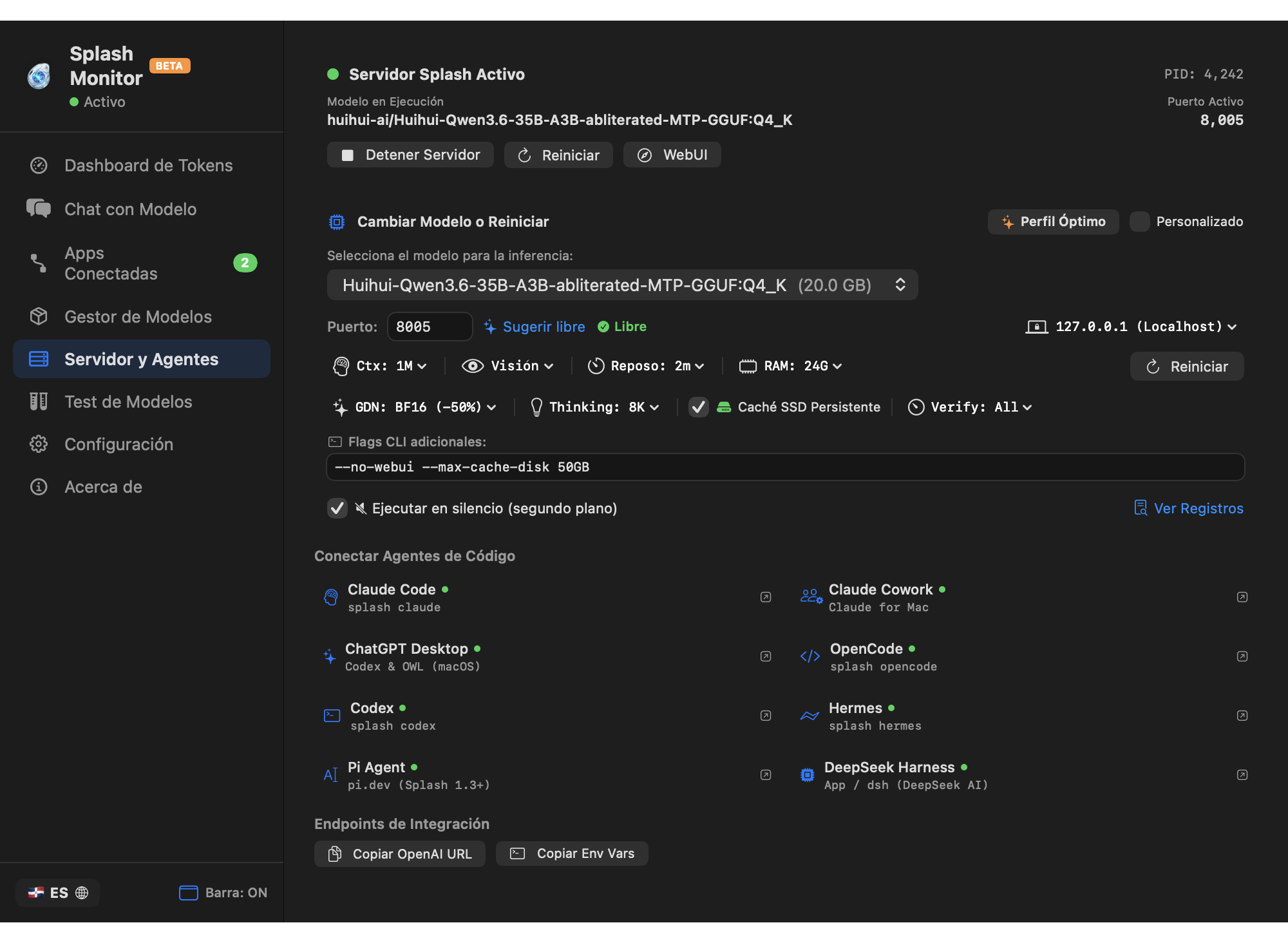
Módulo de Control del Servidor: Inicia y detiene el servidor Splash en un solo clic, cambia el modelo en caliente, configura el puerto, estado recurrente GDN en BF16 (-50% RAM), presupuesto de tokens de razonamiento, caché SSD persistente y lanza agentes autónomos: Claude Cowork (activación de app nativa con aliases para evitar errores 404), Claude Code CLI, OpenCode, Codex, Hermes, Pi Agent y DeepSeek Harness (`dsh`).
2. 💬 Chat Profesional y Multi-Turn Playground
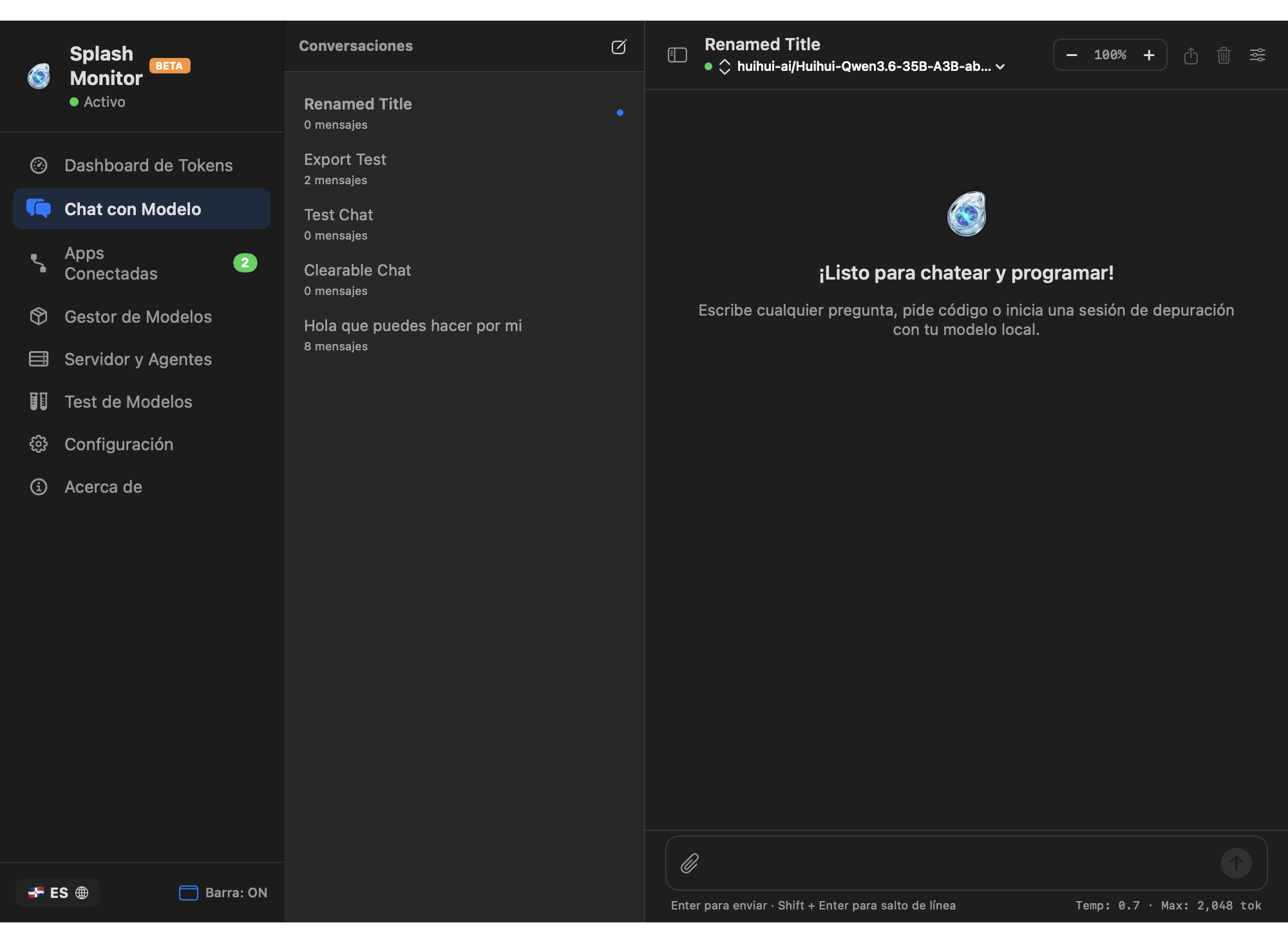
Módulo de Chat Nativo de IA: Interacción conversacional en streaming ultrarrápido (SSE con AsyncSequence), renderizado inteligente de Markdown con bloques de código y botón de copiado de un clic, proceso de pensamiento colapsable (Thinking), telemetría en tiempo real por token (tok/s y latencia TTFT), historial persistente de conversaciones en disco y selector interactivo de temperatura y tokens.
3. 📊 Dashboard de Tokens y Rendimiento Metal
Módulo de Rendimiento en Tiempo Real: Monitorea velocidades de generación de tokens (DECODE y PREFILL en tok/s), ratio de acierto y reutilización de KV Cache, deduplicación de tokens, aceptación especulativa DFlash 2, latencias TTFT/ITL y uso de memoria unificada Metal (M3/M4/M5).
3. 🔌 Aplicaciones y Clientes Conectados
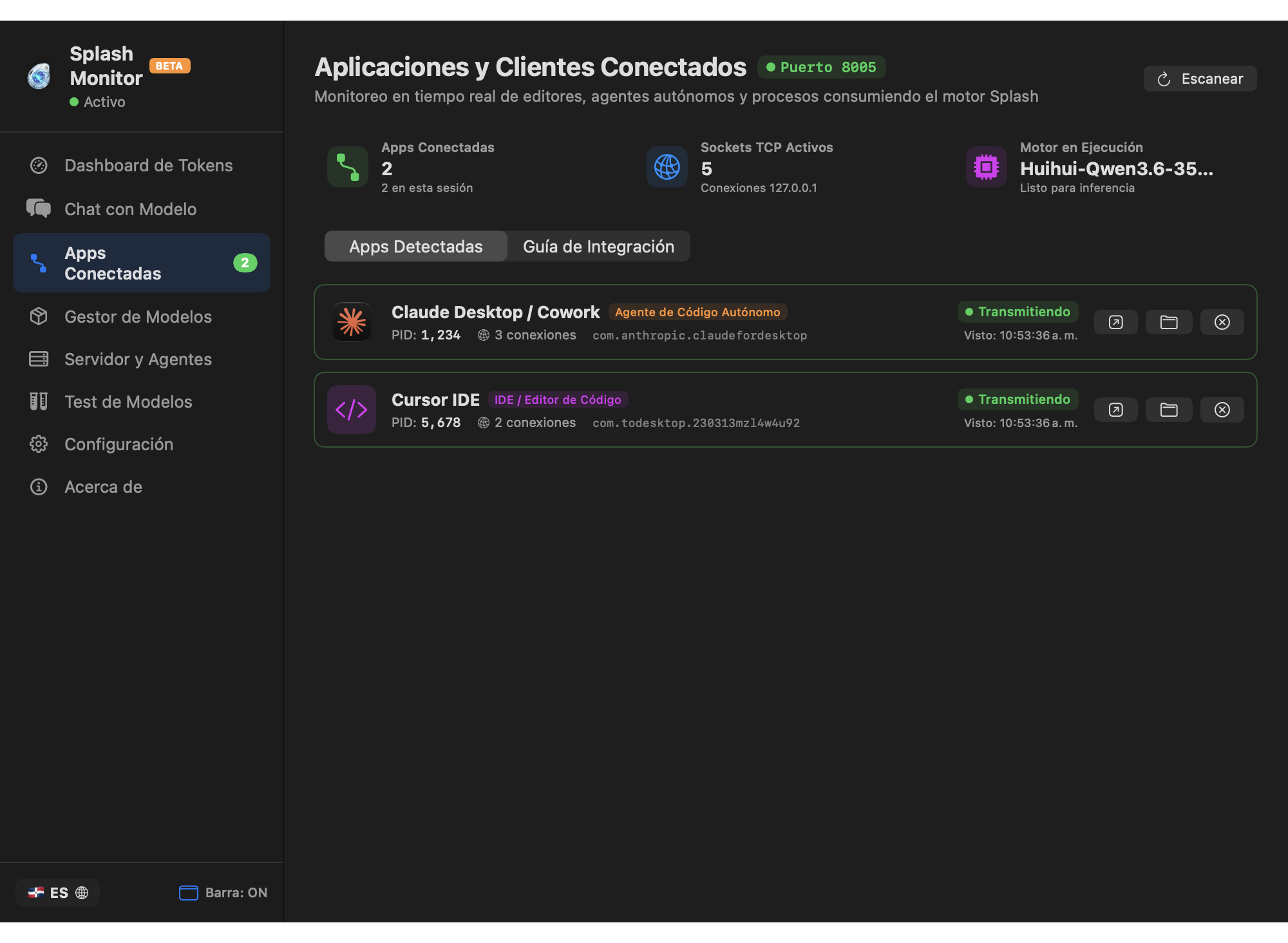
Módulo de Clientes Conectados: Inspección automática de conexiones TCP activas contra el puerto de inferencia, reconociendo clientes como Claude Desktop / Cowork, DeepSeek Harness, Cursor IDE, VS Code y Chatbots con sus íconos nativos y estado de transmisión.
4. 📖 Guía Rápida de Conexión y Gateway
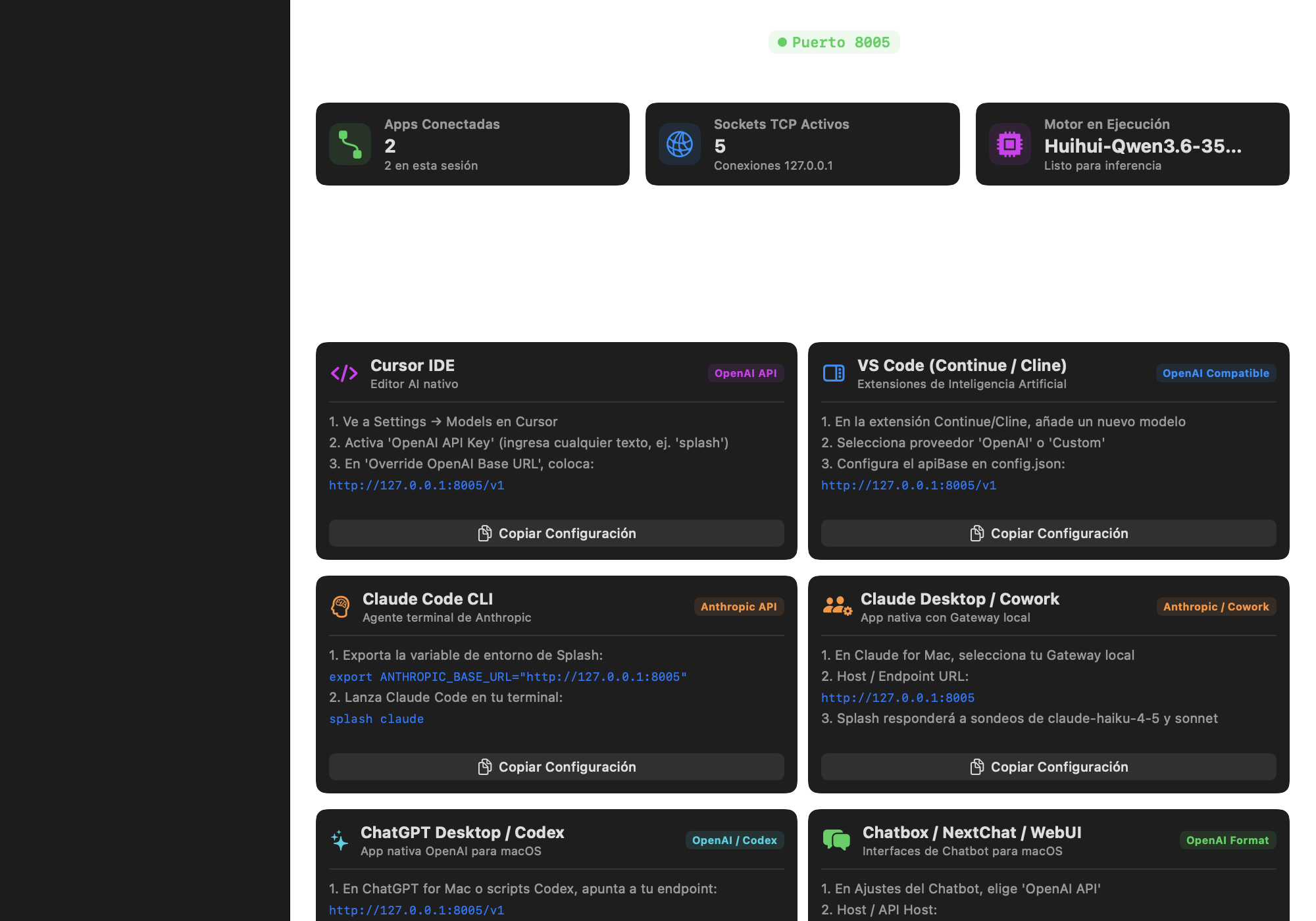
Módulo de Guía de Conexión: Pasos y comandos de un clic para configurar el Gateway local en Claude Desktop, Cursor IDE, VS Code (Cline/Continue), Chatbox y scripts Python (OpenAI SDK / LangChain).
5. 📦 Gestor de Modelos y Telemetría de Descargas
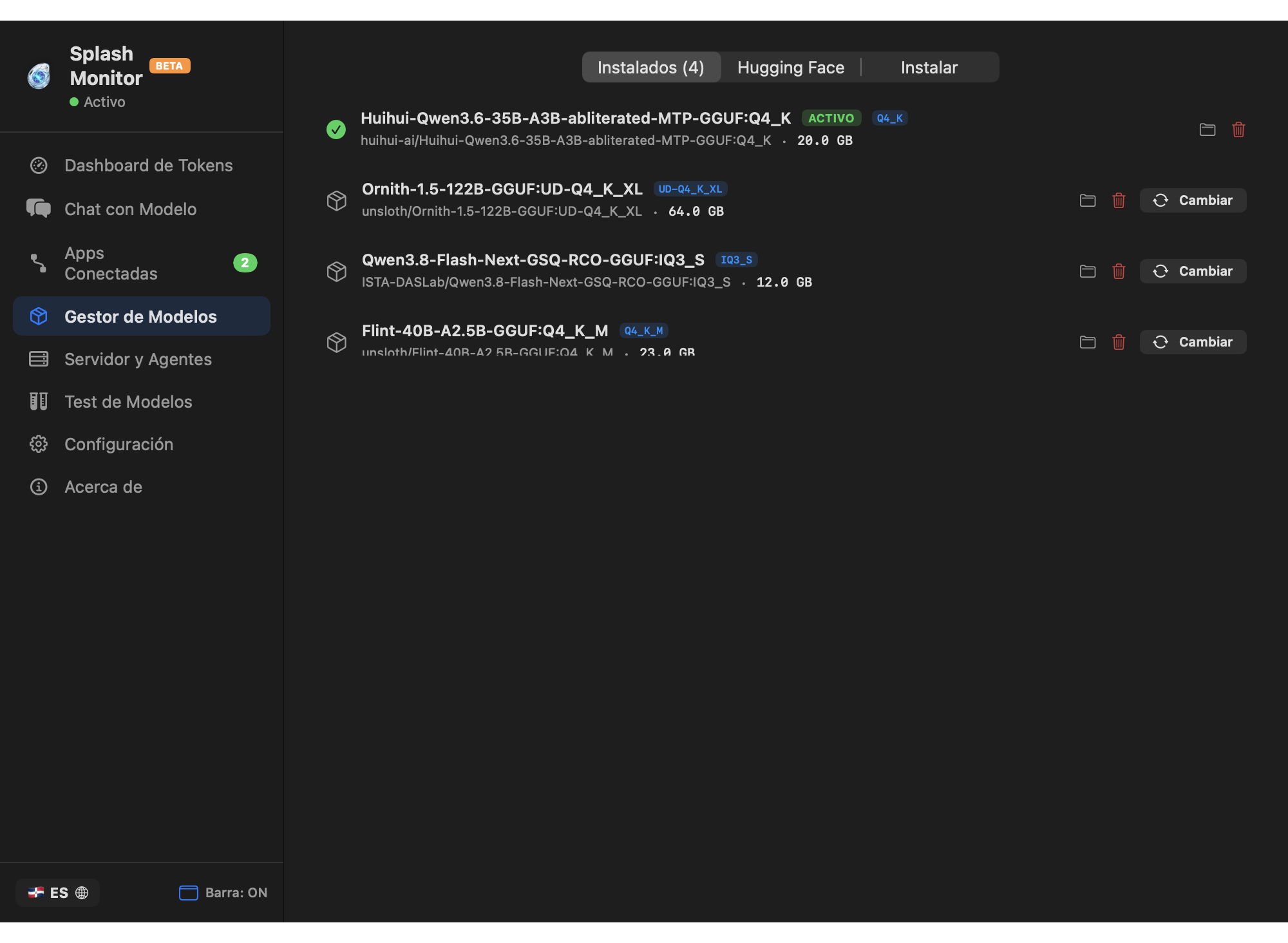
Módulo de Modelos: Control de modelos locales en disco con espacio utilizado, cambio en caliente y exploración del catálogo de Hugging Face con soporte para cuantizaciones oficiales NVIDIA (NVFP4 / FP8), variantes GGUF, guía asistida para repositorios protegidos (403 Gated) y modo --language-only para modelos de código y texto.
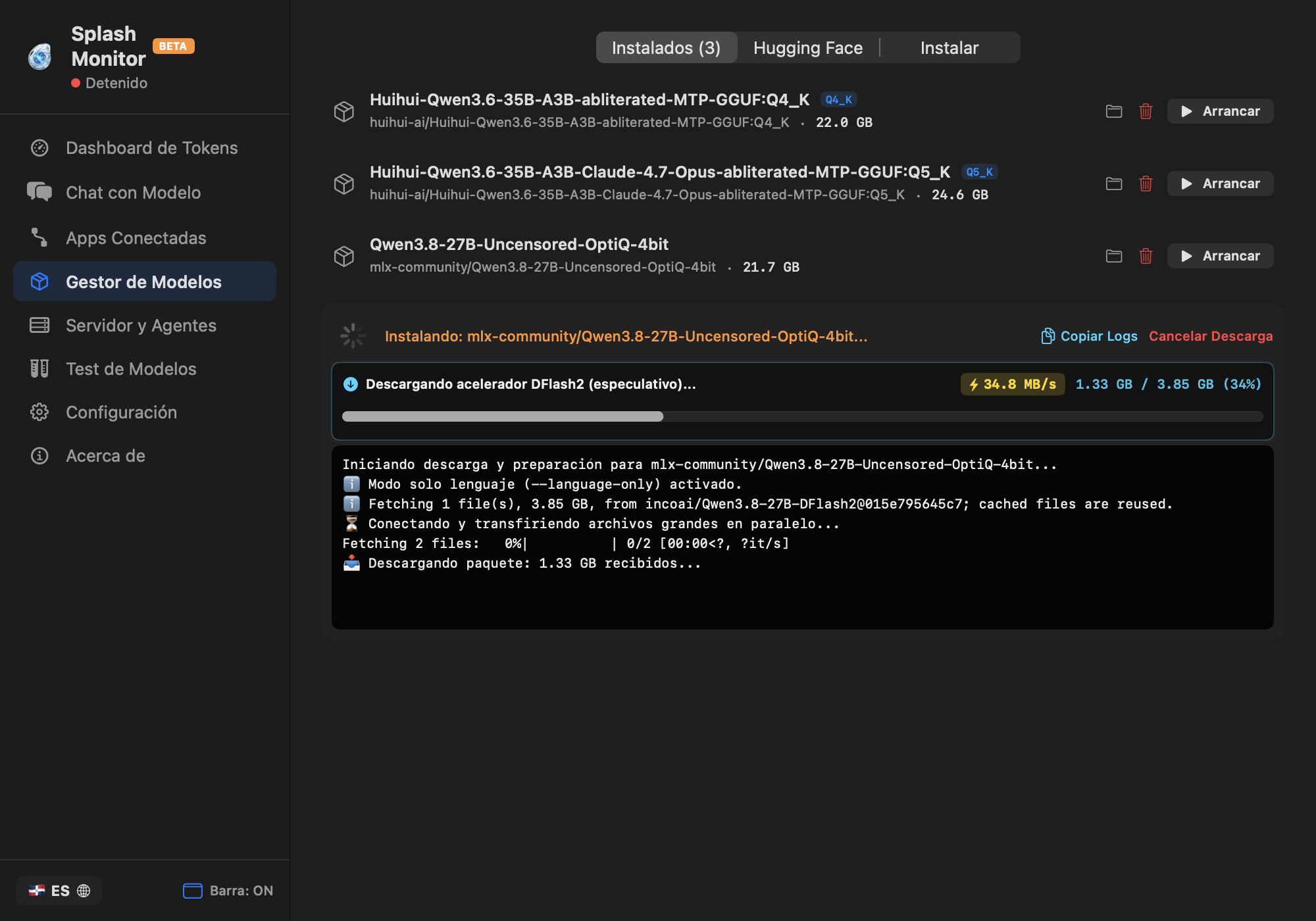
Telemetría de Descarga en Tiempo Real: Medición en vivo de la tasa de transferencia en MB/s (⚡️ 34.8 MB/s), barra de progreso continuo, contador exacto de GB descargados frente al total esperado y detección de fases (acelerador especulativo DFlash2, pesos del modelo y ensamblado Splash).
6. 🧪 Test y Diagnóstico de Modelos (Model Lab)
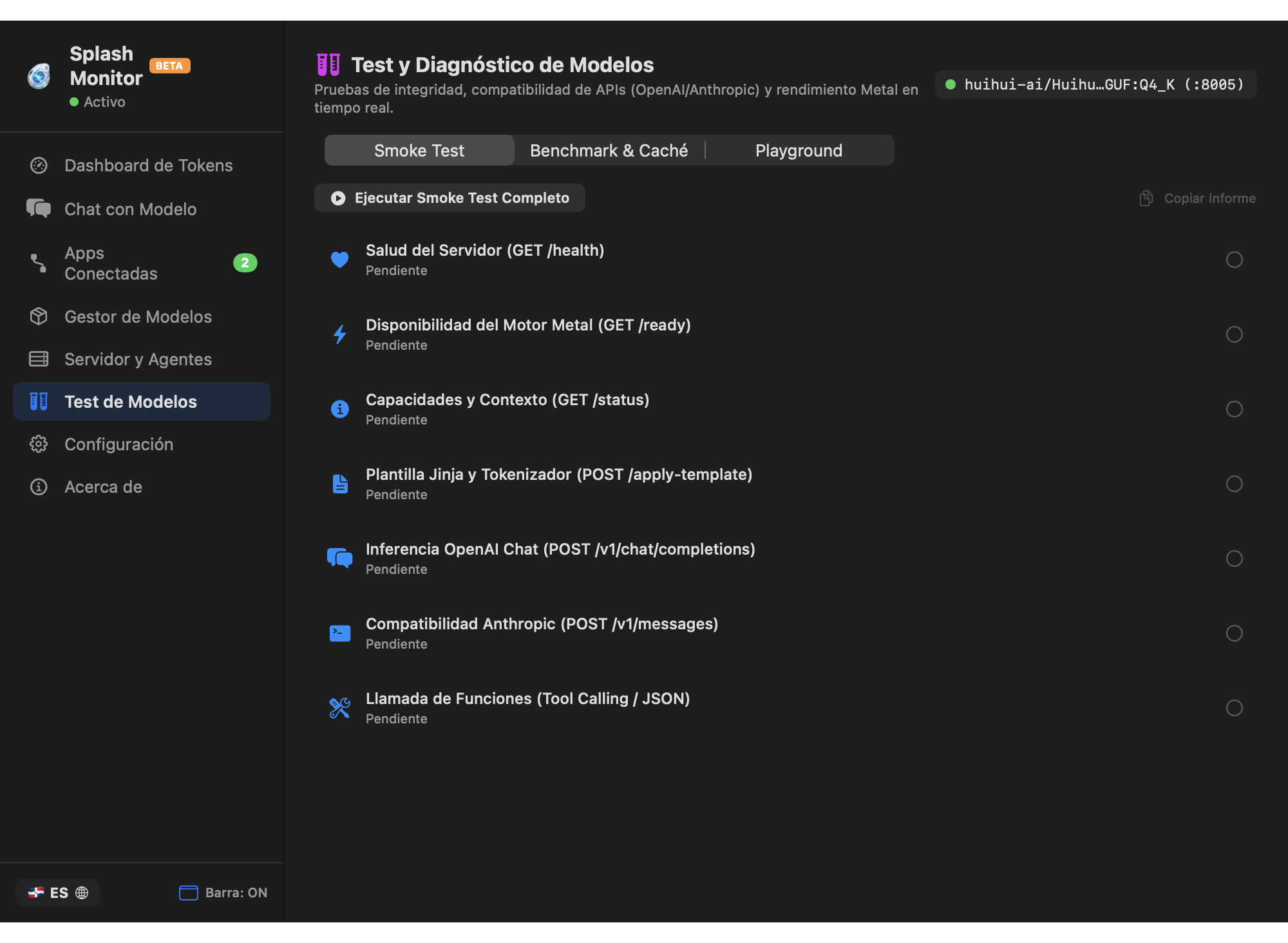
Módulo de Test y Diagnóstico: Suite completa de verificación en un clic con Smoke Test (salud del servidor, disponibilidad Metal, plantilla Jinja, OpenAI Chat, Anthropic Messages y llamadas a herramientas/JSON), Benchmarking de velocidad con cálculo del factor de aceleración del KV Cache y Playground interactivo de inferencia local.
7. ⚙️ Configuración del Sistema
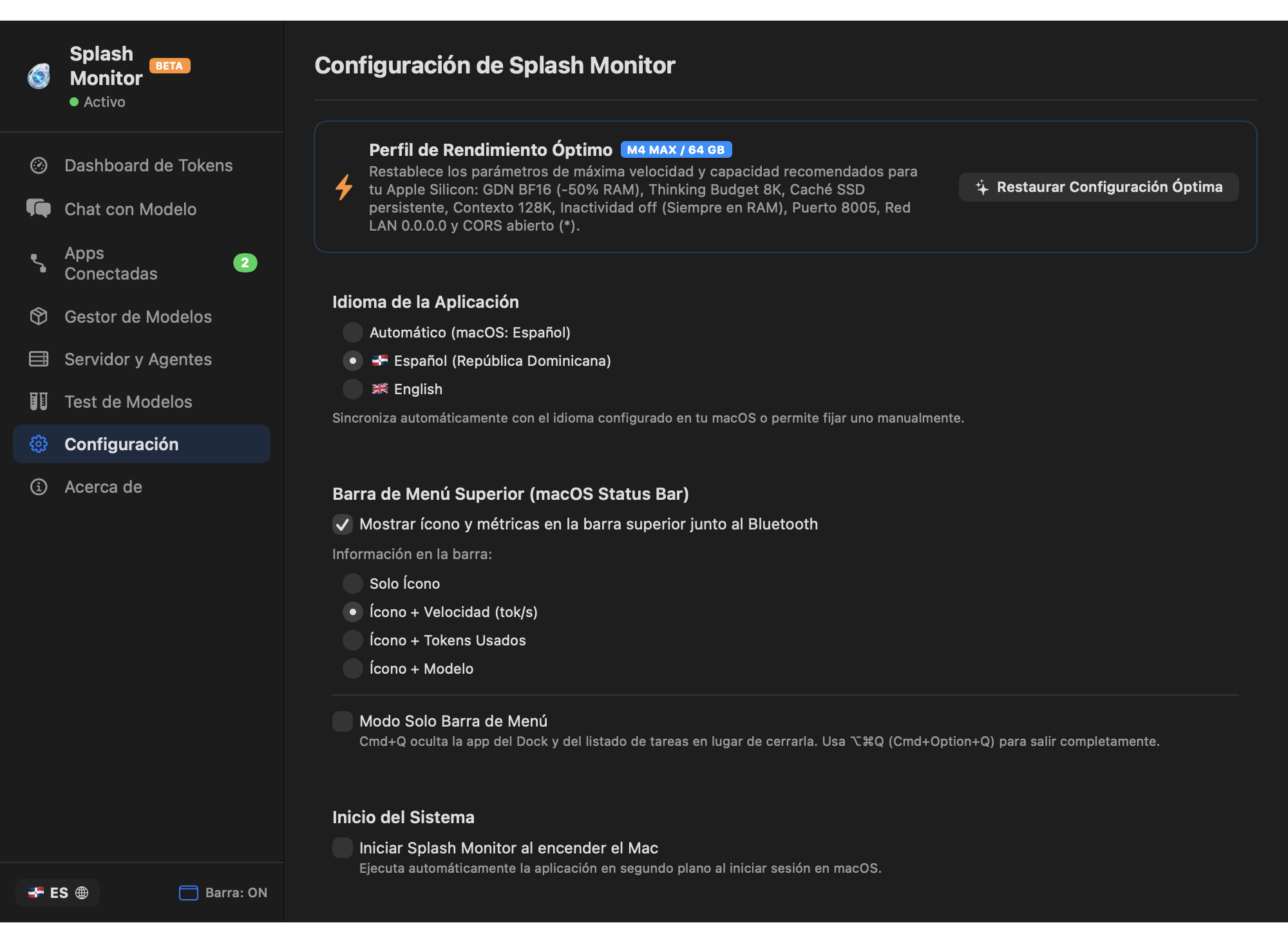
Módulo de Ajustes: Selector de idioma (Español Dominicano 🇩🇴 / English 🇬🇧 / macOS automático), configuración del ícono en la barra de menú superior de macOS y frecuencia de refresco.
8. ℹ️ Acerca de Splash Monitor
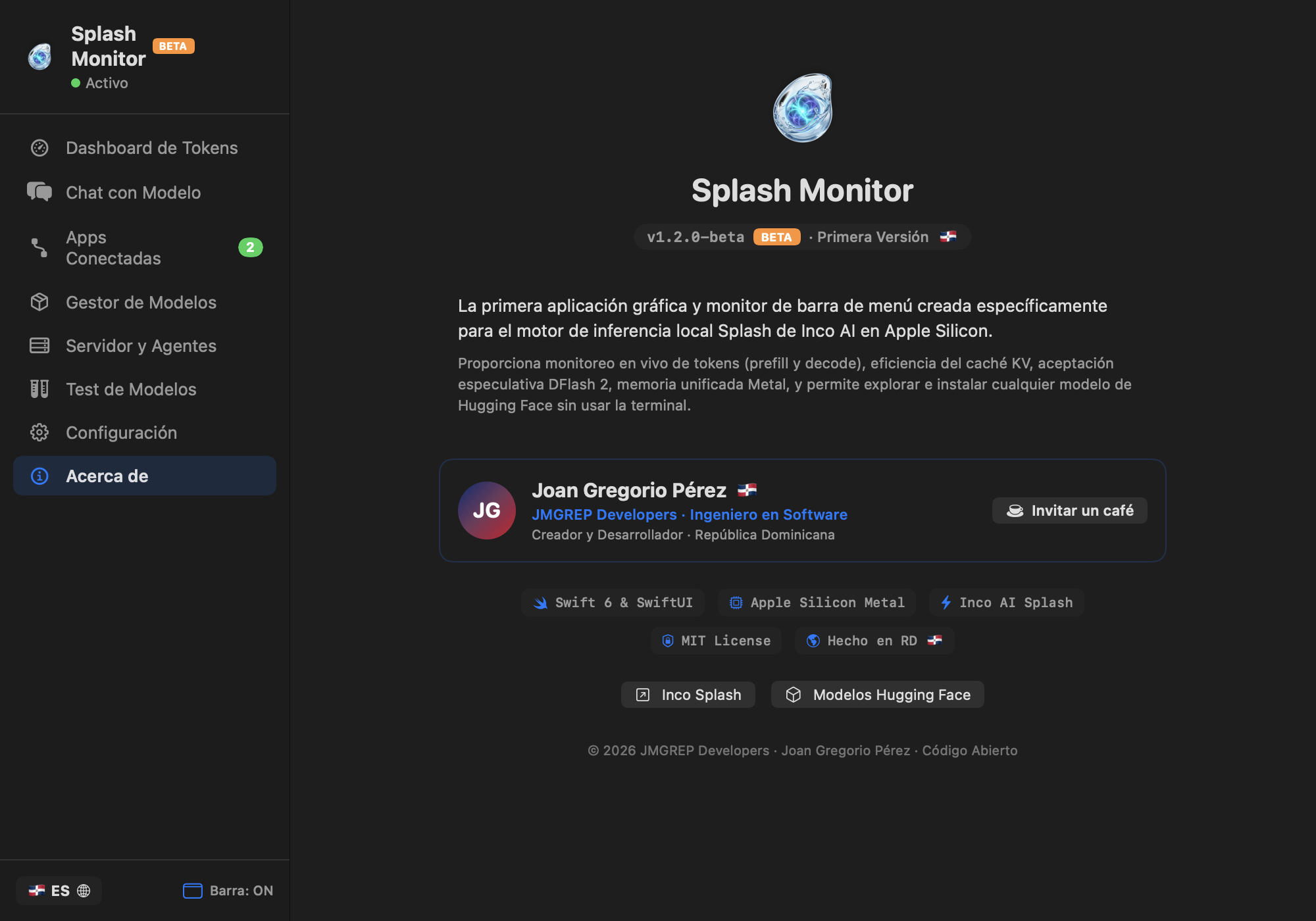
Módulo Informativo: Información de versión (v1.1.0-beta), arquitectura nativa en Swift 6 y Metal, licencia abierta MIT y créditos de autoría de Joan Gregorio Pérez (JMGREP Developers).
📥 Instalación
Requisitos Previos — Motor Splash de Inco AI
Splash Monitor es un monitor gráfico para el motor de inferencia local Splash de Inco AI. Antes de instalar Splash Monitor, necesitas tener Splash funcionando en tu Mac.
Instala Splash desde el repositorio oficial de Inco AI:
# Agregar el tap oficial de Inco AI e instalar Splash
brew install incoai/tap/splash
📋 Requisitos del motor Splash (según incoai/splash):
- Mac con Apple Silicon M3 o posterior
- macOS 26.4 (Tahoe) o posterior
- 36 GB de memoria unificada (48 GB o más recomendado)
Los modelos se descargan automáticamente en el primer uso. Consulta los modelos disponibles en huggingface.co/incoai.
Una vez que Splash esté instalado y funcionando, instala Splash Monitor:
Opción A — Homebrew Cask (Recomendada Oficial · Sin Alertas de Gatekeeper)
La forma nativa y recomendada en macOS. Al instalar mediante Homebrew, macOS no aplica cuarentena de navegador y la app abre de inmediato:
brew install --cask hometrix/tap/splash-monitor
⚠️ Comprueba la versión que instala el cask. El cask del tap es un fichero aparte (
hometrix/homebrew-tap) y puede quedarse atrás respecto a las publicaciones de este repositorio: en la auditoría de la v1.0.2-beta el cask seguía sirviendo la 1.0.0-beta. Verifica conbrew info --cask splash-monitoroSplash Monitor.app/Contents/Info.plist. Si el cask está atrasado, usa la Opción B o C, que siempre apuntan a la última publicación.
Opción B — Instalación en 1 Línea (Terminal / Script)
La forma más rápida si no deseas usar Homebrew tap:
curl -fsSL https://raw.githubusercontent.com/hometrix/SplashMonitor/main/scripts/install.sh | bash
⚡️ Este comando consulta la última publicación en GitHub, descarga el DMG oficial, verifica su suma SHA-256 contra el fichero
SHA256SUMSpublicado y aborta si no coincide, lo monta, copia la app a/Applicationsy la abre automáticamente. Fija una versión concreta conSPLASH_MONITOR_TAG=v1.1.0-beta.
Opción C — Descarga Manual del DMG
Descarga el instalador oficial: 👉 SplashMonitor-1.1.0-beta.dmg
Y su suma de verificación: SHA256SUMS
shasum -a 256 -c SHA256SUMS # debe imprimir "OK"Haz doble clic en el
.dmgdescargado y arrastra Splash Monitor a Aplicaciones.
🛡️ Si macOS muestra: "Apple no ha podido verificar que no contenga software malicioso...": Este aviso lo impone macOS a todas las apps de código abierto sin licencia de pago de Apple. Para abrirla:
- Ve a Ajustes del Sistema en tu Mac.
- Haz clic en Privacidad y seguridad (en la barra lateral) y baja hasta Seguridad.
- Pulsa el botón "Abrir de todas formas" (Open Anyway).
O por Terminal (1 segundo):
xattr -d com.apple.quarantine ~/Downloads/SplashMonitor*.dmg
Opción B — Compilar desde Código Fuente (Desarrolladores)
Requisitos:
| Requisito | Versión Mínima |
|---|---|
| Mac | Apple Silicon (M3, M4, M5) |
| macOS | 13.0 o superior |
| Xcode | 15+ o Swift 6.0 Toolchain |
| Splash Engine | incoai/tap/splash |
# 1. Clonar el repositorio
gh repo clone hometrix/SplashMonitor
cd SplashMonitor

# 2. Ejecutar la batería de pruebas (64 pruebas, sin red ni motor real)
swift test

# 3. Compilar la app y generar el bundle .app
./scripts/build_app.sh

# 4. (Opcional) Generar el instalador DMG comprimido + SHA256SUMS
./scripts/create_dmg.sh

# 5. Iniciar la aplicación
open "Splash Monitor.app"
🔢 Versión única.
Sources/SplashMonitor/Services/Version.swiftes la única fuente de la versión, el identificador de paquete y el número de compilación. Los tres scripts los extraen de ahí consed: no hay que editar la versión en varios sitios (antes se declaraba en cinco lugares y ya habían divergido entre sí).
🧪 Pruebas
swift test                                   # 113 pruebas (100% de éxito)
swift test --filter PollingTests             # solo una suite
swift test --filter ServerOptionsTests       # opciones CLI y Splash 1.3.2
swift test --filter SystemMemoryPressureTests # centinela de memoria macOS
Las pruebas son herméticas por diseño: usan un transporte de estado simulado, un
terminador de procesos simulado, un directorio temporal propio y bootstrapNetwork: false
(sin tráfico a Hugging Face ni a GitHub). Ninguna prueba envía señales a procesos reales
ni escribe en tu ~/.zshrc. Cubren, entre otras cosas:
| Suite | Qué protege |
|---|---|
VersionTests |
Orden semántico de versiones y unicidad de la versión del producto |
ModelIDValidatorTests |
Rechazo de identificadores de modelo con inyección de shell y rutas .. |
ProcessIntrospectionTests |
Que nunca se señalice a un cliente conectado, solo a escuchas del motor |
ServeLockTests |
Lectura de serve-<puerto>.lock, bloqueos vacíos, corruptos y huérfanos |
ShellEnvironmentTests |
Contenido del entorno, reversión exacta del ~/.zshrc y consentimiento |
ModelSizeCacheTests |
Que el sondeo no vuelva a recorrer el árbol de modelos en cada ciclo |
PollingTests |
Que el panel siga detectando el motor tras detenerlo o arrancarlo tarde |
ClientTerminationPolicyTests |
Que no se termine un PID reciclado ni la propia app |
StatusModelTests |
Contrato real de /status del motor y tolerancia a claves nuevas |
ServerCLIValidatorTests |
Validación y sanitización estricta de banderas CLI, estados GDN y presupuestos |
ServerOptionsTests |
Generación de comandos con host LAN, variantes, estado GDN BF16 y flags 1.3.2 |
AgentLaunchTests |
Detección e integración de lanzadores para Claude Cowork, Pi, Hermes y DeepSeek Harness |
SystemMemoryPressureTests |
Notificaciones del centinela de memoria del kernel macOS y purga bajo demanda |
ModelDiagnosticTests |
Batería de validación de endpoints y benchmarking de inferencia Metal |
🏗️ Arquitectura del Proyecto
SplashMonitor/
├── Package.swift                    # Manifiesto Swift Package Manager
├── LICENSE                          # Licencia MIT
├── CONTRIBUTING.md                  # Guías de contribución (bilingüe)
├── SECURITY.md                      # Política de divulgación responsable
├── CODE_OF_CONDUCT.md               # Código de Conducta Contributor Covenant v2.1
├── README.md                        # Documentación técnica bilingüe
├── Resources/
│   ├── AppIcon.icns                 # Bundle de icono multi-resolución
│   └── AppIcon.iconset/             # Assets de icono estándar y Retina
├── scripts/
│   ├── build_app.sh                 # Build Release + empaquetado .app
│   ├── create_dmg.sh                # Empaquetado DMG vía hdiutil + SHA256SUMS
│   └── install.sh                   # Instalador en 1 línea con verificación SHA-256
└── Sources/
    └── SplashMonitor/
        ├── SplashMonitorApp.swift   # Entry point (WindowGroup + MenuBarExtra)
        ├── Models/
        │   └── SplashStatus.swift   # Structs Codable para /status y HF API
        ├── Services/
        │   ├── SplashService.swift  # Singleton (polling, procesos, servidor)
        │   ├── LocalizationService.swift # Detección dinámica del idioma
        │   ├── SystemMemoryPressureSentinel.swift # Centinela de presión de RAM macOS
        │   ├── ServerCLIValidator.swift  # Sanitización y validación de flags CLI
        │   ├── ModelIDValidator.swift    # Validación estricta de IDs de modelos
        │   ├── ModelBenchmarkRunner.swift # Benchmark de tokens y aceleración KV
        │   └── Version.swift        # Fuente única de versión semántica (P-15)
        └── Views/
            ├── MainWindowView.swift # NavigationSplitView de escritorio (8 módulos)
            ├── MenuBarView.swift    # Popover interactivo del menú superior
            ├── TokenMetricsView.swift # Sparkline, tarjetas de velocidad, gauge
            ├── ModelManagerView.swift # Modelos locales + catálogo HF + telemetría
            ├── ServerControlView.swift # Selector, controles, lanzadores, flags 1.3.2
            ├── ConnectedAppsView.swift # Apps conectadas + DeepSeek Harness
            ├── ConnectedAppsGuideView.swift # Guía de integración de clientes
            ├── ModelTestingView.swift  # Smoke testing + benchmarking + playground
            ├── SettingsView.swift   # Ajustes de idioma, menú y sondeo
            ├── AboutView.swift      # Créditos e info de versión
            ├── AppIconView.swift    # Renderizado del icono de la app
            └── DominicanEmblem.swift # Emblema patrio dominicano
🛠️ Stack Tecnológico
| Componente | Tecnología |
|---|---|
| Lenguaje | Swift 6 |
| UI Framework | SwiftUI |
| Package Manager | Swift Package Manager |
| Plataforma | macOS 13.0+ (Apple Silicon) |
| Motor de Inferencia | Inco AI Splash |
| Catálogo de Modelos | Hugging Face API |
| Icono | Custom 3D liquid droplet (SF Symbols + Canvas) |
| Empaquetado | hdiutil (DMG nativo de macOS) |
🤝 Contribuir
¡Las contribuciones son bienvenidas! Consulta nuestras guías antes de participar:
| Documento | Descripción |
|---|---|
| 📋 Guía de Contribución | Flujo de trabajo, convenciones de código y estructura del proyecto |
| 🔒 Política de Seguridad | Divulgación responsable de vulnerabilidades |
| 📜 Código de Conducta | Contributor Covenant v2.1 |
👤 Autor y Créditos

|
Joan Gregorio Pérez Software Engineer · JMGREP Developers 🇩🇴 República Dominicana GitHub |
Agradecimientos especiales:
- Inco AI — Motor de inferencia Splash
- Hugging Face — Catálogo de modelos
💖 Apoyar el Proyecto
Si Splash Monitor te resulta útil para tus flujos de trabajo de IA local y desarrollo con agentes, ¡considera apoyar su desarrollo continuo invitándome a un café! Cada aporte ayuda a mantener el proyecto actualizado, probado y optimizado para Apple Silicon.

📄 Licencia
Este proyecto está licenciado bajo la Licencia MIT. Consulta el archivo LICENSE para los términos completos.
MIT License — Copyright (c) 2026 JMGREP Developers / Joan Gregorio Pérez
Atribuciones y Licencias de Componentes
Splash Monitor es una aplicación independiente de código abierto que interactúa con el motor Splash, modelos de inteligencia artificial y agentes de código autónomos. A continuación se detallan las licencias y atribuciones de cada componente:
1. Motor de Inferencia y Monitor
| Componente | Licencia | Autor / Organización | Repositorio |
|---|---|---|---|
| Splash Monitor | MIT | JMGREP Developers (Joan Gregorio Pérez) | hometrix/SplashMonitor |
| Splash Engine | Apache-2.0 | Inco AI | incoai/splash |
2. Modelos Cuantizados y Aceleradores Especulativos (Splash 1.3.1 / 1.3.2)
| Modelo / Checkpoint | Licencia | Distribuidor / Creador | Repositorio |
|---|---|---|---|
| Qwen3.8-27B-NVFP4 | Apache-2.0 | NVIDIA Model Optimizer | nvidia/Qwen3.8-27B-NVFP4 |
| Qwen3.6-35B-A3B-nvfp4 | Apache-2.0 | MLX Community | mlx-community/Qwen3.6-35B-A3B-nvfp4 |
| Qwen3.8-27B-4bit | Apache-2.0 | MLX Community | mlx-community/Qwen3.8-27B-4bit |
| Qwen3.6-35B-A3B-4bit | Apache-2.0 | MLX Community | mlx-community/Qwen3.6-35B-A3B-4bit |
| DFlash 2 Speculative Decoders | Apache-2.0 | Inco AI | incoai/Qwen3.8-27B-DFlash2 |
| Qwen Base Models (27B & 35B) | Apache-2.0 | Alibaba Cloud / Qwen Team | Qwen/Qwen |
| Variantes Cuantizadas GGUF | Apache-2.0 / MIT | llama.cpp / Creadores Comunitarios | Hugging Face Hub |
3. Clientes y Agentes de Código Autónomos Conectados
| Agente / Cliente | Licencia / Términos | Desarrollador | Enlace Oficial |
|---|---|---|---|
DeepSeek Harness (dsh) |
MIT | DeepSeek Community | GitHub |
Pi Agent (pi) |
MIT | Mario Zechner / Pi.dev | pi.dev |
| Hermes Agent | MIT | Nous Research | NousResearch |
| OpenCode | MIT | SST | opencode.ai |
| Codex CLI | Apache-2.0 / MIT | OpenAI Community | OpenAI Developers |
| Claude Code & Cowork | Términos de Servicio | Anthropic, PBC | anthropic.com |
⚠️ Aviso de Pesos de Modelos: Los pesos, puntos de control (checkpoints) y cuantizaciones de modelos mantienen sus propios términos de licencia y acuerdos de uso de cada autor en Hugging Face Hub.
ℹ️ Descargo de Responsabilidad (Disclaimer): Splash Monitor es un proyecto independiente desarrollado por JMGREP Developers y no está afiliado, patrocinado ni respaldado por Inco AI, Anthropic, OpenAI, NVIDIA o Alibaba Cloud. "Splash" es una marca comercial de Inco AI. Este software interactúa con la API pública local del motor Splash bajo los términos de su licencia Apache-2.0.
🇬🇧 English
Why Splash Monitor?
Until now, Splash could only be operated from the command line. Splash Monitor transforms that experience into a complete visual suite for macOS: real-time metrics monitoring, one-click Hugging Face model management, and code agent launchers — all from a menu bar icon or a native desktop window.
🚀 What's New in Version 1.1.0-beta
- 🌐 100% Bilingual Localization (English / Spanish — Closes #5): Complete and natural English phrasing across all views, controls, model validators (
ModelIDValidator), actionable rejection reasons, confirmation dialogs, and notifications. - ⚡ Live Inference Request Lifecycle Tracker (Closes #6): Interactive real-time pipeline in the Dashboard tracking engine stages:
PREFILL(prompt ingestion & KV hit rate in blue) ➔DECODE(streaming response generation with live tok/s meter and token count in green) ➔IDLE / QUEUED. - 👁️ Multimodal by Default (Vision + Text): Splash now starts with Vision + Text enabled out of the box, with smart auto-fallback to
--language-onlyfor code-only models lacking vision projectors (mmproj). - 🔔 Native macOS Notifications & Login Auto-Launch: Direct
UNUserNotificationCentersystem alerts when the server starts or downloads complete, plus modern login item management via Apple'sSMAppService. - 📌 Menu Bar Only Mode (Closes #4): Option in Settings to hide the Dock icon upon closing the window (
Cmd+Q), keeping the monitor running lightweight in the macOS menu bar. - 🤖 Splash 1.4.1 Compatibility: Official support for
Ornith-1.5-122BandFlint 40B-A2.5B MoE(~190 tok/s on Apple Silicon). - 🛡️ 120 Automated Unit Tests (100% passing): Zero regressions, robust shell injection protection, Metal memory pressure sentinel (
SystemMemoryPressureSentinel), and actor-isolated@MainActorconcurrency.
✨ Key Features
📊 Real-Time Token Dashboard
|
💾 Metal Unified Memory Gauge
|
📦 Model Manager
|
🕹️ Server Controls
|
🌐 Auto Language Detection
|
🍎 Native macOS Experience
|
📸 Visual Tour by Modules
Every module of Splash Monitor is designed and optimized for a native Apple Silicon macOS experience:
1. 🕹️ Server Controls & Agent Launchers (with Claude Cowork & DeepSeek Harness)
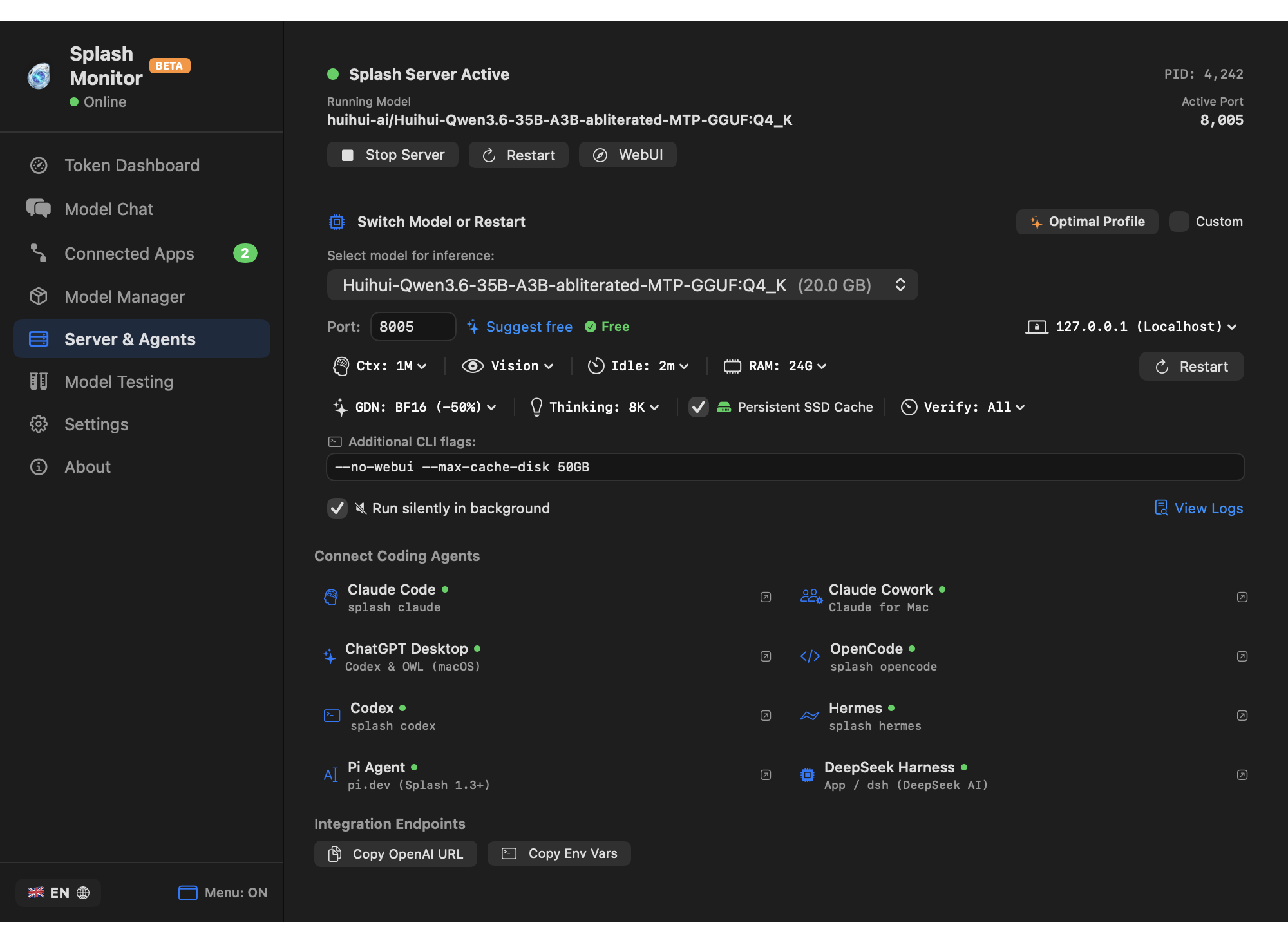
Server Control Module: Start and stop the Splash server with one click, hot-swap models without restarting, configure custom ports, GDN recurrent state format in BF16 (-50% RAM), reasoning token budget, persistent SSD prefix cache, and launch autonomous coding agents: Claude Cowork (native AppKit launch with model aliases to prevent 404 errors), Claude Code CLI, OpenCode, Codex, Hermes, Pi Agent, and DeepSeek Harness (`dsh`).
2. 💬 Professional AI Chat & Multi-Turn Playground
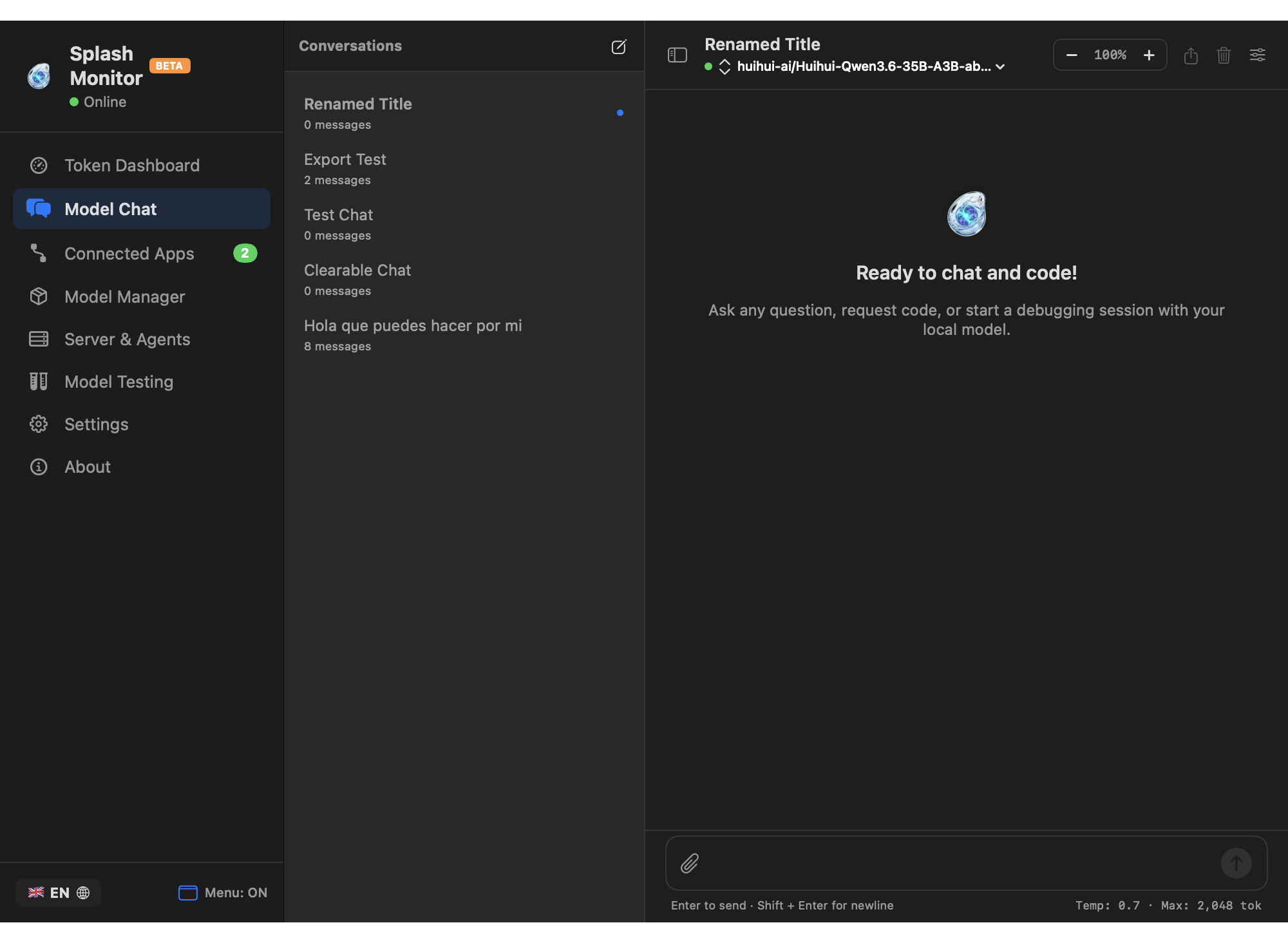
Native AI Chat Module: High-speed conversational streaming (SSE with AsyncSequence), rich Markdown rendering with syntax-aware code blocks and one-click copy, collapsible reasoning process (Thinking blocks), per-token live telemetry (tok/s and TTFT latency), persistent on-disk chat session history, and interactive temperature/token sliders.
3. 📊 Real-Time Token & Metal Performance Dashboard
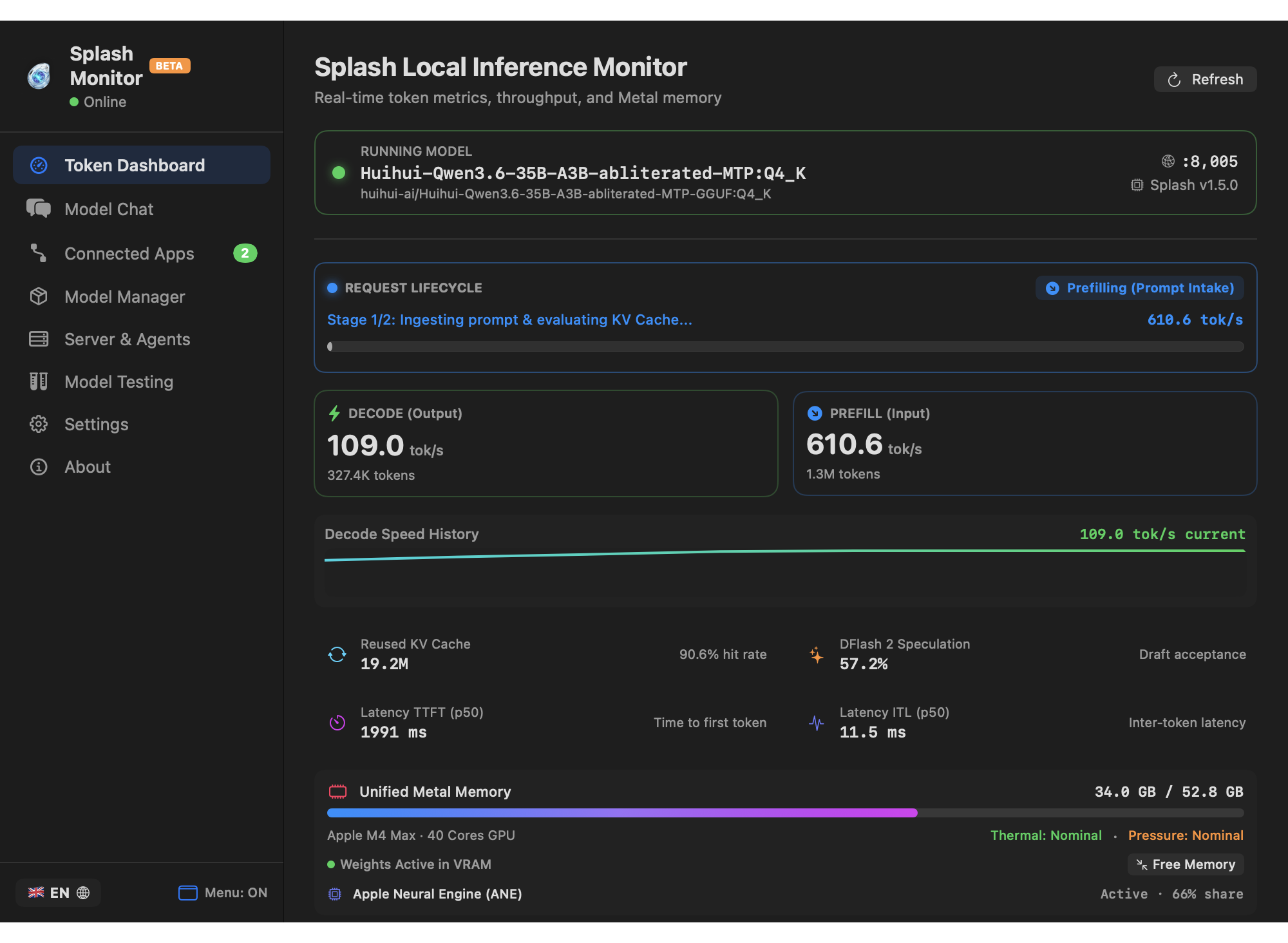
Real-Time Performance Module: Live token generation speed telemetry (DECODE and PREFILL in tok/s), KV Cache hit ratio and token reuse, token deduplication metrics, DFlash 2 speculative decoding acceptance rates, TTFT/ITL latencies, and Apple Silicon Metal unified memory usage (M3/M4/M5).
3. 🔌 Connected Applications & Active TCP Clients
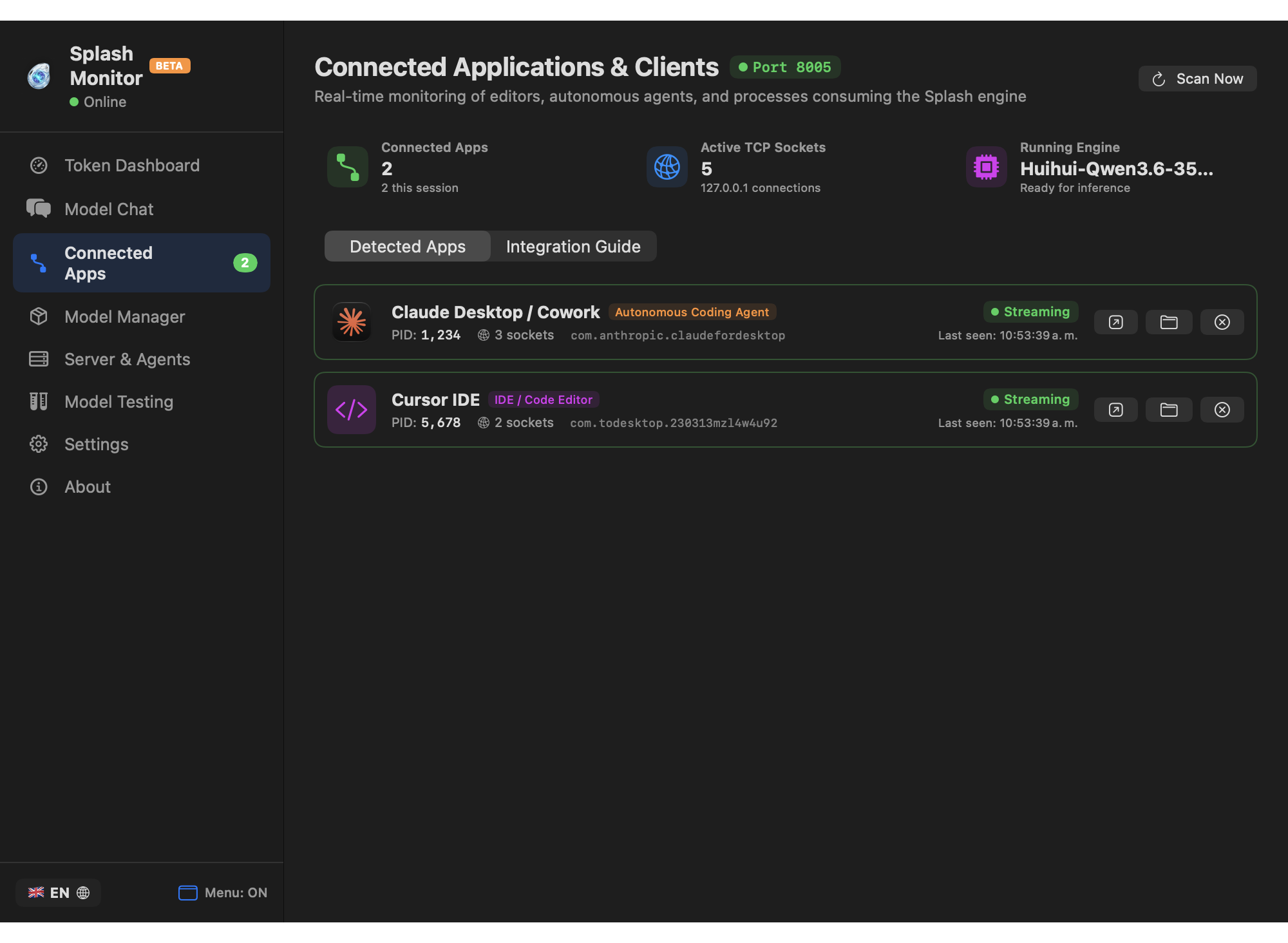
Connected Clients Module: Automatic inspection of active TCP sockets against the inference port, recognizing clients such as Claude Desktop / Cowork, DeepSeek Harness, Cursor IDE, VS Code, and Chatbots with their native macOS application icons and stream state.
4. 📖 Client Connection Guide & Local Gateway
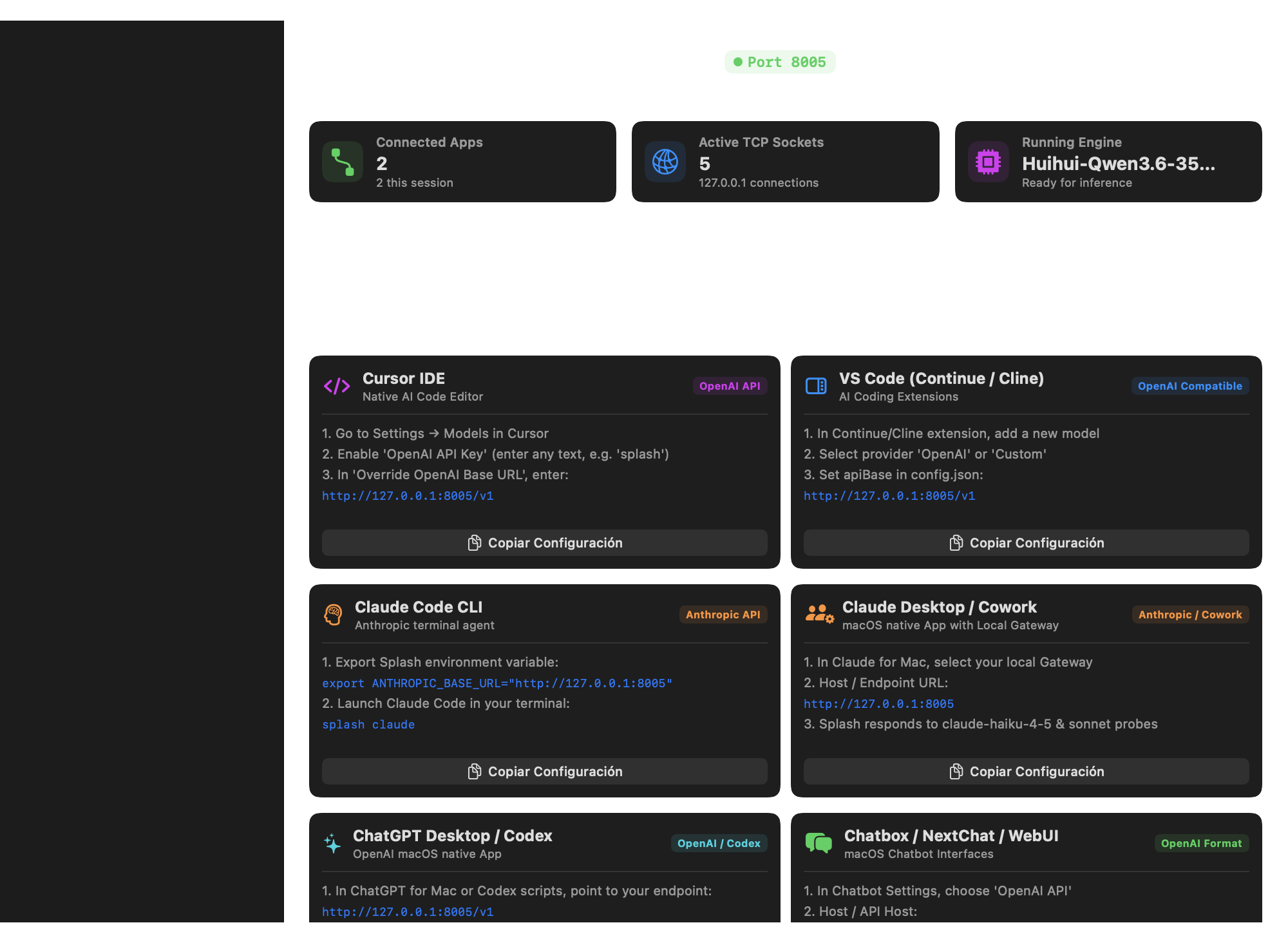
Connection Guide Module: Quick setup instructions and one-click copyable configuration snippets for Claude Desktop, Cursor IDE, VS Code (Cline/Continue), Chatbox, and Python scripts (OpenAI SDK / LangChain).
5. 📦 Hugging Face Model Manager & Download Telemetry
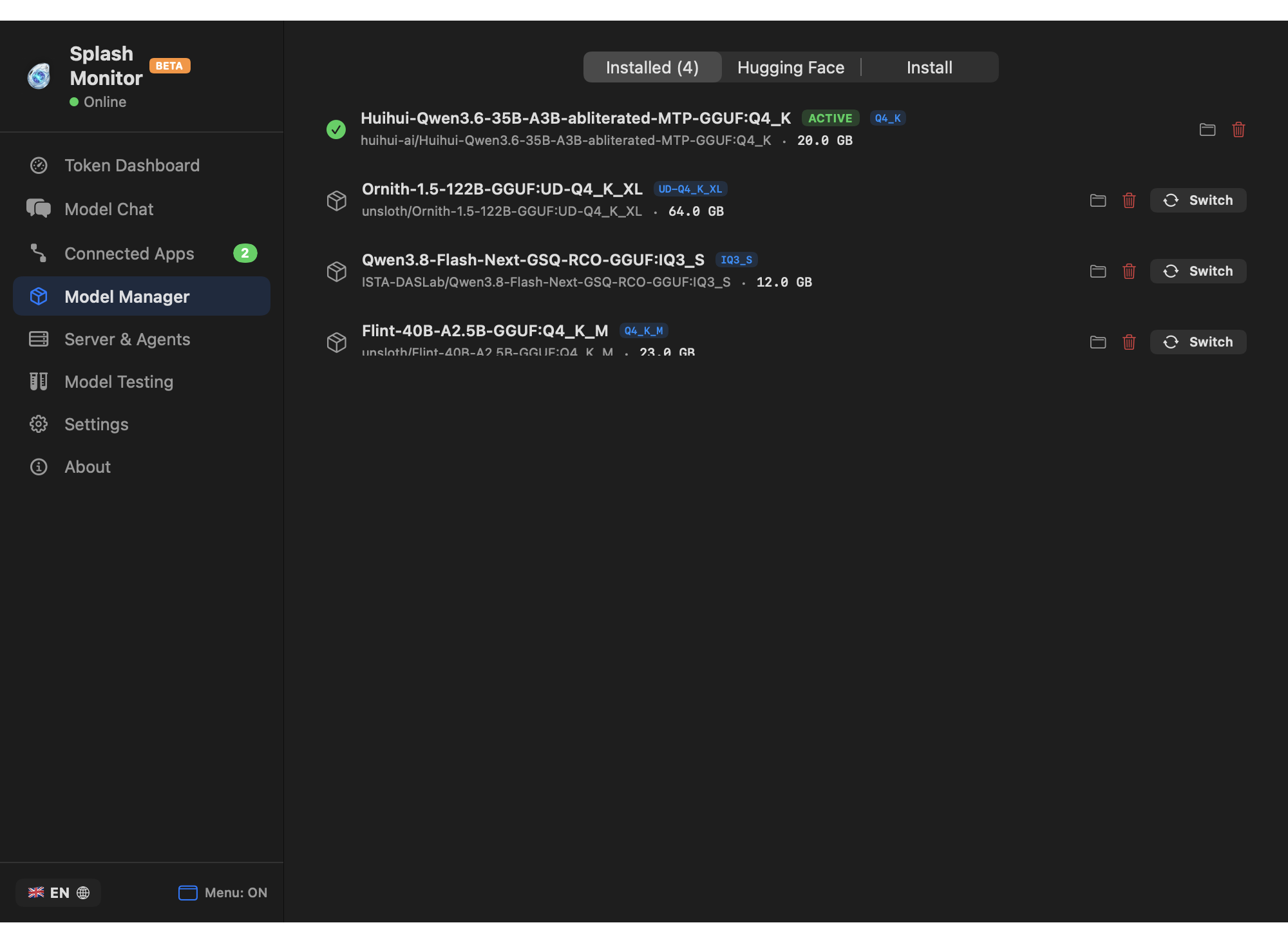
Model Management Module: Disk footprint inspection for local models, hot-swap deployment, and Hugging Face catalog exploration with support for official NVIDIA quantized models (NVFP4 / FP8), GGUF variants, assisted guidance for protected repositories (403 Gated Models), and --language-only mode for Coder/text models.
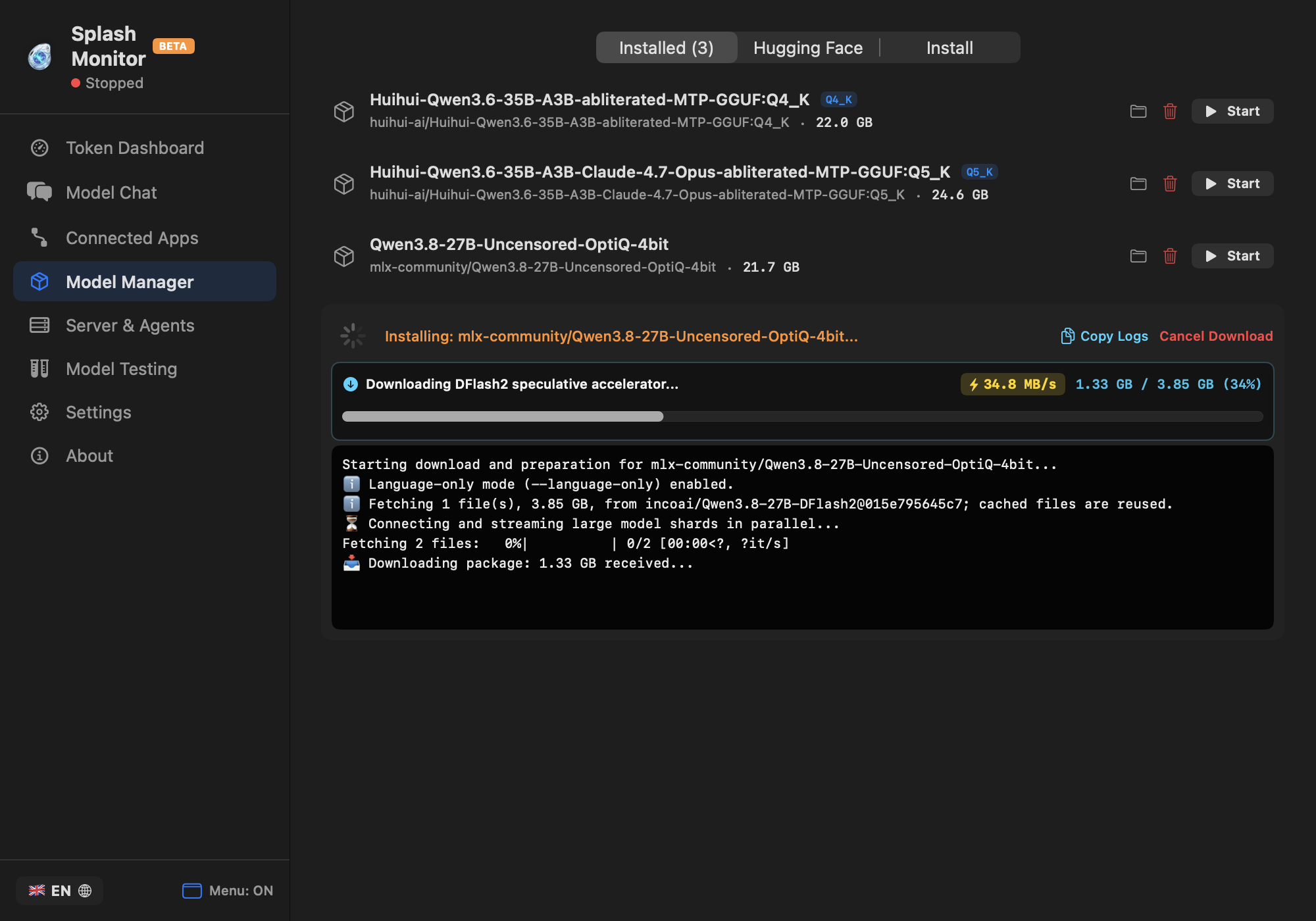
Real-Time Download Telemetry: Live transfer speed measurement in MB/s (⚡️ 34.8 MB/s), continuous progress bar, exact GB downloaded counter vs expected total, and phase detection (DFlash2 speculative accelerator, model weights, and Splash engine assembly).
6. 🧪 Model Testing & Diagnostics Lab
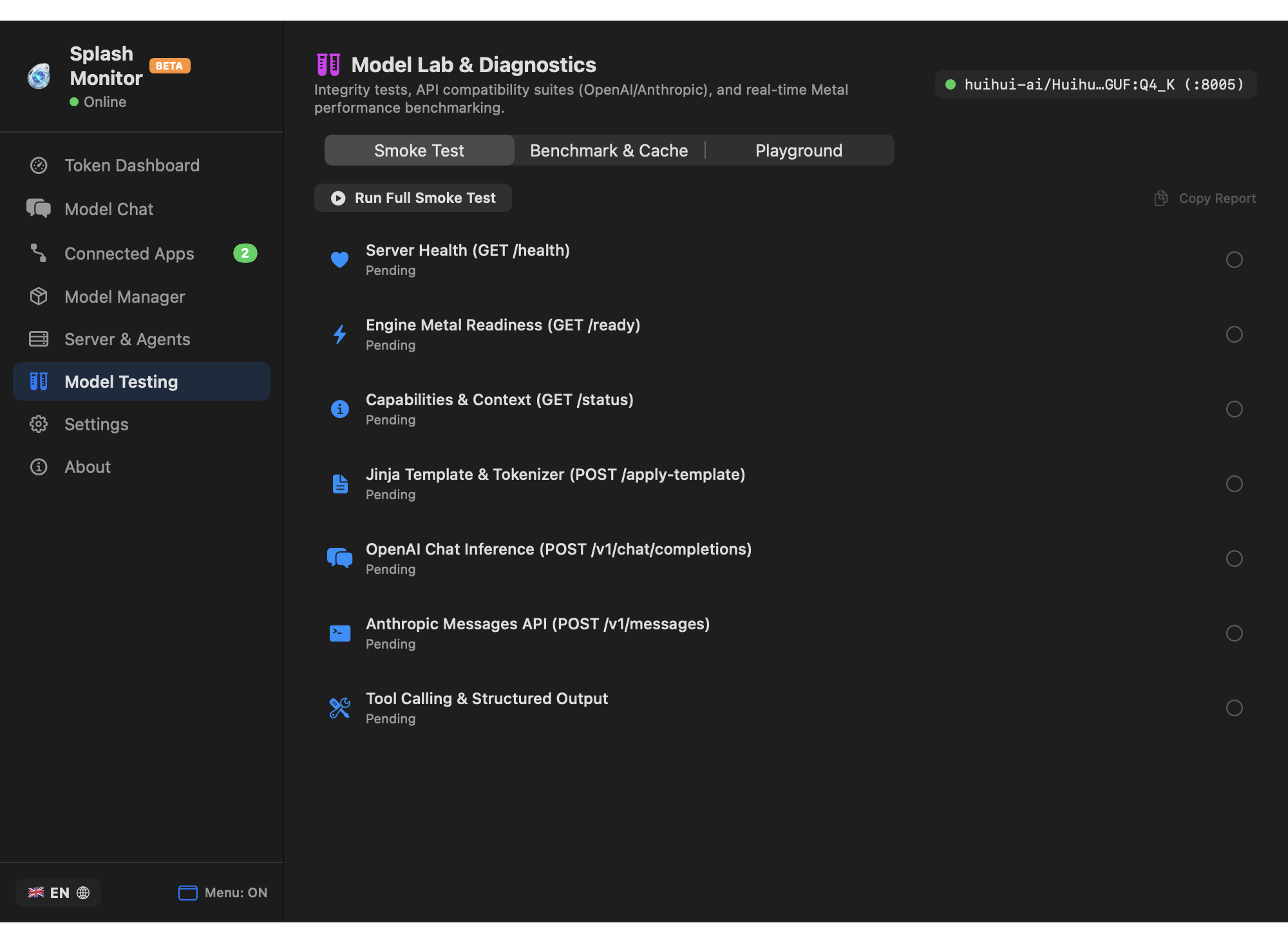
Model Testing Module: Complete one-click verification suite with Smoke Testing (server health, Metal engine readiness, Jinja templates, OpenAI Chat, Anthropic Messages, and Tool Calling/JSON validation), Metal speed benchmarking with KV Cache speedup factor calculation, and an interactive local inference Playground.
7. ⚙️ System Preferences & Settings
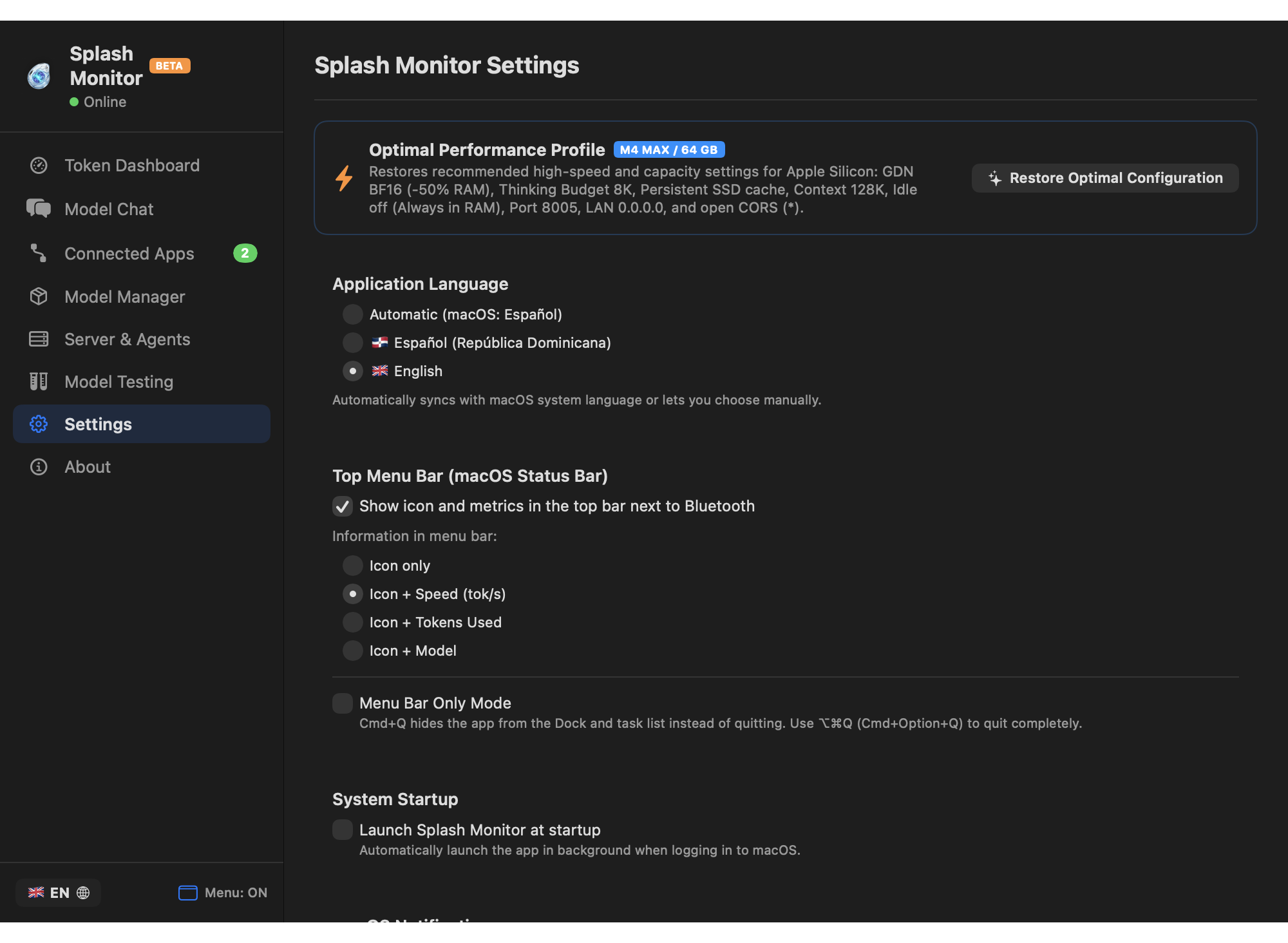
Settings Module: Language selector (Dominican Spanish 🇩🇴 / English 🇬🇧 / macOS auto-sync), customizable macOS menu bar item display modes, and background polling interval controls.
8. ℹ️ About Splash Monitor
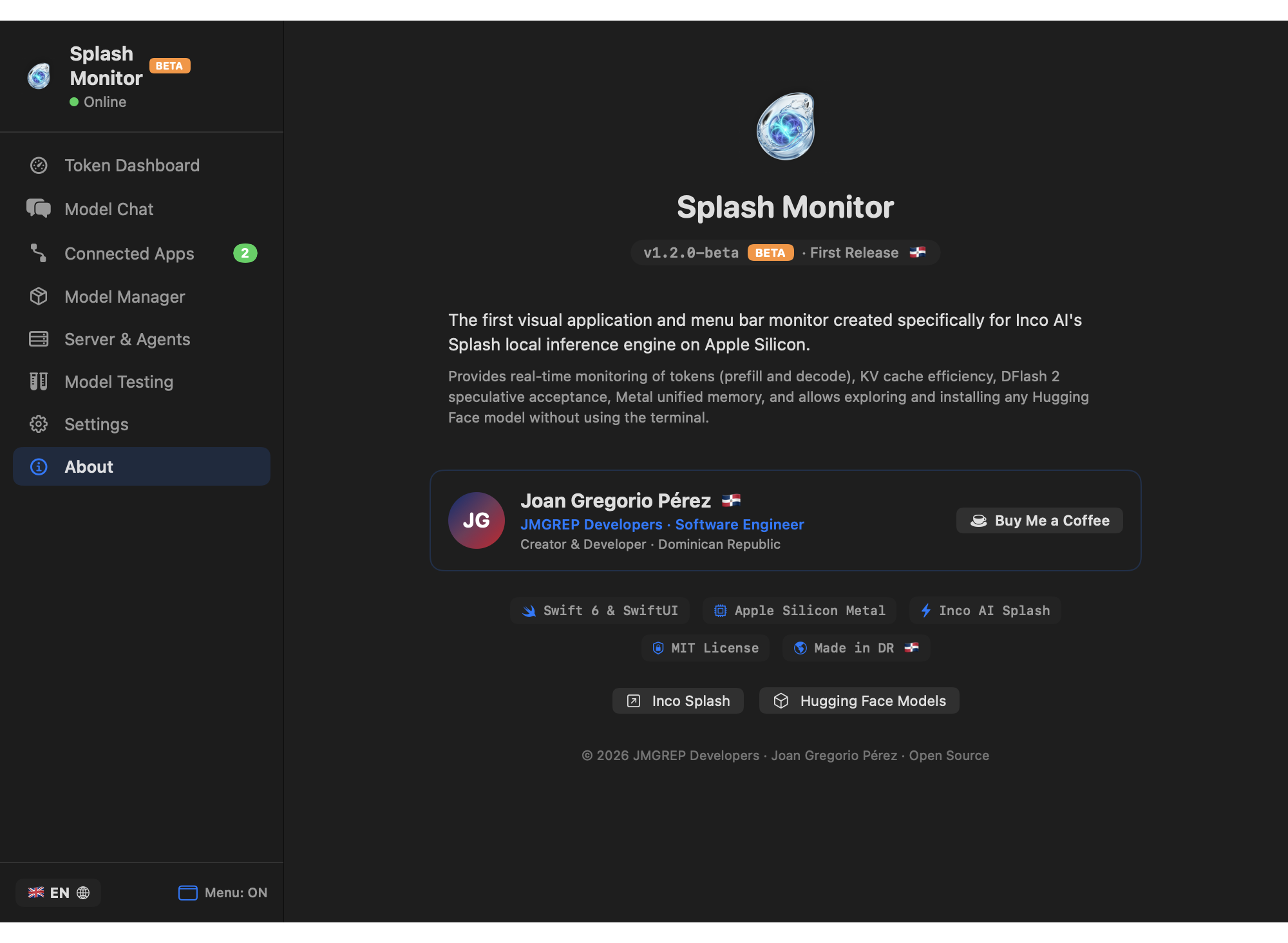
About Module: Version information (v1.1.0-beta), native Swift 6 and Metal architecture details, MIT open-source license, and author credits for Joan Gregorio Pérez (JMGREP Developers).
📥 Installation
Prerequisites — Inco AI Splash Engine
Splash Monitor is a graphical monitor for Inco AI's Splash local inference engine. Before installing Splash Monitor, you need Splash running on your Mac.
Install Splash from the official Inco AI repository:
# Add the official Inco AI tap and install Splash
brew install incoai/tap/splash
📋 Splash engine requirements (from incoai/splash):
- Mac with Apple Silicon M3 or newer
- macOS 26.4 (Tahoe) or later
- 36 GB of unified memory (48 GB or more recommended)
Models are downloaded automatically on first use. See available models at huggingface.co/incoai.
Once Splash is installed and running, install Splash Monitor:
Option A — Homebrew Cask (Recommended · Official · Zero Gatekeeper Prompts)
The native macOS package manager method. When installed through Homebrew, macOS does not flag it with browser quarantine:
brew install --cask hometrix/tap/splash-monitor
⚠️ Check which version the cask installs. The tap cask is a separate file in
hometrix/homebrew-tapand can lag behind this repository's releases: in the v1.0.2-beta audit the cask still served 1.0.0-beta. Verify withbrew info --cask splash-monitororSplash Monitor.app/Contents/Info.plist. If the cask is behind, use Option B or C, which always point at the latest release.
Option B — 1-Line Quick Install (Terminal / Script)
The quickest method without tapping:
curl -fsSL https://raw.githubusercontent.com/hometrix/SplashMonitor/main/scripts/install.sh | bash
⚡️ This script resolves the latest release, downloads the official DMG, verifies its SHA-256 checksum against the published
SHA256SUMSfile (aborting on mismatch), mounts it, installs to/Applications, and opens the app automatically. Pin a specific version withSPLASH_MONITOR_TAG=v1.1.0-beta.
Option C — Manual DMG Download
Download the official installer: 👉 SplashMonitor-1.1.0-beta.dmg
And its checksum file: SHA256SUMS
shasum -a 256 -c SHA256SUMS # must print "OK"Double-click the downloaded
.dmgand drag Splash Monitor to Applications.
🛡️ If macOS shows: "Apple cannot verify that this app is free of malware...": This is a standard Gatekeeper notice for independent open-source apps. To allow it:
- Open System Settings on your Mac.
- Go to Privacy & Security and scroll down to the Security section.
- Click "Open Anyway".
Or via Terminal (1 second):
xattr -d com.apple.quarantine ~/Downloads/SplashMonitor*.dmg
Option B — Build from Source (Developers)
Requirements:
| Requirement | Minimum Version |
|---|---|
| Mac | Apple Silicon (M3, M4, M5) |
| macOS | 13.0 or later |
| Xcode | 15+ or Swift 6.0 Toolchain |
| Splash Engine | incoai/tap/splash |
# 1. Clone the repository
gh repo clone hometrix/SplashMonitor
cd SplashMonitor

# 2. Run the test suite (113 tests, no network, no real engine)
swift test

# 3. Build the release binary and bundle .app
./scripts/build_app.sh

# 4. (Optional) Create the compressed DMG installer + SHA256SUMS
./scripts/create_dmg.sh

# 5. Launch the application
open "Splash Monitor.app"
🔢 Single source of truth for the version.
Sources/SplashMonitor/Services/Version.swiftholds the version, bundle identifier and build number, and all three scripts extract them withsed. Before, the version was declared in five places and had already diverged.
🧪 Tests
swift test                                   # 113 automated tests (100% pass)
swift test --filter PollingTests             # one suite
swift test --filter ServerOptionsTests       # CLI options and Splash 1.3.2 flags
swift test --filter SystemMemoryPressureTests # macOS kernel memory sentinel
Tests are hermetic by design: a stub status transport, a recording process terminator,
a private temp directory and bootstrapNetwork: false (no Hugging Face or GitHub
traffic). No test signals a real process or writes to your ~/.zshrc.
| Suite | Purpose |
|---|---|
VersionTests |
Semantic version ordering and single-source versioning consistency |
ModelIDValidatorTests |
Rejection of model identifiers with shell injection or traversal |
ProcessIntrospectionTests |
Guarantees client processes are never signaled, only engine listeners |
ServeLockTests |
Parsing serve-<port>.lock, empty, corrupted, and orphaned locks |
ShellEnvironmentTests |
Environment sync, idempotent ~/.zshrc mutation and revert |
ModelSizeCacheTests |
Avoids re-scanning model directory trees on every polling tick |
PollingTests |
Guarantees the dashboard re-detects the engine after restart |
ClientTerminationPolicyTests |
Prevents terminating recycled PIDs or the monitor itself |
StatusModelTests |
Engine /status contract conformity and forward-compatibility |
ServerCLIValidatorTests |
Strict validation of CLI arguments, GDN formats, and token budgets |
ServerOptionsTests |
Command generation with LAN host, variants, GDN BF16, and 1.3.2 flags |
AgentLaunchTests |
Launchers and environment integration for Claude Cowork, Pi, Hermes, and DeepSeek Harness |
SystemMemoryPressureTests |
Kernel memory pressure notifications and on-demand purge |
ModelDiagnosticTests |
Comprehensive endpoint verification and Metal KV acceleration benchmark |
🏗️ Architecture
SplashMonitor/
├── Package.swift                    # Swift Package Manager manifest
├── LICENSE                          # MIT License
├── CONTRIBUTING.md                  # Contribution guidelines (bilingual)
├── SECURITY.md                      # Vulnerability disclosure policy
├── CODE_OF_CONDUCT.md               # Contributor Covenant v2.1
├── README.md                        # Bilingual technical documentation
├── Resources/
│   ├── AppIcon.icns                 # Multi-resolution macOS icon bundle
│   └── AppIcon.iconset/             # Standard & Retina icon assets
├── scripts/
│   ├── build_app.sh                 # Release build + .app bundling
│   ├── create_dmg.sh                # DMG packaging via hdiutil + SHA256SUMS
│   └── install.sh                   # 1-line installer with SHA-256 verification
└── Sources/
    └── SplashMonitor/
        ├── SplashMonitorApp.swift   # Entry point (WindowGroup + MenuBarExtra)
        ├── Models/
        │   └── SplashStatus.swift   # Codable structs for /status & HF API
        ├── Services/
        │   ├── SplashService.swift  # Singleton (polling, processes, server)
        │   ├── LocalizationService.swift # Dynamic OS language detection
        │   ├── SystemMemoryPressureSentinel.swift # macOS kernel RAM pressure sentinel
        │   ├── ServerCLIValidator.swift  # CLI flags sanitization and validation
        │   ├── ModelIDValidator.swift    # Strict model identifier validator
        │   ├── ModelBenchmarkRunner.swift # Token benchmark and KV acceleration
        │   └── Version.swift        # Single source of truth for version (P-15)
        └── Views/
            ├── MainWindowView.swift # NavigationSplitView desktop window (8 modules)
            ├── MenuBarView.swift    # Interactive menu bar popover
            ├── TokenMetricsView.swift # Sparkline, speed cards, memory gauge
            ├── ModelManagerView.swift # Local models + HF catalog + telemetry
            ├── ServerControlView.swift # Selector, controls, agent launchers, 1.3.2 flags
            ├── ConnectedAppsView.swift # Connected apps + DeepSeek Harness
            ├── ConnectedAppsGuideView.swift # Client integration guide
            ├── ModelTestingView.swift  # Smoke testing + benchmarking + playground
            ├── SettingsView.swift   # Language, menu bar, and polling preferences
            ├── AboutView.swift      # Author credits and version info
            ├── AppIconView.swift    # App icon rendering component
            └── DominicanEmblem.swift # Dominican Republic national emblem
🛠️ Tech Stack
| Component | Technology |
|---|---|
| Language | Swift 6 |
| UI Framework | SwiftUI |
| Package Manager | Swift Package Manager |
| Platform | macOS 13.0+ (Apple Silicon) |
| Inference Engine | Inco AI Splash |
| Model Catalog | Hugging Face API |
| Icon | Custom 3D liquid droplet (SF Symbols + Canvas) |
| Packaging | hdiutil (native macOS DMG) |
🤝 Contributing
Contributions are welcome! Please read our guidelines before participating:
| Document | Description |
|---|---|
| 📋 Contributing Guide | Workflow, code conventions, and project structure |
| 🔒 Security Policy | Responsible vulnerability disclosure |
| 📜 Code of Conduct | Contributor Covenant v2.1 |
🛠️ Solución de Problemas (Troubleshooting)
1. Conflicto de Puerto (Puerto 8000 en uso)
Si el puerto predeterminado 8000 está ocupado por otro servicio de tu Mac (como Uvicorn, Django, Docker o Node.js):
- Opción A (Automática): En el panel de control del servidor, pulsa el botón ✨ "Sugerir libre" para que Splash Monitor asigne automáticamente el siguiente puerto disponible (ej. 8001 o 8005).
- Opción B (Personalizada): Escribe manualmente el puerto que desees en el campo de texto. Splash Monitor utilizará su Bridge Launcher para ejecutar Splash en el puerto elegido sin errores.
- Opción C (Liberar puerto): Si intentas arrancar en un puerto ocupado, la app te mostrará qué proceso lo tiene tomado y te ofrecerá un botón para liberarlo con un solo clic.
2. Agentes de Código (splash claude, OpenCode, Codex, Hermes)
Si al ejecutar splash claude en tu terminal ves el mensaje:
error: No ready Splash server. Run 'splash serve --model <HF_REPO_ID>' in another terminal first.
Asegúrate de que:
- El servidor Splash esté iniciado y con su modelo cargado (verás el estado en verde en Splash Monitor).
- Si ejecutaste el servidor en un puerto personalizado (distinto de 8000), lanza el agente directamente desde los botones de Splash Monitor para que la app configure automáticamente las variables de entorno de conexión (
ANTHROPIC_BASE_URL,SPLASH_PORT).
👤 Author & Credits
|
|
Joan Gregorio Pérez Software Engineer · JMGREP Developers 🇩🇴 Dominican Republic GitHub |
Special Thanks:
- Inco AI — Splash inference engine
- Hugging Face — Model catalog
💖 Support the Project
If you find Splash Monitor valuable for your local AI workflows and autonomous coding agents, consider supporting its ongoing development by buying me a coffee! Every contribution helps keep the project updated, tested, and fine-tuned for Apple Silicon.
📄 License
This project is licensed under the MIT License. See the LICENSE file for full terms.
MIT License — Copyright (c) 2026 JMGREP Developers / Joan Gregorio Pérez
Attributions & Component Licenses
Splash Monitor is an independent open-source application that interfaces with the Splash inference engine, machine learning models, and autonomous coding agents. Below are the licenses and attributions for each component:
1. Inference Engine & Monitor
| Component | License | Author / Organization | Repository |
|---|---|---|---|
| Splash Monitor | MIT | JMGREP Developers (Joan Gregorio Pérez) | hometrix/SplashMonitor |
| Splash Engine | Apache-2.0 | Inco AI | incoai/splash |
2. Quantized Models & Speculative Accelerators (Splash 1.3.1 / 1.3.2)
| Model / Checkpoint | License | Provider / Origin | Repository |
|---|---|---|---|
| Qwen3.8-27B-NVFP4 | Apache-2.0 | NVIDIA Model Optimizer | nvidia/Qwen3.8-27B-NVFP4 |
| Qwen3.6-35B-A3B-nvfp4 | Apache-2.0 | MLX Community | mlx-community/Qwen3.6-35B-A3B-nvfp4 |
| Qwen3.8-27B-4bit | Apache-2.0 | MLX Community | mlx-community/Qwen3.8-27B-4bit |
| Qwen3.6-35B-A3B-4bit | Apache-2.0 | MLX Community | mlx-community/Qwen3.6-35B-A3B-4bit |
| DFlash 2 Speculative Decoders | Apache-2.0 | Inco AI | incoai/Qwen3.8-27B-DFlash2 |
| Qwen Base Models (27B & 35B) | Apache-2.0 | Alibaba Cloud / Qwen Team | Qwen/Qwen |
| GGUF Quantized Variants | Apache-2.0 / MIT | llama.cpp / Community Creators | Hugging Face Hub |
3. Supported Autonomous Coding Agents & Clients
| Agent / Client | License / Terms | Developer | Official Link |
|---|---|---|---|
DeepSeek Harness (dsh) |
MIT | DeepSeek Community | GitHub |
Pi Agent (pi) |
MIT | Mario Zechner / Pi.dev | pi.dev |
| Hermes Agent | MIT | Nous Research | NousResearch |
| OpenCode | MIT | SST | opencode.ai |
| Codex CLI | Apache-2.0 / MIT | OpenAI Community | OpenAI Developers |
| Claude Code & Cowork | Terms of Service | Anthropic, PBC | anthropic.com |
⚠️ Model Weights Notice: Model checkpoints, weights, and quantizations retain their own specific licenses and terms from their respective authors on the Hugging Face Hub.
ℹ️ Disclaimer: Splash Monitor is an independent project developed by JMGREP Developers and is not affiliated with, sponsored by, or endorsed by Inco AI, Anthropic, OpenAI, NVIDIA, or Alibaba Cloud. "Splash" is a trademark of Inco AI. This software interfaces with the public Splash local API under the terms of the Apache-2.0 license.
Made with ❤️ in the Dominican Republic 🇩🇴

関連プロジェクトを探す
読み込み中…