
grassmunk/Chicago95 has 6,015 GitHub stars and 196 forks. GitHot measured +8 in 7 days. Last checked 2026-11-09 07:06 UTC. Last push 2026-10-01.
A rendition of everyone's favorite 1995 Microsoft operating system for Linux.
計測したスター増加
- 24時間
- 更新が遅れています
- 7日間
- +8
- 15日間
- 履歴を収集中
- 1か月
- 履歴を収集中
期間ごとの純増数です。期間は重複しており、日別の値ではありません。未計測の値は空欄です。スター数は注目度の指標であり、品質の保証ではありません。
README.md
オリジナルChicago95
XFCE / Xubuntu Windows 95 Total Conversion
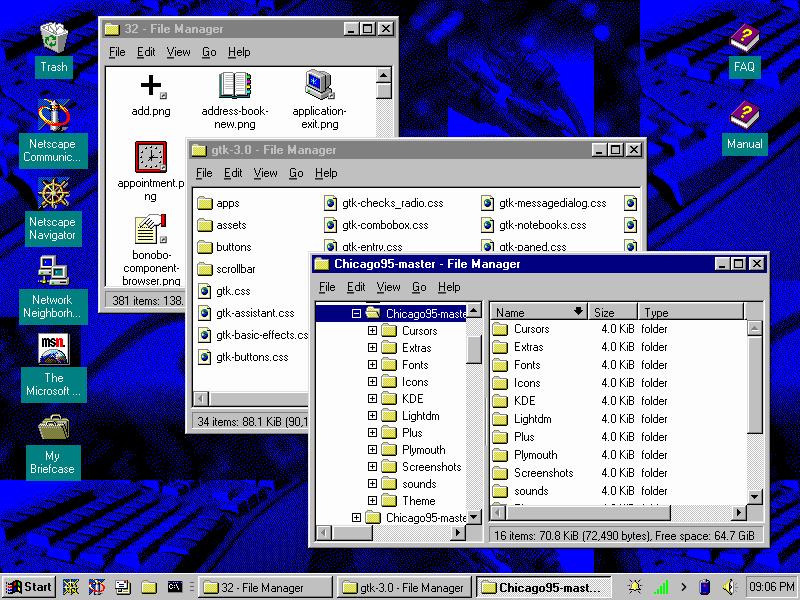
Click here for more screenshots
I was unhappy with the various XFCE/GTK2/GTK3 Windows 95 based themes and decided to make one that was more consistent across the board for theming.
Included in this theme:
- Icons to complete the icon theme started with Classic95
- GTK2, GTK3 and GTK4 themes (GTK4 includes libadwaita application support)
- Edited Redmond XFWM theme to more accurately reflect Windows 95
- Chicago95 Plus! A tool to preview and install Windows 95/98/ME/XP themes
- Plymouth theme created from scratch
- An MS-DOS inspired theme for oh-my-zsh
- Partial support for HiDPI monitors
- Partial icon theme for LibreOffice 6+
Requirements:
- GTK+ 3.22 or 3.24
- GTK 4.22 and libadwaita 1.9 for the GTK4 stylesheet (optional, see INSTALL.md)
- Xfce 4.12, 4.14, 4.16
- gtk2-engines-pixbuf (Recommended for GTK2 applications)
- The xfce4-panel-profiles package
- A Window compositor
(If your are using an older desktop that uses GTK3.18, you can use this forked version of the theme.)
Documentation
Click here for Chicago95 documentation and extra features.
Installation
Installation and setup instructions:
There are multiple ways to set up Chicago95, including an automated installer. Click here for install steps.
Install a Microsoft Windows Plus! theme:
Click here for installing custom themes.
Install the Plymouth boot splash theme:
Click here for install steps.
Install the LibreOffice icon theme:
Click here for installing the LibreOffice Chicago95 icon theme.
Miscellaneous
KDE Support (experimental):
- SDDM Logon Manager:: Click
Install from file...in Loggin Screen (SDDM) manager. SelectSDDM/Chicago95.tar.gzto install the theme. - Splash Screen:
plasmapkg2 -t lookandfeel -i KDE/Splash/chicago95.splashscreen
Screenshots:
Click here to view screenshots
IRC server:
Click here to connect to the IRC server. Please read server rules and be kind.
Code and license
License: GPL-3.0+/MIT