
google-deepmind/graph_nets
google-deepmind/graph_nets has 5,408 GitHub stars and 778 forks. GitHot measured 0 stars in 24 hours. Last checked 2026-11-05 21:09 UTC. Last push 2022-12-12.
Tensorflow で Graph Nets を構築
計測したスター増加
- 24時間
- 0
- 7日間
- 履歴を収集中
- 15日間
- 履歴を収集中
- 1か月
- 履歴を収集中
期間ごとの純増数です。期間は重複しており、日別の値ではありません。未計測の値は空欄です。スター数は注目度の指標であり、品質の保証ではありません。
README.md
オリジナル
Graph Nets library
Graph Nets is DeepMind's library for building graph networks in Tensorflow and Sonnet.
Contact [email protected] for comments and questions.
What are graph networks?
A graph network takes a graph as input and returns a graph as output. The input graph has edge- (E ), node- (V ), and global-level (u) attributes. The output graph has the same structure, but updated attributes. Graph networks are part of the broader family of "graph neural networks" (Scarselli et al., 2009).
To learn more about graph networks, see our arXiv paper: Relational inductive biases, deep learning, and graph networks.

Installation
The Graph Nets library can be installed from pip.
This installation is compatible with Linux/Mac OS X, and Python 2.7 and 3.4+.
The library will work with both the CPU and GPU version of TensorFlow, but to allow for that it does not list Tensorflow as a requirement, so you need to install Tensorflow separately if you haven't already done so.
To install the Graph Nets library and use it with TensorFlow 1 and Sonnet 1, run:
(CPU)
$ pip install graph_nets "tensorflow>=1.15,<2" "dm-sonnet<2" "tensorflow_probability<0.9"
(GPU)
$ pip install graph_nets "tensorflow_gpu>=1.15,<2" "dm-sonnet<2" "tensorflow_probability<0.9"
To install the Graph Nets library and use it with TensorFlow 2 and Sonnet 2, run:
(CPU)
$ pip install graph_nets "tensorflow>=2.1.0-rc1" "dm-sonnet>=2.0.0b0" tensorflow_probability
(GPU)
$ pip install graph_nets "tensorflow_gpu>=2.1.0-rc1" "dm-sonnet>=2.0.0b0" tensorflow_probability
The latest version of the library requires TensorFlow >=1.15. For compatibility with earlier versions of TensorFlow, please install v1.0.4 of the Graph Nets library.
Usage example
The following code constructs a simple graph net module and connects it to data.
import graph_nets as gn
import sonnet as snt

# Provide your own functions to generate graph-structured data.
input_graphs = get_graphs()

# Create the graph network.
graph_net_module = gn.modules.GraphNetwork(
    edge_model_fn=lambda: snt.nets.MLP([32, 32]),
    node_model_fn=lambda: snt.nets.MLP([32, 32]),
    global_model_fn=lambda: snt.nets.MLP([32, 32]))

# Pass the input graphs to the graph network, and return the output graphs.
output_graphs = graph_net_module(input_graphs)
Demo Jupyter notebooks
The library includes demos which show how to create, manipulate, and train graph networks to reason about graph-structured data, on a shortest path-finding task, a sorting task, and a physical prediction task. Each demo uses the same graph network architecture, which highlights the flexibility of the approach.
Try the demos in your browser in Colaboratory
To try out the demos without installing anything locally, you can run the demos in your browser (even on your phone) via a cloud Colaboratory backend. Click a demo link below, and follow the instructions in the notebook.
Run "shortest path demo" in browser
The "shortest path demo" creates random graphs, and trains a graph network to label the nodes and edges on the shortest path between any two nodes. Over a sequence of message-passing steps (as depicted by each step's plot), the model refines its prediction of the shortest path.

Run "sort demo" in browser (Run TF2 version)
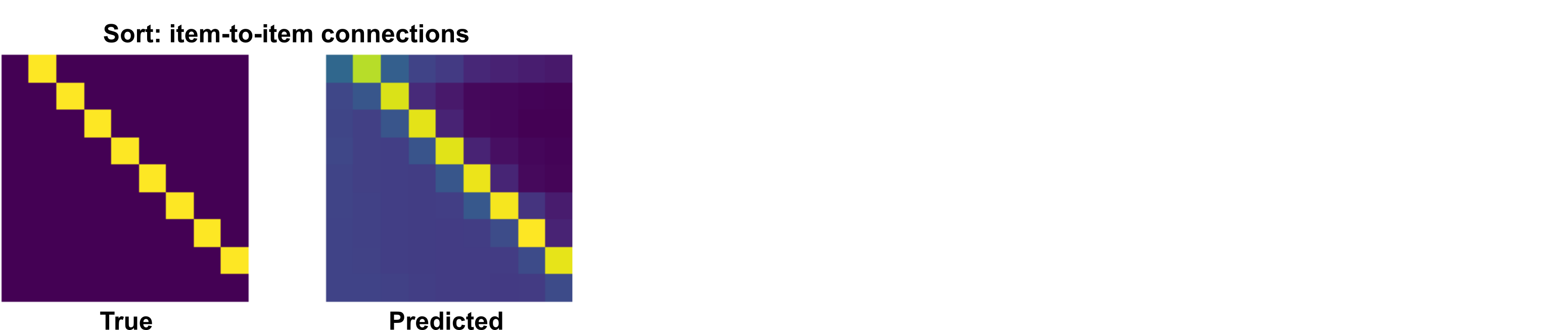
The "sort demo" creates lists of random numbers, and trains a graph network to sort the list. After a sequence of message-passing steps, the model makes an accurate prediction of which elements (columns in the figure) come next after each other (rows).
Run "physics demo" in browser
The "physics demo" creates random mass-spring physical systems, and trains a graph network to predict the state of the system on the next timestep. The model's next-step predictions can be fed back in as input to create a rollout of a future trajectory. Each subplot below shows the true and predicted mass-spring system states over 50 steps. This is similar to the model and experiments in Battaglia et al. (2016)'s "interaction networks".

Run "graph nets basics demo" in browser (Run TF2 version)
The "graph nets basics demo" is a tutorial containing step by step examples about how to create and manipulate graphs, how to feed them into graph networks and how to build custom graph network modules.
Run the demos on your local machine
To install the necessary dependencies, run:
$ pip install jupyter matplotlib scipy
To try the demos, run:
$ cd <path-to-graph-nets-library>/demos
$ jupyter notebook
then open a demo through the Jupyter notebook interface.
Other graph neural network libraries
Check out these high-quality open-source libraries for graph neural networks:
pytorch_geometric: See MetaLayer for an analog of our Graph Nets interface.
関連プロジェクトを探す
tensorflow/tensorflow
すべての人のためのオープンソース機械学習フレームワーク
201,314 スターhuggingface/transformers
🤗 Transformers:テキスト、ビジョン、音声、マルチモーダルの最先端機械学習モデル向けモデル定義フレームワークで、推論と学習の両方に対応します。
168,559 スターAUTOMATIC1111/stable-diffusion-webui
Stable Diffusion の Web UI
165,250 スターComfy-Org/ComfyUI
グラフとノードによるインターフェースを備えた、最も強力でモジュール性の高い拡散モデル向け GUI、API、バックエンド。世界最速のローカル推論エンジン。
145,137 スター