
概要
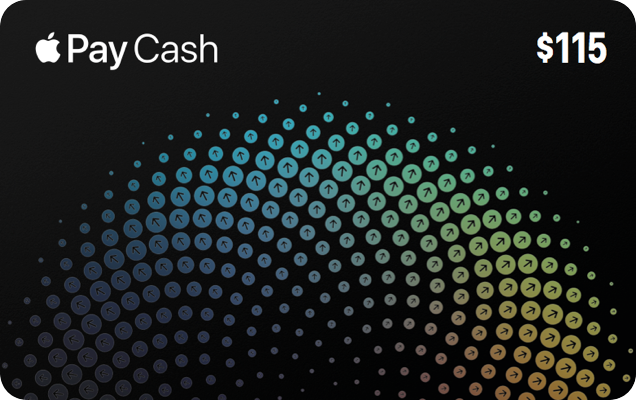
虹色のエフェクトビュー(Apple Pay Cashに着想を得たもの)✨
制作・メディア計測したスター増加
- 24時間
- 0
- 7日間
- 0
- 15日間
- 履歴を収集中
- 1か月
- 履歴を収集中
期間ごとの純増数です。期間は重複しており、日別の値ではありません。未計測の値は空欄です。スター数は注目度の指標であり、品質の保証ではありません。
README.md
オリジナルShiny





Shiny is an iOS library that generates an iridescent effect view matched to the gyroscope, similar to the Apple Pay Cash card in the Wallet app.

$ pod try Shiny
Requirements
- iOS 9.0+
- Swift 5 (Shiny 2.x), Swift 4 (Shiny 1.x)
Usage
Adding ShinyView programmatically (supports storyboard/xib too):
import Shiny

let shinyView = ShinyView(frame: CGRect(x: 0, y: 0, width: 320, height: 200))
shinyView.colors = [.gray, .red, .green, .blue, .gray]
shinyView.startUpdates() // necessary
view.addSubview(shinyView)
You must call startUpdates() for the instance to observe motion changes. Calling stopUpdates() on the instance will stop motion updates.
func startUpdates() // Starts listening to motion updates.
func stopUpdates() // Stops listening to motion updates.
Customization
The ShinyView exposes several properties to customize the radial gradient used to create the shiny effect:
var colors: [UIColor] // The color of each gradient stop.
var locations: [CGFloat]? // The location of each gradient stop. The default is `nil`.
var scale: CGFloat // The scale factor of the gradient. The default is `2.0`.
Installation
Shiny is available via CocoaPods and Carthage.
CocoaPods
To install with CocoaPods, simply add this in your Podfile:
use_frameworks!
pod "Shiny"
Carthage
To install with Carthage, simply add this in your Cartfile:
github "efremidze/Shiny"
Mentions
Communication
- If you found a bug, open an issue.
- If you have a feature request, open an issue.
- If you want to contribute, submit a pull request.
Apps Using Shiny
Feel free to submit a PR if you’re using this library in your apps.
License
Shiny is available under the MIT license. See the LICENSE file for more info.
関連プロジェクトを探す
読み込み中…