
cosZone/MoePeek has 885 GitHub stars and 69 forks. GitHot measured +1 stars in 24 hours and +9 in 7 days. Last checked 2026-11-24 00:43 UTC. Last push 2026-10-20.
できること
- Smart Translation: Use selected content first, fall back to the clipboard snapshot captured when invoked, or open manual input when both are empty
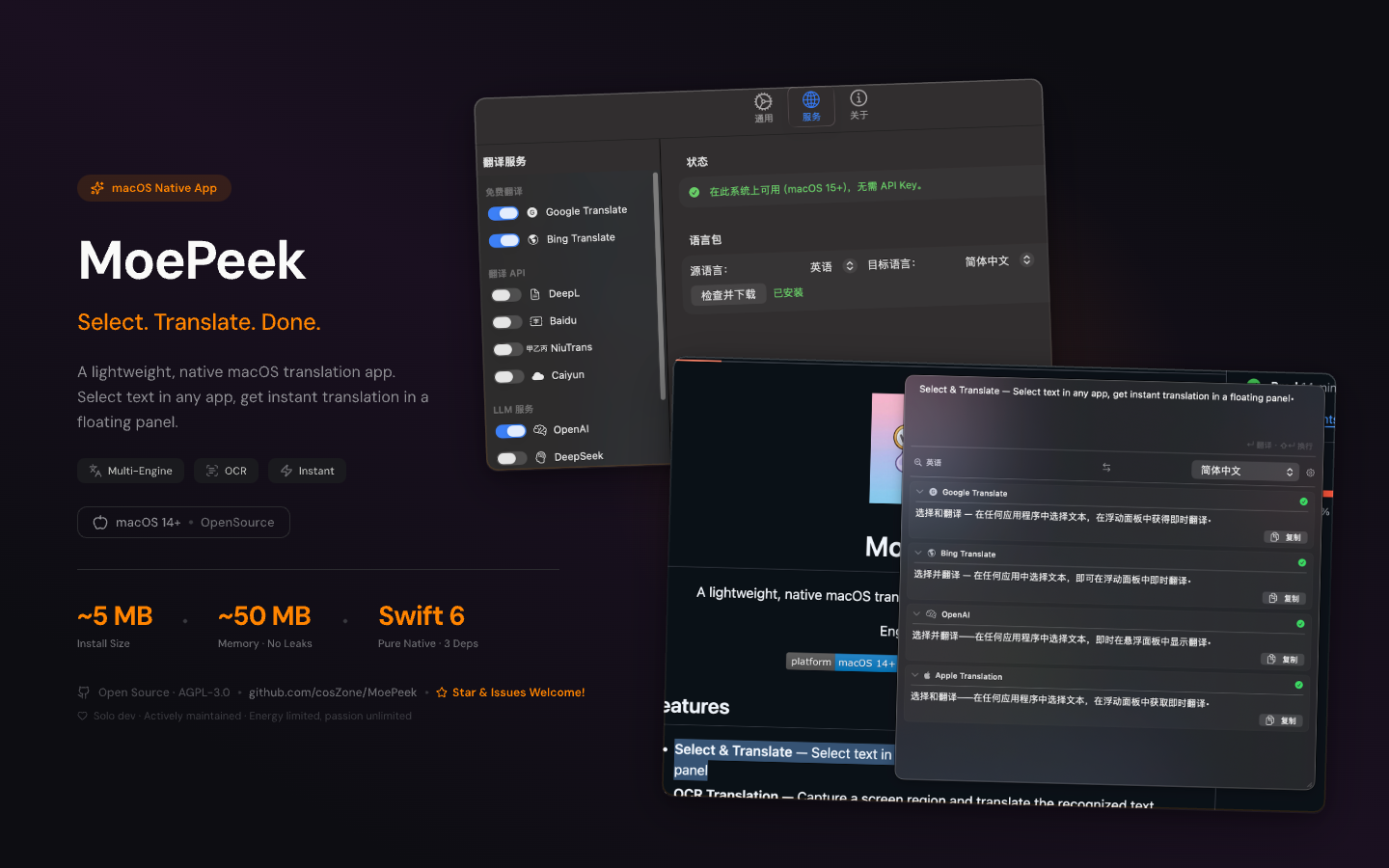
- Select & Translate: Select text in any app, get instant translation in a floating panel
- OCR Screenshot: Capture a screen region and translate the recognized text
- Clipboard Translation: Translate whatever's on your clipboard
計測したスター増加
- 24時間
- +1
- 7日間
- +9
- 15日間
- 履歴を収集中
- 1か月
- 履歴を収集中
期間ごとの純増数です。期間は重複しており、日別の値ではありません。未計測の値は空欄です。スター数は注目度の指標であり、品質の保証ではありません。
概要
純粋な Swift 6 で開発された軽量な macOS 用選択範囲翻訳ツールです。プライバシー保護のためデバイス上の Apple Translate を使用し、インストールサイズはわずか 5MB、メモリ使用量は約 50MBで安定しています。
セキュリティREADME.md
オリジナル

MoePeek
A lightweight, native macOS menu bar translator. Select text, get translation.
English | 中文





Features
Translation Modes
- Smart Translation: Use selected content first, fall back to the clipboard snapshot captured when invoked, or open manual input when both are empty
- Select & Translate: Select text in any app, get instant translation in a floating panel
- OCR Screenshot: Capture a screen region and translate the recognized text
- Clipboard Translation: Translate whatever's on your clipboard
- Manual Input: Type or paste text to translate on demand
Built-in Translation Services
| Free | API | LLM | System |
|---|---|---|---|
| Google Translate | DeepL | OpenAI | Apple Translation |
| Bing Translate | Baidu | Anthropic | (macOS 15+, on-device) |
| Youdao Translate | NiuTrans | DeepSeek | |
| Caiyun | OpenRouter | ||
| DeepLX | Requesty | ||
| 智谱 GLM | |||
| Ollama (local) | |||
| LM Studio (local) |
And More
- Smart language detection across 14 languages, auto-flips translation direction
- Text-to-speech playback for translated text using Apple's built-in speech synthesis
- Non-activating floating panels that never steal focus from your current app
- 3-tier text grabbing: Accessibility API → AppleScript → Clipboard fallback
- Markdown rendering for LLM results, plus optional rich text capture that keeps formatting and images from apps like Word
- Fully customizable keyboard shortcuts
- Built-in auto-updater via Sparkle
Why MoePeek
- ~7 MB app size: Pure Swift 6, only 4 dependencies. No Electron, no WebView.
- ~50 MB background memory: Systematic memory leak prevention for long-running sessions.
- Privacy-friendly: Apple Translation runs entirely on-device.
- Open source: AGPL-3.0 licensed. Issues and feedback welcome.
Limitations & Alternatives
MoePeek is a personal, AI vibe-coded side project. It works well for my own use cases, but it's not designed to be a polished, production-grade tool — there are plenty of edge cases in text selection and window handling that commercial tools have spent years ironing out, and MoePeek likely misses many of them.
If you need a more robust solution, these apps are excellent:
- Clicknow — feature-rich, actively maintained selection translator
- PopClip — the gold standard for macOS text selection actions, with a rich extension ecosystem
Installation
Download the latest .dmg or .zip from GitHub Releases and drag MoePeek.app into /Applications.
Usage
On first launch, MoePeek walks you through an onboarding flow to grant the required permissions:
- Accessibility: Needed to grab selected text via the Accessibility API
- Screen Recording: Needed for OCR screenshot translation
Default Shortcuts
| Action | Shortcut |
|---|---|
| Smart Translation | Not set |
| Translate Selection | ⌥ D |
| OCR Screenshot | ⌥ S |
| Manual Input | ⌥ A |
| Clipboard Translation | ⌥ V |
All shortcuts can be customized in Settings → General. Smart Translation is opt-in and never changes existing shortcut bindings; assign it there if you want the unified fallback behavior.
OpenClip Integration
Use OpenClip to send selected text to MoePeek:
- Install MoePeek and complete its initial setup.
- Download
MoePeek.openclipext.zipfrom the latest release and unzip it. - Open
MoePeek.openclipextwith OpenClip and confirm the installation. - Select text and choose MoePeek in OpenClip. The translation appears in MoePeek using your configured services and target language.
PopClip Integration
If you use PopClip, you can translate selected text with a single click from the PopClip bar.
Install the extension:
- Make sure MoePeek is installed and running.
- Download
MoePeek.popclipext.zipfrom the latest release and unzip it. - Remove the quarantine attribute so macOS allows the extension to load:
xattr -dr com.apple.quarantine /path/to/MoePeek.popclipext - Double-click
MoePeek.popclipext— PopClip will install it automatically. - Select any text in any app → click the MoePeek icon in the PopClip bar.
Note: If PopClip shows an error, also make sure MoePeek.app itself has been un-quarantined — see the FAQ below. (Related issue)
FAQ
"MoePeek.app is damaged and can't be opened"
The app is not notarized with Apple, so macOS Gatekeeper may block it. This does not mean the file is corrupted. To fix:
- Open Terminal
- Run:
sudo xattr -r -d com.apple.quarantine /Applications/MoePeek.app
Then launch the app as usual.
Onboarding screen doesn't appear / want to re-trigger onboarding
Reset all user preferences to restore the first-launch state:
defaults delete com.nahida.MoePeek
Then relaunch the app.
Contributing
Issues and PRs are welcome! A few things to know:
- I work a day job, so I may not respond immediately — I typically batch-process issues and PRs on weekends.
- Feel free to fork and build your own version. Per the AGPL-3.0 license, derivative works must also be open source.
Acknowledgements
MoePeek was inspired by Easydict and Bob. Thank you for paving the way.
Built with:
- KeyboardShortcuts by Sindre Sorhus
- Defaults by Sindre Sorhus
- Sparkle for auto-updates
- Textual for Markdown rendering
Contributors
Sponsor

Star History
License
関連プロジェクトを探す
読み込み中…