
coding-by-feng/ai-agent-session-center
概要
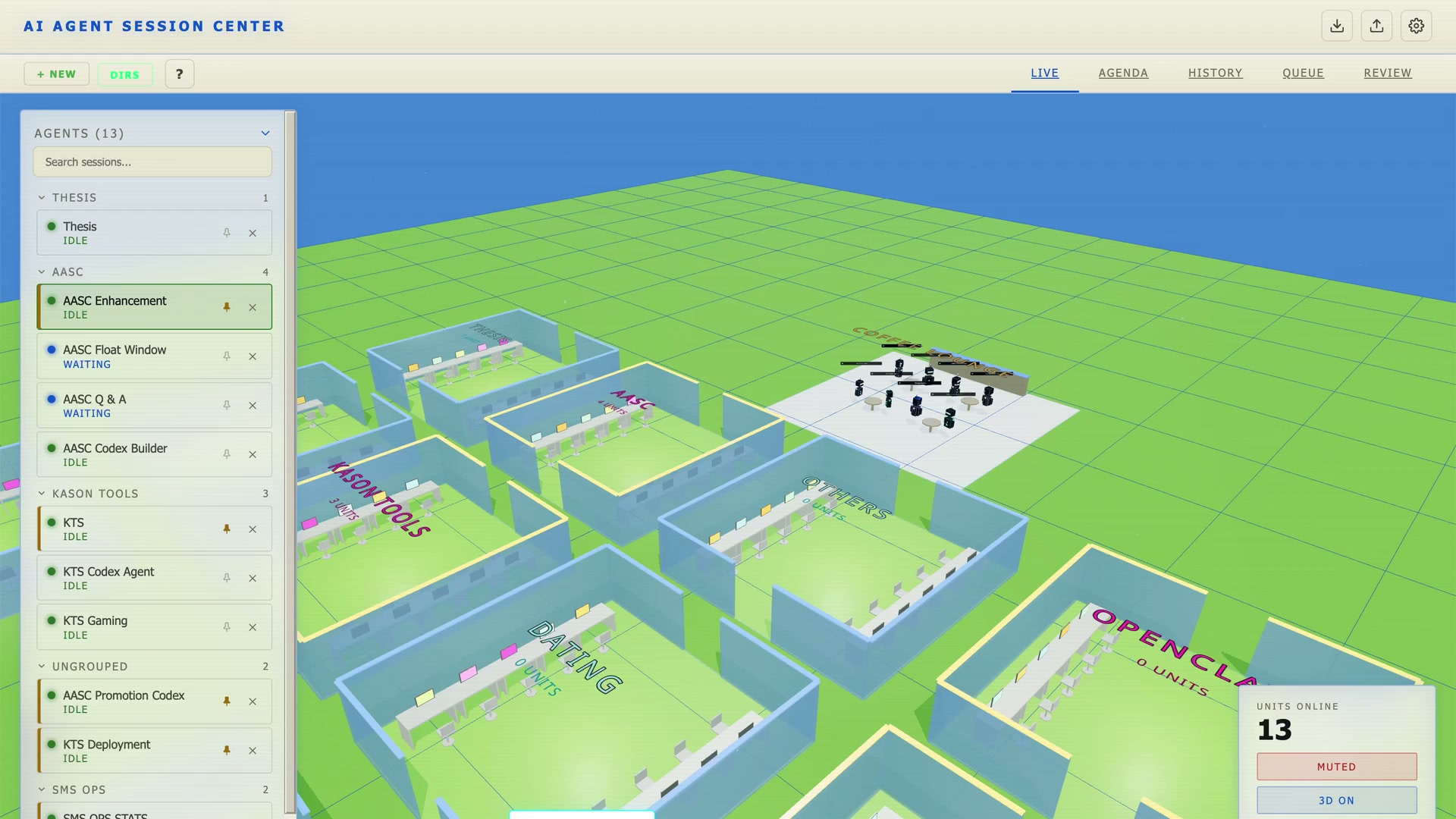
Real-time dashboard for Claude Code and Codex AI coding agents: live terminals, status alerts, prompt queues, and workspace resume. Desktop app or browser, with an optional 3D view.
開発ツールできること
- Know which agent needs you — working / waiting / approval / input / idle states with sound alerts; rooms, pins, labels.
- Live terminals — server-owned xterm.js terminals shared by browser, desktop app and phone; resume, fork, clone, pop-out windows.
- Prompt queue — once / loop / scheduled prompts, chains, quiet hours; sent when the session goes idle.
- Auto-resume — on overload, 5xx, rate-limit or network errors, sends "continue" for you (3 tries / 30 min, with back-off).
計測したスター増加
- 24時間
- 0
- 7日間
- 0
- 15日間
- 0
- 1か月
- 履歴を収集中
期間ごとの純増数です。期間は重複しており、日別の値ではありません。未計測の値は空欄です。スター数は注目度の指標であり、品質の保証ではありません。
README.md
オリジナルAI Agent Session Center
One dashboard for all your Claude Code and Codex sessions — see which agent needs you, work in live terminals, queue the next prompt, and pick your workspace back up after a restart.



▶ Try the demo in your browser — no install → aasc.work/demo
Install
Desktop app (macOS, Apple Silicon)
Download
AI.Agent.Session.Center-<version>-arm64.dmgfrom the latest release and drag the app into Applications.The app is not notarized by Apple, so macOS says it is "damaged and can't be opened". It isn't damaged — click Cancel (not Move to Trash), then clear the download quarantine flag in Terminal:
xattr -cr "/Applications/AI Agent Session Center.app"Then open the app normally. (Or double-click Open App (Start Here).command in the DMG, which does the same.) You need to repeat this after installing each new version.
Follow the setup wizard and set a password — it keeps other devices on your network out.
From source (any OS with Node.js 22.12+)
git clone https://github.com/coding-by-feng/ai-agent-session-center.git
cd ai-agent-session-center
npm install
npm rebuild better-sqlite3 node-pty   # rebuild native modules for your Node
npm run build
npm start                             # opens http://localhost:3333
Requirements: Claude Code and/or Codex CLI 0.130+ (Codex hooks are opt-in), and jq (brew install jq) so events match the right terminal.
First run
Start the dashboard (it registers its hooks), then run claude or codex in any terminal — the session appears on LIVE. Click it to open its terminal, project, conversation, notes and queue.
Features
- Know which agent needs you — working / waiting / approval / input / idle states with sound alerts; rooms, pins, labels.
- Live terminals — server-owned xterm.js terminals shared by browser, desktop app and phone; resume, fork, clone, pop-out windows.
- Prompt queue — once / loop / scheduled prompts, chains, quiet hours; sent when the session goes idle.
- Auto-resume — on overload, 5xx, rate-limit or network errors, sends "continue" for you (3 tries / 30 min, with back-off).
- Workspace restore — layout, rooms and sessions come back after a restart.
- Project browser & transcript — file tree, fuzzy find, Markdown/TeX/PDF/image viewers, full conversation search, history.
- Ask about a selection — explain or translate highlighted text in a floating AI session.
- Resources — catalogue of your skills, commands, rules, agents, MCP servers and memory (secrets masked; host only).
- Themes & 3D — ten themes, tunable sounds, rebindable shortcuts, optional 3D cyberdrome.
📺 58-second intro · 12-minute walkthrough
How it works
Claude Code / Codex → hook script (background, never blocks the CLI)
  → /tmp/claude-session-center/queue.jsonl
  → server (match event to session → state machine) → WebSocket → dashboard
What it changes on your machine: hook entries in ~/.claude/settings.json (and ~/.codex/config.toml if enabled), hook scripts in ~/.claude/hooks/, the terminal tab title, and <project>/.claude/last-session-id. Hooks are re-registered every time the server starts. Your data lives in data/ (source) or ~/Library/Application Support/ai-agent-session-center/ (desktop app).
Phone and LAN access
Other devices can open http://<your-address>:3333, but only with a password (otherwise refused). Sessions are host-only until you share them, one device drives a session at a time, and it's plain HTTP — use a trusted network or VPN. Anyone with the password can run terminals on this machine, so treat it like SSH access.
Commands
npm run dev              # hot reload (:3332) + backend (:3333)
npm start                # start the server (after npm run build)
npm start -- --port 4444 # use another port
npm run set-password     # set the dashboard password
npm run uninstall-hooks  # remove hooks from the CLI configs
npm run reset            # remove hooks AND delete history/settings (backed up first)
npm test                 # Vitest
npm run typecheck:all    # type-check client and server
npm run electron:build   # build the desktop installer
Troubleshooting
| Problem | Fix |
|---|---|
| macOS: "damaged and can't be opened" | xattr -cr "/Applications/AI Agent Session Center.app" (see Install) |
| Sessions don't appear | grep dashboard-hook ~/.claude/settings.json, then npm run install-hooks; make sure jq is installed |
| "compiled against a different Node.js version" | npm rebuild better-sqlite3 node-pty |
| Port 3333 in use | The server kills whatever holds it; to run a second copy use --port 4444 |
Known limitations
- Session matching is heuristic — two sessions in one directory can occasionally cross-link.
- Loops, schedules and auto-resume run in the dashboard, so they pause when no window is open.
- The macOS app is unsigned with no auto-update; the Windows hook is less tested.
Contributing
Run npm test, npm run lint and npm run typecheck:all before a PR, and use conventional commits (feat:, fix: …). Per-feature docs live in docs/feature/.
License
関連プロジェクトを探す
読み込み中…