プロジェクト GitHubで見る
baoyongzhang/android-ActionSheet
baoyongzhang/android-ActionSheet has 806 GitHub stars and 249 forks. GitHot measured 0 stars in 24 hours and 0 in 7 days. Last checked 2026-11-24 10:27 UTC. Last push 2017-03-29.
計測したスター増加
- 24時間
- 0
- 7日間
- 0
- 15日間
- 履歴を収集中
- 1か月
- 履歴を収集中
期間ごとの純増数です。期間は重複しており、日別の値ではありません。未計測の値は空欄です。スター数は注目度の指標であり、品質の保証ではありません。
概要
Android向けのiOS UIActionSheet
開発ツールREADME.md
オリジナルActionSheet


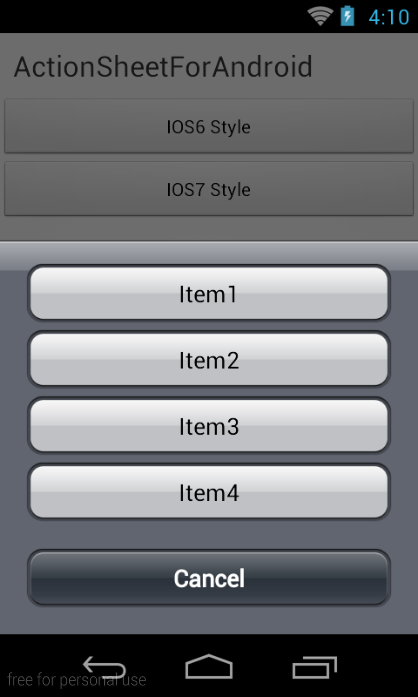
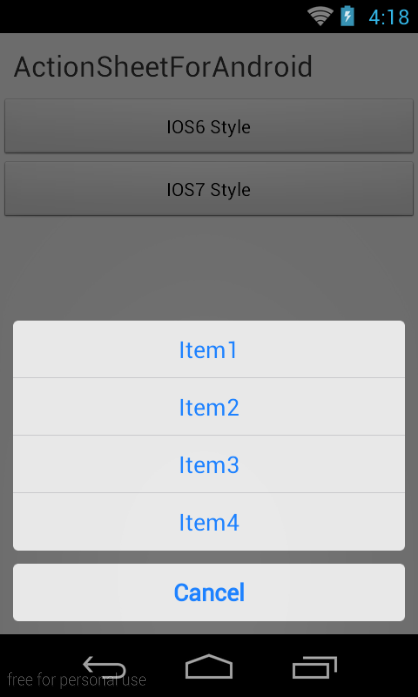
This is like iOS UIActionSheet component, has iOS6 and iOS7 style, support custom style, background, button image, text color and spacing etc.
Usage
Add dependency
dependencies {
    compile 'com.baoyz.actionsheet:library:1.1.7'
}
Create ActionSheet and show
ActionSheet.createBuilder(this, getSupportFragmentManager())
				.setCancelButtonTitle("Cancel")
				.setOtherButtonTitles("Item1", "Item2", "Item3", "Item4")
				.setCancelableOnTouchOutside(true)
				.setListener(this).show();
Methods
setCancelButtonTitle()Cancel button title, (String)setOtherButtonTitles()Item buttons title,(String[])setCancelableOnTouchOutside()Touch outside to close, (boolean)setListener()set a Listener to listen eventshow()Show ActionSheet, returnActionSheetObject,calldismiss()method ofActionSheetto close.
Listen event
implementing ActionSheetListener interface.
onOtherButtonClick()Click item event,indexis item index.onDismiss()Dismiss event.
   	@Override
	public void onOtherButtonClick(ActionSheet actionSheet, int index) {
		Toast.makeText(getApplicationContext(), "click item index = " + index,
				0).show();
	}

	@Override
	public void onDismiss(ActionSheet actionSheet, boolean isCancle) {
		Toast.makeText(getApplicationContext(), "dismissed isCancle = " + isCancle, 0).show();
	}
Style
Default style is bad,ActionSheet has iOS6 and iOS7 style,you can configure the theme.
<!-- Application theme. -->
    <style name="AppTheme" parent="AppBaseTheme">
        <item name="actionSheetStyle">@style/ActionSheetStyleiOS6</item>
        or
        <item name="actionSheetStyle">@style/ActionSheetStyleiOS7</item>
    </style>
You can custom style, can refer to ActionSheetStyleiOS6/ActionSheetStyleiOS7 writing.
 <!-- iOS7 Style -->
 <style name="ActionSheetStyleiOS7">
        <item name="actionSheetBackground">@android:color/transparent</item>
        <item name="cancelButtonBackground">@drawable/slt_as_ios7_cancel_bt</item>
        <item name="otherButtonTopBackground">@drawable/slt_as_ios7_other_bt_top</item>
        <item name="otherButtonMiddleBackground">@drawable/slt_as_ios7_other_bt_middle</item>
        <item name="otherButtonBottomBackground">@drawable/slt_as_ios7_other_bt_bottom</item>
        <item name="otherButtonSingleBackground">@drawable/slt_as_ios7_other_bt_single</item>
        <item name="cancelButtonTextColor">#1E82FF</item>
        <item name="otherButtonTextColor">#1E82FF</item>
        <item name="actionSheetPadding">10dp</item>
        <item name="otherButtonSpacing">0dp</item>
        <item name="cancelButtonMarginTop">10dp</item>
        <item name="actionSheetTextSize">12sp</item>
    </style>
Style attributes
actionSheetBackgroundcancelButtonBackgroundotherButtonTopBackgroundotherButtonMiddleBackgroundotherButtonBottomBackgroundotherButtonSingleBackgroundcancelButtonTextColorotherButtonTextColoractionSheetPaddingotherButtonSpacingcancelButtonMarginTopactionSheetTextSize
関連プロジェクトを探す
読み込み中…