
aparsoft/yolo-streamlit-detection-tracking has 432 GitHub stars and 171 forks. GitHot measured 0 stars in 24 hours, +1 in 7 days, and 0 in 15 days. Last checked 2026-11-21 06:47 UTC. Last push 2026-10-13.
計測したスター増加
- 24時間
- 0
- 7日間
- +1
- 15日間
- 0
- 1か月
- 履歴を収集中
期間ごとの純増数です。期間は重複しており、日別の値ではありません。未計測の値は空欄です。スター数は注目度の指標であり、品質の保証ではありません。
概要
YOLO Vision Studio: a free, open-source Streamlit app for detection, segmentation, pose, text prompts (YOLO World, YOLOE) and tracking with honest counts. Built on Ultralytics YOLO26.
機械学習README.md
オリジナル🔬 YOLO Vision Studio
Detect · Segment · Read poses · Find what you type · Track and count in video
A free, open-source Streamlit app built on Ultralytics YOLO26, YOLOE, YOLO World v2 and RT-DETR.





Watch the film · 45-second cut · Quick start · Report a bug
Why this app
Point a camera at a street and ask how many people walked past. Counting the people in one frame is easy. Knowing how many different people walked past is the hard part: people overlap, cross and walk out of view, and a careless tracker counts the same person three times.
YOLO Vision Studio shows both numbers on every frame, and is honest about them. The overlay has three lines:
- In Frame (green): what the detector sees right now, per class.
- Total Tracked (yellow; Total Unique Objects in the sidebar): different objects so far. An object counts only after it has been seen in 5 processed frames, so a one-frame false detection never inflates the total.
- Churn (grey): track IDs the tracker opened ÷ IDs it actually showed. The tracker opens an ID for every candidate track, and a candidate that disappears before it is confirmed is never drawn. 1.0 means no ID was wasted; a high value means many short-lived candidates (flicker, occlusion, borderline detections).
What it does
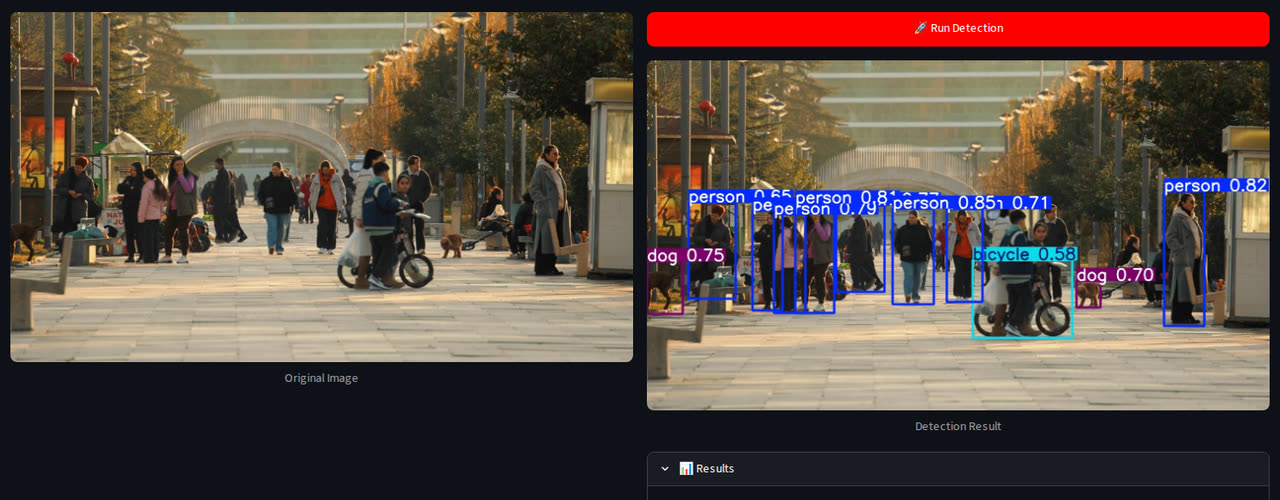 Detect the 80 COCO object types (YOLO26 nano → xlarge, or RT-DETR) |
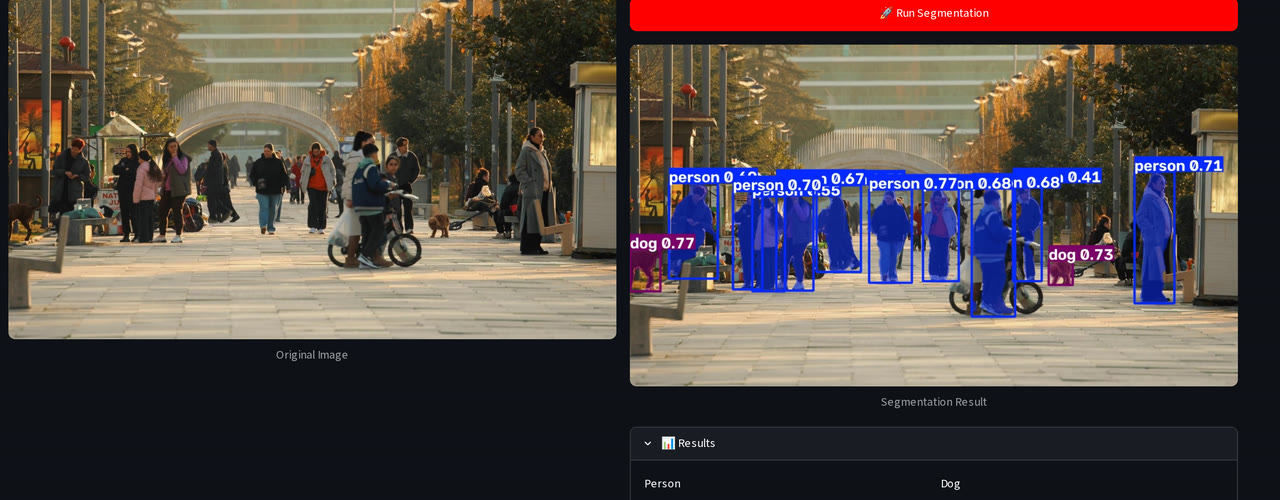 Segment: a pixel mask for every object |
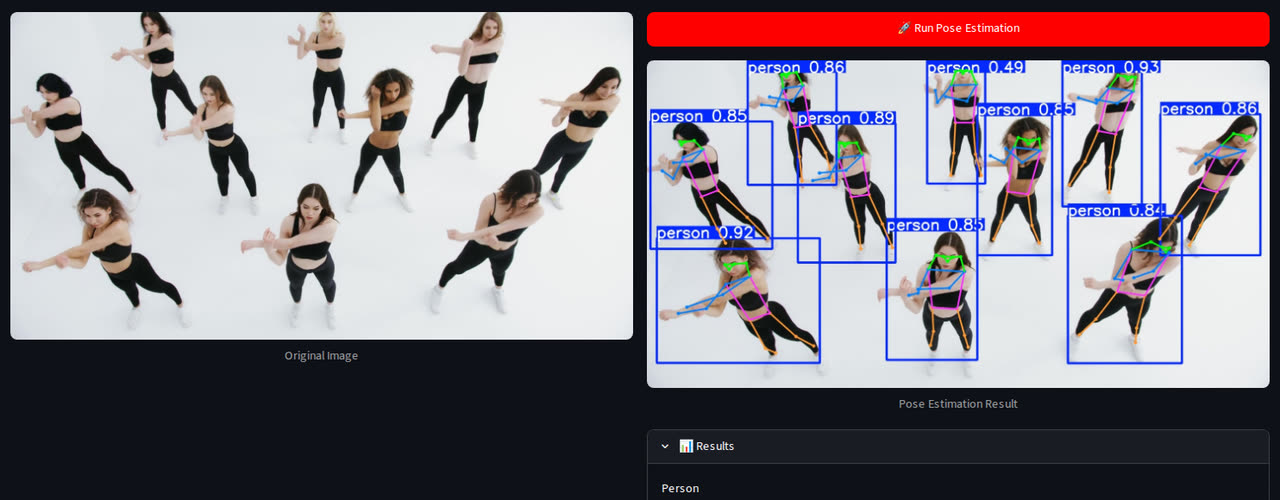 Pose: 17 body keypoints and the skeleton |
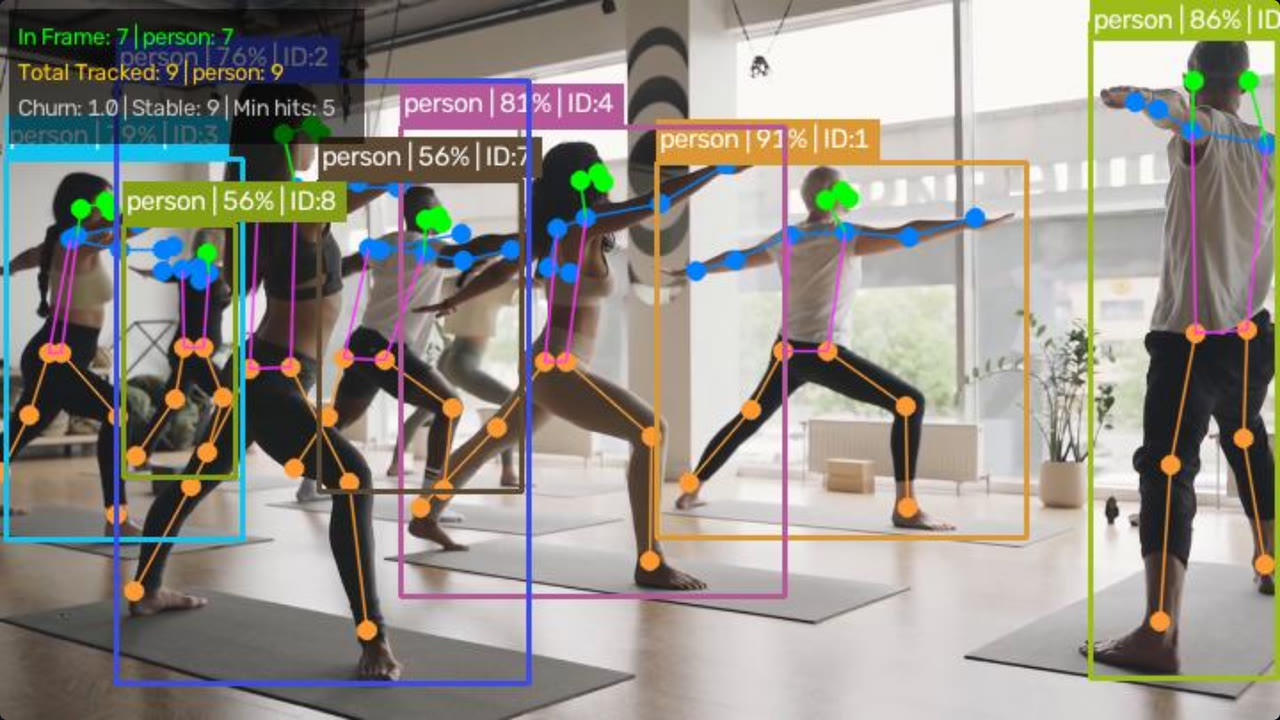 Every task works on video, here pose with tracked IDs |
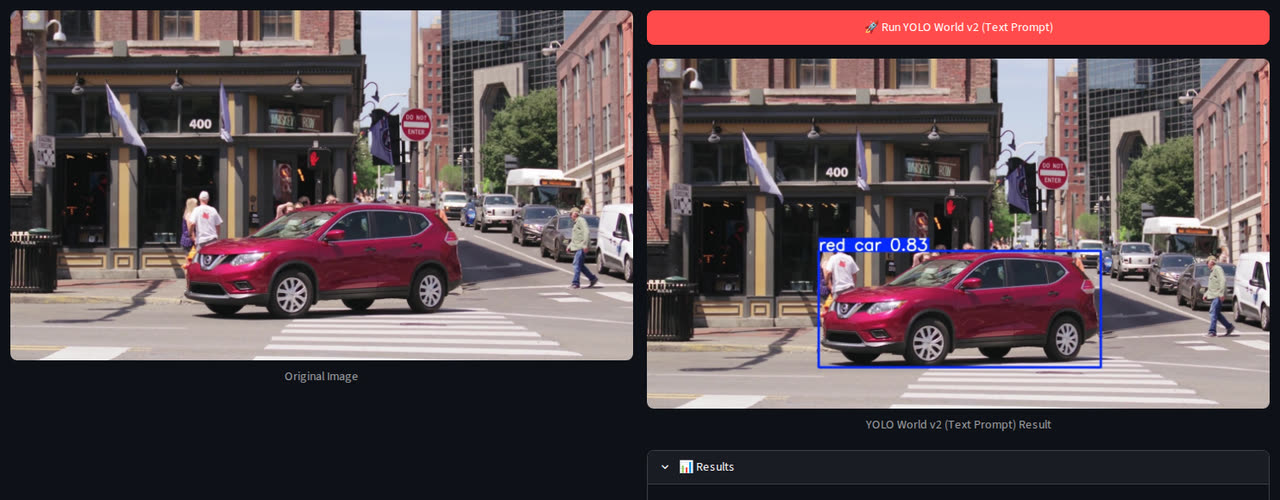 Type what you're looking for (YOLO World v2): red car finds only the red one |
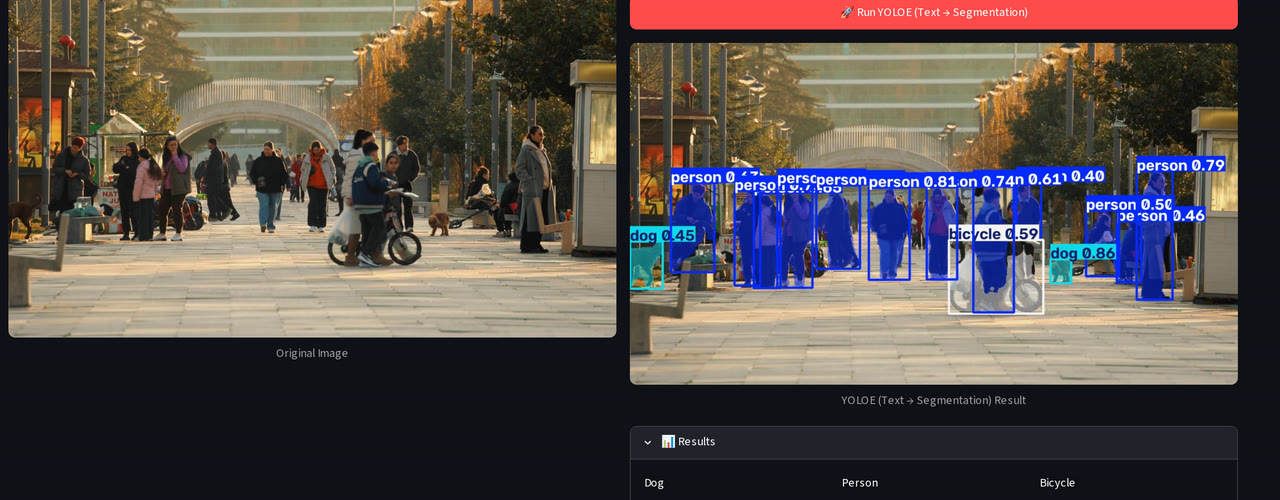 YOLOE: type category names, get boxes and masks |
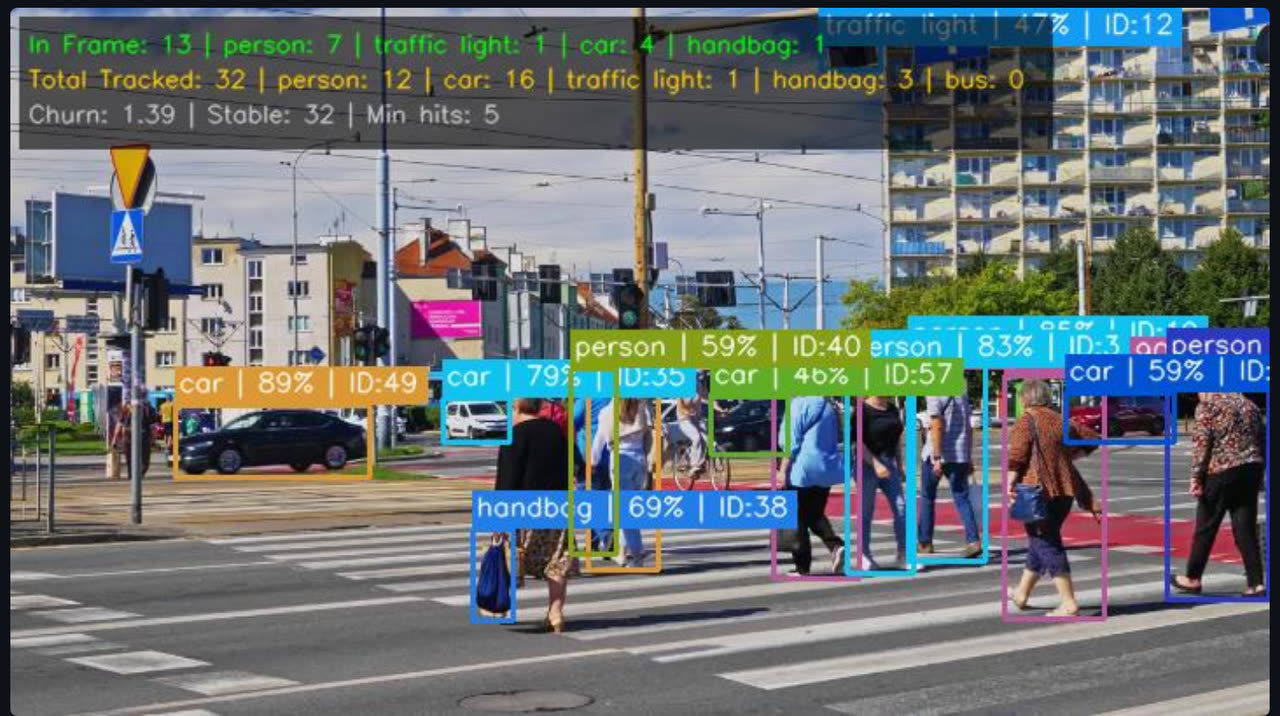 Four trackers and optional appearance ReID; every box reads class | conf | ID |
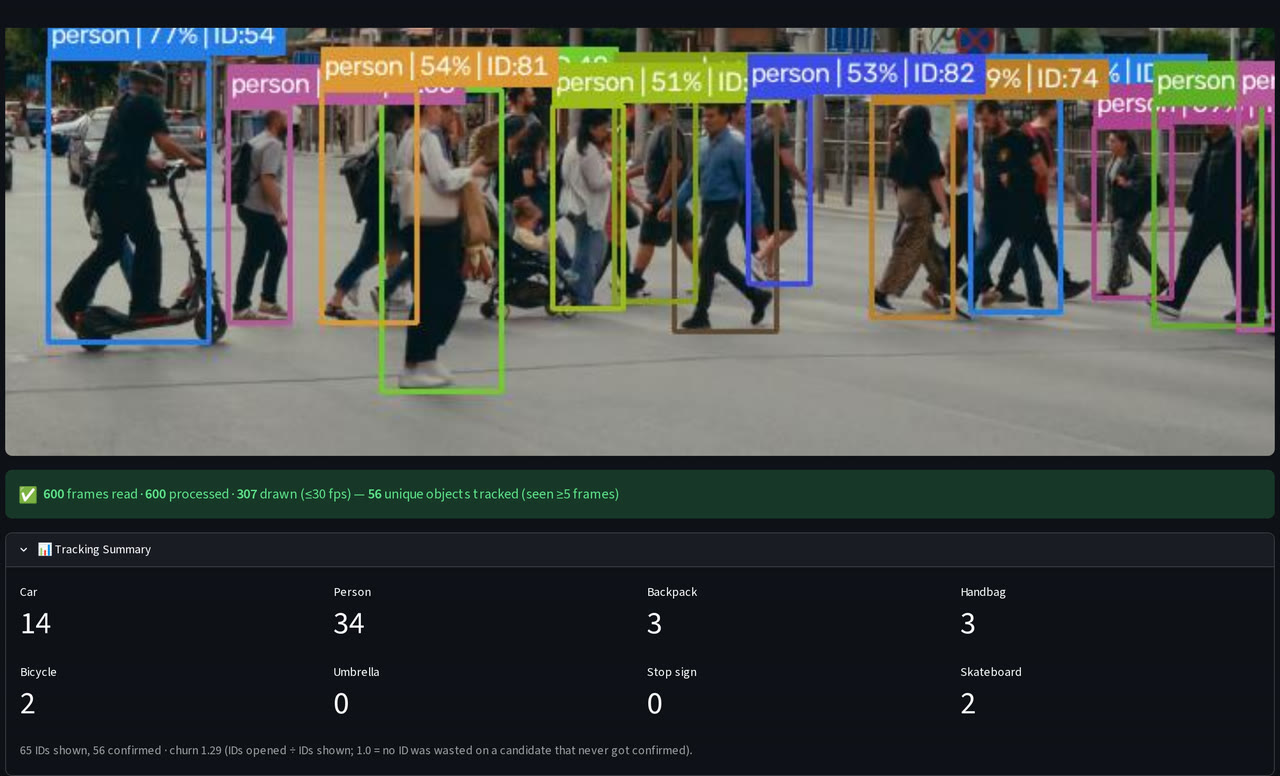 Tracking Summary: confirmed objects per class, IDs and churn |
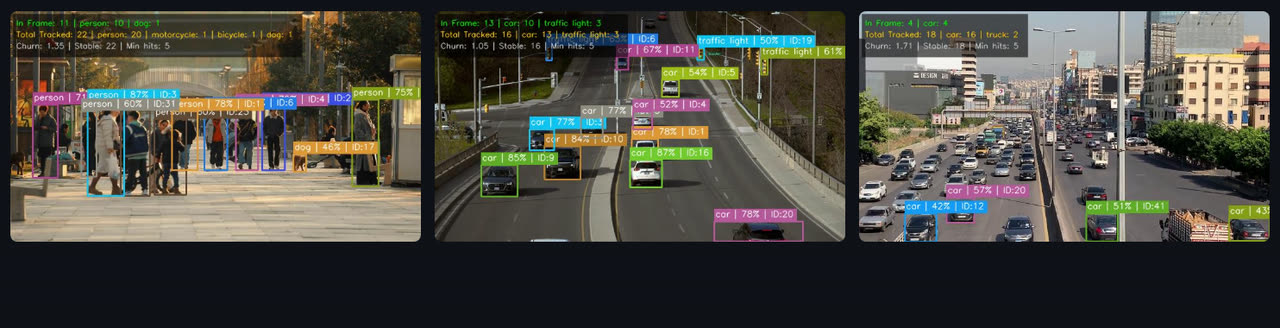
Several stored videos side by side, each with its own model and tracker, so IDs and counts never mix.
Feature overview
| Area | What you get |
|---|---|
| Tasks | Detection, Segmentation, Pose Estimation, YOLO World v2 (text prompt), YOLOE (text → masks). All of them work on images and on video |
| Models | YOLO26 n / s / m / l / x for detection, segmentation and pose; RT-DETR L / X (transformer) for detection; YOLO World v2 s / m / l / x; YOLOE-26 n / s / m / l / x. Weights download on first use |
| Images | Upload JPG, PNG, BMP or WEBP, or run on the default image. Phone photos are rotated by their EXIF tag. Results: the annotated image, a count and average confidence per class, every detection's confidence, and the pose or mask count |
| Video sources | Stored files (several at once), your webcam in the browser (streamlit-webrtc), RTSP camera streams, YouTube URLs (yt-dlp) |
| Tracking | ByteTrack (default), BoT-SORT, Deep OC-SORT, TrackTrack. Each box carries its ID, in a colour that belongs to that ID |
| Appearance ReID | For BoT-SORT, Deep OC-SORT and TrackTrack: choose an encoder (yolo26n-cls, yolo26s-reid.onnx or the detector's own features) and tune three gates: proximity (IoU), appearance similarity and lost-track memory |
| Speed controls | 🎯 Limit to classes (detection, segmentation, pose), ⏩ Skip frames 1–8×, a confidence slider. Every processed frame is detected and counted; only the display is capped at 30 fps, to keep the browser smooth |
| Live metrics | Frame, FPS, in-frame counts, confirmed totals per class and churn in the sidebar, refreshed 5× a second. ⏹ Stop ends a run and keeps the counts so far |
| Several users | Tracking runs on a model owned by each browser session, so two visitors never share a tracker. Shared cached models are locked during inference |
YOLO World prompts: one object with one attribute works best (red car, dog, wooden chair). Descriptions of
people (person in black) score low; if a prompt finds nothing, lower the confidence.
YOLOE prompts: category names only (person, car, laptop), not descriptions.
Privacy: appearance ReID compares how objects look within one video to keep an ID through a crossing. The app never knows who anyone is; there is no face recognition.
🚀 Quick start
With uv (recommended): installs the exact versions in uv.lock on Linux, macOS and
Windows.
git clone https://github.com/aparsoft/yolo-streamlit-detection-tracking.git
cd yolo-streamlit-detection-tracking
uv sync                                     # creates .venv with the locked versions
uv run python scripts/get_sample_videos.py  # optional: the 8 other sample clips (~34 MB)
uv run streamlit run app.py                 # opens http://localhost:8501
With pip:
git clone https://github.com/aparsoft/yolo-streamlit-detection-tracking.git
cd yolo-streamlit-detection-tracking
python -m venv .venv
source .venv/bin/activate                   # Windows: .venv\Scripts\activate
pip install -r requirements.txt             # or requirements-lock.txt for the exact locked versions
python scripts/get_sample_videos.py         # optional
streamlit run app.py
Requirements and first run
- Python 3.10+ (tested on 3.11 and 3.12). Runs on CPU; an NVIDIA GPU makes video much faster.
- GPU on Linux: PyTorch from PyPI already includes CUDA, with uv and with pip.
- GPU on Windows: PyPI's PyTorch is CPU-only there. With pip, install a CUDA build from
pytorch.org first, then
requirements.txt. With uv,uv syncinstalls the locked PyPI build, so install the CUDA build into.venvafterwards (uv pip install torch torchvision --index-url …) and start the app withuv run --no-sync streamlit run app.py. - Model weights download automatically on first use, into
weights/. YOLO World also fetches its CLIP text encoder (~340 MB) and YOLOE its MobileCLIP encoder (~245 MB) the first time you use them. uv syncalso installs Jupyter support for the playground notebook.uv sync --group rfdetradds RF-DETR andsupervisionfor your own experiments; the app does not use them.
Sample videos
One clip ships in git (videos/pedestrians_summer_street.mp4), so the app works straight after a clone. The other
eight live on the sample-videos release
to keep the repo small; scripts/get_sample_videos.py downloads them and checks each one against its SHA-256, so every
machine runs the same clips (--force downloads them again). They are Pexels clips,
chosen by running this app's own detector and tracker over 731 candidates; creators are credited in
videos/ATTRIBUTION.md.
| Clip | Good for |
|---|---|
pedestrians_summer_street (in git, the default) |
People counting and tracking |
crosswalk_red_car · street_person_in_red |
YOLO World prompts |
street_dogs_bikes |
Mixed classes: people, dogs, bicycles |
highway_bridge_traffic · city_traffic_dense |
Vehicle counting, many IDs at once |
yoga_warrior_pose · stretching_from_above |
Pose estimation |
busy_intersection |
Paths crossing: ReID trackers, multi-video |
Your own videos: drop .mp4, .avi, .mkv, .mov, .wmv or .webm files into videos/. They appear in the
picker on the next rerun. Extensions are matched in lower case, so rename CLIP.MP4 to CLIP.mp4.
📖 Using it
Sidebar, top to bottom: Inference Mode (📷 image / 🎬 video) → Task → 🧠 Model (nano is fastest, xlarge most accurate) → Model Confidence (10–100 %, default 40 %).
Images
- For YOLO World or YOLOE, type the prompt first (comma-separated).
- Upload an image, or keep the default one.
- Press 🚀 Run <task>. The result stays on screen until you change the image, task, model, prompt or confidence.
Video
- 📹 Video Source: Stored Video, Webcam, RTSP Stream or YouTube.
- Tracking is on by default. Pick a tracker; for BoT-SORT, Deep OC-SORT and TrackTrack you can switch on 🧬 Appearance ReID, choose its encoder and tune its gates. ReID costs roughly two-thirds of the FPS.
- Optional: 🎯 Limit to classes, ⏩ Skip frames. For YOLO World / YOLOE, type the prompts in the main panel.
- Start it:
| Source | How to start | What you get at the end |
|---|---|---|
| Stored Video, one clip | 🚀 Detect Video Objects | The last frame, a run summary and the 📊 Tracking Summary |
| Stored Video, several clips | Select them all, then 🚀 Detect Video Objects | A 3-per-row grid; one result line per video (IDs are per video and never summed) |
| RTSP Stream | Paste the URL, 🚀 Start RTSP Stream | As for one stored clip |
| YouTube | Paste the URL, 🚀 Detect YouTube Video | As for one stored clip |
| Webcam | START in the player, allow the camera | Live annotated video; stop it with the player's STOP |
⏹ Stop (sidebar) ends a stored, RTSP or YouTube run early; the frame on screen and the counts so far stay. With Skip frames above 1 and tracking on, objects move further between updates, which is where ReID helps most.
⚙️ Configuration
Every default lives in config.py:
| Setting | Default | What it does |
|---|---|---|
DEFAULT_CONFIDENCE |
0.40 |
Starting value of the confidence slider |
MIN_TRACK_HITS |
5 |
Processed frames before a track counts |
TRACKERS_LIST |
ByteTrack, BoT-SORT, Deep OC-SORT, TrackTrack | Trackers in the sidebar. TRACKER_OCSORT and TRACKER_FASTTRACK are already defined; add them to the list to offer them |
GMC_METHOD |
"none" |
Camera-motion compensation for the non-ByteTrack trackers; use "sparseOptFlow" for a moving camera |
REID_ENCODER_CHOICES, REID_PROXIMITY_THRESH, REID_APPEARANCE_THRESH, REID_TRACK_BUFFER |
see file | ReID encoders and the starting values of its three sliders |
VIDEO_DISPLAY_WIDTH |
720 |
A ceiling on the processed and streamed width; frames are never upscaled |
VIDEO_DISPLAY_FPS |
30.0 |
Frames painted per second (every frame is still inferred) |
VIDEO_JPEG_QUALITY, METRICS_REFRESH_HZ |
75, 5.0 |
Streaming quality and the sidebar refresh rate |
MIN_SKIP_FRAMES, MAX_SKIP_FRAMES |
1, 8 |
Range of the skip-frames slider |
DEFAULT_IMAGE, DEFAULT_VIDEO |
office_4.jpg, pedestrians_summer_street |
What the image page and the video picker start with |
DEFAULT_WORLD_CLASSES, DEFAULT_YOLOE_CLASSES |
person, car, dog, … |
Starting prompts |
Your own model: put the .pt file in weights/ and add it to the task's catalog in config.py
(for example DETECTION_MODELS["My model"] = "my_model.pt"). It then appears in the 🧠 Model selector.
🧠 How it works
- One per-frame path for every source (
video_service._process_frame): resize to at most 720 px, track or predict, count, draw the boxes and IDs, draw the overlay. - Isolated tracker state: tracking uses a session-owned model, multi-video gives each clip a fresh model, and each model keeps its own track-ID counter, so concurrent runs never interleave IDs. Trackers reset at the end of every run, so the same video with the same settings gives the same count.
- Smooth playback: frames are painted at most 30 times a second, sidebar metrics 5 times a second, and replaced frames are freed during the run instead of at its end.
The measurements behind these choices are in docs/single_video_performance.md
and docs/multi_video_performance.md.
📚 Learn with it
docs/yolo26_playground.ipynb: a runnable tour of YOLO26: theResultsobject, confidence and model size, RT-DETR, segmentation, pose, YOLO World vs YOLOE, tracking and local vs global counting, video sources, performance tuning (imgsz, skip frames, half precision), the architecture, export, oriented boxes (OBB) and the CLI.docs/obb_images.pyfetches the aerial image its OBB section uses.docs/yolo26_docs.md: notes on what YOLO26 changed (NMS-free heads, no DFL, ProgLoss, STAL, MuSGD).docs/test.py: the smallest possible YOLO26 script, as a starting point.
🗂️ Project structure
yolo-streamlit-detection-tracking/
├── app.py                    # page setup, sidebar, routing
├── config.py                 # models, paths, defaults
├── model_loader.py           # cached, per-session and per-video models; device placement
├── image_service.py          # image tasks: upload → run → results
├── video_service.py          # sources, tracking, counting, overlay, live metrics
├── scripts/
│   └── get_sample_videos.py  # downloads and verifies the sample clips
├── docs/                     # playground notebook, YOLO26 notes, performance write-ups
├── assets/readme/            # README media
├── images/                   # sample images (credits in images/ATTRIBUTION.md)
├── videos/                   # your clips + the default one (credits in videos/ATTRIBUTION.md)
├── weights/                  # model weights, downloaded on first use
├── pyproject.toml  uv.lock                              # uv
└── requirements.txt  requirements-lock.txt  packages.txt  # pip, Streamlit Cloud
☁️ Deploy to Streamlit Cloud
Connect the repo at share.streamlit.io with app.py as the main file; requirements.txt
and packages.txt handle the dependencies. Things to know:
- There is no GPU, so video is slower than on a local NVIDIA card.
- Only the default clip is in git. Add your own clips to
videos/in your fork, or use RTSP / YouTube. - The webcam connects through WebRTC. On some networks it needs a TURN server, which the app does not configure.
🤝 Contributing
Issues and pull requests are welcome: fork, branch, commit, open a PR. Good first ideas:
- Export detections and tracks to CSV / JSON
- Region-of-interest (line or zone) counting
- An
imgszcontrol in the sidebar (accuracy vs speed) - A model comparison page
- A multi-camera RTSP dashboard
📄 License
The app's code is Apache-2.0. The models come from Ultralytics under AGPL-3.0 (closed-source commercial use needs their Enterprise licence). The sample footage is from Pexels creators (credits).
🙏 Acknowledgements
- Ultralytics for YOLO26, YOLOE, YOLO World and RT-DETR
- Streamlit and streamlit-webrtc
- The Pexels creators whose clips make the demos, and all 400+ stargazers ⭐
Made by Aparsoft · Need vision AI on your own cameras? [email protected]