
alyssaxuu/carden has 490 GitHub stars and 52 forks. GitHot measured -1 stars in 24 hours and -1 in 7 days. Last checked 2026-11-16 22:31 UTC. Last push 2022-06-17.
計測したスター増加
- 24時間
- -1
- 7日間
- -1
- 15日間
- 更新が遅れています
- 1か月
- 更新が遅れています
期間ごとの純増数です。期間は重複しており、日別の値ではありません。未計測の値は空欄です。スター数は注目度の指標であり、品質の保証ではありません。
概要
Flashcards with spaced repetition and gamification 🌱
学習README.md
オリジナルCarden
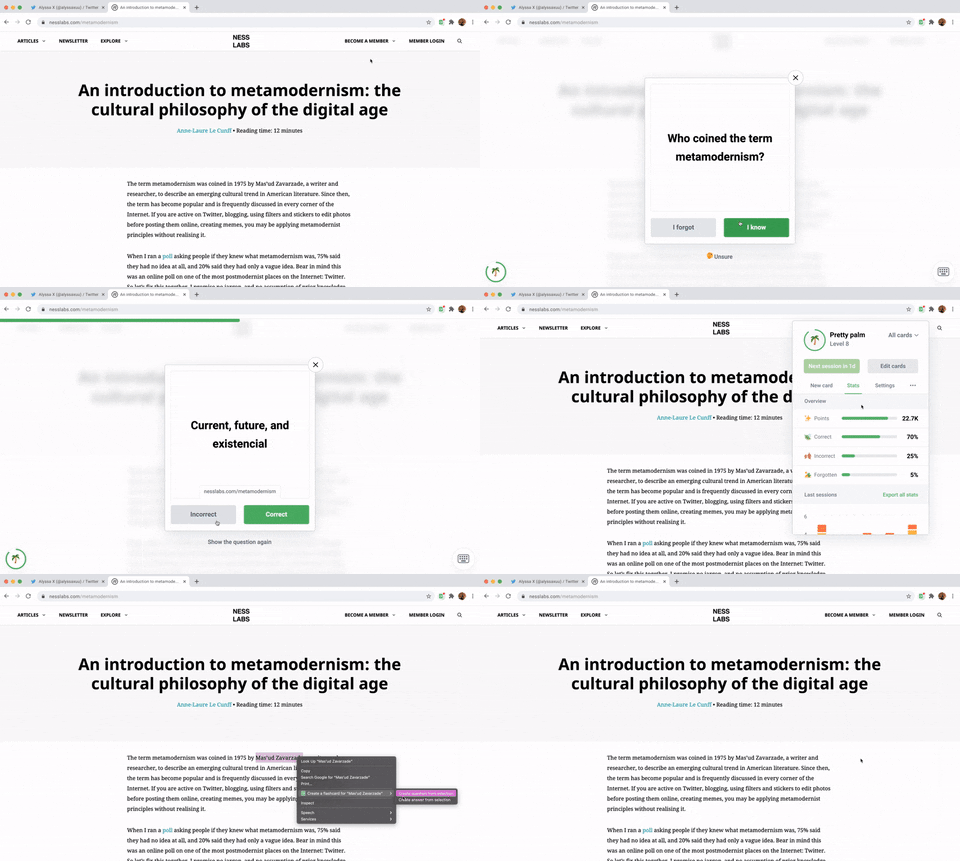
Flashcards with spaced repetition and gamification 🌱
Carden is a Chrome Extension that helps you turn the content you consume into long-term knowledge. Create flashcards in context, view in-depth stats, collect points and level up, and much more.
Made by Anne-Laure Le Cunff & Alyssa X

Table of contents
Features
🔬 Practice using spaced repetition based on the evidence-based SM2 algorithm
✏️ Create flashcards in context whenever you read something interesting
🗄️ Organize your flashcards into decks
🏆 Collect points and level up as you practice and grow your knowledge
🧩 Cross-compatible with apps like Anki, Quizlet, Brainscape, and more
📦 Import and export flashcards as .txt and .csv files
📊 View and download in-depth stats
...and much more!
Self-hosting Carden
You can run Carden locally without having to install it from the Chrome Store. Here's how:
- Download the code. In the web version of GitHub, you can do that by clicking the green "Code" button, and then "Download ZIP".
- Note that there's a server folder for the back-end. You will need to setup a server with a MySQL database.
- Add the appropriate credentials in config.php to access your database.
- Modify the access-control-allow-origin in all PHP files to allow requests from the extension (with its unique ID).
- Replace the POST URLs throughout the javascript files in the chrome-extension folder.
- Go to chrome://extensions/ in your browser, and enable developer mode.
- Drag the chrome-extension folder (make sure it's a folder and not a ZIP file, so unzip first), or click on the "Load unpacked" button and locate the folder.
- That's it, you will now be able to use Carden locally. Make sure you pin it on the toolbar by clicking the "puzzle" icon in the toolbar and pinning Carden.
Libraries used
- jQuery - for better event handling and DOM manipulation
- jQuery Nice Select - for better, more stylish dropdowns
- Chart.js - for rendering the chart for the stats
- ExtensionPay - for handling the yearly subscription
- Twemoji - for the cool emojis throughout the extension ✨
Feel free to reach out to me through email at [email protected] or on Twitter if you have any questions or feedback! Hope you find this useful 💜