
acoyfellow/coil
acoyfellow/coil has 45 GitHub stars and 1 forks. Star changes are not measured yet. Last checked 2026-11-14 04:22 UTC. Last push 2026-11-13.
計測したスター増加
- 24時間
- 履歴を収集中
- 7日間
- 履歴を収集中
- 15日間
- 履歴を収集中
- 1か月
- 履歴を収集中
期間ごとの純増数です。期間は重複しており、日別の値ではありません。未計測の値は空欄です。スター数は注目度の指標であり、品質の保証ではありません。
概要
One thread, one agent, one computer. Pi Durable and a Cloudflare Container in one Durable Object, compacted together.
開発ツールREADME.md
オリジナル

Agent threads with their own computer, in the cloud.
Each thread gets terminals, a real WebKit browser window (the engine Safari uses), and a disk. You and the agent use the same ones, from any device.
For agents · Deploy · What you get · Limits · Proof
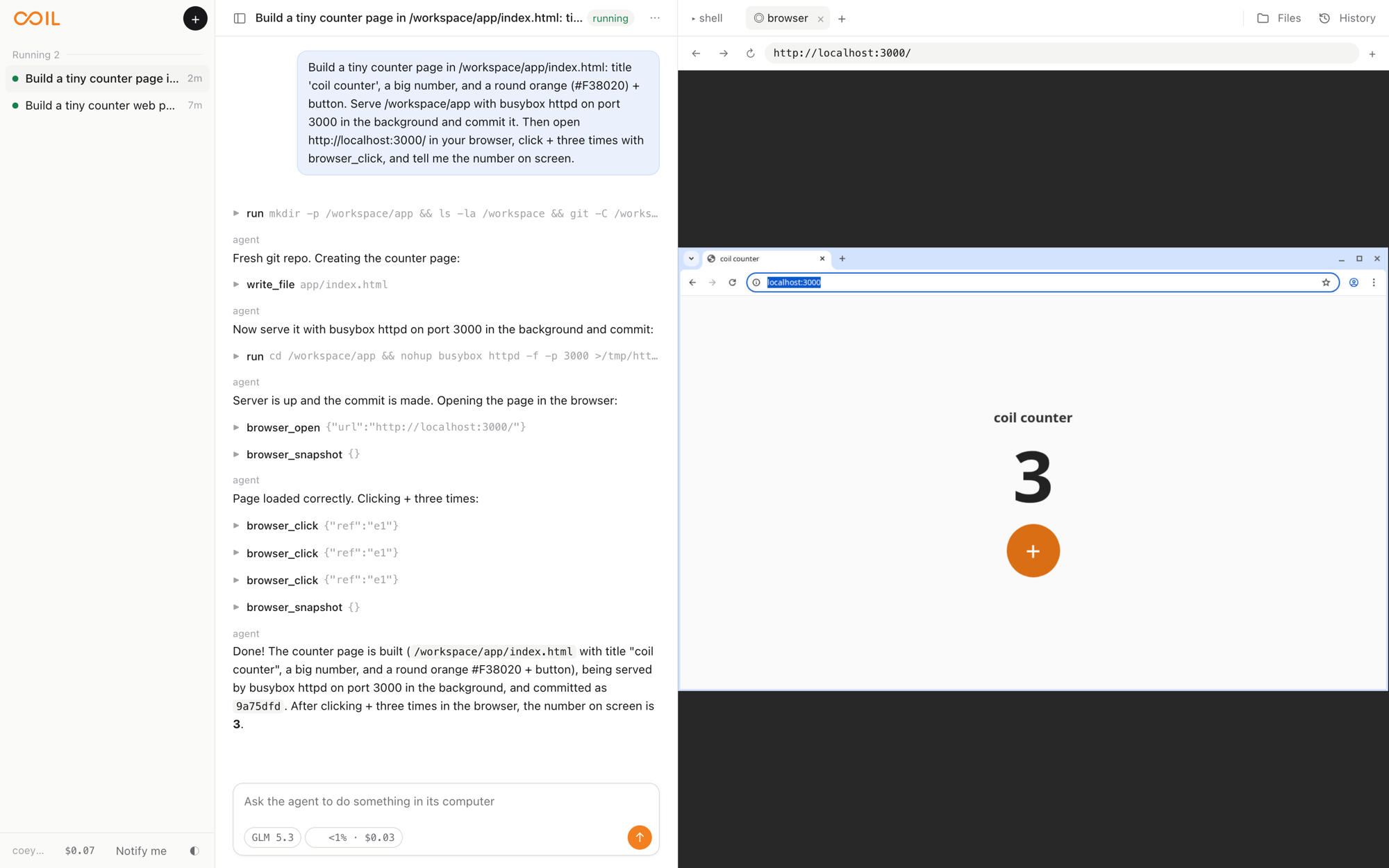
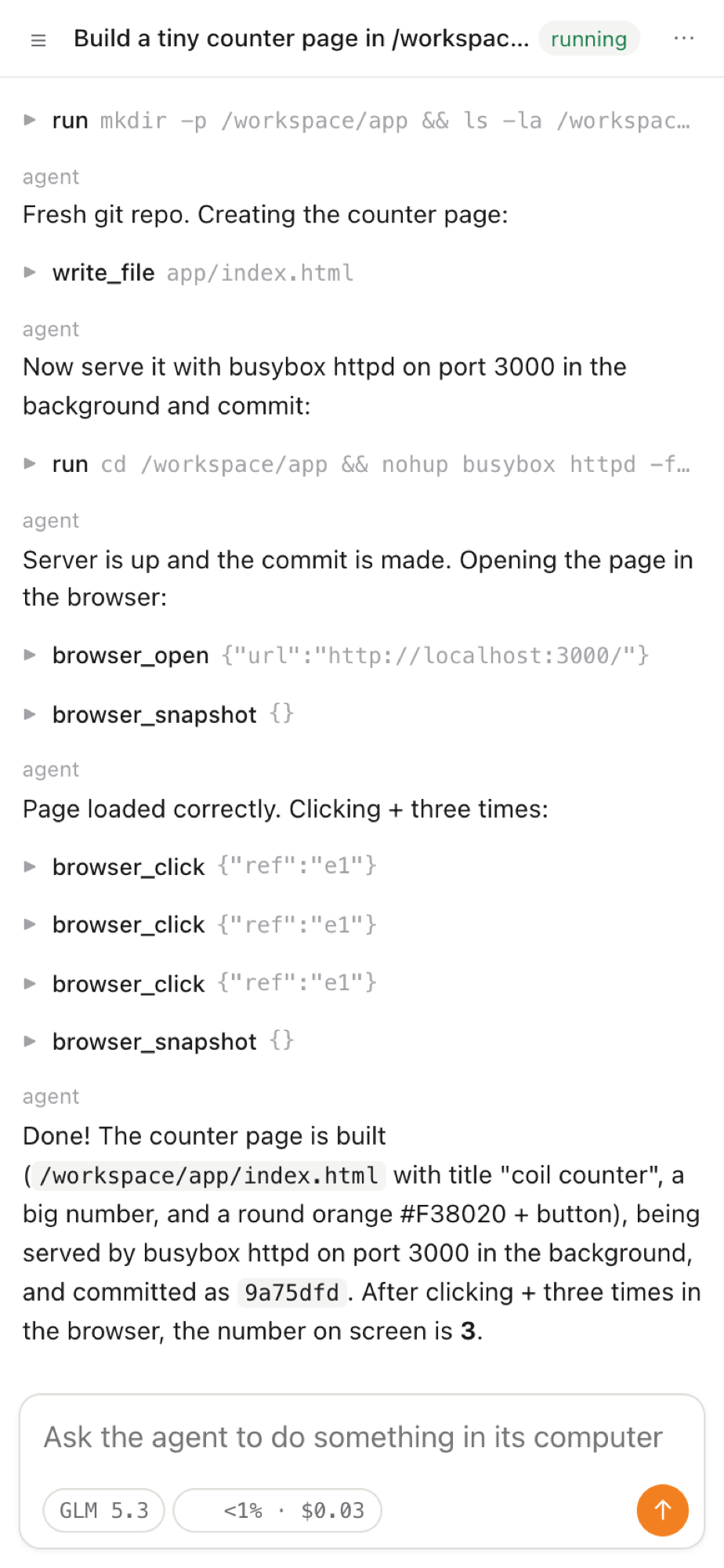
One prompt. The agent wrote a page, served it on localhost:3000, opened it in the thread's own browser, clicked + three times, and read back 3. Watch the 8-second clip.
coil is one Cloudflare Worker. Every thread is a Durable Object that runs a Pi agent and owns a Container. It installs as a PWA. There is no desktop app, browser extension, or local helper.
An instance runs in one of two sign-in modes, set by COIL_AUTH in its config:
| Mode | Who gets in | Whose account runs Workers AI |
|---|---|---|
access (default) |
Whoever your Zero Trust Access policy admits | The instance's account |
cloudflare |
Anyone who signs in with a Cloudflare account (OAuth) | The signed-in person's account |
Full guide and API reference: /docs on any instance. Plain text for agents: /llms.txt.
Quick start for agents
Paste this to your coding agent:
Deploy coil (https://github.com/acoyfellow/coil) to my Cloudflare account.
Read README.md "Deploy". Copy deploy/example.conf to deploy/<name>.conf,
ask me for the values you cannot look up, then run
`bun run ship -- deploy/<name>.conf`. It must finish with "coil is live".
Never commit deploy/<name>.conf.
Once it is deployed, an agent can drive coil without the UI. One list of capabilities (src/capabilities.ts) drives the MCP tools, the coil_run script tool, the REST endpoint, /llms.txt, and /docs.
| Surface | Use it for |
|---|---|
POST /mcp |
MCP. coil_describe returns a TypeScript declaration of the coil object. coil_run runs an async script that calls coil.<capability>(input), at most 40 calls per run, with no network access of its own. Every capability is also its own tool. |
POST /api/capabilities/<name> |
One capability, with its input as a JSON body. |
POST /api/threads/:name/messages |
One turn. Send an Idempotency-Key header. "wait": true waits for the answer; otherwise it returns 202. |
GET /api/threads/:name/events |
Server-sent events while a turn runs. |
GET /llms.txt, GET /docs |
The capability list as text and as a web page. Both are public. |
The MCP tools, in the order the server lists them:
coil_describe, coil_run, thread_list, thread_create, thread_send, thread_status, thread_fork, thread_exec, thread_read_file, thread_write_file, browser_open, browser_snapshot, browser_click, browser_type, browser_eval, thread_compact, thread_message, thread_wait, thread_context_budget, thread_model, thread_stop, thread_pause, thread_resize, thread_extensions, base_prepare.
Signing in from a script. On an access instance, send a Cloudflare Access token in the cf-access-token header. Get one with cloudflared access login https://<your-domain>, then cloudflared access token -app https://<your-domain>. On a cloudflare instance there is no header token: calls need the signed session cookie from signing in at /oauth/login. Without it, /api/* and /mcp answer 401 with {"error":"sign in with Cloudflare first"}.
What you get
| A computer per thread | /workspace is a git repo (or a clone of the repo you give). bash, git, node, python3, curl, ripgrep, jq. The image's git refuses force-push. |
| Terminals | As many as you want. Each is a tmux session the agent can use too. Reload the page and the shell is still there. |
| A real browser | Headed WebKit, the engine Safari uses, in the same computer, shown over VNC. It opens the agent's localhost:3000. It is one page with no tabs: back, forward, reload, and the address bar in the panel work. The agent drives the same window with browser tools; the panel follows it. Logins persist across pauses. |
| Pause, fork, compact | Pause saves the disk and stops the computer. Fork starts a new thread from this disk plus a summary. Compact records the summary and the disk together, so they always match. |
| Child threads | The agent can give a side task to a child thread with its own computer and wait for the answer. Threads can also message each other (thread_message, thread_wait). |
| Pi extensions | Load stock Pi extensions into a thread with thread_extensions, from an https git URL (optionally #ref or #ref:subdir) or a ./path inside /workspace. Their tools run inside the thread's computer. The agent can call them from its next turn. |
| Loops | Run a prompt every 30 seconds or more, until a gate command exits 0, a run count or dollar limit is reached, or you stop it. |
| Models | Workers AI by default. Add an AI Gateway or any OpenAI/Anthropic-compatible gateway for frontier models. Pick per thread. |
| Spend | A per-person dollar limit, set from the sidebar. No limit by default. Each thread shows context used and dollars spent. |
| Layout | Collapse or resize the thread list (⌘B) and the computer (⌘J). ⌘K opens the command palette. Phones get drawers. |
| Share | A read-only link to a conversation at /s/<token>. The visitor must still be signed in. |
| Private by owner | Each signed-in person gets their own threads. Nobody can open anyone else's. |
Deploy
One command per instance. Each instance has one config file that never leaves your machine.
You need
- Bun and Docker (builds
linux/amd64). - A Cloudflare account on Workers Paid with Containers and Workers AI, and
npx wrangler login. - A zone in that account for the hostname.
- The nix-cf-proof base image in that account's registry (
npx wrangler containers push). - For
COIL_AUTH=access: a self-hosted Zero Trust Access application for exactly that hostname. Copy its Application Audience (AUD). - For
COIL_AUTH=cloudflare: an OAuth client from Manage Account → OAuth clients with the redirect URLhttps://<your-domain>/oauth/callback, and no Access application on the host. Before you ship, store two Worker secrets on the instance account:OAUTH_CLIENT_SECRET, andSESSION_SECRET(at least 32 characters).deploy/example.confhas the commands.
Then
git clone https://github.com/acoyfellow/coil && cd coil && bun install
cp deploy/example.conf deploy/mine.conf     # git ignores deploy/*.conf
$EDITOR deploy/mine.conf
bun run ship -- deploy/mine.conf
ship (scripts/ship.sh) does this, in order:
- Checks the file has every value its mode needs.
- Runs typecheck, lint, and tests.
- Writes
wrangler.<name>.local.jsoncwith the image, and deploys to the account in the file. - If
COIL_MODEL_GATEWAY_TOKEN_COMMANDis set, runs it and stores the output as the Worker secretMODEL_GATEWAY_TOKEN. - In
cloudflaremode, stops ifOAUTH_CLIENT_SECRETorSESSION_SECRETis missing. - Fails unless the host matches the mode: an Access login for
access, no Access login forcloudflare.
If COIL_AUTH is neither mode, the Worker answers 503. bun run ship:all -- deploy/<a>.conf deploy/<b>.conf ships several instances in parallel.
The full procedure, the security rules for private instances, and connectors are in docs/deploy.md.
Public and private instances. The repo holds the engine and deploy/example.conf. Your real instances live in deploy/<name>.conf files that git ignores: account ID, hostname, sign-in settings, image, and gateway settings. Keep several side by side (for example a personal one and a team one) and ship each with its own file. Nothing private is committed, and bun run check fails if an account ID or token appears in a tracked file.
Models (all optional, in the same file)
| Setting | Effect |
|---|---|
COIL_MODEL |
Default Workers AI model. Default @cf/zai-org/glm-5.3. |
COIL_AI_GATEWAY |
An AI Gateway in the same account. Enables the gateway/* models through the AI binding, billed to that account. |
COIL_MODEL_GATEWAY_URL, COIL_MODEL_GATEWAY_HEADER, COIL_MODEL_GATEWAY_TOKEN_COMMAND |
Any gateway that serves <url>/openai and <url>/anthropic. The token command runs on your machine at deploy time; its output becomes a Worker secret. |
Run locally
NIX_IMAGE=<image> node scripts/with-image.mjs
npx wrangler dev -c wrangler.local.jsonc --var LOCAL_DEV_WITHOUT_ACCESS:1
Real containers in Docker and real Workers AI. Open http://localhost:8787/. LOCAL_DEV_WITHOUT_ACCESS skips sign-in only for localhost, 127.0.0.1, and [::1].
Limits
- Passkeys and security keys do not work in the cloud browser. The key is on your device; WebAuthn only signs for the page's own site. Password + TOTP logins work and stay logged in.
- Idle threads pause after 9 minutes with no turn, command, or open terminal or browser. The next action resumes them.
- A resumed computer gets its disk back, not its processes. Terminals reopen in the same folders. Servers the agent started are gone until something starts them again.
- The browser comes back on its last page, not its state. After a restart, the browser reopens the last
http,https, orfileURL it had open, with its cookies. The page reloads, so anything held only in the page (a counter, a form) starts over. - The browser view is 1280×800, scaled to fit.
- The browser has one page and no tabs. The panel's new-tab button opens the page in the same view.
- Agent commands stop after 120 seconds. Start servers in the background. API and MCP commands stop after 10 minutes. Output is cut at 256 KB.
- A Pi extension tool call stops after about 280 seconds. Only tools load. Extension commands and shortcuts are reported as unsupported.
- The model gateway token is minted once per deploy.
shiprunsCOIL_MODEL_GATEWAY_TOKEN_COMMANDon every run. If that token expires,gateway/*turns fail until you runbun run ship -- deploy/<name>.confagain. The chat showsThe model call failed:and then the gateway's response; coil has no message of its own for an expired token. cloudflaremode sessions last 30 days. coil refreshes the account token before each call. If the grant is revoked, turns fail with "Sign in with Cloudflare again".- Computers have internet access. coil is not a sandbox for hostile code.
- Snapshots are kept. The container binding has no delete call yet.
- Notifications need an open tab. No Web Push yet.
- No splits yet. The computer panel is one row of tabs.
Proof
bun run check runs the offline suite in workerd: the real Thread and Directory Durable Objects and the real Pi harness, with a scripted model and an in-memory computer.
| Test | Proves |
|---|---|
| Isolation | One thread's files are not visible to another |
| Kill and resume | A thread killed mid-turn finishes the same request once |
| Compaction pairs | After compact, pause, kill, resume, the disk and summary come back together |
| Access | Missing, expired, wrong-issuer, wrong-audience, or wrong-key tokens are refused |
| Browser restore | After the Durable Object is killed, the thread still has the last real page URL |
| Owners | A second user cannot list, read, run, pause, or fork your threads |
| Spend | A person over their limit cannot start turns or children |
| Gateways | Gateway models route to the right path and never send a provider key |
| Receipt | Shows |
|---|---|
receipts/f1-agent-path.json |
On coil.coey.dev: /llms.txt and /docs served. MCP lists coil_run and coil_describe. A coil_run script ran a shell command, clicked in the browser twice, and paused |
receipts/f2-pi-extensions.json |
On coil.coey.dev: two stock Pi extensions loaded with no errors, and the agent called both tools inside the computer |
receipts/auth-cloudflare.json |
On coil.coey.dev in cloudflare mode: an anonymous request was refused. A signed-in user created a thread, switched to gateway/claude-opus-5-5, and got an answer |
receipts/live-v5.json |
Production run: loops, share links, notifications, edit and retry, palette, phone layout, agent tools |
receipts/lighthouse-v5.json |
Lighthouse 99 / 100 / 100 / 100 |
receipts/flow-control.json |
Terminal output stops for a client that stops acknowledging |
receipts/browser-eval.json |
Why the browser runs inside the computer |
receipts/reviews/ |
Independent adversarial reviews, every round kept |
docs/research/remote-webauthn.md |
What can and cannot work for security keys from a PWA |
Where things live
| Path | What |
|---|---|
src/agent.ts |
The prompt and the agent's tools |
src/capabilities.ts |
The capability list behind MCP, coil_run, REST, /llms.txt, and /docs |
src/auth/ |
access and cloudflare sign-in |
src/extensions.ts, computer/pi-host.mjs |
Pi extensions: sources, and the host that runs them in the computer |
src/thread.ts |
One thread: boot, pause, compact, fork, children, loops, live events |
src/gateway.ts |
Model routing: Workers AI, AI Gateway, external gateways |
src/browser.ts |
Xvfb, x11vnc, and WebKit over a pipe to computer/webkit-host.py |
src/terminal.ts |
tmux over a PTY WebSocket with flow control |
client/src/ |
The web client (foldkit on Effect) |
computer/Dockerfile |
The computer image |
scripts/ship.sh, deploy/example.conf |
Deploy |
Built on
Pi · armada (snapshot and restart) · tardigrade · cloudterm · noVNC · nix-cf-proof
License
MIT