
YusufCeng1z/svelte-bash
YusufCeng1z/svelte-bash has 104 GitHub stars and 2 forks. Star changes are not measured yet. Last checked 2026-11-10 22:13 UTC. Last push 2026-10-30.
A fully typed, lightweight, and customizable terminal emulator component for Svelte 5. Features a virtual file system, custom commands, themes, and autoplay mode for demos. 🚀
できること
- Portfolio mode: createPortfolio({...}) gives you about, projects, skills, contact, open, neofetch and more.
- A real little shell: ls cat cd pwd echo mkdir touch rm cp mv alias unalias grep head tail wc find tree man history theme nano clear, plus |, >, >>, ;, && and quoting.
- Virtual file system that is never mutated (your object is copied) and can be persisted to localStorage.
- Window chrome: macOS, Linux or Windows style title bars.
計測したスター増加
- 24時間
- 更新が遅れています
- 7日間
- 履歴を収集中
- 15日間
- 履歴を収集中
- 1か月
- 履歴を収集中
期間ごとの純増数です。期間は重複しており、日別の値ではありません。未計測の値は空欄です。スター数は注目度の指標であり、品質の保証ではありません。
README.md
オリジナルSvelte Bash

Svelte Bash
The ultimate lightweight, fully typed, and customizable terminal component for Svelte 5.
Live Demo · 17 Examples · NPM · GitHub




Svelte Bash is a terminal emulator component for Svelte 5. It has a virtual file system, a small real shell (quotes, pipes, redirects, aliases), command history, themes, an in-terminal nano, scripted demos, and a one-call portfolio mode.
New here? Open the live examples: each one has a working terminal and code you can copy.
It uses plain scoped CSS: you do not need Tailwind or any other CSS framework.
Themes
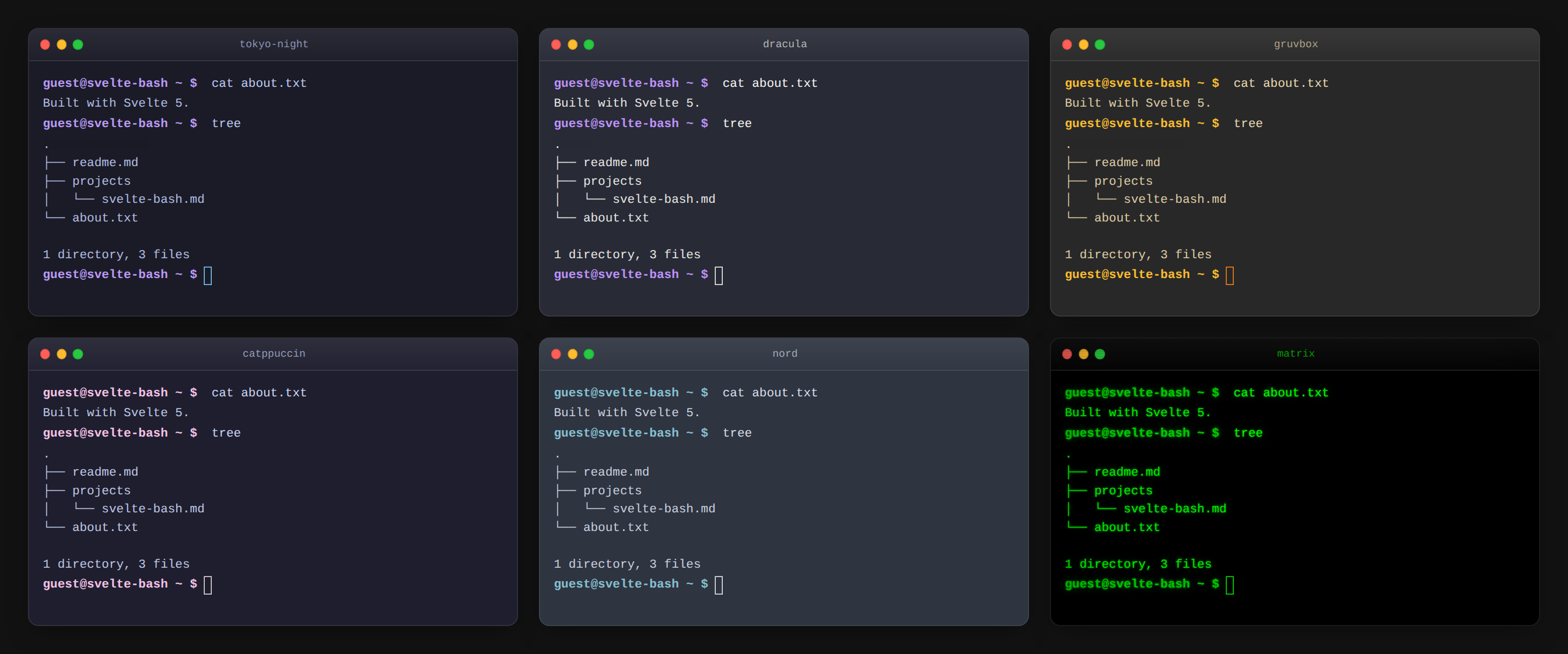
Pick one with a single prop: <Terminal theme="dracula" />. Nine presets are built in, and you can pass your own colors. See Theming.
Key features
- Portfolio mode:
createPortfolio({...})gives youabout,projects,skills,contact,open,neofetchand more. - A real little shell:
ls cat cd pwd echo mkdir touch rm cp mv alias unalias grep head tail wc find tree man history theme nano clear, plus|,>,>>,;,&&and quoting. - Virtual file system that is never mutated (your object is copied) and can be persisted to
localStorage. - Window chrome: macOS, Linux or Windows style title bars.
- 9 themes and CSS variables for everything else.
- Autoplay / bootplay / typewriter for landing pages and docs. Autoplay really runs the commands.
- Ghost completion, ZSH-style syntax highlighting, Tab completion for commands, paths and aliases.
- Accessible and mobile friendly:
role="log", labelled input, on-screen Tab/arrow keys (mobileKeys). - Fully typed and covered by 260+ tests.
Installation
npm install svelte-bash
Requires Svelte 5.
Portfolio in 30 seconds
<script>
  import { Terminal, createPortfolio } from 'svelte-bash';

  const portfolio = createPortfolio({
    name: 'Ada Lovelace',
    role: 'Software Engineer',
    location: 'London',
    about: 'I build fast, accessible web apps.',
    skills: { Frontend: ['Svelte', 'TypeScript'], Backend: ['Node.js'] },
    projects: [
      { name: 'My App', description: 'Something cool', url: 'https://example.com', tags: ['svelte'] }
    ],
    links: { github: 'https://github.com/you', linkedin: 'https://linkedin.com/in/you' },
    email: '[email protected]',
    resumeUrl: 'https://example.com/cv.pdf'
  });
</script>

<Terminal
  {...portfolio}
  windowStyle="macos"
  title="you — zsh"
  theme="tokyo-night"
  ghostCompletion
  syntaxHighlight
  style="height: 480px"
/>
Visitors can type about, projects, projects my-app, skills, contact, open github, resume, neofetch, cat projects/my-app.md, tree or theme nord.
createPortfolio option |
Description |
|---|---|
name (required), role, location |
Shown in the welcome message, README.md, neofetch. |
about |
String or array of lines (about, about.txt). |
skills |
string[] or { group: string[] }. |
projects |
{ name, description, url?, tags? }[], also written to projects/<slug>.md. |
links, email, resumeUrl |
Used by contact, links, open, resume. |
files, commands, welcome |
Extra files, extra/override commands, custom welcome lines. |
open and resume only open http(s): and mailto: URLs, in a new tab with noopener,noreferrer.
Basic usage
<script>
  import { Terminal } from 'svelte-bash';

  const files = {
    'readme.md': '# Hello World',
    src: { 'app.js': 'console.log("Hi")' }
  };
</script>

<Terminal structure={files} user="guest" style="height: 300px" />
The component fills its parent: give it (or its parent) a height.
Custom commands
<script>
  const commands = {
    hello: () => 'Hello from svelte-bash!',
    shout: (args, ctx) => (ctx.stdin ?? args.join(' ')).toUpperCase(),
    time: async () => new Date().toLocaleTimeString(),
    chart: () => MyChartComponent            // return a Svelte component to render it
  };
</script>

<Terminal {commands} />
Give a command a description and it shows up in help and answers --help:
<script>
  const commands = {
    hello: {
      description: 'Say hello',
      usage: 'hello [name]',
      run: (args) => `Hello ${args[0] ?? 'world'}!`
    }
  };
</script>
Handlers get (args, { stdin, cwd, user }). Return a string, string array, number, a Svelte component, or nothing. Thrown errors are printed as errors. Custom commands take priority over built-ins and work in pipes: echo hi | shout.
Persistence
<Terminal structure={initial} persist="my-site-terminal" />
The whole file system is saved to localStorage under that key and restored on the next visit (it replaces structure, so deleted files stay deleted). persist={true} uses the key svelte-bash-fs. Storage errors never break the terminal.
Controlling the terminal
<script>
  let term;
</script>

<Terminal bind:this={term} />
<button onclick={() => term.run('ls -la')}>Run ls</button>
| Method | Description |
|---|---|
run(command) |
Execute a line as if typed. |
clear() |
Clear the screen. |
focus() |
Focus the input. |
reset() |
Restore the initial file system and clear the screen. |
getStructure() |
Copy of the current file system. |
Autoplay and bootplay
<Terminal
  autoplay={[
    { command: 'mkdir project' },
    { command: 'echo "hello" > project/hi.txt', delayAfter: 500 },
    { command: 'tree' },
    { command: 'deploy', output: 'Shipped! 🚀' }   // fixed output instead of running
  ]}
  typingSpeed={60}
/>

<Terminal bootplay={[{ output: 'Booting…' }, { output: 'Ready.', delay: 400 }]} />
Without output, the command is actually executed. When the script loops, the screen and file system are reset. All timers stop when the component is destroyed.
Shell reference
| Command | Notes |
|---|---|
ls [-a] [-l] [-1] [path…] |
Hidden files with -a. |
cat [-n] [file…] |
Reads stdin when piped. |
cd, pwd |
cd, cd ~, cd .., absolute and ~/ paths. |
echo, mkdir [-p], touch |
Several arguments allowed. |
rm [-r] [-f], cp [-r], mv |
Several sources into a directory. Refuses unsafe moves. |
grep [-i -v -n -c] pattern [file…] |
JavaScript regular expressions. |
head, tail (-n N or -N), wc [-l -w -c] |
Files or stdin. |
find [path] [-name glob] [-type f|d], tree [path] |
|
alias, unalias, history, clear, man, help, whoami, date |
|
theme [name] |
List or switch themes at runtime. |
nano <file> |
^X saves and exits, ^C / Esc cancels. |
Operators: a | b, a > file, a >> file, a; b, a && b. Quotes ("…", '…') and \ escapes are supported.
Keyboard: Tab completes, ↑/↓ history, Ctrl+L clear, Ctrl+C cancel line (copies if text is selected).
Customize
Every option is a prop. Use <user>, <host>, <cwd>, <path> (or {user} inside a JS string) as tokens.
<Terminal
  promptFormat="<user>@<host>:<cwd>$"
  placeholder="Type 'help'"
  cursorStyle="bar"
  visualEffect="crt"
  fontFamily="'JetBrains Mono', monospace"
  fontSize={15}
  helpMessage="Try: about, projects, contact"
  notFoundMessage="Sorry, <cmd> is not a thing here."
  disabledCommands={['rm', 'mv']}
  maxLines={500}
/>
promptFormat may also be a function (ctx) => string with ctx = { user, host, cwd, path }. visualEffect is 'none' | 'glow' | 'scanlines' | 'crt'. cursorStyle is 'block' | 'bar' | 'underline'. Animations respect prefers-reduced-motion. Shortcuts: Ctrl+A / Ctrl+E start / end of line, Ctrl+U clear line, Ctrl+L clear screen, Ctrl+C cancel (or copy a selection).
More colour variables: --sb-error, --sb-muted, --sb-cmd, --sb-bad, --sb-flag, --sb-str, --sb-op, --sb-font, --sb-font-size, --sb-line-height, --sb-padding, --sb-ring, --sb-focus.
Theming
Presets: dark (default), light, dracula, matrix, tokyo-night, nord, gruvbox, catppuccin, github-dark.
<Terminal theme={{ background: '#1a1b26', foreground: '#a9b1d6', prompt: '#7aa2f7', cursor: '#c0caf5' }} />
Or override the CSS variables from outside:
<Terminal style="--sb-bg:#000; --sb-fg:#ddd; --sb-prompt:#0f0; --sb-cursor:#0f0; --sb-selection:#444; --sb-radius:12px; height:400px" />
API reference
| Prop | Type | Default | Description |
|---|---|---|---|
structure |
FileStructure |
{} |
Virtual file system (copied, never mutated). |
commands |
Record<string, CommandHandler | CommandDefinition> |
{} |
Custom commands. |
theme |
string | Theme |
'dark' |
Preset name or colour object. |
user / host |
string |
'user' / 'host' |
Prompt: user@host ~ $. |
promptStr |
string |
– | Replaces the whole prompt. |
promptFormat |
string | (ctx) => string |
– | Prompt template with <user> <host> <cwd> <path>. |
placeholder |
string |
– | Hint shown while the input is empty. |
cursorStyle / cursorBlink |
'block' | 'bar' | 'underline' / boolean |
'block' / true |
Caret look. |
visualEffect |
'none' | 'glow' | 'scanlines' | 'crt' |
'none' |
Screen effect. |
animations |
boolean |
true |
Turn all motion off with false. |
fontFamily / fontSize / lineHeight |
string / number / number |
– | Typography. |
maxLines |
number |
1000 |
Scrollback limit. |
helpMessage |
string | string[] | (names) => string |
– | Replaces the help output. |
notFoundMessage |
string |
– | Unknown-command text; <cmd> is the typed name. |
disabledCommands |
string[] |
[] |
Built-ins to switch off. |
welcomeMessage |
string | string[] |
[] |
Shown on start. |
typewriter |
boolean | number |
false |
Type the welcome message (number = ms per char). |
windowStyle |
'none' | 'macos' | 'linux' | 'windows' |
'none' |
Title bar style. |
title |
string |
'Terminal' |
Title bar text and aria-label. |
syntaxHighlight |
boolean |
false |
Colour commands, flags, strings, operators. |
ghostCompletion |
boolean |
false |
Faint command suggestion; Tab accepts. |
persist |
boolean | string |
– | Save the file system to localStorage. |
autoplay |
AutoplayItem[] |
– | Scripted demo (read-only terminal). |
autoplayLoop |
boolean |
true |
Loop the autoplay script. |
typingSpeed |
number |
50 |
Autoplay typing speed (ms). |
bootplay / bootSpeed |
BootplayItem[] / number |
– / 10 |
Fast non-interactive log. |
readonly |
boolean |
false |
Show output, no input. |
autoFocus |
boolean |
false |
Focus the input on mount. |
mobileKeys |
boolean |
false |
Show Tab / ↑ / ↓ / Ctrl+C / Clear buttons. |
onchange |
(fs) => void |
– | File system changed. |
oncommand |
(line) => void |
– | A command line was executed. |
class, style |
string |
– | Container class / inline style. |
The old on:change={…} event still works.
Server-side rendering
The component renders on the server (SvelteKit-safe); localStorage is only touched in the browser.
Development
npm install
npm run dev        # demo site
npm test           # unit + component tests
npm run test:cov   # with coverage
npm run check      # svelte-check
npm run package    # build ./dist
Contributing
Contributions are welcome! Please run npm run check && npm test before opening a pull request.
License
MIT © Yusuf Cengiz
