
TannerGabriel/discord-bot
TannerGabriel/discord-bot has 627 GitHub stars and 395 forks. GitHot measured 0 stars in 24 hours. Last checked 2026-11-15 15:45 UTC. Last push 2026-10-10.
計測したスター増加
- 24時間
- 0
- 7日間
- 更新が遅れています
- 15日間
- 更新が遅れています
- 1か月
- 更新が遅れています
期間ごとの純増数です。期間は重複しており、日別の値ではありません。未計測の値は空欄です。スター数は注目度の指標であり、品質の保証ではありません。
概要
Simple discord bot to play music and manage your server
制作・メディアREADME.md
オリジナルDiscord Music bot
A simple discord bot that helps you manage your server by providing useful commands like playing music or deleting text messages.
You can find the tutorial about building a discord music bot here.
Table of content
Requirements
Getting started
First, make sure you have all the required tools installed on your local machine then continue with these steps.
Installation
# Clone the repository
git clone https://github.com/TannerGabriel/discord-bot.git

# Enter into the directory
cd discord-bot/

# Install the dependencies
npm install

# Configure Discord Bot Token
 echo "DISCORD_TOKEN='INSERT_YOUR_TOKEN_HERE'" > .env
Other environment variables
Currently we also need to set the DP_FORCE_YTDL_MOD environment variable to override ytdl-core for the discord-player.
DISCORD_TOKEN=INSERT_YOUR_TOKEN_HERE
DP_FORCE_YTDL_MOD="@distube/ytdl-core"
Required permissions
Make sure that your bot has the applications.commands application scope enabled, which can be found under the OAuth2 tab on the developer portal
Enable the Server Members Intent and Message Content Intent which can be found under the Bot tab on the developer portal
Configuration
After cloning the project and installing all dependencies, you need to add your Discord API token in the .env file.
Changing the status
You can change the status of your discord bot by editing the activity and activityType variables inside the config.json file. activityType needs to be set to an integer with the following options.
Starting the application
node index.js
Starting the application using Docker
# Build the image
docker build --tag discordbot .

# Run the image
docker run -d discordbot
Deploying commands
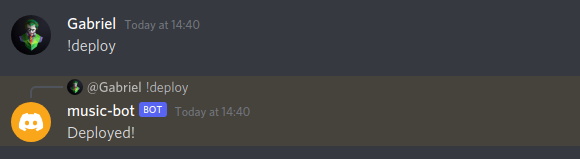
Before you can use the bots slash command you first need to add them to your Discord server. You can use the !deploy command to do so.
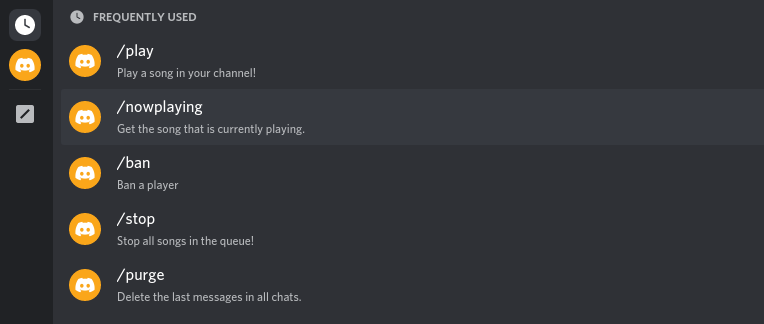
After deploying the commands you should be able to see and access them by typing a slash:
Docker
A mutliarch docker image for amd64 and arm64 based on the main branch is available from Github Container Registry:
docker pull ghcr.io/TannerGabriel/discord-bot:latest
A Github Action automatically builds and push amd64 and arm64 to ghcr.io, all builds are based on the main branch.
Only :latest tag is supported, otherwise use SHA256 from https://github.com/TannerGabriel/discord-bot/pkgs/container/discord-bot for pinning to a specific commit.
Features & Commands
Note: The repository now uses the new Discord slash commands
- Play
- Pause
- Resume
- Now Playing
- Queue
- Shuffle
- Loop
- Skip
- Remove
- Move
- Swap
- Stop
- Volume
- Help
- Userinfo
- Ban
- Purge
Play
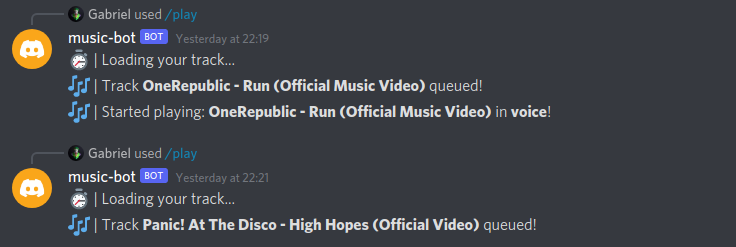
▶️ Play music from YouTube via url or search by song name, added to the bottom of the queue.
/play YOUTUBE_URL/play SONG_NAME
▶️ Play music via url or using song name, this places it next at the top of the queue (position 1).
/playtop YOUTUBE_URL/playtop SONG_NAME
Pause
⏸️ Pause music
/pause
Resume
▶️ Resume playing paused music
/resume
Now Playing
🎶 Display current playing song
/nowplaying
Queue
🗒️ Display the current queue
/queue
Shuffle
🔀 Shuffle the current queue
/shuffle
Loop
🔁 Loop/Repeat controls. Off, Track and Queue
/loop MODE
Skip
⏭️ Skip the current playing song and play the next in queue
/skip
Remove
⏏ Remove song from the queue
/remove POSITION
Move
↕ Move song position. This shifts all other songs up or down one, depending on direction you move the target song.
/move TRACK_POSITION TARGET_POSITION
Swap
↔️ Swap two songs current positions with each other
/swap POSITION_1 POSITION_2
Stop
🔇 Stop playing (disconnects bot from voice channel)
/stop
Volume
🔊 Adjust the music bot volume between 0-200
/volume NUMBER
Help
❓ Display commands
/help
Userinfo
- Get information about a user (/userinfo USER)
Ban
- Ban a player (/ban USER)
Purge
- Delete the latest chat messages (/purge NUM_OF_MESSAGES)
Common errors
Here is a list of common errors and how you can fix them.
Dependencies aren't up to date
The packages used in this repository get updated often, especially the ytdl-core package. That is why it is always worth a try updating those if you get an error like invalid URL: undefined or when the bot crashes when running the play command.
npm install ytdl-core@latest
FFMPEG is not installed on the machine running the bot
The play command requires FFMPEG to be installed on the machine that is running the bot. You can download it on the official FFMPEG website. Note: This isn't relevant if you use the Dockerfile because it will install FFMPEG inside of the container.
Contributing
You are welcome to contribute by submitting a Pull Request to the repository.
Author
Support me

License
This project is licensed under the MIT License - see the LICENSE.md file for details