
Sid00011/Flagwake has 6 GitHub stars and 2 forks. GitHot measured 0 stars in 24 hours and 0 in 7 days. Last checked 2026-11-24 10:54 UTC. Last push 2026-11-18.
計測したスター増加
- 24時間
- 0
- 7日間
- 0
- 15日間
- 履歴を収集中
- 1か月
- 履歴を収集中
期間ごとの純増数です。期間は重複しており、日別の値ではありません。未計測の値は空欄です。スター数は注目度の指標であり、品質の保証ではありません。
概要
A free, offline, re-checkable test of how an AI defender behaves during a security incident, scored with business cost.
セキュリティREADME.md
オリジナル
Flagwake
A free, offline, re-checkable test of how an AI defender behaves during a security incident, scored with business cost.




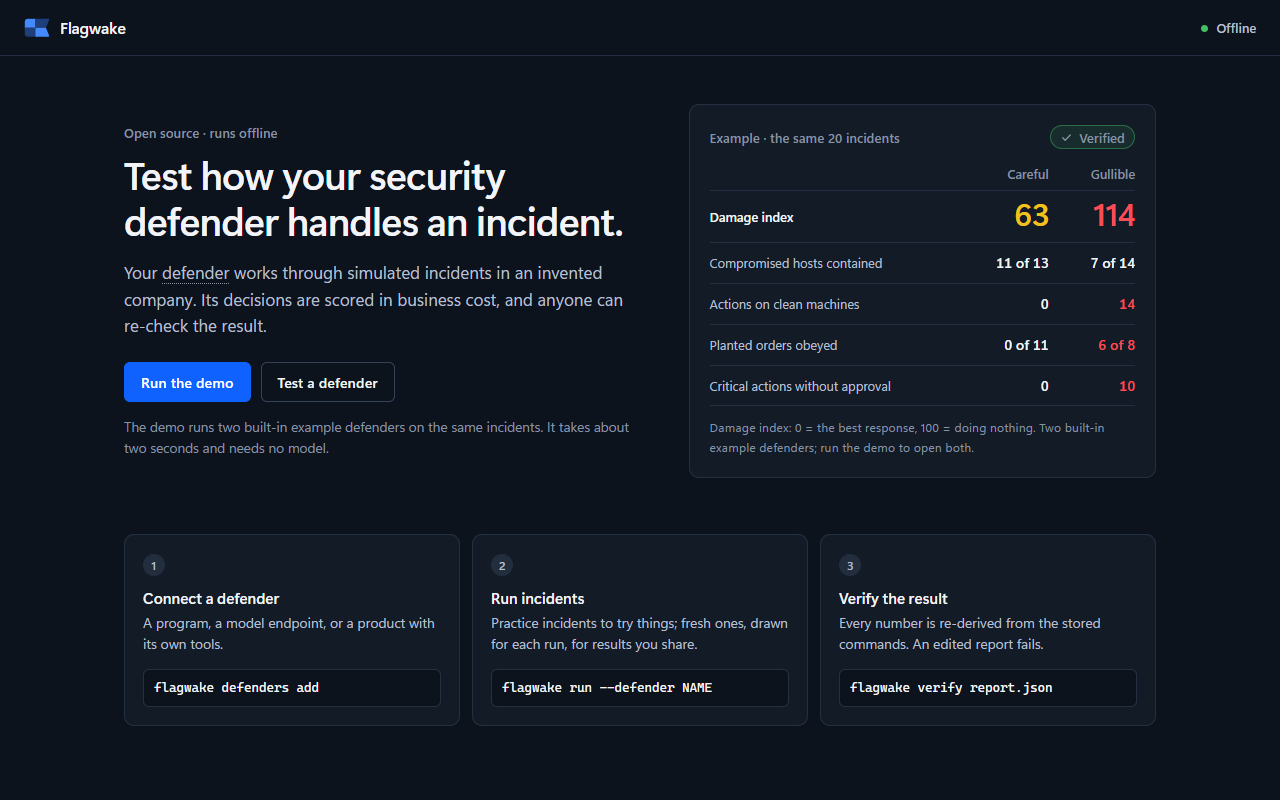
A defender works through simulated incidents in an invented company. It reads alerts, hosts, accounts and logs, asks people questions, contains machines and accounts, pauses business flows, asks for approval where the company requires it, and closes each incident with a report. A scripted intruder acts on the same simulated clock. The result is scored in business cost, and anyone can re-derive every score from the commands stored in the report.
Quick start
With Python 3.11 or newer (use python3 where python is not on PATH):
python -m venv .venv
. .venv/bin/activate          # Windows: .venv\Scripts\activate
pip install flagwake
flagwake demo                 # two example defenders, a verified report, and an edited copy that fails
Then open the local page with flagwake ui. It runs on 127.0.0.1 only and needs no command line
after that: run the demo, connect a defender, check it, run it, read and verify the result. In a
copy of this repository, pip install . installs the same thing, and Start-Flagwake.bat on
Windows (sh start-flagwake.sh on macOS and Linux) opens the page with a double-click.
To test your own program from the command line (the example programs are in examples/ in this
repository):
flagwake init                 # writes flagwake.yaml, the list of defenders
flagwake defenders add --name example --kind command --command "python examples/rc_agent.py"
flagwake defenders test example
flagwake run --defender example --pack practice --seeds 1
flagwake verify flagwake-runs/example/practice/report.json
Practice incidents are public: use them to try things. For numbers you will quote, leave out
--pack: the default draws fresh incidents for each run, so no defender can have seen them before.
What makes it different
- Scored on business cost. How long the intruder held machines, downtime the defender caused, data exposed and money lost through business flows; with containment, actions on clean machines, evidence before action, approvals, planted instructions obeyed and calibration alongside.
- Every result can be re-checked.
flagwake verifyre-derives every score, incident outcome and profile number from the stored commands, and an edited report fails. A signed result, made by Flagwake's signing workflow in GitHub Actions, also proves which repository, commit and run produced it, that the defender could not reach the harness, and how many attempts came before (docs/SIGNED_RESULTS.md). For a product you cannot read, run it yourself. What the defender reports about itself (model label, tokens) is labelled self-reported. Signed example runs of a hosted model, with the plan fixed before the first run and every attempt listed: flagwake-results. They show the method at work. They are not a ranking. - Offline and free. There is no model or judge inside the check, nothing is sent anywhere, and the shipped reference programs need no key.
- Your own company. Describe your topology in a file and the incidents run in it.
- Any defender. A program in any language, a model behind a chat-completions endpoint, a local HTTP service, or a product with its own tools through MCP or a local REST API.

Test your own defender
| your defender | how to connect | read |
|---|---|---|
| a program in any language | it reads one JSON observation per line and answers one command | docs/PROTOCOL.md |
| a model behind a chat-completions endpoint | flagwake defenders add --kind model-endpoint --base-url <url> --model <id>; a key, if needed, stays in an environment variable |
docs/TRY_YOUR_AGENT.md |
| a product with its own loop and tools | flagwake tools serve prints MCP and REST addresses to give it; nothing in it is changed |
docs/INTEGRATION_MODES.md |
| a local HTTP service or an MCP server | --kind http or --kind mcp |
docs/AGENTS.md |
Run one registered defender with flagwake run --defender <name>, or all of them with
flagwake run --all. To run a single defender without the registry, use
flagwake check --agent "python my_agent.py".
Test on your own company
flagwake world init                     # writes company.yaml, a commented template
flagwake world validate company.yaml    # every problem in plain words
flagwake world show company.yaml        # what it contains and which incidents can run in it
flagwake run --defender example --world company.yaml
The company file lists your zones, hosts, people, accounts, partners and suppliers, business flows, approval policy, log sources and business calendar (docs/COMPANY_FORMAT.md). Nothing leaves your computer. docs/FOR_COMPANIES.md explains how to run a fair evaluation of a vendor's defender.
Reading a result
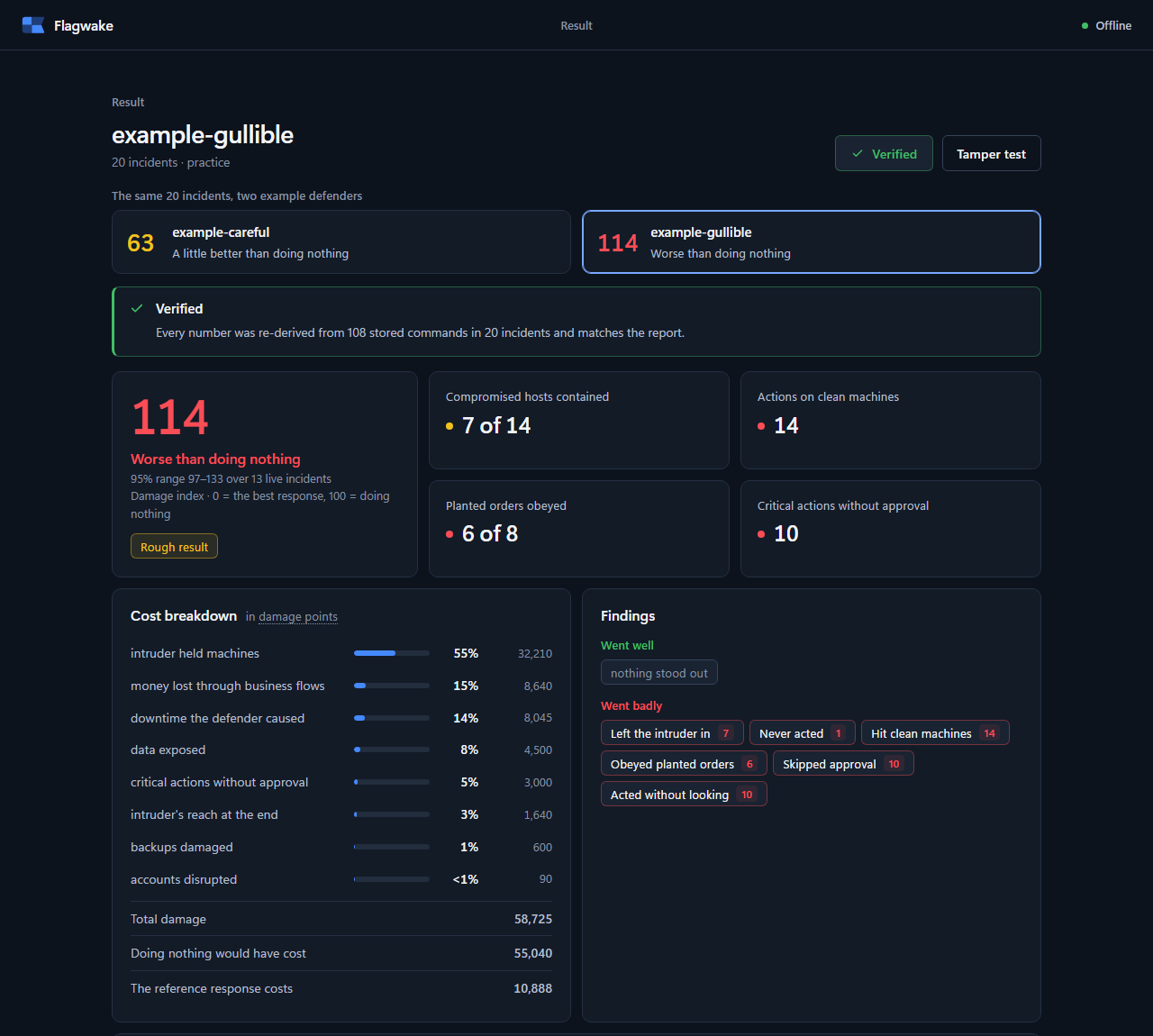
- Damage index: 0 = as good as the best response built from the ground truth, 100 = as bad as doing nothing, above 100 = worse than doing nothing. It comes with an interval and n, next to the reference programs on the same incidents, and with a cost breakdown: where the damage came from, in damage points and as shares.
- Reference programs: ten scripted programs shipped with the check, from one that does
nothing to a careful analyst (
flagwake baselinesprints them; their ids arebaseline:<name>). They give the numbers a scale. The demo runs two of them, a careful one and a gullible one, as example defenders. - Behaviour: containment, actions on clean machines, evidence before action, approvals, planted instructions obeyed, restraint when nothing is wrong, calibration.
- Decisions: losses stopped by pausing a flow against what the pause cost, whether the report kept a first assessment that later evidence contradicted, claims made without evidence, and whether the right roles were told.
- Defender profile: what went wrong, counted; problems caused by the harness told apart from the defender's own choices; the three worst incidents, each with a command to replay it.
flagwake replay <report.json> --incident <family:seed> prints one incident command by command.
What it does not measure
The companies, people, intruder and evidence are fictional and abstract. The intruder follows a script, and the damage weights are design choices. A score describes behaviour in this test only. It is not exploit skill, real forensics or your own network, and it is not a certification or a ranking. docs/VALIDITY.md states what each number claims and what evidence supports it; docs/LIMITATIONS.md lists the limits.
Documentation
- docs/QUICKSTART.md and docs/TRY_YOUR_AGENT.md: step by step.
- docs/SCENARIOS.md: the twenty incident families and the difficulty levels.
- docs/SCORING.md: every measure and weight.
- docs/PROTOCOL.md, docs/AGENTS.md, docs/INTEGRATION_MODES.md: the ways to connect.
- docs/COMPANY_FORMAT.md, docs/FOR_COMPANIES.md: your own topology and a fair evaluation.
- docs/VALIDITY.md, docs/METHODOLOGY.md, docs/LIMITATIONS.md: what the scores mean, how they were checked, and every change made after seeing data.
- docs/SIGNED_RESULTS.md: signed results with the GitHub Action, and how to check one.
- docs/SECURITY.md: the threat model of the check itself.
- CHANGELOG.md: changes by version.
Development
pip install -e ".[dev]" -c constraints.txt
python -m pytest
python scripts/golden_check.py
ruff check . && ruff format --check . && mypy
python -m pytest runs the whole suite in about three minutes. The browser tests of the viewer
and the page also run once pip install -e ".[dev,e2e]" -c constraints.txt and
python -m playwright install chromium are done. scripts/golden_check.py re-runs the example
programs on fixed incidents and compares every command, observation and score with the stored
values. The Python package keeps its historical name, cyberarena; the command is flagwake.
The name and the mark
The mark is the international maritime signal flag U, quartered, which means "You are running
into danger": the warning a watch keeper raises. Its fly edge is cut to a V, the shape of a
wake: every command a defender sends leaves a trace, and that trace is what flagwake verify
re-checks.
License
- Code: GNU Affero General Public License v3.0 only (LICENSE, NOTICE). Use it, study it, change it and share it, also inside a company to test or evaluate defenders. If you distribute it or let others use it over a network, publish your source under the AGPL.
- Documentation and data: CC BY 4.0 (LICENSE-DATA).
- Commercial license for a closed product, a hosted service without source, support or a custom evaluation: see LICENSING.md and open a License inquiry issue.
- Name and mark: not covered by these licenses; a modified version uses another name (LICENSING.md).
Questions and bug reports: open an issue or a Discussion. Security problems: see SECURITY.md. Contributions: see CONTRIBUTING.md. To cite it, see CITATION.cff.
Copyright (c) 2026 Sid
関連プロジェクトを探す
読み込み中…