
PixelsCommander/HTML-GL
PixelsCommander/HTML-GL has 3,514 GitHub stars and 151 forks. GitHot measured -1 stars in 24 hours, -4 in 7 days, and -3 in 15 days. Last checked 2026-11-23 21:06 UTC. Last push 2021-03-28.
計測したスター増加
- 24時間
- -1
- 7日間
- -4
- 15日間
- -3
- 1か月
- 履歴を収集中
期間ごとの純増数です。期間は重複しており、日別の値ではありません。未計測の値は空欄です。スター数は注目度の指標であり、品質の保証ではありません。
概要
HTML/CSS を WebGL でレンダリングして、必要なだけの FPS と驚きのエフェクトを実現します。
制作・メディアREADME.md
オリジナル
60 FPS and amazing effects by rendering HTML/CSS in WebGL, framework agnostic

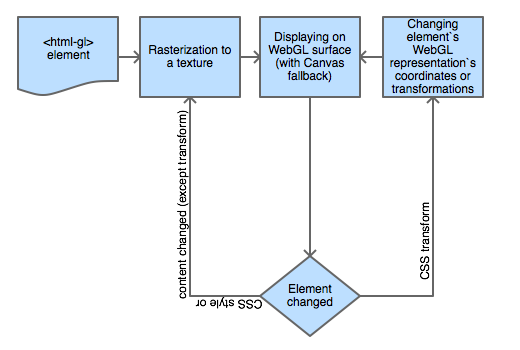
HTML GL solves "the slow DOM problem" by creating WebGL representations of DOM elements and hiding actual DOM after. This speeds up HTML/CSS animations and transformations by using 3D hardware acceleration and allows to apply OpenGL effects as modern 3D games have.
Using HTML GL you still work with HTML/CSS as you are common to, but DOM elements are just facades to their WebGL representations. These GPU accelerated textures are very effective from resources consuming perspective and are very cheap to transform or animate.
Install
npm:
npm install --save html-gl
Bower:
bower install --save htmlgl
Usage
As Web Component
<html-gl>
    This element`s content is rendered in <h1>WebGL</h1>
    <span style="color: green;">was it easy?</span>
    Feel free to use CSS, images and all you are common to in HTML/CSS world.
</html-gl>
As jQuery plugin
$('.some div').htmlgl();
No DOM + WebGL rendering = highest FPS possible for Web platform
Demos
- Filters WebGL is not only about performance. It breaks any HTML/CSS limits in terms of animations and interactivity
- Mobile effects use attribute
effectson<html-gl>element to specify effects you use, this one is nice for mobile - Basic HTML GL demo shows how to use HTML GL and animate GL Elements. It also demonstrate that HTML GL handle content change events and repaints element`s WebGL representation
- Basic DOM this is the same project as previous. The only difference is that htmlgl.js is not included
- Advanced content HTML GL slider with nested content rendered via WebGL and animated, ability to drag with mouse horizontaly, click event listeners on boxes
- Advanced content DOM
How to use?
Include HTMLGL.js into project. Use tag name <html-gl> or jQuery plugin $(myElement).htmlgl() for elements you are going to animate. These elements will be rendered in WebGL and their CSS Transform properties will be mapped to WebGL representation transformations. So DOM node itself will not be animated or displayed in order to avoid resources consuming.
HTML GL is framework agnostic and is easy to inject into existing project which needs performance tweaking.
Rasterization API
In order to improve technology we are trying to promote standardized native Rasterization API for JavaScript. Help us to be better and to add this cool feature to browsers by spreading the article and proposal draft.
Fast way to animate
The most performant way to animate HTML-GL tags is to operate on tag's styleGL.transform in the same way you operate on style.transform. E.g. style.transform = 'translateX(100px) translateY(50px)'.
Velocity.js copy from HTML-GL repository (https://github.com/PixelsCommander/HTML-GL/blob/master/demo/js/vendor/velocity.js) have this optimization built-in. Feel free to use it in the way described in official Velocity.js documentation.
Animating HTML-GL tag children
Since it is very efficient to make transformations (move, rotate, scale, change opacity) on HTML-GL tags it becomes very slow to animate it's children until they are HTML-GL tags too. This happens because of necessity to rasterize and send HTML-GL tag texture to GPU.
Running demos from repository
Please run bower install before running demos
License
Copyright 2015 Denis Radin aka PixelsCommander
関連プロジェクトを探す
読み込み中…