
MasayukiSuda/ExoPlayerFilter
MasayukiSuda/ExoPlayerFilter has 906 GitHub stars and 163 forks. GitHot measured 0 stars in 24 hours and 0 in 7 days. Last checked 2026-11-21 23:27 UTC. Last push 2023-04-06.
計測したスター増加
- 24時間
- 0
- 7日間
- 0
- 15日間
- 履歴を収集中
- 1か月
- 履歴を収集中
期間ごとの純増数です。期間は重複しており、日別の値ではありません。未計測の値は空欄です。スター数は注目度の指標であり、品質の保証ではありません。
概要
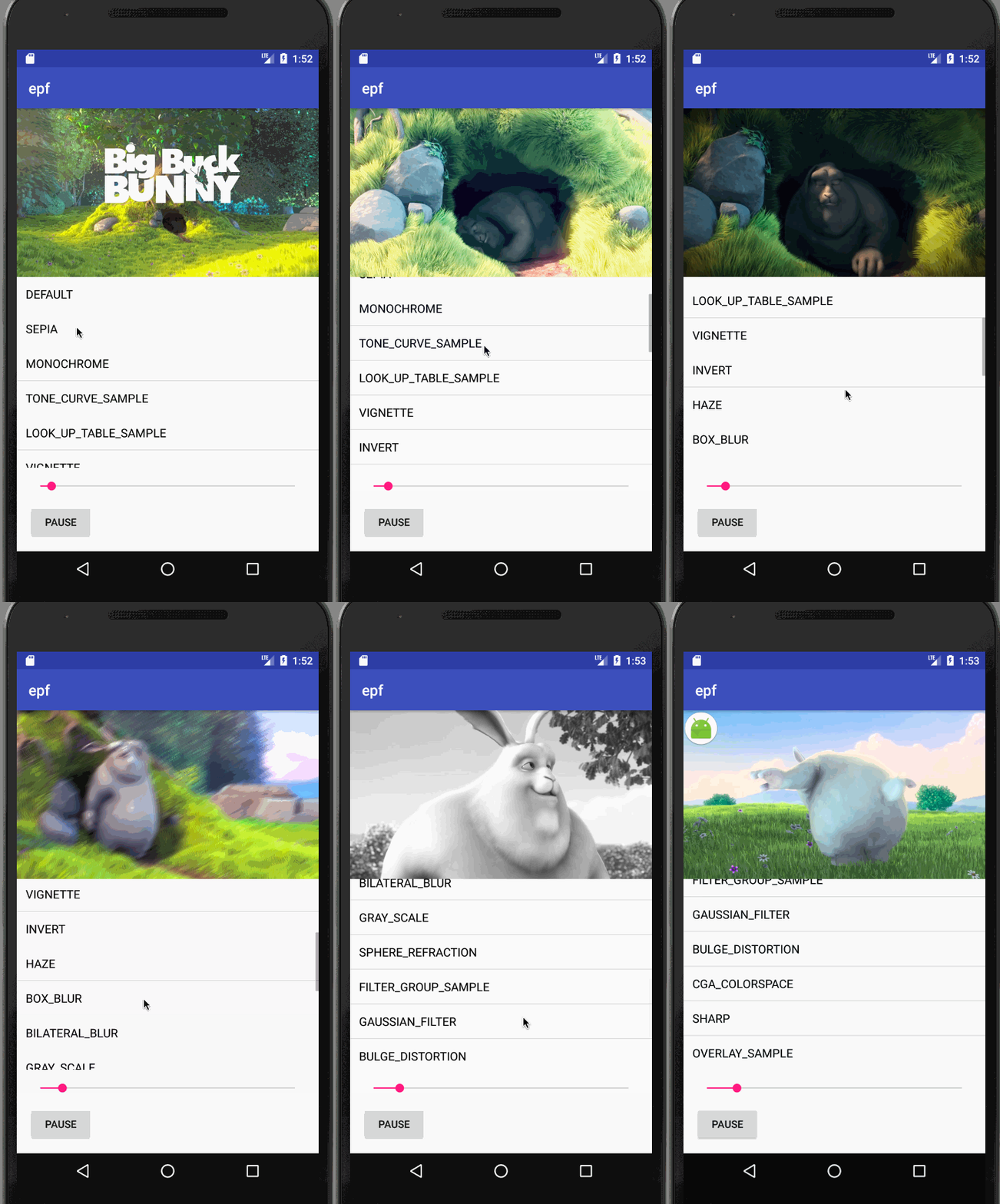
This library uses OpenGL Shaders to apply effects on ExoPlayer video at Runtime
制作・メディアREADME.md
オリジナルExoPlayerFilter



This library uses OpenGL Shaders to apply effects on ExoPlayer video at Runtime and
depends EXOPlayer core 2.18.0.
Gradle
Step 1. Add the JitPack repository to your build file
allprojects {
	repositories {
		...
		maven { url 'https://jitpack.io' }
	}
}
Step 2. Add the dependency
    dependencies {
        implementation 'com.github.MasayukiSuda:ExoPlayerFilter:v0.2.6'
        implementation 'com.google.android.exoplayer:exoplayer-core:2.18.0'
    }
This library depends ExoPlayer core 2.18.0
Sample Usage
STEP 1
Create ExoPlayer instance.
In this case, play MP4 file.
Read this if you want to play other video formats.
    // Produces DataSource instances through which media data is loaded.
    DataSource.Factory dataSourceFactory = new DefaultDataSourceFactory(this, Util.getUserAgent(this, "yourApplicationName"));

    // SimpleExoPlayer
    player = new ExoPlayer.Builder(this)
            .setMediaSourceFactory(new ProgressiveMediaSource.Factory(dataSourceFactory))
            .build();
    player.addMediaItem(MediaItem.fromUri(Constant.STREAM_URL_MP4_VOD_SHORT));
    player.prepare();
    player.setPlayWhenReady(true);
STEP 2
Create EPlayerView and set SimpleExoPlayer to EPlayerView.
    ePlayerView = new EPlayerView(this);
    // set SimpleExoPlayer
    ePlayerView.setSimpleExoPlayer(player);
    ePlayerView.setLayoutParams(new RelativeLayout.LayoutParams(ViewGroup.LayoutParams.MATCH_PARENT, ViewGroup.LayoutParams.MATCH_PARENT));
    // add ePlayerView to WrapperView
    ((MovieWrapperView) findViewById(R.id.layout_movie_wrapper)).addView(ePlayerView);
    ePlayerView.onResume();
STEP 3
Set Filter. Filters is here.
Custom filters can be created by inheriting GlFilter.java.
ePlayerView.setGlFilter(new GlSepiaFilter());
Special Thanks to
License
Copyright 2017 MasayukiSuda
MIT License
Permission is hereby granted, free of charge, to any person obtaining a copy of this software and associated documentation files (the "Software"), to deal in the Software without restriction, including without limitation the rights to use, copy, modify, merge, publish, distribute, sublicense, and/or sell copies of the Software, and to permit persons to whom the Software is furnished to do so, subject to the following conditions:
The above copyright notice and this permission notice shall be included in all copies or substantial portions of the Software.
THE SOFTWARE IS PROVIDED "AS IS", WITHOUT WARRANTY OF ANY KIND, EXPRESS OR IMPLIED, INCLUDING BUT NOT LIMITED TO THE WARRANTIES OF MERCHANTABILITY, FITNESS FOR A PARTICULAR PURPOSE AND NONINFRINGEMENT. IN NO EVENT SHALL THE AUTHORS OR COPYRIGHT HOLDERS BE LIABLE FOR ANY CLAIM, DAMAGES OR OTHER LIABILITY, WHETHER IN AN ACTION OF CONTRACT, TORT OR OTHERWISE, ARISING FROM, OUT OF OR IN CONNECTION WITH THE SOFTWARE OR THE USE OR OTHER DEALINGS IN THE SOFTWARE.
ExoPlayer and ExoPlayer demo.
Copyright (C) 2014 The Android Open Source Project

Licensed under the Apache License, Version 2.0 (the "License");
you may not use this file except in compliance with the License.
You may obtain a copy of the License at

    http://www.apache.org/licenses/LICENSE-2.0

Unless required by applicable law or agreed to in writing, software
distributed under the License is distributed on an "AS IS" BASIS,
WITHOUT WARRANTIES OR CONDITIONS OF ANY KIND, either express or implied.
See the License for the specific language governing permissions and
limitations under the License.
関連プロジェクトを探す
読み込み中…