
MICS-Lab/thunder has 51 GitHub stars and 15 forks. Star changes are not measured yet. Last checked 2026-11-12 20:07 UTC. Last push 2026-11-02.
[NeurIPS25 D&B Spotlight] A tile-level histopathology image understanding benchmark
計測したスター増加
- 24時間
- 履歴を収集中
- 7日間
- 履歴を収集中
- 15日間
- 履歴を収集中
- 1か月
- 履歴を収集中
期間ごとの純増数です。期間は重複しており、日別の値ではありません。未計測の値は空欄です。スター数は注目度の指標であり、品質の保証ではありません。
README.md
オリジナルTile-level Histopathology image Understanding benchmark





Published at NeurIPS 2025 Datasets and Benchmarks Track (Spotlight)
We introduce THUNDER, a comprehensive benchmark designed to rigorously compare foundation models across various downstream tasks in computational pathology. THUNDER enables the evaluation and analysis of feature representations, robustness, and uncertainty quantification of these models across different datasets. Our benchmark encompasses a diverse collection of well-established datasets, covering multiple cancer types, image magnifications, and varying image and sample sizes. We propose an extensive set of tasks aimed at thoroughly assessing the capabilities and limitations of foundation models in digital pathology.
⚡ Paper: THUNDER: Tile-level Histopathology image UNDERstanding benchmark
⚡ Homepage/Documentation: THUNDER docs
⚡ Examples: THUNDER examples
⚡ Reproduce results: THUNDER reproduction guidelines
⚡ Leaderboards: THUNDER leaderboards
News
- 2026-04-08: GenBio-PathFM is now supported in THUNDER. Its downstream performance was integrated into the up-to-date rank-sum leaderboard and the SPIDER leaderboard.
- 2025-12-07: OpenMidnight is now supported in THUNDER. Its downstream performance was integrated into the up-to-date rank-sum leaderboard and the SPIDER leaderboard.
- 2025-11-21: As requested (https://github.com/MICS-Lab/thunder/issues/6), H0-mini is now supported in THUNDER. Its downstream performance was integrated into the up-to-date rank-sum leaderboard and the SPIDER leaderboard.
- 2025-11-14: GIGAPATH and KAIKO-ViT model variants (S/8, S/16, B/8, B/16) are now supported in THUNDER. The downstream performance of GIGAPATH, KAIKO-S/16 and KAIKO-B/16 were integrated into the up-to-date rank-sum leaderboard and the SPIDER leaderboard.
- 2025-11-11: You can now run any task in THUNDER on a custom dataset. Check the tutorial to learn more about this feature.
- 2025-10-30: DINOv3 model variants (B, S, L) are now supported in THUNDER. Their downstream performance was integrated along with SPIDER results into a new up-to-date rank-sum leaderboard.
- 2025-10-06: As requested (https://github.com/MICS-Lab/thunder/issues/1), a new zero-shot classification task to evaluate VLMs was included into THUNDER. Example command:
thunder benchmark keep spider_breast zero_shot_vlm. See the dedicated zero-shot classification leaderboard. - 2025-09-30: Patch-level SPIDER datasets have been integrated into THUNDER. See the dedicated SPIDER leaderboard.
- 2025-09-18: THUNDER was accepted to NeurIPS 2025 Datasets & Benchmarks Track as a Spotlight presentation!
Overview
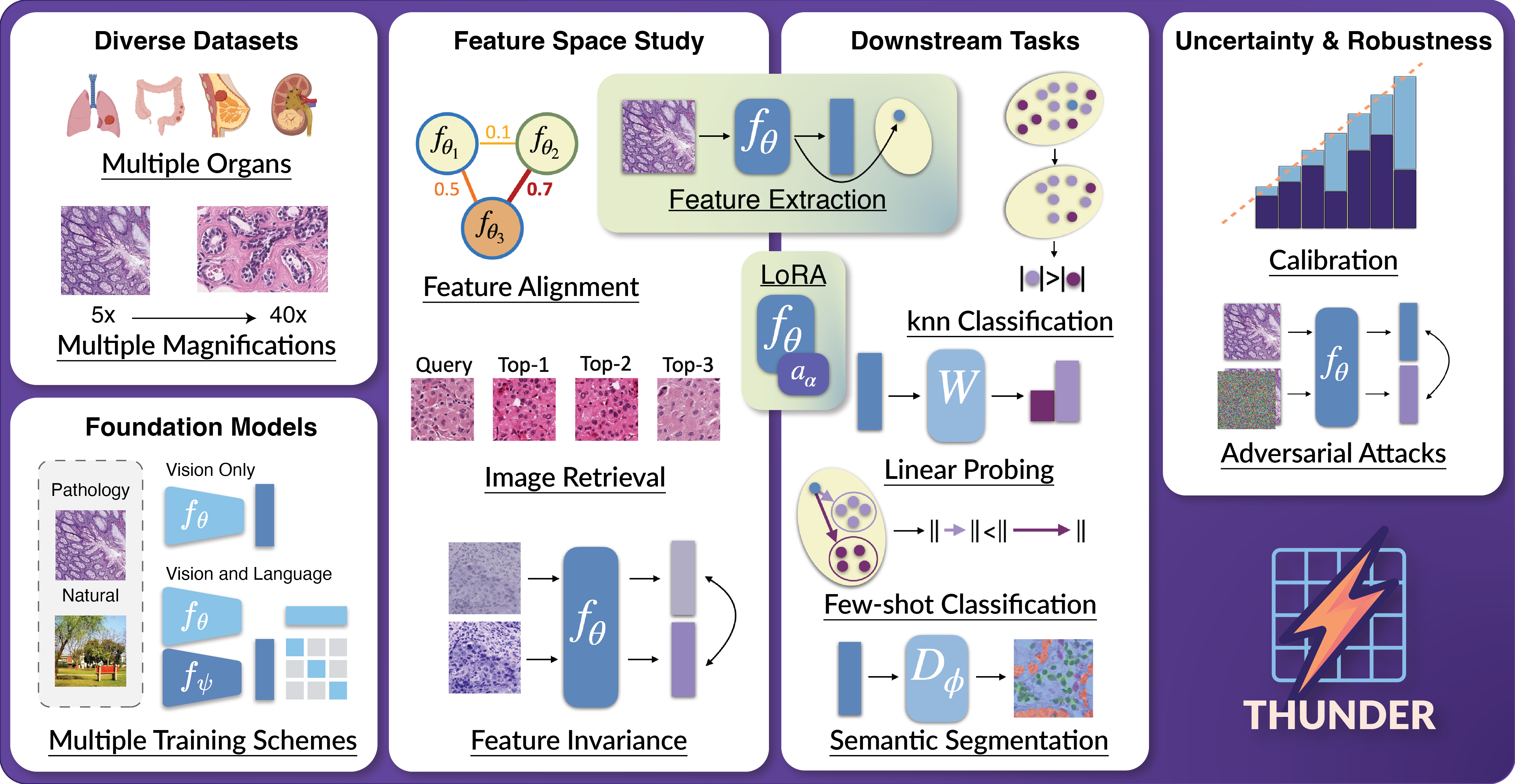
We propose a benchmark to compare and study foundation models across three axes: (i) downstream task performance, (ii) feature space comparisons, and (iii) uncertainty and robustness. Our current version integrates 23 foundation models, vision-only, vision-language, trained on pathology or natural images, on 16 datasets covering different magnifications and organs. THUNDER also supports the use of new user-defined models for direct comparisons.
Usage
To learn more about how to use thunder, please visit our documentation.
An API and command line interface (CLI) are provided to allow users to download datasets, models, and run benchmarks. The API is designed to be user-friendly and allows for easy integration into existing workflows. The CLI provides a convenient way to access the same functionality from the command line.
[!IMPORTANT] Downloading supported foundation models: you will have to visit the Huggingface URL of supported models you wish to use in order to accept usage conditions.
List of Huggingface URLs
- UNI: https://huggingface.co/MahmoodLab/UNI
- UNI2-h: https://huggingface.co/MahmoodLab/UNI2-h
- Virchow: https://huggingface.co/paige-ai/Virchow
- Virchow2: https://huggingface.co/paige-ai/Virchow2
- H-optimus-0: https://huggingface.co/bioptimus/H-optimus-0
- H-optimus-1: https://huggingface.co/bioptimus/H-optimus-1
- OpenMidnight-1.1: https://huggingface.co/medarc/OpenMidnight-1.1
- OpenMidnight-1.1-SPECTRA: https://huggingface.co/medarc/OpenMidnight-1.1-SPECTRA
- H-optimus-0-SPECTRA: https://huggingface.co/medarc/H-optimus-0-SPECTRA
- Virchow-SPECTRA: https://huggingface.co/medarc/Virchow-SPECTRA
- Midnight-12k-SPECTRA: https://huggingface.co/medarc/Midnight-12k-SPECTRA
- GenBio-PathFM: https://huggingface.co/genbio-ai/genbio-pathfm
- CONCH: https://huggingface.co/MahmoodLab/CONCH
- TITAN/CONCHv1.5: https://huggingface.co/MahmoodLab/TITAN
- Phikon: https://huggingface.co/owkin/phikon
- Phikon2: https://huggingface.co/owkin/phikon-v2
- Hibou-b: https://huggingface.co/histai/hibou-b
- Hibou-L: https://huggingface.co/histai/hibou-L
- Midnight-12k: https://huggingface.co/kaiko-ai/midnight
- KEEP: https://huggingface.co/Astaxanthin/KEEP
- QuiltNet-B-32: https://huggingface.co/wisdomik/QuiltNet-B-32
- PLIP: https://huggingface.co/vinid/plip
- MUSK: https://huggingface.co/xiangjx/musk
- DINOv2-B: https://huggingface.co/facebook/dinov2-base
- DINOv2-L: https://huggingface.co/facebook/dinov2-large
- ViT-B: https://huggingface.co/google/vit-base-patch16-224-in21k
- ViT-L: https://huggingface.co/google/vit-large-patch16-224-in21k
- CLIP-B: https://huggingface.co/openai/clip-vit-base-patch32
- CLIP-L: https://huggingface.co/openai/clip-vit-large-patch14
API Usage
When using the API you can run the following code to download datasets, models and run a benchmark:
from thunder import benchmark

benchmark("phikon", "break_his", "knn")
CLI Usage
When using the CLI you can run the following command to see all available options,
thunder --help
In order to reproduce the above example you can run the following command:
thunder benchmark phikon break_his knn
Reproducing the leaderboard results (SLURM)
To reproduce our leaderboard results for a given model across all datasets and tasks, we provide a SLURM array script:
sbatch scripts/benchmark_all_tasks.sh <model_name>
It also works with a custom model by passing a custom: path to your model file:
sbatch scripts/benchmark_all_tasks.sh custom:/path/to/your/model.py
Once all array tasks finish, gather the outputs with thunder results-summary; the reproduced leaderboard scores are the benchmark_* rows of the resulting table. The script is a generic SLURM template, you will likely need to adapt the #SBATCH header at the top of the file to your cluster before it will run. The segmentation datasets need a GPU with at least 32 GB of VRAM. See the guidelines for details.
Extracting embeddings with any supported foundation model (API Usage)
We also provide a get_model_from_name function through our API to extract embeddings using any foundation model we support on your own data. Below is an example if you want to get the Pytorch callable, transforms and function to extract embeddings for uni2h:
from thunder.models import get_model_from_name

model, transform, get_embeddings = get_model_from_name("uni2h", device="cuda")
Installing thunder
Code tested with Python 3.10. To replicate, you can create the following conda environment and activate it,
conda create -n thunder_env python=3.10
conda activate thunder_env
To install thunder run one of the following commands:
From PyPi
pip install thunder-bench
From Source
pip install -e . # install the package in editable mode
pip install . # install the package
Before running thunder, ensure that the environment variable THUNDER_BASE_DATA_FOLDER is defined. This variable specifies the path where outputs, foundation models, and datasets will be stored. You can set it by running:
export THUNDER_BASE_DATA_FOLDER="/path/to/your/data/folder"
Replace /path/to/your/data/folder with your desired storage directory.
If you want to use the CONCH and MUSK models, you should install them as follows:
pip install git+https://github.com/Mahmoodlab/CONCH.git # CONCH
pip install git+https://github.com/lilab-stanford/MUSK.git # MUSK
Citation
@article{marza2025thunder,
  title={{THUNDER}: Tile-level Histopathology image UNDERstanding benchmark},
  author={Marza, Pierre and Fillioux, Leo and Boutaj, Sofi{\`e}ne and Mahatha, Kunal and Desrosiers, Christian and Piantanida, Pablo and Dolz, Jose and Christodoulidis, Stergios and Vakalopoulou, Maria},
  journal={Neural Information Processing Systems (NeurIPS) D&B Track},
  year={2025}
}
Acknowledgments
This work has been partially supported by ANR-23-IAHU-0002, ANR-21-CE45-0007, ANR-23-CE45-0029, and the Health Data Hub (HDH) as part of the second edition of the France-Québec call for projects Intelligence Artificielle en santé. It was performed using computational resources from the Mésocentre computing center of Université Paris-Saclay, CentraleSupélec and École Normale Supérieure Paris-Saclay supported by CNRS and Région Île-de-France, and from GENCI-IDRIS (Grant 2025-AD011016068).
関連プロジェクトを探す
tensorflow/tensorflow
すべての人のためのオープンソース機械学習フレームワーク
201,584 スターhuggingface/transformers
🤗 Transformers:テキスト、ビジョン、音声、マルチモーダルの最先端機械学習モデル向けモデル定義フレームワークで、推論と学習の両方に対応します。
168,917 スターAUTOMATIC1111/stable-diffusion-webui
Stable Diffusion の Web UI
165,300 スターComfy-Org/ComfyUI
グラフとノードによるインターフェースを備えた、最も強力でモジュール性の高い拡散モデル向け GUI、API、バックエンド。世界最速のローカル推論エンジン。
146,472 スター