
LalitMaganti/syntaqlite
LalitMaganti/syntaqlite has 828 GitHub stars and 18 forks. GitHot measured 0 stars in 24 hours and -1 in 7 days. Last checked 2026-11-22 00:34 UTC. Last push 2026-11-07.
計測したスター増加
- 24時間
- 0
- 7日間
- -1
- 15日間
- 履歴を収集中
- 1か月
- 履歴を収集中
期間ごとの純増数です。期間は重複しており、日別の値ではありません。未計測の値は空欄です。スター数は注目度の指標であり、品質の保証ではありません。
概要
A fast parser, formatter, static analyzer, and language server for SQLite SQL.
データREADME.md
オリジナル
syntaqlite
A fast parser, formatter, static analyzer and language server for SQLite SQL, built from SQLite's own grammar.




Quick start · Why syntaqlite? · Install · Documentation · Playground
What is syntaqlite?
syntaqlite is a parser, formatter, static analyzer and language server for SQLite SQL, available as a CLI, editor extensions and libraries.
- Parser: a C parser generated from SQLite's own grammar, keeping comments and whitespace.
- Formatter:
syntaqlite fmt, with configurable width, indentation and keyword case. - Static analyzer: checks queries against your schema without a database.
- Language server: diagnostics, completion, hover, go to definition and rename.
- Libraries: Rust, Python, JavaScript and C, plus a parser-only C library.
Quick start
1. Install syntaqlite
On macOS, Linux or Windows:
curl -sSf https://raw.githubusercontent.com/LalitMaganti/syntaqlite/main/tools/syntaqlite | python3 - install
Prefer a package manager? See Install for pip, Homebrew, mise and Cargo.
2. Format SQL
syntaqlite fmt -e "select id,name,email from users where active=1 and role='admin' order by name"
SELECT id, name, email
FROM users
WHERE
  active = 1
  AND role = 'admin'
ORDER BY
  name;
syntaqlite fmt -i query.sql formats a file in place, and --check reports
files that aren't formatted without changing them.
3. Check SQL against your schema
Given this schema.sql:
CREATE TABLE users (id, name, email);
syntaqlite analyze --schema schema.sql -e "SELECT nme, email FROM users"
error: unknown column 'nme'
 --> <expression>:1:8
  |
1 | SELECT nme, email FROM users
  |        ^~~
  = help: did you mean 'name'?
A syntaqlite.toml file maps groups of SQL files to their schemas, for both
the CLI and the language server. See
project setup.
4. Target your SQLite version
syntaqlite --sqlite-version 3.32.0 analyze \
  -e "DELETE FROM users WHERE id = 1 RETURNING *;"
error: syntax error near 'RETURNING'
 --> <expression>:1:32
  |
1 | DELETE FROM users WHERE id = 1 RETURNING *;
  |                                ^~~~~~~~~
RETURNING arrived in SQLite 3.35.0. Optional features work the same way,
with --sqlite-cflag SQLITE_ENABLE_MATH_FUNCTIONS.
Try it in your browser
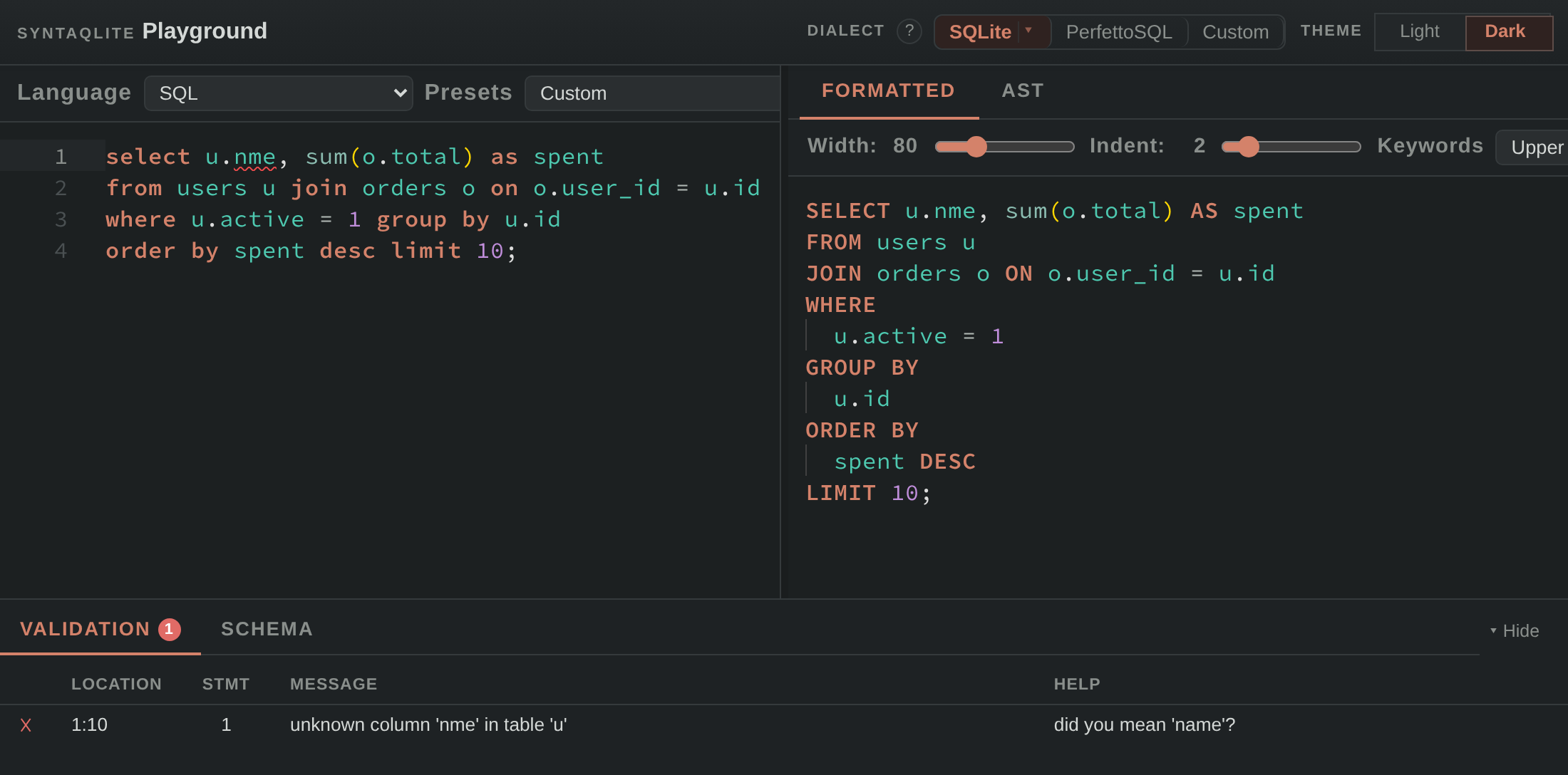
The playground runs syntaqlite in your browser: paste SQL and a schema to see it formatted, analyzed and parsed. Click the screenshot to open this example.
Why syntaqlite?
- Fast: parses 870 statements in 2.5 ms and formats them in 4.9 ms, startup included (benchmarks).
- Accurate: agrees with SQLite on 99.7% of SQLite's own test suite.
- Version-aware: checks SQL against the SQLite version and compile-time flags you run.
- No database needed: catches unknown columns and malformed statements in CI from just a schema file.
- Safe formatting: keeps comments and preserves what each statement does.
- Extensible: supports SQLite-based dialects. Perfetto builds PerfettoSQL on it.
Install
Shell installer
curl -sSf https://raw.githubusercontent.com/LalitMaganti/syntaqlite/main/tools/syntaqlite | python3 - install
pip, Homebrew, mise or Cargo
pip install syntaqlite
brew install LalitMaganti/tap/syntaqlite
mise use github:LalitMaganti/syntaqlite
cargo binstall syntaqlite-cli   # downloads the prebuilt binary
cargo install syntaqlite-cli    # builds from source
Editors
- VS Code: install syntaqlite from the Marketplace.
- Zed: follow the Zed guide.
- Claude Code:
claude plugin install syntaqlite@lalitmaganti-plugins. - Other editors: start
syntaqlite lspfrom your LSP client. The editor guide has examples.
Libraries
cargo add syntaqlite        # Rust
pip install syntaqlite      # Python
npm install syntaqlite      # JavaScript and WebAssembly
For C, download libsyntaqlite or libsyntaqlite-parser from the
latest release,
or build libsyntaqlite with cargo build -p syntaqlite-capi. The
C guide explains which to choose.
Documentation
- Getting started: CLI, VS Code, Zed, other editors, Rust, Python, JavaScript and C.
- Guides: project setup, CI integration and custom dialects.
- Reference: CLI, configuration file, formatting options and language server features.
Project status
syntaqlite is ready to use today. It was built for Perfetto, which uses it to parse PerfettoSQL in Trace Processor and to format Perfetto's SQL standard library.
It is still 0.x, so its APIs and command-line interface may change before 1.0.
Contributing
tools/install-build-deps
tools/cargo build
The contributing guide covers the repository layout and tests. Pull requests are welcome.
AI usage
For coding: AI was used extensively for mechanical implementation, but the design, architecture, and overall shape of the project came from me. I understand all of the code and take full responsibility for it.
For other tasks: AI was used for research, brainstorming, testing, documentation, and integrations. I wrote a detailed account of how I built syntaqlite with AI, including where it helped and where it was detrimental.
License
Apache 2.0. The parts derived from SQLite are public domain under the SQLite blessing. See LICENSE for details.
関連プロジェクトを探す
読み込み中…