
Joelheile/voz has 67 GitHub stars and 5 forks. GitHot measured +1 stars in 24 hours and +5 in 7 days. Last checked 2026-11-23 23:24 UTC. Last push 2026-11-11.
計測したスター増加
- 24時間
- +1
- 7日間
- +5
- 15日間
- 履歴を収集中
- 1か月
- 履歴を収集中
期間ごとの純増数です。期間は重複しており、日別の値ではありません。未計測の値は空欄です。スター数は注目度の指標であり、品質の保証ではありません。
概要
Free, open source dictation for Mac. A Wispr Flow alternative that runs offline and grows with TypeScript extensions.
セキュリティREADME.md
オリジナルVoz
Type at the speed you talk.
Tap right Command, say what you mean, and clean text appears in any app.
Free, open source dictation that runs on your Mac. Missing a feature? Your coding agent writes it as an extension.




Install
You need macOS 26 on Apple Silicon.
- Download Voz.
- Open the disk image and drag Voz into Applications.
- Open Voz. It walks you through the rest.
How it works
Tap right Command, talk, and tap again. You say:
um so tell kaitlyn the uh deck is ready
Voz types this at your cursor:
Tell Kaitlyn the deck is ready.
Speech to text runs on your Mac with NVIDIA's Parakeet model in 25 languages, and Apple's on-device model cleans up the text. So Voz works offline, in your editor, browser, terminal or Claude Code. There is no account and no word limit.
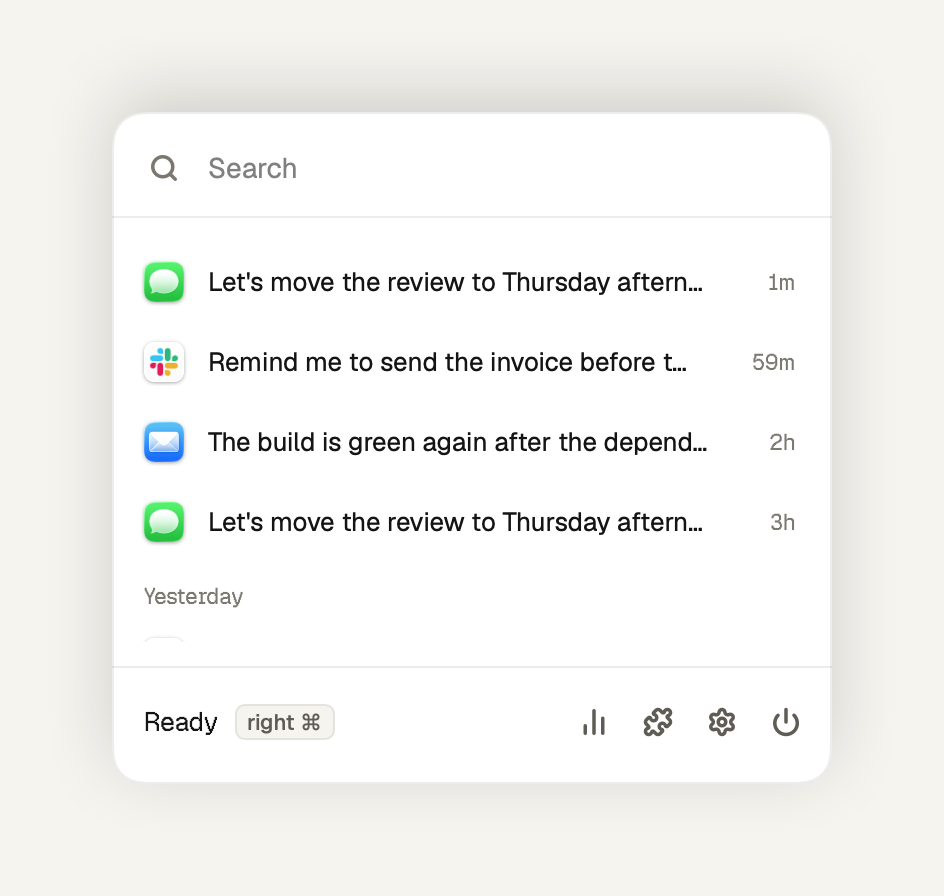
Press Esc while you talk to throw a recording away. Press Return, and Voz stops the recording, types the text and sends it, which suits chats and coding agents. Turn that off with Quick send under Settings.
Voz lives in the menu bar and keeps your history on your Mac. Click a transcript to copy it, or search for older ones.
Why Voz
I paid for Wispr Flow until a subscription to talk to my own computer started to annoy me. The open source apps I tried had too many settings. Hex came closest, but every change I wanted meant a pull request and a long wait.
So Voz has a small core that records, transcribes, cleans up and types. Everything else is an extension you write for yourself and can share with others.
Extensions
Extensions are TypeScript files in ~/.voz/extensions. They can use your apps, files, terminal and the network.
import { defineExtension } from "voz";

export default defineExtension((voz) => {
  voz.registerCommand({
    phrase: "send it",
    run: (event, ctx) => ctx.press("return"),
  });
});
Now "let's ship it, send it" types "Let's ship it" and presses Return. Other ideas:
- Turn rambling into a clear prompt for your coding agent
- Write mail with your greeting and sign-off
- File a Linear issue from what you said
Extensions run with your permissions, so install only ones you trust. If one is slow or crashes, dictation keeps working. With no extensions installed, Voz runs nothing extra.
Build one with your coding agent
Click Build your own under Extensions and paste the prompt into Claude Code, Codex or another coding agent. The click also installs the voz-extension skill, so the agent asks what you want, writes the extension and tests it with you. Voz loads it when you save. The API is in api.md.
To install the skill without Voz, run npx skills add Joelheile/voz -g.
Share it
Publish it to npm with the voz-package keyword, and it shows up under Extensions for everyone. Install one from the menu bar or with voz install voz-meeting. Here is every published extension, updated hourly:

Terminal and MCP
Everything in the menu is a voz command, and extensions add their own. Your coding agent can dictate, search your history or set up an extension the same way you do.
voz start                         # open Voz in the background
voz status                        # permissions, model and extensions
voz dictation start               # record, then voz dictation stop
voz dictation stop --print        # print the text instead of typing it
voz dictation stop --send         # type it, then press Return
voz dictation cancel              # throw the recording away
voz logs --extensions --since 5m  # what extensions logged
voz history invoice --limit 5     # find what you dictated
voz vocabulary add Kubernetes     # teach Voz a word
voz config voz-jira token -       # set a token from stdin
voz disable voz-jira              # turn an extension off
voz jira issues VOZ               # run a tool an extension adds
voz feedback "Hotkey lags"        # tell the developer, privately
voz help calendar                 # find a command
voz guide                         # how to build an extension
voz <command> --helplists a command's flags.- Add
--jsonfor JSON. Coding agents get JSON without the flag. - Repeating a command is safe.
voz enable voz-jiratwice reports that it is already on and still succeeds. - When Voz is closed, most commands exit with code 3 and ask you to run
voz start.voz install,voz list,voz new,voz dev,voz logsandvoz guidework without it.
| Exit code | Meaning |
|---|---|
| 0 | Done, or it already was |
| 1 | The command failed |
| 2 | Wrong command or flag |
| 3 | Voz is not running |
| 4 | Voz heard no speech |
voz mcp offers the same commands to Claude, Codex and other MCP apps, and opens Voz if it is closed:
claude mcp add voz -- /Applications/voz.app/Contents/MacOS/voz mcp
codex mcp add voz -- /Applications/voz.app/Contents/MacOS/voz mcp
Each command becomes a tool, such as history, vocabulary_add or voz-jira_issues. Read-only commands are marked, so the app can run them without asking you. Commands that install code or need a terminal, such as voz install and voz dev, are not offered.
What's new
- Bluetooth headphones keep full sound quality in meetings while Voz is open
- Find settings faster, grouped into Dictation, Models and Sound
Privacy
Dictation runs on your Mac. Your audio and transcripts stay there unless an extension you install sends them somewhere.
Extensions that write with an AI model ask you to pick one the first time you press their hotkey: ChatGPT, Claude or Apple's on-device model. Change it under Settings > AI model. With ChatGPT or Claude, the text they send goes to OpenAI or Anthropic under your account, and Voz keeps the sign-in in your Keychain.
Voz never records your screen. An extension can read the text of the window in front only if its package declares it, and the Extensions page and voz extensions show which ones do. Voz reads through Accessibility, never screenshots. It skips password fields, password managers, private browser windows and the lock screen, and hides keys, tokens, card numbers and IBANs before the extension sees the text. voz-reply keeps 30 days on your Mac, and voz reply forget deletes it. It learns your writing style with Apple's model on your Mac, whatever model you picked, so that learning never leaves your Mac.
Voz sends PostHog, without your IP address:
- Anonymous counts you can't turn off, each with a new random ID and only the UTC day as a timestamp, so they can't be linked. They cover pings on install and update, setup and usage milestones, and, after each day you dictate, rounded words, dictations, totals per app, median speed and error codes. Once a week they add your settings and the public npm extensions you have enabled. Only app names on a public list leave your Mac, and everything else counts as
other - Crash reports, on by default under Privacy, with a stack trace, a new random ID each launch and no text, audio or app names
- Usage stats, only if you opt in, tied to a random ID: timings per dictation and daily totals per website. Only sites on a public list leave your Mac, everything else counts as
other, and private browser windows count no website - Feedback, only when you send it
None of these contain what you dictate. Run voz telemetry to see every event and the list of names. The local log at ~/Library/Logs/Voz/voz-logs.jsonl includes your text only when you turn on Include text under Privacy.
When an extension types text for you, such as a reply draft, Voz saves it with the window title and reads the field for up to two minutes to see whether you kept, changed or sent it. Dictations also save the window title, such as a chat name. All of this stays in the history on your Mac, and extensions you install can read it.
Voz asks for System Audio Recording to mute other apps while you dictate, and it saves no audio. Extensions see the app you dictate into and, in browsers, the hostname, never the full address. An AI app you connect with voz mcp can read your history and drafts, so connect only apps you trust.
Found a vulnerability? Open a private advisory, not a public issue.
Contributing
Pull requests that make the core faster or more reliable, add languages or add extension points are welcome. Everything else ships as an extension. If the API can't do what you need, open an issue.
You need the Command Line Tools, not Xcode:
scripts/test.sh          # run the tests
scripts/run.sh           # build a debug app and launch it
scripts/make-app.sh      # build and sign build/voz.app
AGENTS.md has the code map and release rules.
License
MIT. Dependencies and downloaded models keep their own licenses. Signed apps include Contents/Resources/ThirdPartyNotices.txt, with dependency licenses and model attributions.
関連プロジェクトを探す
読み込み中…