
Changroro/llmux has 26 GitHub stars and 3 forks. GitHot measured 0 stars in 24 hours, 0 in 7 days, and 0 in 15 days. Last checked 2026-11-25 05:22 UTC. Last push 2026-11-23.
できること
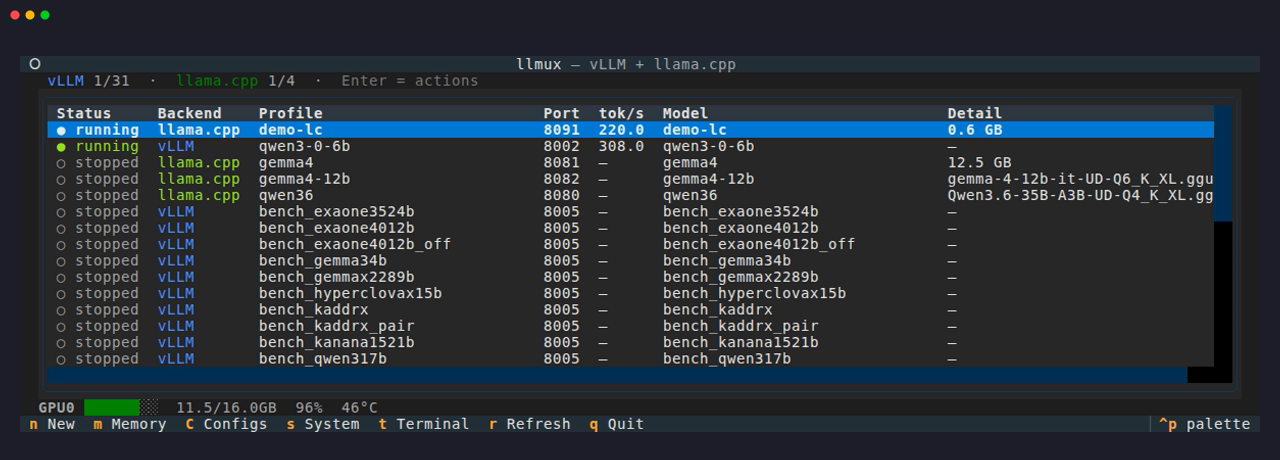
- One dashboard for both engines — Every vLLM and llama.cpp profile side-by-side in a single Textual TUI, with a live tok/s column per running model.
- Build a profile once, spin it up and down — Keep every model you're experimenting with as a named profile in one profiles.yaml. No re-writing config each time — pick one, hit Enter, and it launches the right engine; stop it and start another just as fast.
- Pin any engine image per profile — Run a versioned vLLM release, nightly, the rolling llama.cpp CUDA image, or an image you built from source — pinned per profile via image_tag. llmux refuses the ambiguous :latest; versioned vLLM images are also verified inside the running container.
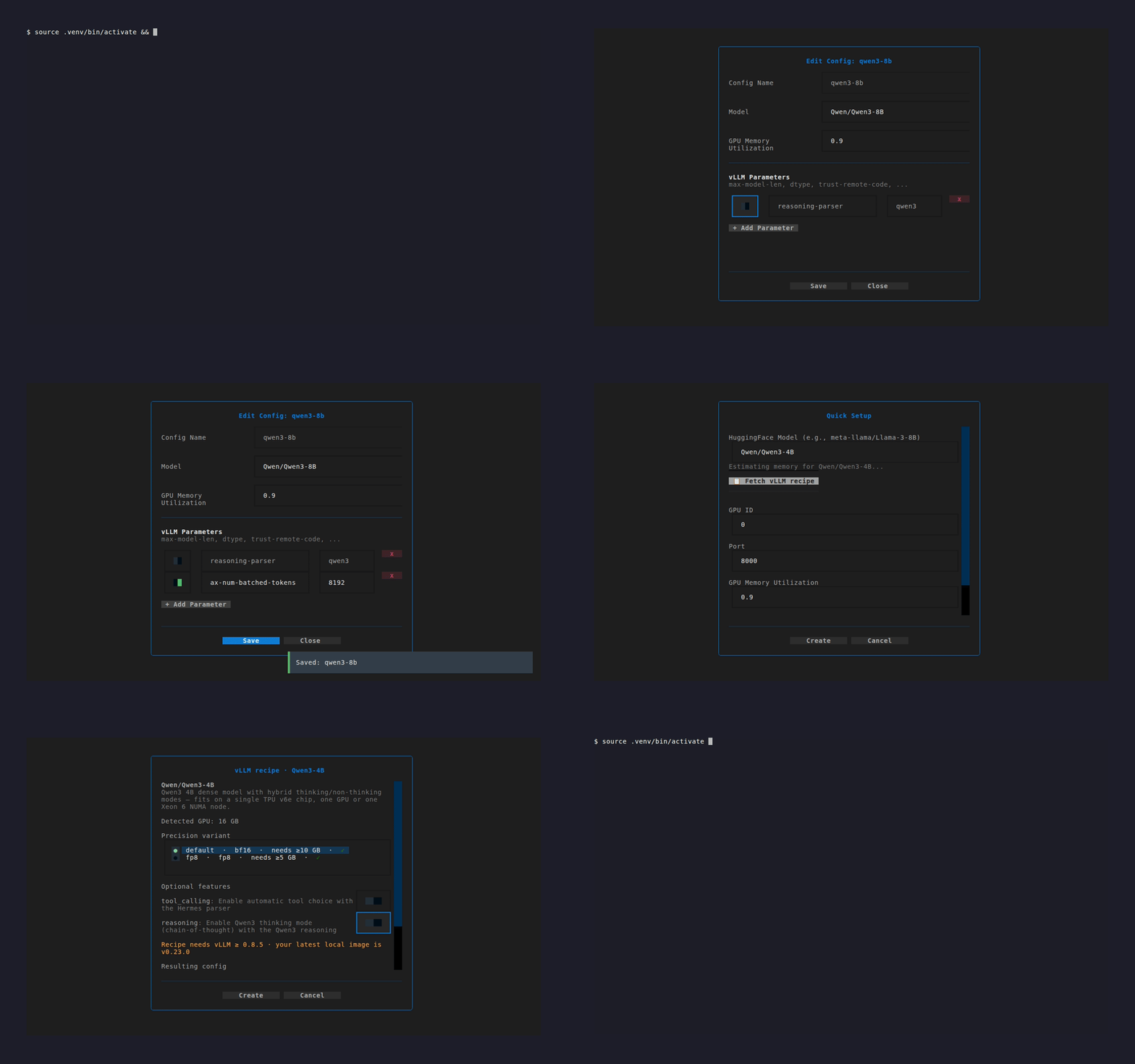
- VRAM-aware vLLM recipe import — Pull a model's official vllm-project/recipes config, then review its precision variants (bf16 / fp8 / awq) against your actual GPU's VRAM before it's written — so a recipe verified on an 80 GB card doesn't silently overshoot a 16 GB one.
計測したスター増加
- 24時間
- 0
- 7日間
- 0
- 15日間
- 0
- 1か月
- 履歴を収集中
期間ごとの純増数です。期間は重複しており、日別の値ではありません。未計測の値は空欄です。スター数は注目度の指標であり、品質の保証ではありません。
概要
Run and manage both vLLM and llama.cpp model servers from one terminal UI + CLI — shared Docker Compose profiles, live tok/s, and cross-backend port/GPU conflict checks. NVIDIA + Linux.
開発ツールREADME.md
オリジナル
llmux
Run and manage vLLM and llama.cpp servers from one terminal — TUI or CLI.







English | 한국어
vLLM for HF Transformers. llama.cpp for GGUF.
Two different toolchains, two different configs, two different terminals.
llmux unifies both under a single Textual dashboard backed by Docker Compose.
Pick a profile, press Enter — whichever engine it belongs to just runs.
Linux · NVIDIA GPU · Docker. No macOS, AMD/ROCm, or CPU-only yet.
Demos
Both engines on one GPU, live tok/s per model — a vLLM model and a llama.cpp model running side by side, each with its own throughput, all in one dashboard
One dashboard for vLLM + llama.cpp — toggle a config flag on/off, add one with autocomplete, then import a model from its official vLLM recipe — reviewed against your GPU's VRAM
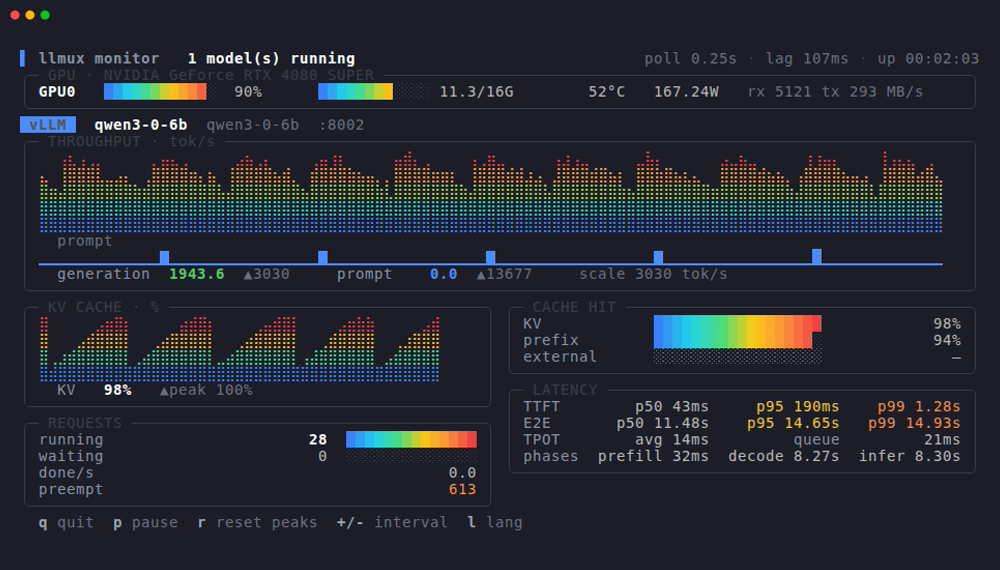
Live monitor — press v (or run llmux top) for GPUs plus a panel per running model: throughput and KV-cache graphs, cache hit rate, and latency percentiles read off the engine's Prometheus histograms
Headless CLI — recipe import, parameter on/off, status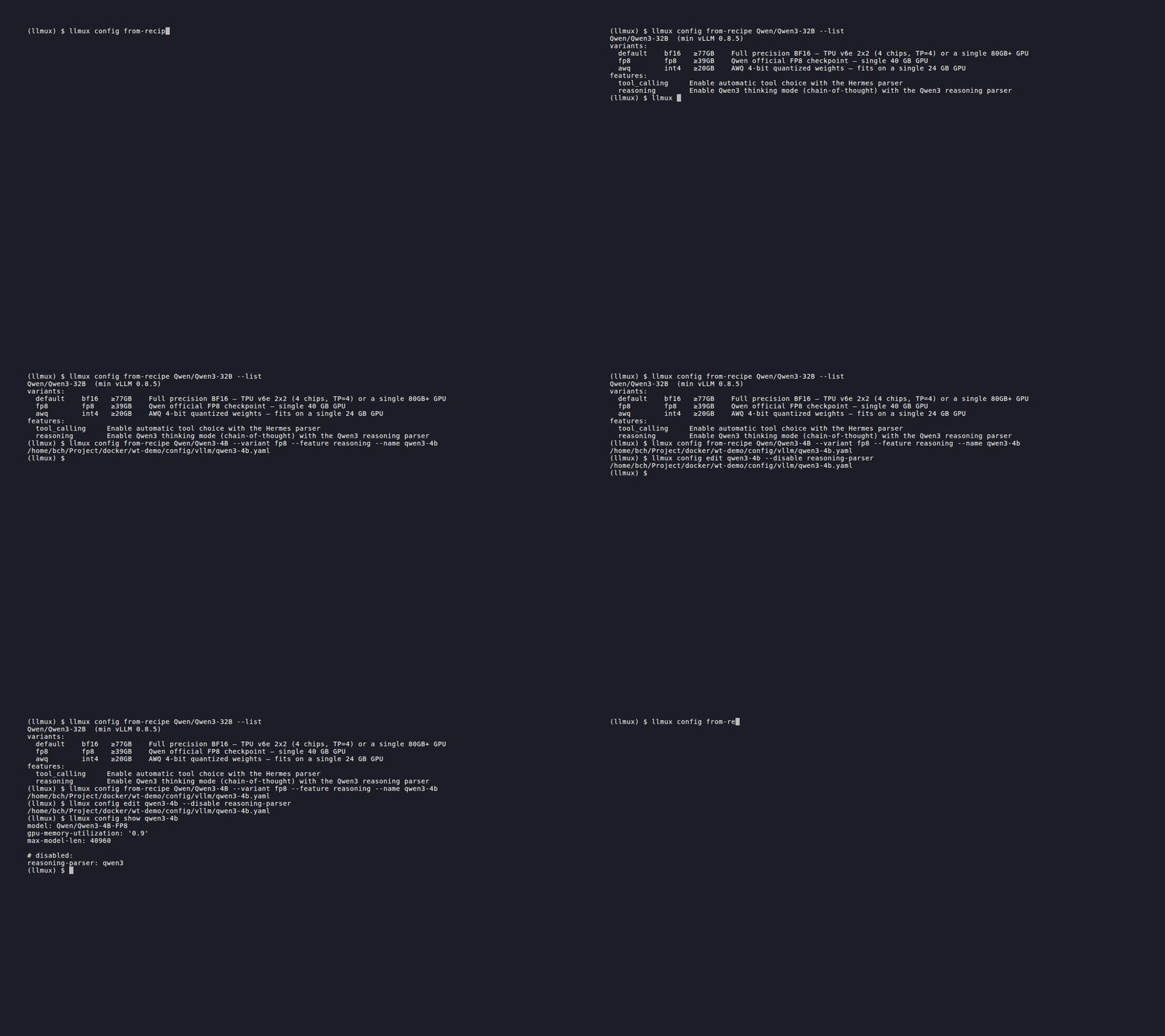
|
GPU memory estimator — per-GPU fit bar across models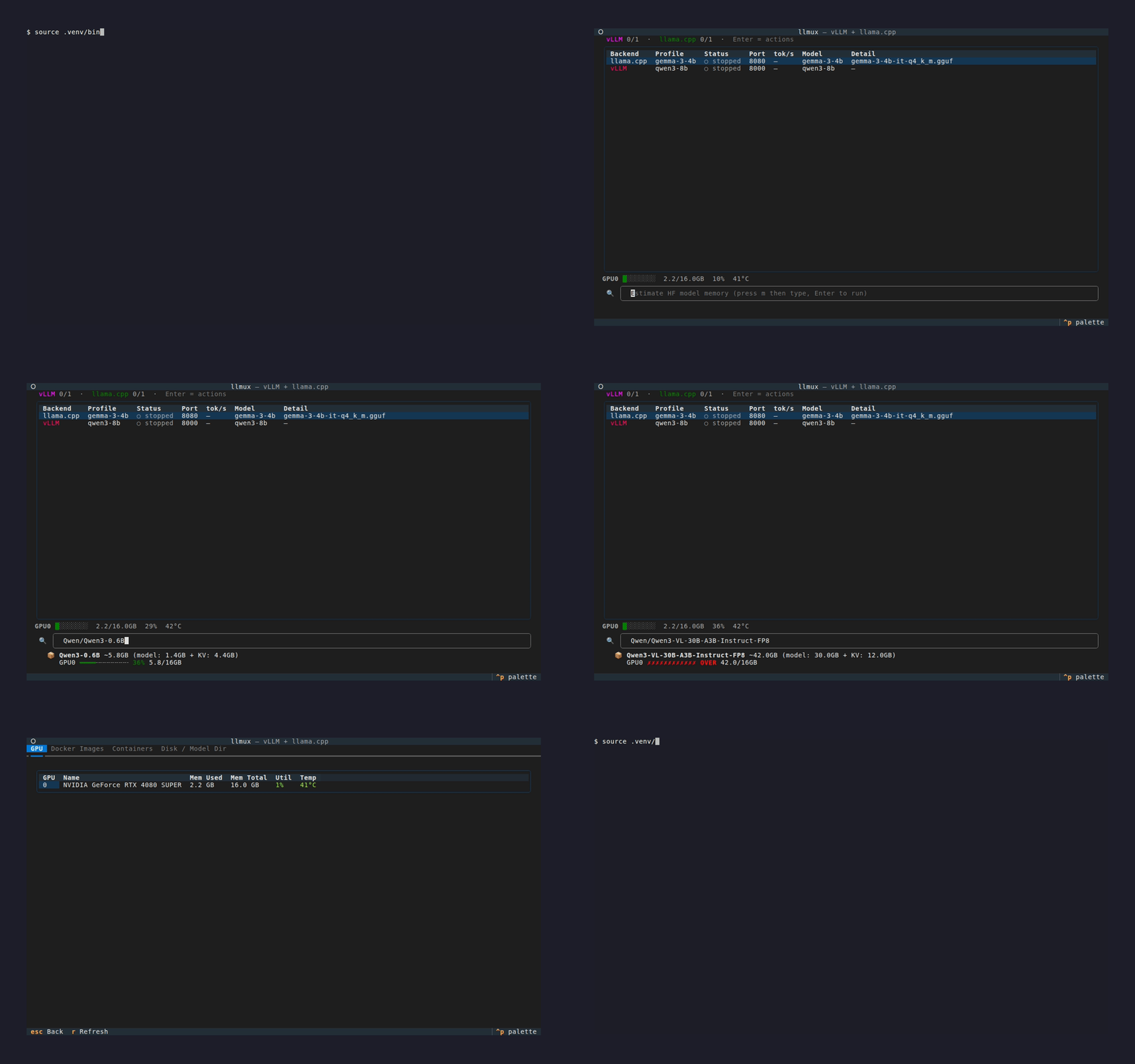
|
Features
- One dashboard for both engines — Every vLLM and llama.cpp profile side-by-side in a single Textual TUI, with a live tok/s column per running model.
- Build a profile once, spin it up and down — Keep every model you're experimenting with as a named profile in one
profiles.yaml. No re-writing config each time — pick one, hit Enter, and it launches the right engine; stop it and start another just as fast. - Pin any engine image per profile — Run a versioned vLLM release,
nightly, the rolling llama.cpp CUDA image, or an image you built from source — pinned per profile viaimage_tag. llmux refuses the ambiguous:latest; versioned vLLM images are also verified inside the running container. - VRAM-aware vLLM recipe import — Pull a model's official vllm-project/recipes config, then review its precision variants (bf16 / fp8 / awq) against your actual GPU's VRAM before it's written — so a recipe verified on an 80 GB card doesn't silently overshoot a 16 GB one.
- Memory estimator — Point it at an HF model and get a per-GPU fit bar (
hf-mem) before you download or launch anything. - Every engine flag, 1:1 —
config/<backend>/<name>.yamlmaps directly to engine flags — sampling, context length, KV-cache precision, MoE CPU offload. Toggle any flag on/off without deleting it, and your hand-written comments survive edits. - Flag autocomplete from your running server — The config editor reads
vllm serve/llama-serverflags inside the selected running container, including one-off image overrides. For stopped profiles it inspects the next startup image and caches by image ID. Failed discovery disables autocomplete instead of suggesting unverified flags. - LoRA and speculative / MTP setups — LoRA modules are profile fields, mounted and served on the base model; speculative decoding params are ordinary config params on a profile pinned to whatever image that setup needs.
- Benchmarks —
llmux benchruns a warmup + median pass so you can compare quant A against quant B on the same hardware. - btop-style live monitor — Press
vin the TUI, or runllmux topwith no TUI at all. Every GPU is always shown (util·mem·temp·power·PCIe as heat bars), plus a panel per running model: braille throughput and KV graphs, cache-hit, requests, and TTFT/E2E percentiles (p50/p95/p99) with prefill/decode phases. Metrics an engine doesn't expose read—rather than a made-up number. - Dev builds from source — Build a
vllm-dev:/llamacpp-dev:image from any fork/branch (GPU arch auto-detected) and pin a profile to it viaimage_tag. - Everything scriptable — Every TUI action is also a headless
llmuxsubcommand. Structured output is available only on commands that document--json. Lifecycle and mutation commands keep their documented text or stream output and exit codes.
Quick Start
Install with one command — it clones llmux, installs dependencies (and uv
itself if missing), and puts the llmux command on your PATH:
curl -fsSL https://raw.githubusercontent.com/Changroro/llmux/main/install.sh | sh
Then just launch it — the first run walks you through a short setup wizard
(HF cache directory, model directory, optional token) and writes .env.common
for you:
llmux
The checkout stays a live git repo, so git pull in ~/.llmux applies updates
with no reinstall — and llmux checks GitHub for a newer release on every
interactive run and offers to pull it for you. llmux update asks on demand
(--check to only report, --yes to skip the prompt); U does the same in
the TUI. Install elsewhere by passing LLMUX_DIR to the script:
curl -fsSL ... | LLMUX_DIR=/path sh.
Manual install
git clone https://github.com/Changroro/llmux.git && cd llmux
uv tool install --editable .   # editable — code edits are picked up live
uv tool update-shell           # one-time: adds ~/.local/bin to PATH
Prefer not to install globally?
uv run llmuxworks from inside the repo. From elsewhere, setLLMUX_ROOT=/path/to/llmux.
Language: the TUI is bilingual (English / Korean). It follows your system locale by default; force one with
LLMUX_LANG=enorLLMUX_LANG=ko.
See the Installation guide and Quick Start for the full walkthrough.
Headless CLI
Every TUI feature is also a non-interactive subcommand — llmux with no arguments
launches the TUI, any subcommand bypasses it:
llmux up <profile>                 # start a container
llmux prepare <profile>            # download the model + render setup, don't start
llmux prepare <profile> -w 2       # throttle to 2 connections (leave the line alone)
llmux update --check               # is a newer llmux release out?
llmux logs <profile>               # follow logs
llmux ps --json --running          # machine-readable status, both backends
llmux stats --once --json          # live tok/s from every running container
llmux bench <profile> --runs 3     # warmup + median tok/s benchmark
llmux profile quick-setup Qwen/Qwen3-8B --gpu-id 0,1
llmux config edit <name> --disable trust-remote-code   # toggle a flag off, keep it
llmux config from-recipe Qwen/Qwen3-32B --variant fp8   # official vLLM recipe
llmux config from-recipe my/Qwen3-32B-AWQ --recipe-from Qwen/Qwen3-32B --merge
llmux profile rename old-name new-name                  # container must be stopped
llmux image build-dev --backend llamacpp --branch master
--json is supported by every list/show/check command. Full command/flag list in the
CLI Reference.
Documentation
Full docs live at Changroro.github.io/llmux:
| Section | What's there |
|---|---|
| Getting Started | Installation, first-model walkthrough (TUI + CLI) |
| Guide | Profiles, model configs, container lifecycle, TUI shortcuts, dev builds |
| Backends | vLLM and llama.cpp deep-dives + a feature comparison matrix |
| Reference | Every CLI command/flag, .env.common variables, internal architecture |
| Troubleshooting | Common start/download/GPU issues — symptom → cause → fix |
Why llmux?
| Manual, two toolchains | llmux | |
|---|---|---|
| Switch engines | Different CLI, compose, and TUI per engine | One Textual dashboard for both |
| Profile format | .env per profile, scattered across two repos |
Single profiles.yaml, YAML-native, renders to .env at launch |
| Port / GPU clash | Find out when the container crashes | Pre-start conflict gate across both backends |
| Image versioning | docker pull latest and hope |
Refuses :latest; resolves to semver + verifies in-container version |
| Dev builds | Clone, build, wire compose by hand | llmux image build-dev from any branch; pin per profile |
| Memory sizing | Guess and hope it fits | hf-mem integration with per-GPU fit bars |
| GGUF setup | hf download → edit compose → mount |
llama.cpp downloads on first start, cached on the host |
What llmux is not. It doesn't proxy or route inference requests — each profile serves on its own port, and llmux is the layer that starts, stops, builds, and benchmarks them. If you want request-level model swapping behind a single endpoint, that's what llama-swap does. It's also not a chat UI — point Open WebUI or any OpenAI-compatible client at the servers it launches.
Requirements
- Linux with NVIDIA GPU(s) + a recent driver
- Docker Engine + the NVIDIA Container Toolkit (for GPU passthrough)
- Python 3.10+, and uv for the TUI environment
Confirm GPU passthrough works before the first run:
docker run --rm --gpus all ubuntu nvidia-smi
macOS, AMD/ROCm, and CPU-only aren't supported yet — llmux drives CUDA images through NVIDIA GPU passthrough, which needs an NVIDIA GPU on Linux.
Roadmap
- Recipe-based config recommender — Shipped in v2.4.0 as
llmux config from-recipe - Profile clone across backends —
llmux profile cloneduplicates within a backend today; cloning a vLLM profile as its llama.cpp GGUF equivalent is still open - Batch operations — Start/stop multiple profiles across both backends at once
- Export/Import bundles — Share full profile + config sets between machines
- AMD / ROCm — Mostly a base-image + device-mount swap; more feasible than macOS
- macOS (native Metal) — Under consideration, and llama.cpp only: Docker can't pass an Apple GPU into a Linux container, so this would mean running llama.cpp as a native process instead of a container (vLLM stays CUDA-only)
- Web UI — Optional browser-based dashboard for remote access
Built on
llmux is a control layer — the hard parts are upstream. It runs the official, unmodified images and stands on:
- vLLM and llama.cpp — the inference engines it drives
- vllm-project/recipes — source of the imported vLLM configs
- hf-mem — the model memory estimator
- Textual and Typer — the TUI and CLI
MIT License
関連プロジェクトを探す
読み込み中…