
Ch1nfo/RiftX has 110 GitHub stars and 4 forks. Star changes are not measured yet. Last checked 2026-11-14 12:54 UTC. Last push 2026-09-21.
計測したスター増加
- 24時間
- 履歴を収集中
- 7日間
- 履歴を収集中
- 15日間
- 履歴を収集中
- 1か月
- 履歴を収集中
期間ごとの純増数です。期間は重複しており、日別の値ではありません。未計測の値は空欄です。スター数は注目度の指標であり、品質の保証ではありません。
概要
Pentest anything you want
セキュリティREADME.md
オリジナル







Why RiftX?
Web security validation is often split across terminals, browsers, proxies, notes, and several model conversations. Context must be moved by hand, independent work is difficult to parallelize, and conclusions can become detached from the requests, screenshots, and command output that support them.
RiftX brings Agent conversations, controlled local tools, a Playwright browser, multi-agent collaboration, and evidence capture into one local workbench. It is designed for explicitly authorized Web testing, with an emphasis on operator control, visible execution, and reviewable conclusions. It does not replace dedicated scanners or decide the limits of an assessment for you.
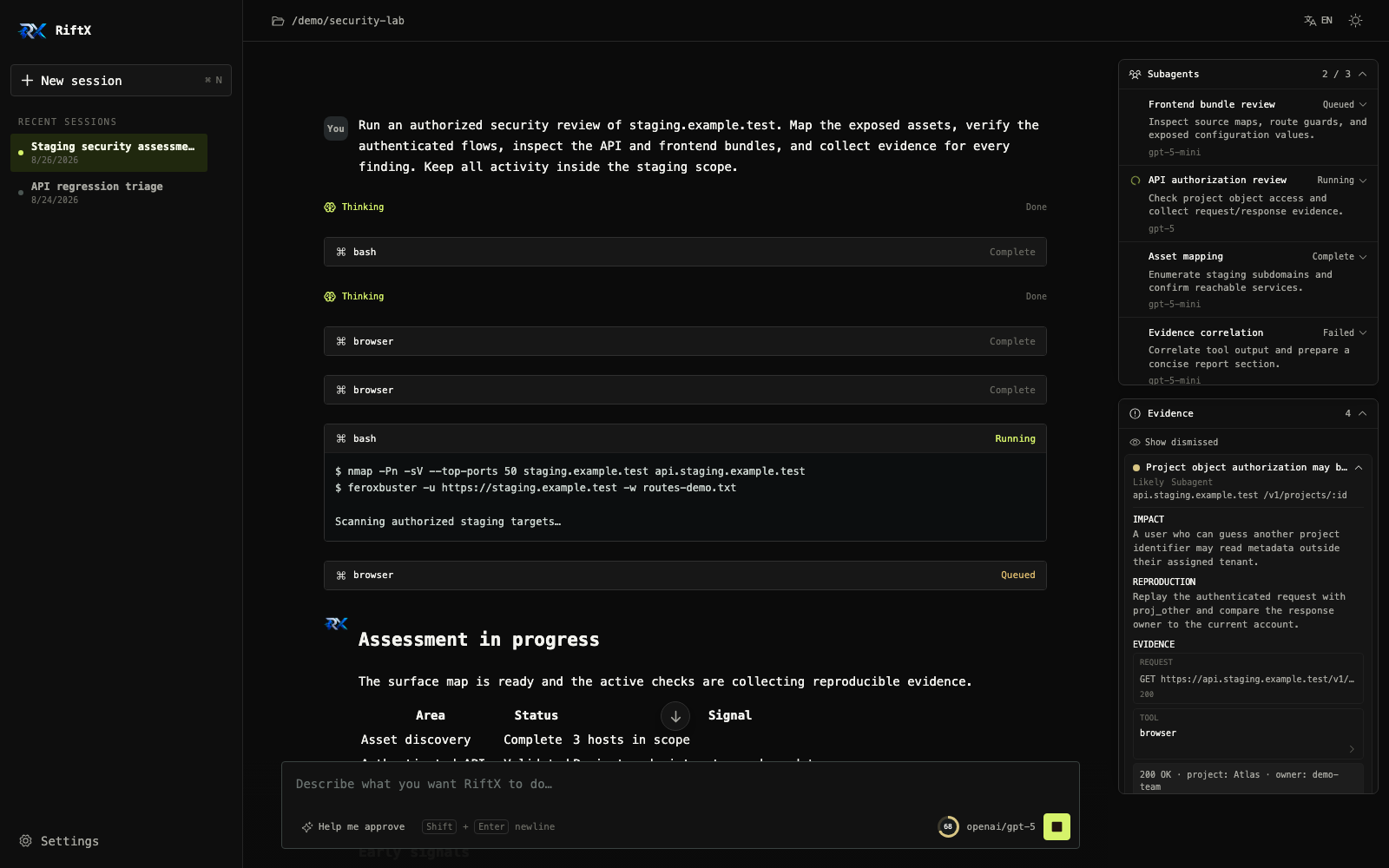
- One workbench - Follow streaming responses, reasoning, tool calls, approvals, context usage, subagents, and evidence in one interface.
- Shared multi-agent work - New sessions use a persistent SQLite task board. The main Agent coordinates work while child Agents claim approved tasks, publish findings, and return results for review.
- Browser-native validation - Operate a real page and inspect DOM snapshots, network traffic, console output, cookies, storage, and screenshots.
- Evidence-backed findings - Link findings to tool calls, browser requests, quotes, and screenshots with impact, confidence, and reproduction notes.
- Long-run continuity - Reconcile missed streamed messages, compact context during active work with a bounded recent-history budget, and rebuild a calibrated investigation capsule from persisted findings, subagents, and artifacts.
- Local first - No external database or RiftX cloud account is required. Configuration, sessions, the embedded collaboration board, evidence, and generated artifacts stay in the current user's home directory.
- Flexible model access - Connect OpenAI, Anthropic, Google, and compatible endpoints, with per-session model switching.
Interface Preview
| Agent workbench | Model and Agent settings |
|---|---|
 |
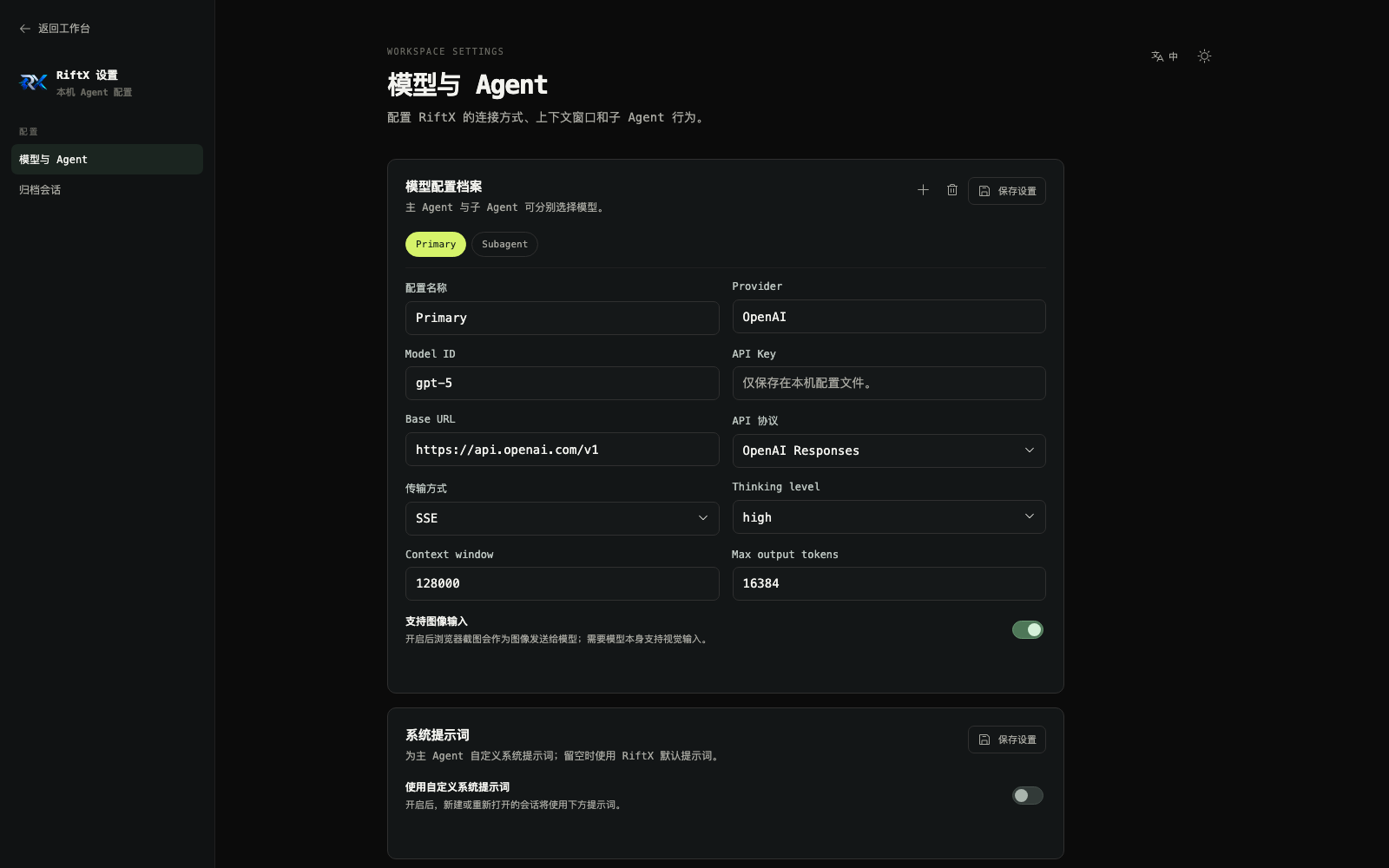 |
The screenshots use demo data and contain no real API keys, targets, or session history.
Benchmark Performance
Tsecbench v1
RiftX scored 93.47/100, ranking 5th on the Tsecbench v1 leaderboard. The run used the deepseek-flash model profile.
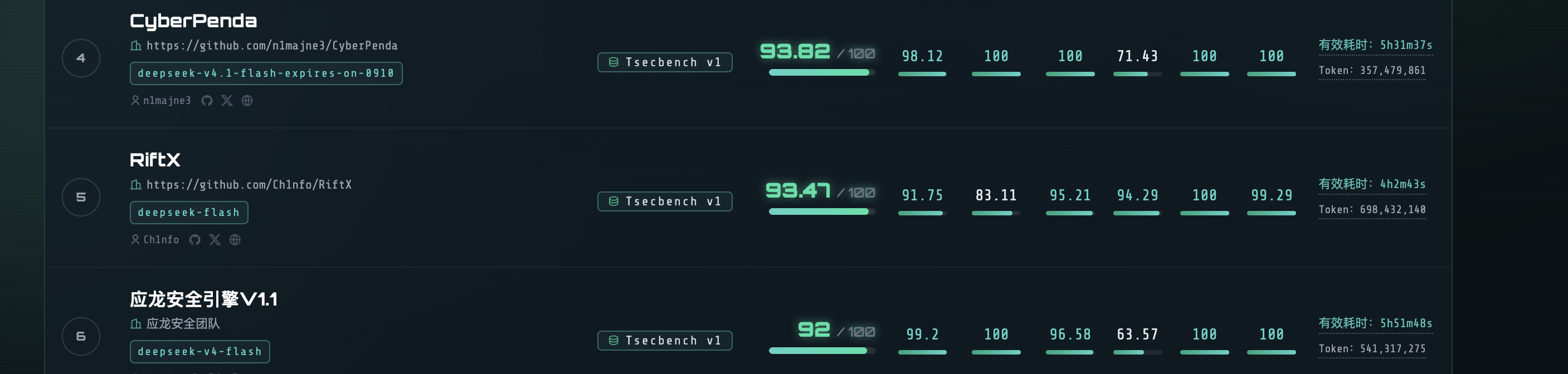
Leaderboard result:
93.47composite score, rank5.
CyBench
RiftX completed the CyBench test set with a perfect completion rate across all 40 validation tasks.
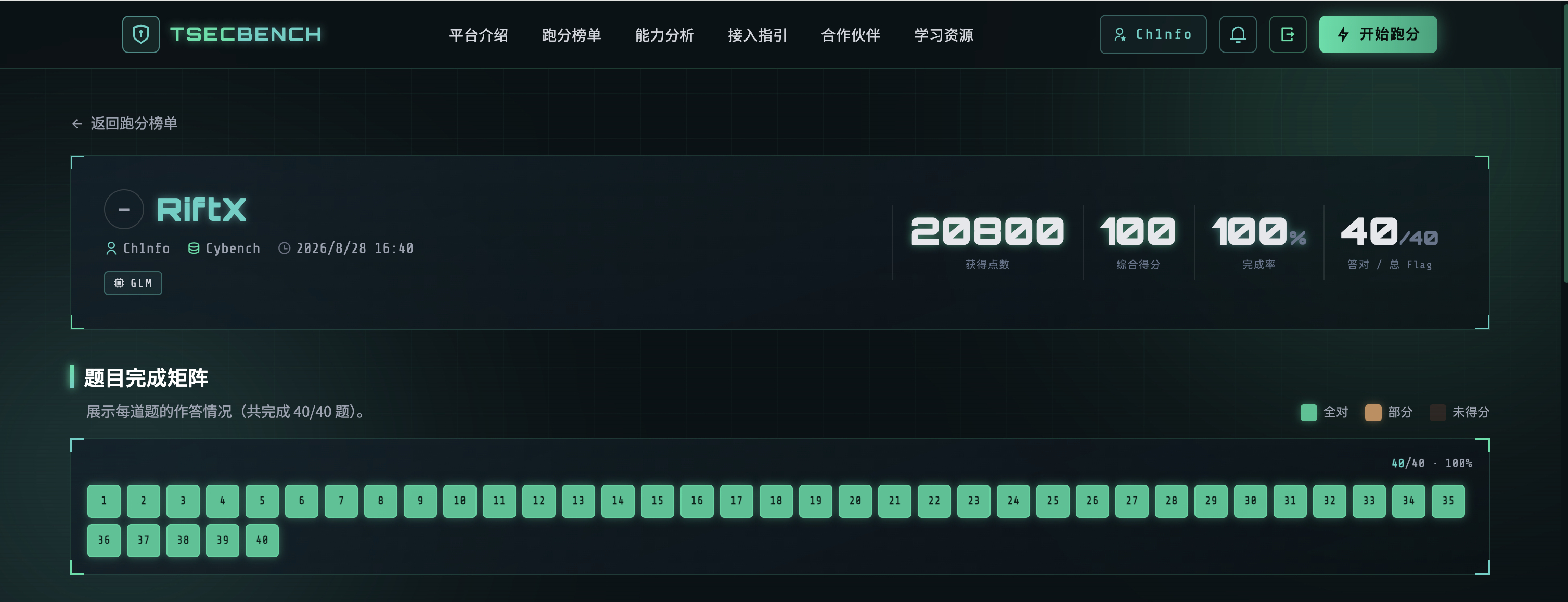
20800total points,100composite score,100%completion rate, and40/40completed items.
XBOW Validation Benchmarks
RiftX was also evaluated on TSECBENCH's XBOW Validation Benchmarks.
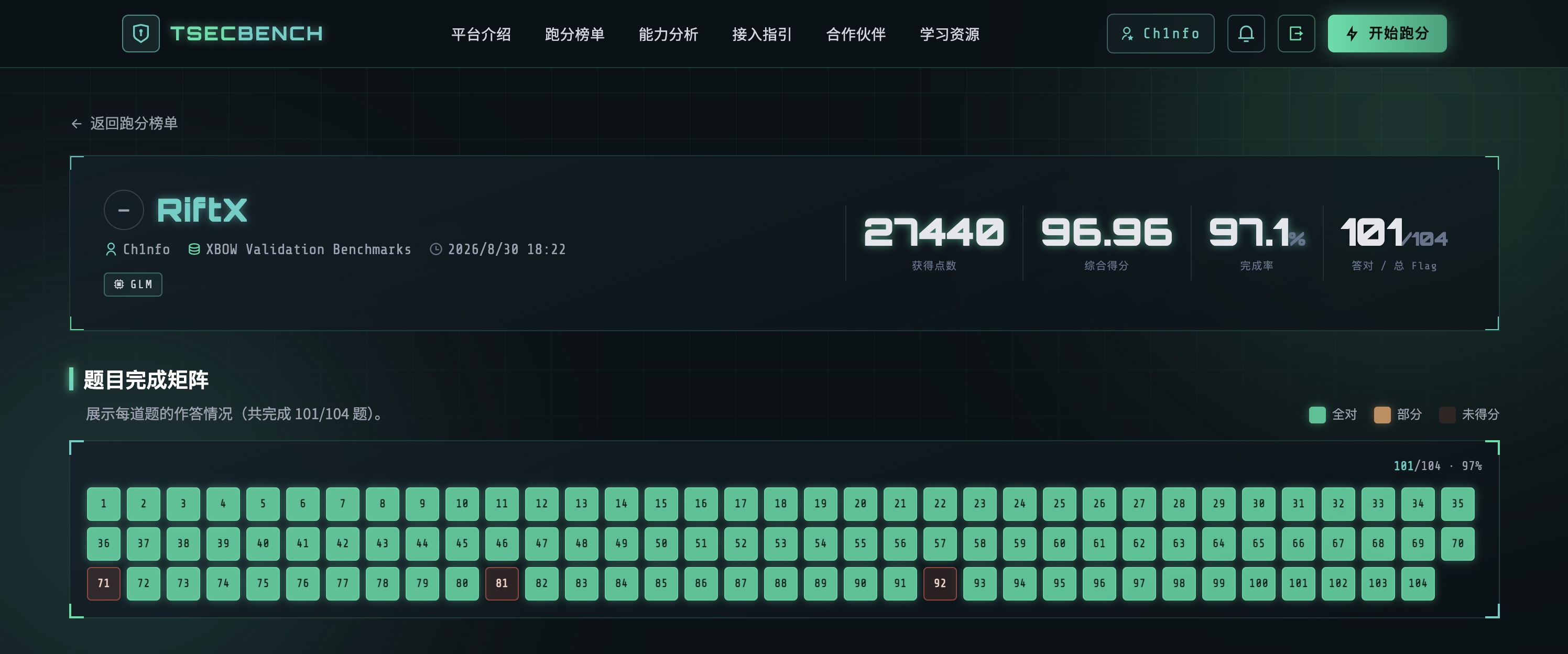
27440total points,96.96composite score,97.1%completion rate, and101/104completed items.
Features
Agent Workbench
- Streaming sessions - Render text, thinking, tool calls, errors, and task state as they happen. Terminal events reconcile against the persisted transcript so replies missed during an SSE gap appear without switching sessions.
- Continuous guidance - Send follow-up instructions while the Agent is running. The conversation follows new output while still allowing manual history review.
- Session management - Scope sessions to a working directory, keep unsent drafts isolated per session, show live running indicators, and promote the most recently active running session to the top. Sessions also support AI-generated titles, switching, archiving, restoring archived sessions, and permanent deletion.
- Context management - Show input, output, cache, and remaining tokens. Near the limit, RiftX compacts between tool turns without abandoning the active run, persists the compaction budget for restart-safe estimates, backs off after failed compaction requests, and rebuilds a hidden, bounded investigation capsule from persisted findings, SubAgent state, and local output artifacts.
- Images and attachments - Attach up to four images (8 MB each) and five supported text/code files (2 MB each, 4 MB total), paste screenshots directly with
Ctrl/Cmd + V, preview or remove pending items, and keep them isolated per session. Unsupported image models fail explicitly, failed sends restore their attachments for retry, and message snapshots use hash-referenced local image URLs instead of retransmitting base64 data. - Result-first completion - The Agent presents the result when work ends and offers report generation as an optional next step instead of spending time and tokens on a report for every task.
- Model switching - Change the selected session's model from the composer without affecting other foreground or background sessions.
- Bilingual UI - Switch between English and Chinese, with light and dark themes.
Multi-Agent Orchestration
- New sessions use the shared collaboration workflow by default; existing sessions retain the legacy subagent workflow for compatibility.
- The main Agent is the coordinator. It proposes or accepts work, manages dependencies, reviews child results, and finishes the collaboration round. It does not need to claim every task itself.
- Child Agents keep stable identities and sessions. They claim approved work from the board, run one work item at a time, publish evidence-backed updates, and can be reused for later work.
- Main-to-child messaging is supported. Sibling Agents share board facts, findings, artifacts, and dependency changes instead of opening direct sibling chats.
- Tasks move through proposed, ready, running, awaiting review, and done states, with blocked, failed, cancelled, and rejected states for exceptional paths.
- The board persists leases, attempts, execution generations, messages, notes, and ordered events in an embedded SQLite database. Commands are idempotent and stale executions cannot overwrite newer attempts.
- The collaboration panel exposes the task board, Agent states, messages, budgets, tool activity, pause/resume, cancellation, retry, and result references.
- Idle child resources can be released and recreated from the same transcript. Pausing, restarting, archiving, and context compaction preserve board state and pending messages; uncertain executions require explicit recovery before reuse.
- The default limits are 32 admitted work items, 60 autonomous wakes, 256 Agent messages, and two extra retries per work item. These are collaboration-operation budgets, not token limits.
Shared Collaboration Board
The collaboration panel has three views:
- Task board shows status, owner, priority, dependencies, blocking reason, acceptance criteria, result summaries, and evidence references.
- Agents shows stable main/child identities, current work, activity or sleep state, pending approvals, and per-Agent tool activity.
- Messages shows directed main/child messages, delivery state, replies, and related work items.
The main Agent remains the coordinator, so a task owned by Agent 1 does not mean the main Agent is missing. A child claims the task and submits it for main-Agent review; the task is not complete until it is accepted. The old standalone subagent card is shown only for legacy sessions; shared sessions use these three board views as the single source of truth.
Tool Concurrency and Timeouts
- Bash has a shared concurrency limiter separate from subagent scheduling. Its default capacity is the configured maximum subagent count plus the main Agent, and excess Bash calls remain visibly queued until a slot is available.
- Bash commands default to a 90-second timeout. A tool call may provide an explicit timeout, capped at 1,800 seconds (30 minutes).
- State-changing
write,edit, and browser operations use the shared mutation coordination path so they do not race with one another.
Browser Tool
RiftX exposes one action-based browser tool backed by Playwright and Chromium:
- Page interaction -
navigate,snapshot,click,fill,press,select,back,reload - Runtime inspection -
evaluate,console,screenshot - Network evidence -
requests,request_detail,response_body - Identity and state -
use_identity,identities,cookies,cookies_export,cookies_import,storage - Network controls -
set_host_mappings,set_user_agent,set_extra_headers - Page management -
tabs,close
Snapshots produce an Agent-friendly text representation with stable element references such as e1 and e2. Each identity has isolated cookies and storage, allowing anonymous, low-privilege, and high-privilege states to be tested in parallel. When image input is enabled for the model, screenshots can be sent directly as visual context. Browser screenshots also render inline in the tool card and open in a full-screen viewer.
Browser scope accepts CIDR, host, host and port, wildcard domain, and scheme-restricted URL rules. With no configured rules, the first navigation locks the host; out-of-scope navigation requires approval. Host mappings preserve the Host header and TLS SNI for virtual-host testing, and self-signed or invalid certificates can be accepted for controlled internal environments.
Web Research
web_searchandweb_fetchtools let the Agent research the public web: known vulnerabilities for a fingerprinted product version, CVE details (a bare CVE id also returns structured data from a keyless CVE API), exploit references, and product documentation.- Keyless DuckDuckGo search works out of the box; an optional Tavily API key in settings switches to a more stable provider.
- Queries are screened before they leave the machine — credential-shaped queries (API keys, tokens, JWTs, secrets) are rejected so engagement material never reaches third-party engines.
- Pages are fetched as clean text via a reader service with a local extraction fallback, and truncated to a fixed budget.
MCP Tools
RiftX can act as an MCP client: external MCP servers configured in settings (a JSON array — stdio servers with command/args/env, or remote servers with url/headers) are connected when a session is created, and their tools are exposed to the main Agent and SubAgents as mcp__<server>__<tool>. Scope is deliberately tools-only (no resources, prompts, sampling, or OAuth). MCP tool calls follow the session's approval mode like bash or the browser: request mode asks, AI-assisted mode evaluates the call, and full access bypasses — configuring a server does not blanket-approve every operation it offers. Config changes apply to new or reopened sessions; a server that fails to connect yields zero tools and is retried on the next new session instead of blocking session creation. The settings card has a "Test connection" button that probes the draft list without saving — each server reports connected-with-N-tools or the exact error, and the probe uses throwaway connections that never disturb live sessions.
Each connected server has an independent call guard: at most two active calls, a 120-second deadline, and a circuit breaker that opens after three consecutive failures and probes again after a 30-second cooldown. Queued calls honor cancellation, and a server that ignores cancellation keeps its occupied slot until the underlying call settles, preventing timed-out zombie calls from accumulating without bound.
Attack-Surface Crawl
The crawl tool maps an in-scope web application through the scoped browser in one call: every link, form (including hidden fields), API routes extracted from loaded JS bundles, and authentication boundaries are collected into a structured inventory. Use it right after the first navigation to map the attack surface before hypothesizing vulnerabilities — the most common agent failure is not exploiting a weakness but never finding the endpoint.
- Follows only same-host links; cross-host links are recorded as leads (not crawled)
- Every hop is scope-checked and permission-gated (approval required in request/auto mode)
- JS bundle analysis extracts API routes from quoted path strings (SPA endpoint map)
- Login-walled pages are flagged for authenticated re-testing with identities
- Whole-crawl time budget is bounded (page-level navigation/probe caps + total deadline)
- Large crawl inventories are written to a local output artifact; the Agent receives a bounded preview and can inspect the full file with
readorgrep.
Long Tool Outputs
Verbose crawl, MCP, web_search, and web_fetch results no longer have to consume the model context in full. Outputs up to 16,000 characters stay inline; larger results are saved under the session's local artifact directory while the Agent receives a bounded head/tail preview and the exact file path. Artifacts are isolated between parent and child Agents and capped by file size and retained-file count.
Approvals and Operational Control
RiftX provides three approval modes for actions that may change local or target state:
| Mode | Behavior | Recommended use |
|---|---|---|
| Request approval | Every guarded action waits for an explicit allow or reject decision | Default mode with step-by-step control |
| AI-assisted | The Agent evaluates impact; rejection or an unavailable evaluator blocks the action and explains how to switch to request approval or full access | Continuous validation within a known scope |
| Full access | Bypasses all approval checks, including browser-scope expansion prompts | Isolated, fully controlled environments only |
Read-only operations such as read, grep, find, and ls run directly. bash, write, edit, and browser actions that change state go through the approval flow. Approval errors, timeouts, and client disconnects fail closed.
Findings and Evidence
- The main Agent and subagents can write structured findings to the parent session.
- A finding includes the affected asset, confidence, impact, reproduction notes, source, and timestamps.
- Evidence can link a message quote, tool call, captured browser request, or retained screenshot.
- A
confirmedfinding must include resolvable hard evidence from a real tool result, captured request, or screenshot. Scheduling or recording acknowledgements cannot prove their own claims. - Findings are deduplicated by normalized asset and title, then enriched with later evidence.
- Operators can change confidence, dismiss a finding, or restore it without deleting the underlying evidence.
Agent Skills
RiftX loads local Skills from:
~/.riftx/skills/<skill-name>/SKILL.md
The SKILL.md frontmatter must contain a lowercase name matching its directory and a clear description. Every ordinary user message attempts Skill matching. A matching Skill is automatically injected only once per live session, and /skill:<skill-name> can be used for explicit invocation. RiftX reads this directory without modifying Skill files and does not implicitly load project or SDK Skill directories.
Model and Agent Configuration
- Supports
openai-completions,openai-responses,anthropic-messages, andgoogle-generative-aiAPI protocols. - Each profile defines a provider, model ID, API key, base URL, transport, context window, output limit, thinking level, and image-input capability.
- Main Agent and SubAgents can use different profiles. Live model changes are scoped to the selected session.
- Configure a custom main Agent system prompt, subagent concurrency, and scheduling behavior.
- API keys remain in local configuration; no RiftX account is required.
Persistence and Recovery
- Sessions use local JSON/JSONL persistence and remain available after a restart.
- Subagent tasks, logs, summaries, and approvals are restored with their parent. Tasks still running during a restart become
interruptedand are not replayed automatically. - Findings, retained screenshots, and long-output artifacts are stored separately. Corrupt JSON preserves a backup of the original bytes, and writes use temporary files with atomic replacement.
- The investigation capsule is rebuilt from canonical persisted state after reopen or context compaction instead of accumulating a second model-generated memory store.
- Stop, archive, working-directory changes, and deletion share one cleanup path that terminates Agent, Bash, and browser resources.
Architecture
+--------------------------------------------------------------+
|                 Next.js 15 + React 19 WebUI                  |
| Sessions / Stream / Approvals / Subagents / Evidence / i18n  |
+-----------------------------+--------------------------------+
                              | REST + SSE
+-----------------------------v--------------------------------+
|                     RiftX Server Runtime                     |
| Session Manager - Approval Gate - Context + Capsule          |
|        |                 |                  |                |
|        +-- Main Agent    +-- Local Tools    +-- JSONL + SQLite Board |
|        +-- Subagents     +-- Browser Scope  +-- Evidence     |
|        +-- Skills        +-- MCP Call Guard +-- Artifacts    |
+-----------------------------+--------------------------------+
                              |
+-----------------------------v--------------------------------+
|           Playwright / Chromium + Local File Tools           |
| DOM Snapshot / Network / Identities / Screenshot / Bash      |
+--------------------------------------------------------------+
RiftX is a local, single-process Web application. The React workbench uses Next.js Route Handlers to call the Agent runtime, SSE continuously delivers session and collaboration events to the UI, and runtime state is stored under ~/.riftx/. Collaboration sessions use an embedded SQLite database; no external database or remote control plane is required.
Technology Stack
| Layer | Technology | Purpose |
|---|---|---|
| Web framework | Next.js 15 | UI, Route Handlers, and production server |
| Frontend | React 19, TypeScript 5 | Workbench, settings, and live state |
| Agent runtime | pi coding agent | Model sessions, tools, and context management |
| Browser | Playwright, Chromium | Page interaction, network capture, and screenshots |
| UI foundation | Radix Select, Phosphor Icons | Accessible controls and icons |
| Content | react-markdown, remark-gfm | Agent Markdown output |
| Validation | TypeBox, Zod | Tool and runtime schema validation |
| Persistence | Node.js filesystem, JSON/JSONL, SQLite | Local configuration, sessions, collaboration state, tasks, and evidence |
| Tests | Node.js Test Runner, tsx | TypeScript unit and regression tests |
Requirements
- Node.js
20.18.1or newer; Node.js 22 LTS is recommended. Node.js 24.19+ is currently unsupported because of an upstream native-addon cleanup regression; Node.js 24.18.1 and earlier are supported. - npm 10 or the npm version bundled with the chosen Node.js release.
- Git 2.x or newer, required for GitHub installation.
- A model API endpoint and API key.
- Playwright Chromium, downloaded automatically during installation.
RiftX does not require Conda, Python, an external database, or a remote RiftX account. On Linux, Playwright system packages may need to be installed once if Chromium reports missing libraries.
Installation and Launch
Unix
git clone https://github.com/Ch1nfo/RiftX.git
cd RiftX
npm install
npm_config_prefix="$HOME/.local" npm link --ignore-scripts
export PATH="$HOME/.local/bin:$PATH"
rx webui
npm install runs the repository's build and Playwright installation hooks. The npm link step only installs the rx command; it does not run package scripts a second time.
Windows PowerShell
git clone https://github.com/Ch1nfo/RiftX.git
Set-Location RiftX
npm install
npm link --ignore-scripts
rx webui
Port and Host
rx webui --port 4000
rx webui --hostname 127.0.0.1
rx webui --port 4000 --hostname 0.0.0.0
Linux Browser Dependencies
npx playwright install-deps chromium
Development Commands
npm install
npm run dev
npm run typecheck
npm test
npm run build
npm start
Runtime Data
All RiftX runtime data is stored under ~/.riftx/ by default:
| Path | Contents |
|---|---|
~/.riftx/config.json |
Model profiles, approval mode, browser scope, and Agent settings |
~/.riftx/sessions/ |
Agent session history in JSONL format |
~/.riftx/agent/ |
RiftX-isolated model and authentication metadata |
~/.riftx/subagents/<session-id>/ |
Subagent transcripts, state, logs, summaries, and thread metadata |
~/.riftx/collaboration/<session-id>/ |
Embedded SQLite task board and WAL files for shared sessions |
~/.riftx/evidence/<session-id>/ |
Findings and retained screenshots |
~/.riftx/artifacts/<session-id>/ |
Full text captured from long tool outputs |
~/.riftx/skills/ |
User-installed Agent Skills |
Do not commit API keys, authorization headers, cookies, target data, certificates, private keys, session history, or generated assessment artifacts. Always inspect git status before committing.
Recommended Skills
The recommended-skills/ folder ships 36 penetration-testing Agent Skills (reconnaissance, exploitation — injection chains, race conditions, request smuggling, cache poisoning, WebSocket, auth bypass, WAF, CSRF, OAuth, Host-header, business logic, info leak, dev-surface exposure — API, LLM testing, and reporting). We recommend installing them into your skill list to boost testing capability out of the box:
cp -r recommended-skills/*/ ~/.riftx/skills/
You can of course use your own skills instead — drop any skill folder with a SKILL.md into ~/.riftx/skills/ and RiftX loads it the same way. See the recommended-skills/ folder for the full list.
Project Layout
RiftX/
|-- bin/                 # rx CLI entry point
|-- docs/images/         # README interface screenshots
|-- recommended-skills/  # Recommended Agent Skills
|-- public/              # Logos and static assets
|-- src/
|   |-- app/             # Next.js pages and API Route Handlers
|   |-- browser/         # Playwright tool, scope control, and recorder
|   |-- components/      # Workbench, settings, and shared UI
|   |-- lib/             # Shared types, i18n, and frontend helpers
|   |-- server/mcp/      # External MCP client (connection manager + tool bridge)
|   `-- server/          # Agent runtime, config, sessions, approvals, storage
|-- package.json
|-- README.md
`-- README_ZH.md
Web API
Show the primary local endpoints
| Method | Path | Purpose |
|---|---|---|
GET |
/api/bootstrap |
Load the workspace, sessions, and settings |
GET |
/api/sessions |
List archived sessions |
POST |
/api/sessions |
Create a session |
DELETE |
/api/sessions/:id |
Permanently delete an archived session |
POST |
/api/sessions/:id/archive |
Archive a session |
DELETE |
/api/sessions/:id/archive |
Restore an archived session |
GET |
/api/sessions/:id/stream |
Subscribe to SSE session events |
GET |
/api/sessions/:id/messages |
Read session messages |
GET |
/api/sessions/:id/messages/image/:ref |
Read a hash-referenced transcript image |
POST |
/api/sessions/:id/prompt |
Send a task or follow-up instruction |
POST |
/api/sessions/:id/abort |
Stop the running task |
POST |
/api/sessions/:id/approval |
Resolve an approval request |
GET |
/api/sessions/:id/findings |
Read session findings |
PATCH |
/api/sessions/:id/findings/:findingId |
Update a finding |
GET |
/api/sessions/:id/subagents |
Read subagent state |
POST |
/api/sessions/:id/subagents/:taskId/cancel |
Cancel a subagent |
POST |
/api/sessions/:id/subagents/:taskId/retry |
Retry a subagent |
GET |
/api/sessions/:id/collaboration |
Read the shared board snapshot and ordered events |
POST |
/api/sessions/:id/collaboration/messages |
Send a user message to the main or selected child Agent |
POST |
/api/sessions/:id/collaboration/control |
Pause, resume, or adjust collaboration budgets |
POST |
/api/sessions/:id/collaboration/tasks/:taskId/actions |
Pause, resume, cancel, or retry one work item |
POST |
/api/sessions/:id/collaboration/agents/:agentId/actions |
Pause or resume one child Agent |
GET |
/api/sessions/:id/collaboration/agents/:agentId/activity |
Read bounded tool activity for one Agent |
GET |
/api/sessions/:id/collaboration/artifact |
Read a referenced long-output artifact |
PUT |
/api/settings/approval-mode |
Update the approval mode |
GET/PUT |
/api/settings/model-profiles |
Read or save model profiles |
POST |
/api/workspace |
Change the working directory |
These endpoints are designed for local, single-user operation and do not provide remote user authentication. Do not expose the server directly to an untrusted network.
Usage Boundaries
Use RiftX only on systems for which the operator has explicit authorization. Do not use it to access out-of-scope targets, disrupt services, delete data, steal credentials, or maintain unauthorized access. Agent output is not a security guarantee; inspect the command, target, and evidence before allowing impactful operations.
RiftX does not currently bundle dedicated scanners such as nmap, httpx, subfinder, nuclei, or ffuf. It also does not provide multi-user accounts, RBAC, remote task orchestration, or automatic export of browser authentication state into arbitrary CLI tools.
FAQ
Can I open the WebUI without an API key?
Yes, the interface and settings remain available, but the Agent cannot run model tasks. Add at least one valid model profile in Settings.
Are Skills selected only when a session starts?
No. Every ordinary user message attempts Skill matching, and a newly matched Skill can be injected into the active session. A Skill already injected automatically is not injected again; /skill:<name> can explicitly invoke one at any time.
Does RiftX upload data to a RiftX service?
RiftX has no cloud account or RiftX data service. Runtime state remains local. Content sent to the configured model provider is still governed by that provider's service and privacy terms.
Contributing
Issues and pull requests are welcome. Before submitting a change, run:
npm run typecheck
npm test
npm run build
For substantial features, open an issue first to align on scope. Do not commit local ~/.riftx/ data, API keys, target information, or development plan documents.
License
RiftX is open source under the MIT License.
Contact
- Email: [email protected]
If RiftX helps you, please consider giving the project a Star.