プロジェクト GitHubで見る
AviranAbady/CookieBar2
AviranAbady/CookieBar2 has 664 GitHub stars and 76 forks. GitHot measured 0 stars in 24 hours and 0 in 7 days. Last checked 2026-11-25 07:05 UTC. Last push 2022-12-22.
計測したスター増加
- 24時間
- 0
- 7日間
- 0
- 15日間
- 履歴を収集中
- 1か月
- 履歴を収集中
期間ごとの純増数です。期間は重複しており、日別の値ではありません。未計測の値は空欄です。スター数は注目度の指標であり、品質の保証ではありません。
概要
画面の上部または下部にテキストメッセージ、通知、アラートを表示するAndroidライブラリです。ToastやSnackbarによる通知に代わる選択肢です。
開発ツールREADME.md
オリジナル



CookieBar 2
CookieBar is a lightweight UI/UX library for displaying an interactive message on the screen.
implementation 'org.aviran.cookiebar2:cookiebar2:1.1.5'
CookieBar2 is now hosted in Maven Central, make sure you have mavenCentral() added to your repositories in build.gradle
buildscript {
    ...
    repositories {
        ...
        mavenCentral()
    }
}
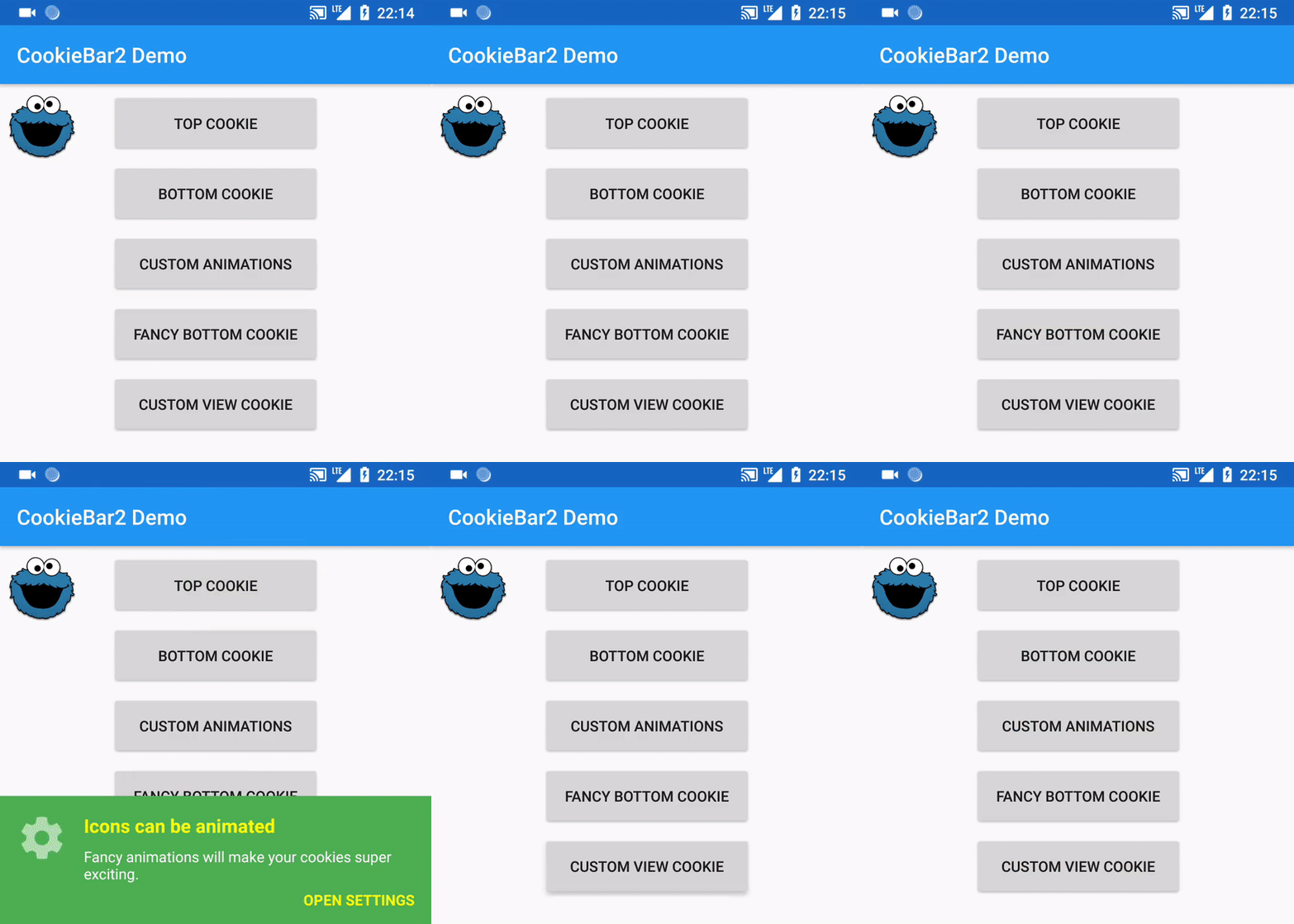
Screenshot
Latest additions to CookieBar2:
- Swipe to dismiss has been added.
- Programmatic dismiss functionality added.
- Only one Cookie can be displayed at a time (New top cookie will dismiss the current top one if exists).
- Message view captures clicks, blocks downward propagation.
- Slightly different build interface.
- Icon animator support.
- Custom layout can be applied to a cookie.
- Colors presets added.
- Root view can be overridden and customized.
- Removed supportRtl / allowBackup from library scope (Set at app level when necessary).
Create a simple cookie
Using Kotlin
CookieBar.build(activity)           // Provide activity, using this@MainActivity / getActivity() or otherwise
         .setTitle("TITLE")         // String resources are also supported
         .setMessage("MESSAGE")     // i.e. R.string.message
         .show()                    // Cookies are displayed at the top by default
Using Java
CookieBar.build(getactivty())
         .setTitle("TITLE")
         .setMessage("MESSAGE")
         .setCookiePosition(CookieBar.BOTTOM)  // Cookie will be displayed at the bottom
         .show();                              // of the screen
Customize colors, icon, icon animation, call to action button, display duration
CookieBar.build(activity)
         .setTitle(R.string.title)
         .setTitleColor(R.color.green)
         .setIcon(R.drawable.icon)
         .setIconAnimation(R.animator.spin)
         .setMessage(R.string.message)
         .setAction(R.string.action_text) {
              // Action code - Do something
         }
         .setDuration(5000) // 5 seconds
         .show()
Customize in/out animation
CookieBar.build(activity)
         .setTitle(R.string.title)
         .setMessage(R.string.message)
         .setAnimationIn(android.R.anim.slide_in_left, android.R.anim.slide_in_left)
         .setAnimationOut(android.R.anim.slide_out_right, android.R.anim.slide_out_right)
         .show()
Programmatically dismiss cookies currently being displayed
CookieBar.dismiss(activity)
Create a cookie with a custom layout - Create a dialog!
CookieBar.build(activity)
         .setCustomView(R.layout.custom_cookie)
         .setCustomViewInitializer { view ->
             val btnNew = view.findViewById<Button>(R.id.custom_cookie_btn_new)
             val btnOpen = view.findViewById<Button>(R.id.custom_cookie_btn_open)
             val btnSave = view.findViewById<Button>(R.id.custom_cookie_btn_save)
             val btnListener = View.OnClickListener { view ->
                 val button = view as Button
                 button.setText(R.string.clicked)
             }
             btnNew.setOnClickListener(btnListener)
             btnOpen.setOnClickListener(btnListener)
             btnSave.setOnClickListener(btnListener)
         }
         .setAction("Close") { CookieBar.dismiss(activity) }
         .setTitle(R.string.custom_view_cookie_title)
         .setMessage(R.string.custom_view_cookie_message)
         .setEnableAutoDismiss(false)
         .setSwipeToDismiss(false)
         .setCookiePosition(Gravity.BOTTOM)
         .show()
/* setCustomView -  Set the layout resource for your custom cookie view.
   setCustomViewInitializer - Called after layout inflation, for subview setup. */

CookieBar.build(MainActivity.this)
         .setCustomView(R.layout.custom_cookie)
         .setCustomViewInitializer(new CookieBar.CustomViewInitializer() {
                  @Override
                  public void initView(View view) {

                           Button btnNew = view.findViewById(R.id.custom_cookie_btn_new);
                           Button btnOpen = view.findViewById(R.id.custom_cookie_btn_open);
                           Button btnSave = view.findViewById(R.id.custom_cookie_btn_save);

                           View.OnClickListener btnListener = new View.OnClickListener() {

                                    @Override
                                    public void onClick(View view) {
                                             Button button = (Button) view;
                                             button.setText(R.string.clicked);
                                    }
                                };

                           btnNew.setOnClickListener(btnListener);
                           btnOpen.setOnClickListener(btnListener);
                           btnSave.setOnClickListener(btnListener);
                  }
         })
         .setAction("Close", new OnActionClickListener() {
                  @Override
                  public void onClick() {
                           CookieBar.dismiss(MainActivity.this);
                  }
         })
         .setTitle(R.string.title)
         .setMessage(R.string.message)
         .setEnableAutoDismiss(false) // Cookie will stay on display until manually dismissed
         .setSwipeToDismiss(false)    // Deny dismiss by swiping off the view
         .setCookiePosition(CookieBar.BOTTOM)
         .show();
Change default cookie style by setting theme attributes
<style name="AppTheme" parent="Theme.AppCompat.Light.DarkActionBar">
   <item name="cookieTitleColor">@color/default_title_color</item>
   <item name="cookieMessageColor">@color/default_message_color</item>
   <item name="cookieActionColor">@color/default_action_color</item>
   <item name="cookieBackgroundColor">@color/default_bg_color</item>
   <item name="cookiePadding">24dp</item>
   <item name="cookieTitleSize">24sp</item>
   <item name="cookieMessageSize">16sp</item>
   <item name="cookieActionSize">18sp</item>
</style>
Dynamically set cookie properties
- Cookie position (Top/Bottom)
- Display duration
- Title text color
- Body text color
- Action text color
- Background color
- Icon resource
- Icon animation
- In/Out animations for the entire view
- View layout
Attribution
Forked from the early code base of CookieBar, by Eric Liu.
License
Copyright 2018, Aviran Abady.

Licensed under the Apache License, Version 2.0 (the "License");
you may not use this file except in compliance with the License.
You may obtain a copy of the License at

   http://www.apache.org/licenses/LICENSE-2.0

Unless required by applicable law or agreed to in writing, software
distributed under the License is distributed on an "AS IS" BASIS,
WITHOUT WARRANTIES OR CONDITIONS OF ANY KIND, either express or implied.
See the License for the specific language governing permissions and
limitations under the License.
関連プロジェクトを探す
読み込み中…