
codingmoh/open-codex
Tentang
Fully open-source command-line AI assistant inspired by OpenAI Codex, supporting local language models.
Alat pengembanganYang dapat Anda lakukan
- Natural Language → Shell Command (via local or Ollama-hosted LLMs)
- Local-only execution: no data sent to the cloud
- Confirmation before running any command
- Option to copy to clipboard / abort / execute
Pertumbuhan bintang terukur
- dalam 24 jam
- 0
- dalam 7 hari
- -1
- dalam 15 hari
- +1
- dalam 1 bulan
- Mengumpulkan riwayat
Perubahan bersih pada periode yang tumpang tindih, bukan total harian. Pengukuran yang belum tersedia dibiarkan kosong. Bintang menunjukkan perhatian, bukan kualitas.
README.md
AsliOpen Codex
Open Codex CLI
Lightweight coding agent that runs in your terminal
brew tap codingmoh/open-codex && brew install open-codex
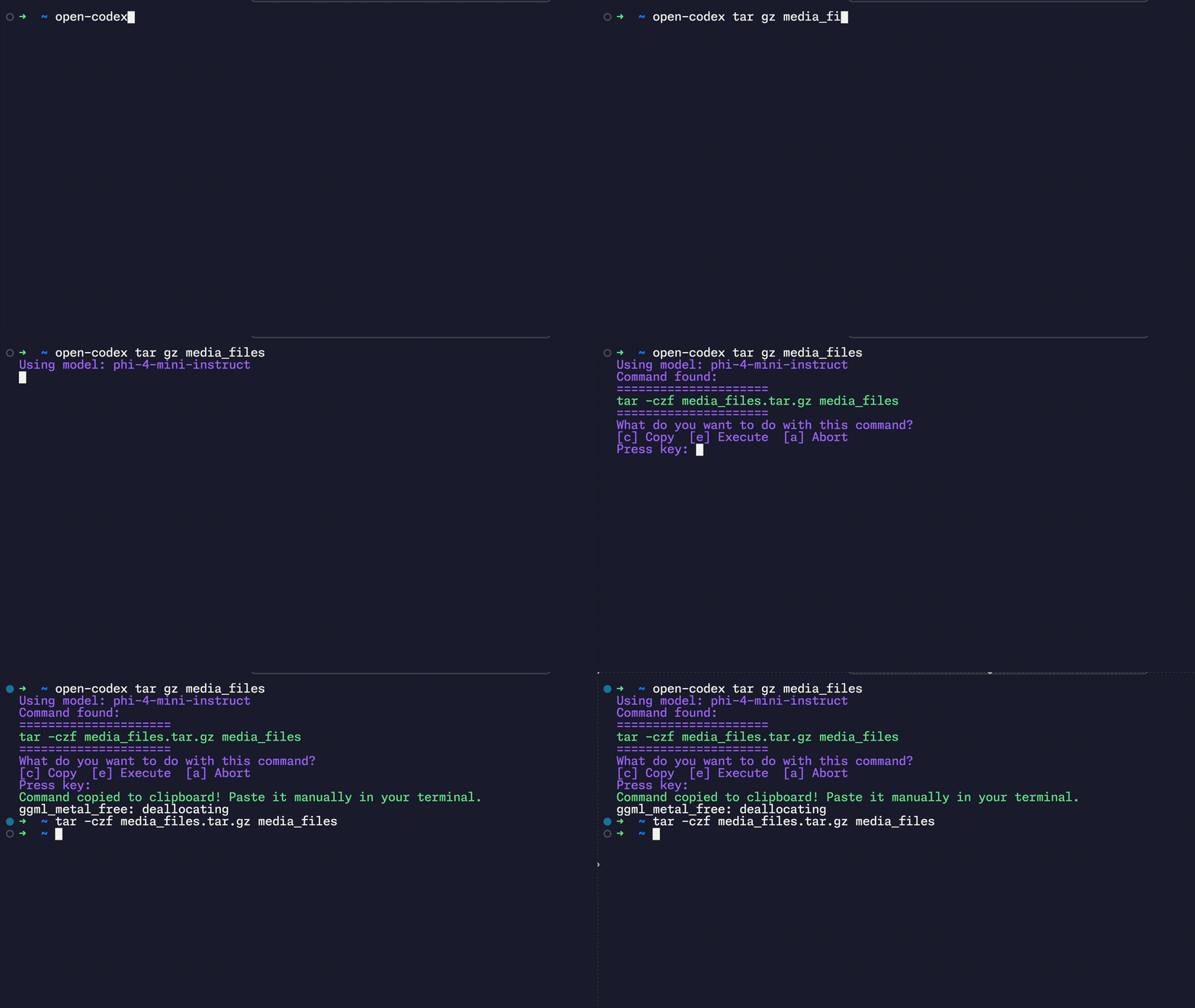
Open Codex is a fully open-source command-line AI assistant inspired by OpenAI Codex, supporting local language models like phi-4-mini and full integration with Ollama.
🧠 Runs 100% locally – no OpenAI API key required. Everything works offline.
Supports
- One-shot mode:
open-codex "list all folders"-> returns shell command - Ollama integration for (e.g., LLaMA3, Mistral)
- Native execution on macOS, Linux, and Windows
✨ Features
- Natural Language → Shell Command (via local or Ollama-hosted LLMs)
- Local-only execution: no data sent to the cloud
- Confirmation before running any command
- Option to copy to clipboard / abort / execute
- Colored terminal output for better readability
- Ollama support: use advanced LLMs with
--ollama --model llama3
🔍 Example with Ollama:
open-codex --ollama --model llama3 "find all JPEGs larger than 10MB"
Codex will:
- Send your prompt to the Ollama API (local server, e.g. on
localhost:11434) - Return a shell command suggestion (e.g.,
find . -name "*.jpg" -size +10M) - Prompt you to execute, copy, or abort
🛠️ You must have Ollama installed and running locally to use this feature.
🧱 Future Plans
- Interactive, context-aware mode
- Fancy TUI with
textualorrich - Full interactive chat mode
- Function-calling support
- Whisper-based voice input
- Command history & undo
- Plugin system for workflows
📦 Installation
🔹 Option 1: Install via Homebrew (Recommended for MacOS)
brew tap codingmoh/open-codex
brew install open-codex
🔹 Option 2: Install via pipx (Cross-platform)
pipx install open-codex
🔹 Option 3: Clone & install locally
git clone https://github.com/codingmoh/open-codex.git
cd open-codex
pip install .
Once installed, use the open-codex CLI globally.
🚀 Usage Examples
▶️ One-shot mode
open-codex "untar file abc.tar"
✅ Codex suggests a shell command
✅ Asks for confirmation / add to clipboard / abort
✅ Executes if approved
▶️ Using Ollama
open-codex --ollama --model llama3 "delete all .DS_Store files recursively"
🛡️ Security Notice
All models run locally. Commands are executed only after your explicit confirmation.
🧑💻 Contributing
PRs welcome! Ideas, issues, improvements — all appreciated.
📝 License
MIT
❤️ Built with love and caffeine by codingmoh.
Jelajahi proyek terkait
Memuat…