
chen08209/FlClash
Tentang
A multi-platform proxy client based on ClashMeta,simple and easy to use, open-source and ad-free.
Alat pengembanganYang dapat Anda lakukan
- One app for Android, Windows, macOS and Linux, with x64 and ARM64 builds on the desktop.
- mihomo (Clash.Meta) core with rule routing, proxy groups, latency tests, system proxy and TUN mode.
- Profiles from a subscription link or a file, with a built-in editor, override scripts, and custom rules, proxies and proxy groups.
- Live views of connections, requests, DNS queries and logs.
Pertumbuhan bintang terukur
- dalam 24 jam
- +234
- dalam 7 hari
- +1.480
- dalam 15 hari
- +3.085
- dalam 1 bulan
- Mengumpulkan riwayat
Perubahan bersih pada periode yang tumpang tindih, bukan total harian. Pengukuran yang belum tersedia dibiarkan kosong. Bintang menunjukkan perhatian, bukan kualitas.
README.md
Asli
FlClash
A multi-platform proxy client based on ClashMeta. Simple to use, open source and ad-free.
English · 简体中文




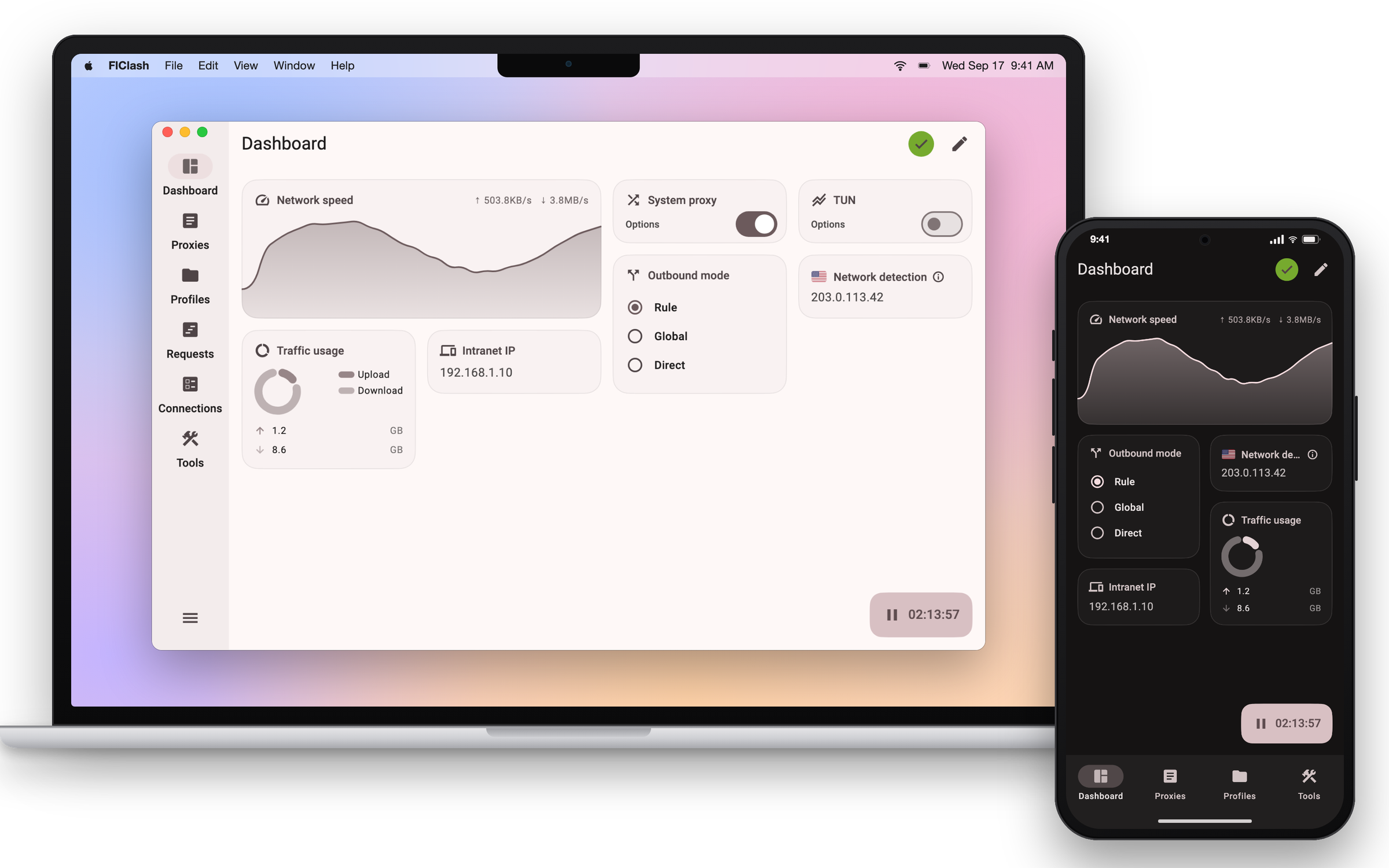
Features
- One app for Android, Windows, macOS and Linux, with x64 and ARM64 builds on the desktop.
- mihomo (Clash.Meta) core with rule routing, proxy groups, latency tests, system proxy and TUN mode.
- Profiles from a subscription link or a file, with a built-in editor, override scripts, and custom rules, proxies and proxy groups.
- Live views of connections, requests, DNS queries and logs.
- Material You design with Apple-style interaction: dynamic color, light and dark themes, continuous corners, sheets that snap between heights, and layouts that adapt from phones to desktops.
- Backup and restore through WebDAV or a local file.
- Platform touches: a Quick Settings tile, per-app proxy and Android TV support on Android; a tray menu and global hotkeys on the desktop.
- Open source and ad-free, licensed under GPL-3.0.
Download
Get the latest build from GitHub Releases, or open the website, which picks the right file for your device.
| Platform | Packages | Notes |
|---|---|---|
| Android | APK for arm64 (arm64-v8a), armv7 (armeabi-v7a) and amd64 (x86_64) |
Most phones use arm64. Also on the F-Droid repository below. |
| Windows 10 and later | Installer (.exe) or portable .zip, for x64 and ARM64 |
Pick ARM64 on Snapdragon and other ARM laptops. |
| macOS 12 and later | DMG for Apple Silicon and Intel | Also on Homebrew. |
| Linux | .deb, .rpm and AppImage, for x64 and ARM64 |
See the tray note below. |
Homebrew
brew tap chen08209/tap
brew install --cask flclash
macOS first launch
The app is not notarized, so macOS refuses to open it the first time. After dragging it to Applications, run
xattr -dr com.apple.quarantine /Applications/FlClash*.app, or choose Open Anyway under System Settings > Privacy &
Security. Later updates install from inside the app.
Linux tray icon
The tray icon is a StatusNotifierItem. KDE Plasma, XFCE and most panels show it as is; GNOME needs the AppIndicator and KStatusNotifierItem Support extension.
Unattended desktop
FlClash starts the core only after the disclaimer is accepted. Where nobody can click it, such as a container, set
FLCLASH_ACCEPT_DISCLAIMER=1 in the app's environment to accept it on first launch.
Usage
Import a profile from a link. Opening a link in this form imports the subscription into FlClash. The clashmeta://
and flclash:// schemes work the same way.
clash://install-config?url=<URL-encoded subscription link>
Automate on Android. Tasker, MacroDroid and similar apps can start, stop or toggle the proxy by starting an activity with one of these actions:
com.follow.clash.action.START
com.follow.clash.action.STOP
com.follow.clash.action.TOGGLE
From a computer, the same works over adb:
adb shell am start -a com.follow.clash.action.TOGGLE
Build from source
You need Flutter 3.50 (release builds use 3.50.1), Go 1.27 and Rust installed through rustup. Each platform builds on its own host, except Android, which builds anywhere.
git clone --recursive https://github.com/chen08209/FlClash.git
cd FlClash
flutter pub get
dart run tool/package.dart android   # or windows, macos, linux
Packages land in dist/. The Go core and the Rust libraries are compiled as part of the Flutter build.
| Platform | Also needed |
|---|---|
| Android | Android SDK with the NDK. Add --arch arm64 to build a single ABI. |
| Windows | GCC (MinGW-w64) for the core and Inno Setup 6 for the installer. |
| macOS | Xcode and Node.js. The script installs appdmg through npm. |
| Linux | Debian or Ubuntu. The script installs the build packages with apt and downloads appimagetool. |
Run dart run tool/package.dart --help for the remaining options, such as --targets to build only some package formats or --dry-run to list the files a run would write.
Support
Starring the repository is the easiest way to support the project. Questions and announcements go to the Telegram channel; bugs and feature requests go to GitHub Issues.
License
FlClash is released under the GPL-3.0 license.
Jelajahi proyek terkait
Memuat…