Proyek Lihat di GitHub
baffler/OBS-OpenVR-Input-Plugin
Tentang
This OBS plugin provides an input plugin to 64bit OBS that allows capturing directly from OpenVR/SteamVR mirror surface in full resolution.
Alat pengembanganPertumbuhan bintang terukur
- dalam 24 jam
- 0
- dalam 7 hari
- 0
- dalam 15 hari
- Mengumpulkan riwayat
- dalam 1 bulan
- Mengumpulkan riwayat
Perubahan bersih pada periode yang tumpang tindih, bukan total harian. Pengukuran yang belum tersedia dibiarkan kosong. Bintang menunjukkan perhatian, bukan kualitas.
README.md
AsliOpenVR Capture plugin for OBS source code
This OBS plugin provides an input plugin to 64bit OBS that allows capturing directly from OpenVR/SteamVR mirror surface in full resolution.
by Keijo "Kegetys" Ruotsalainen, http://www.kegetys.fi
Compiling:
- Extract over OBS source
- Put OpenVR SDK (openvr-master) under deps
- Add add_subdirectory(win-openvr) to plugins/CMakeLists.txt after win-capture
- Compile with visual studio. Only 64bit version has been tested.
Installation
- Download latest zip release from https://github.com/baffler/OBS-OpenVR-Input-Plugin/releases (make sure not to download one labeled "Source Code").
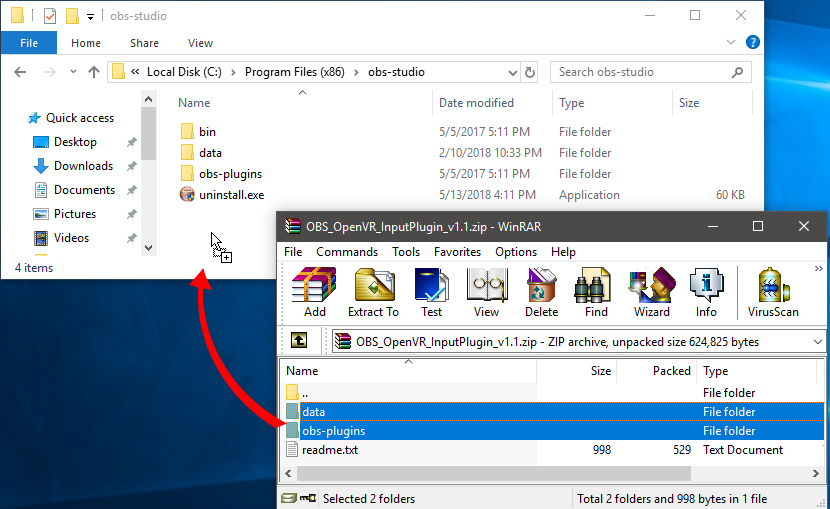
- The zip file you download should contain a "data" and "obs-plugins" folder with a readme file. If not, makes sure to download the release zip file.
- Close OBS Studio or Streamlabs OBS if it's open.
- Extract the zip file into your OBS studio directory or Streamlabs OBS directory.
- OBS Studio; typically installed in
C:\Program Files (x86)\obs-studioand choose Replace Files if prompted. - Streamlabs OBS; typically installed in
C:\Program Files\Streamlabs OBS\resources\app.asar.unpacked\node_modules\obs-studio-nodeand choose Replace Files if prompted.
- OBS Studio; typically installed in
- Launch OBS or Streamlabs OBS and add a new source to one of your scenes, the source name is "OpenVR Capture"

Jelajahi proyek terkait
Memuat…