
zzunkie/yardlet
zzunkie/yardlet has 36 GitHub stars and 5 forks. Star changes are not measured yet. Last checked 2026-11-09 16:58 UTC. Last push 2026-11-07.
Comment ces chiffres sont mesurés
Claude Code and Codex, better together: run the real agent CLIs side by side in one native app, with the sign-ins you already have.
Progression mesurée des étoiles
- in 24h
- Mise à jour retardée
- in 7 days
- Mise à jour retardée
- in 15 days
- Mise à jour retardée
- in 1 month
- Mise à jour retardée
Variations nettes sur des périodes qui se chevauchent, pas des totaux quotidiens. Les mesures absentes restent vides. Les étoiles indiquent l’intérêt, pas la qualité.
README.md
OriginalYardlet







Claude Code and Codex, better together. Yardlet is a native macOS app that runs the real agent CLIs you already use, Codex, Claude Code, OpenCode, Antigravity CLI and others, side by side in one window of projects and tasks, each with the agent loop, sign-in and session history it already has. It adds no agent layer of its own and writes nothing into the agents' settings.
Yardlet is written in Swift and SwiftUI; it is not a web view. It does not replace the agents or proxy their accounts: it starts the CLI you already use, with the account you already signed in to.
Most of us will end up with an agent workbench of our own. Yardlet began as one, built for working with several agents and accounts every day, and it is shared for anyone who doesn't have one yet.
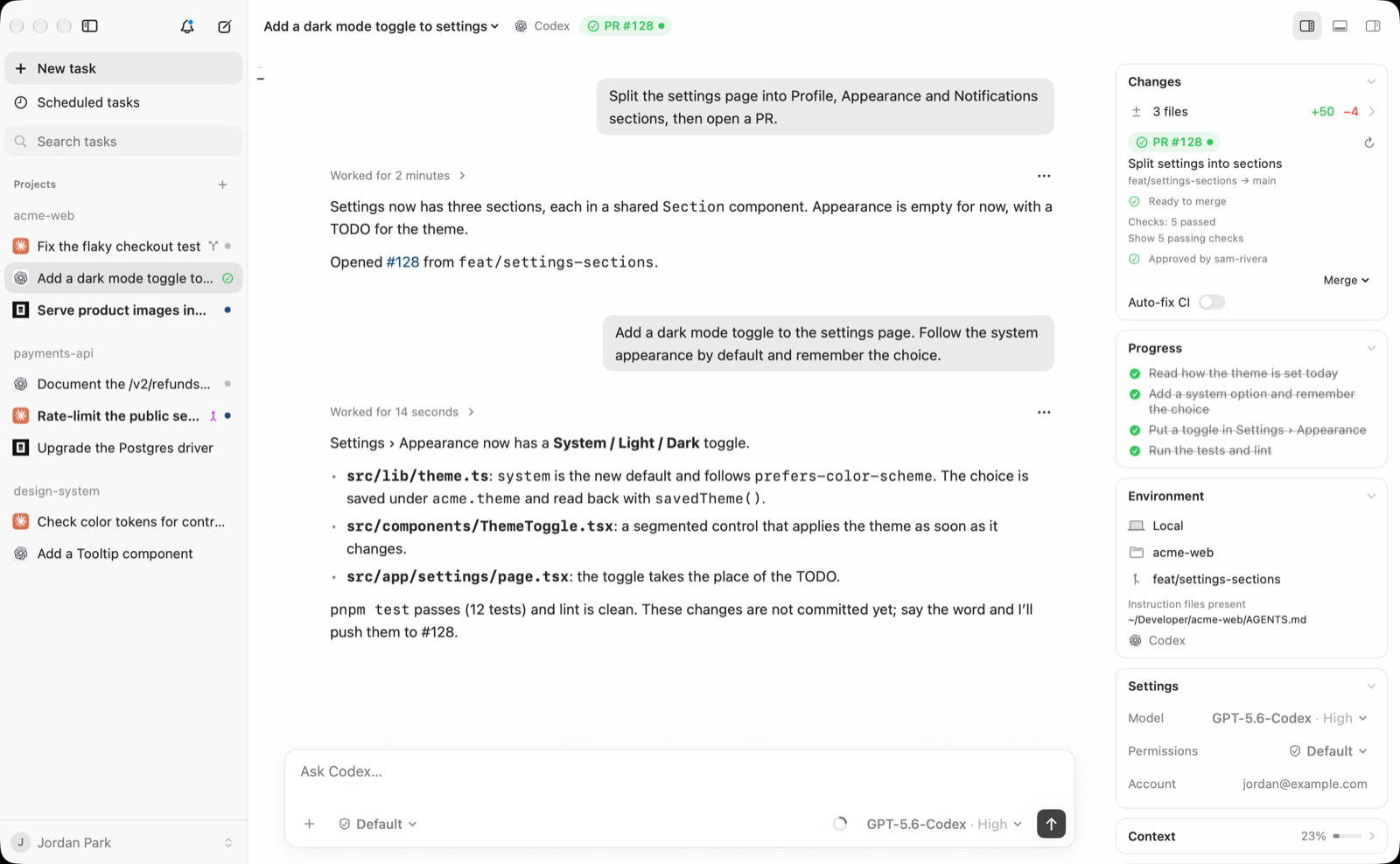
What it does
- One window for every agent. Codex, Claude Code, OpenCode, Cursor Agent, Antigravity CLI, Kimi Code, Grok Build, Pi and others share the same sidebar, conversation view, composer and approval cards. Controls stay in the same place; the choices and values come from each agent.
- Sessions stay where the agent keeps them. Codex runs against your normal
CODEX_HOMEand Claude Code against its own store, so a session started in Yardlet resumes in the original app or CLI, and the other way round. Yardlet keeps only its own index, drafts and reading state. - Stop whenever you like. Yardlet writes nothing into the agents' own configuration; it hands them its tools when it starts them. Quit it or remove it, and each agent, its sign-in and its sessions are as they were, ready in the original app or CLI (see Uninstall).
- Several accounts. Register more than one account per provider and start a task on the one with quota left; Yardlet shows each account's session and weekly limits, and the tokens the agents' own transcripts on your Mac record, by day, model, project and task (see Token usage).
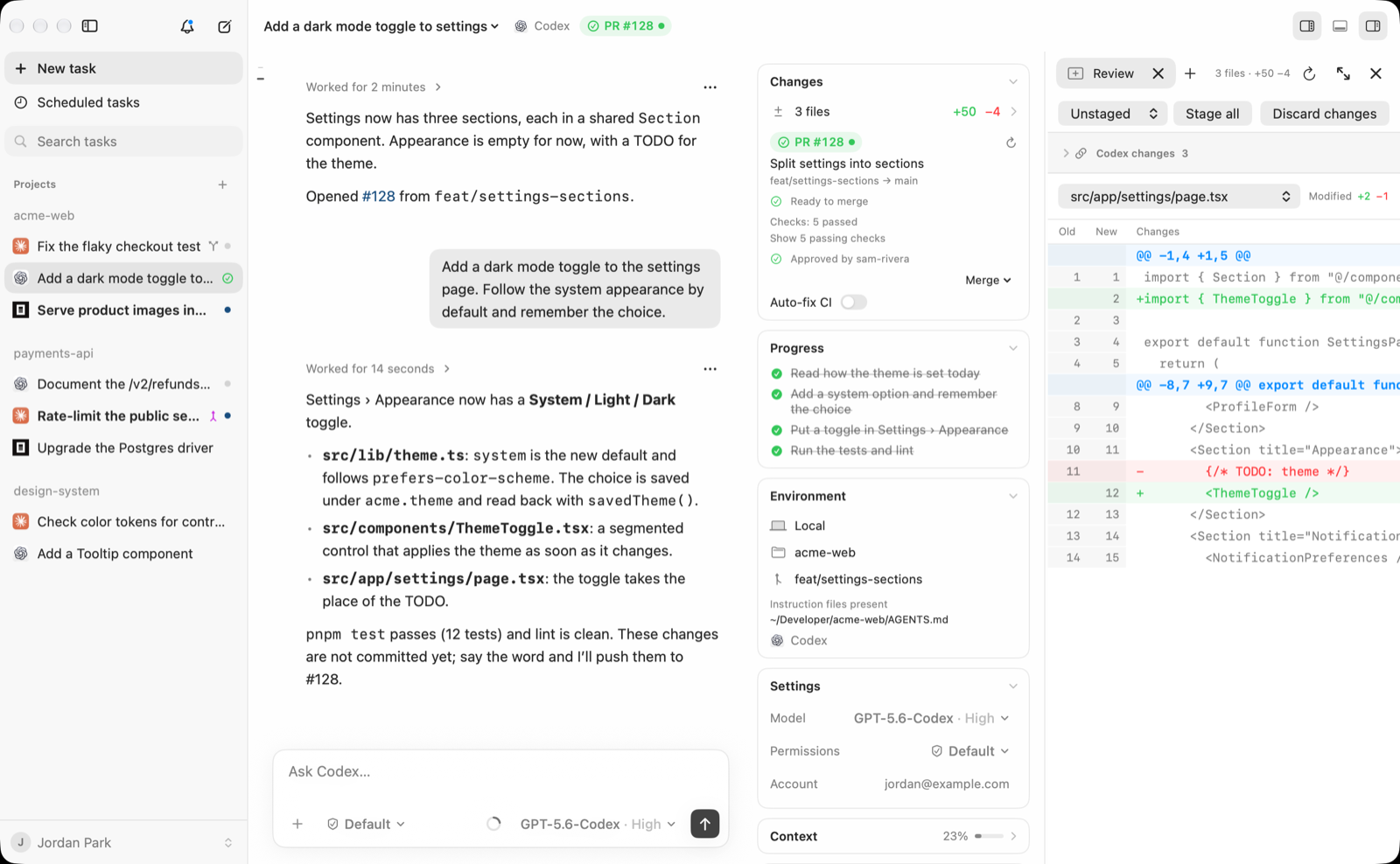
- Review the work. Diffs of the last turn, file restore and fork, a pull request tab with checks
through your own
gh, a terminal, and a files pane next to the conversation. Local file previews include images (including animation), PDFs, and movies and audio supported by macOS. Movies and audio start paused and stop when you leave the preview; videos fit the pane without enlargement. - Connectors for every agent. Gmail, Google Calendar and Google Drive through Yardlet's built-in MCP server on your Mac, GitHub, Slack, and dozens of remote MCP services that connect with one sign-in. A connector set up once is offered to the agents you run, and can be turned off per task.
- Built-in browser. A Chromium panel the agents can drive through browser tools while you watch.
- Personal agents. Chat with your existing ChatGPT dots alongside coding tasks, with saved drafts and native file previews. The account stays with its Codex runtime; no browser needs to stay open (see Personal agents for current limits).
- Scheduled tasks that run while Yardlet is open, and session tools that let one task read, message or start another.
- Another Mac's tasks. Pair Yardlet on another Mac once with a link from Settings › Remote, then follow and drive that Mac's tasks in a window of their own (File › Connect to Mac…), on the same network, over Tailscale or through the end-to-end encrypted relay. Sign-ins and sessions stay on the Mac that runs them.
Requirements
- macOS 15 or later, on Apple silicon or Intel. The Intel version is new and has limits of its own (see Known limitations).
- At least one agent CLI installed and signed in, for example
codexorclaude. Yardlet uses the CLI's own sign-in and never copies it from other apps.
Install
Download the notarized disk image from Releases: Yardlet-<version>.dmg for a Mac
with Apple silicon (M1 or later), Yardlet-<version>-x86_64.dmg for an Intel Mac. Open it and drag
Yardlet to Applications. Or install it with Homebrew,
which picks the one for your Mac:
brew install --cask zzunkie/tap/yardlet
Either way, Yardlet then updates itself (see Updates).
The main branch can be ahead of the latest release, so a feature described in this repository may
not be in the app you installed yet. Yardlet > About Yardlet shows the installed version, and
Releases lists what each version contains.
To build from source, see Development.
Updates
Yardlet updates itself with Sparkle. Once a day it reads
https://yardlet.app/appcast.xml (appcast-x86_64.xml in the Intel version, which updates to the Intel
version); a newer version downloads in the background and is installed when
Yardlet quits. Yardlet > Check for Updates… checks now and offers Install and Relaunch. With
tasks running, Yardlet waits for them to finish before it quits to update; meanwhile the Yardlet menu
shows Waiting to Update, and Cancel Update leaves the update for the next quit.
Turn off Settings > General > Automatically check for updates and Yardlet asks for nothing until
you check yourself.
An update installs only if it is signed with the release key built into Yardlet and with the same
Developer ID. Sparkle keeps its settings in Yardlet's own preferences (keys starting with SU) and
downloads under ~/Library/Caches/com.zzunkie.yardlet/org.sparkle-project.Sparkle/. It installs no
login item, launch agent or system helper: its installer runs only while an update is put in place.
Uninstall
Quit Yardlet and move it to the Trash, or run brew uninstall --cask zzunkie/tap/yardlet. Your
agents, their sign-ins and their sessions do not change. If Settings > General > Keep tasks
working with the lid closed is on, turn it off first: macOS keeps an app's background item after
the app is deleted. It has nothing left to run then, and you can also turn Yardlet off in System
Settings > General > Login Items & Extensions. To remove Yardlet's own data as well:
~/.yardlet(task list, drafts, reading state) and~/Library/Application Support/Yardlet(browser profiles, staged updates).brew uninstall --zap --cask zzunkie/tap/yardletremoves these together with Yardlet's caches and preferences.~/Library/Logs/Yardlet, which holds the hang log described under Privacy.- In Keychain Access, the items whose name starts with
Yardlet(connector sign-ins, the phone remote, the password vault), andChromium Safe Storageif you do not use Chromium itself. - Yardlet's entries in System Settings > Privacy & Security.
Privacy
Yardlet has no analytics and no server that receives your work. Task metadata, drafts and reading
caches live under ~/.yardlet; agent sessions stay in each agent's own store. If you pair a phone
or another Mac with the remote and it is away from your network, its end-to-end encrypted messages pass
through Yardlet's relay at relay.yardlet.app, which cannot read them and stores none
(relay/README.md). The Mac also reaches the same relay at yardlet-relay-pages.pages.dev, which
is often nearer, and keeps whichever answers first. Connector sign-ins are kept in the
macOS Keychain, and connector calls go straight from your Mac to the service. What an agent reads
through a connector is sent to that agent's provider under your account with it. The daily update
check asks yardlet.app for the appcast with Yardlet's and Sparkle's versions in its user agent and
sends no system profile; updates download from GitHub Releases. When Yardlet's main thread stays
busy for more than 250 ms, it writes the time and the stack (function names only) to
~/Library/Logs/Yardlet/hangs.log, kept under 2 MB and sent nowhere;
defaults write com.zzunkie.yardlet Yardlet.debug.hangLog -bool NO turns it off from the next
launch. See the
privacy policy.
Permissions
Yardlet is not sandboxed. The agents it starts run as you, as they would in a terminal, under their own approval and sandbox settings. Yardlet uses the access below only for the feature named, and macOS asks you the first time:
- Camera and microphone: a site you allow in the built-in browser, or a command running in a task, such as an agent's voice dictation or a program in the terminal.
- Bluetooth and USB: passkeys from your phone or tablet, and security keys, in the built-in browser.
- Automation (Apple Events): a command running in a task that asks to control another app.
- Calendars, Reminders and Contacts: the Apple Calendar, Reminders and Contacts connectors, once you turn them on.
- Local network: your phone finding this Mac on the same Wi-Fi, when the phone remote is on.
Three helpers in the app bundle do work outside the main process:
- The browser host runs the built-in Chromium (CEF) browser in its own processes, with its
profiles under
~/Library/Application Support/Yardlet. yardlet-mcpis a small stdio MCP server that Yardlet adds to each agent session it starts, through that agent's per-session option, never its settings files. It forwards the agent's calls to browser tools, connectors and session tools to the running Yardlet over a local socket.- The lid helper runs only while Settings > General > Keep tasks working with the lid closed is on, which it is not by default. It is a launch daemon that runs as root, because the system setting that keeps a Mac awake with its lid closed needs it. It turns that setting on only while tasks are working, and puts it back when they finish, when Yardlet quits or crashes, and whenever the Mac starts. Turning the option off unregisters the helper.
Known limitations
- The Intel version is new. It has been tried on one Intel Mac, a 2018 Mac mini with Intel UHD
Graphics 630 on macOS 15.8, where it starts, streams a task and draws the built-in browser; other
Intel graphics (Iris, AMD Radeon) and macOS 26 on Intel have not been tried. CI starts it on Intel
macOS 15 and 26 with every change to
main, but those Macs have only a virtual GPU, on which the built-in browser often stops before it draws. If you use Yardlet on an Intel Mac, please tell us how it goes, especially if the built-in browser closes or stays blank: a bug report with "Intel" chosen, or a note in Discussions. - On Intel Macs the built-in browser plays no H.264 video or AAC audio, such as many sites' MP4 videos; WebM video (VP9, AV1) plays. The Intel version uses CEF's own Chromium build, which leaves those codecs out; the Apple silicon version has them.
- Connectors, browser tools and session tools reach Codex, Claude Code and the agents that use ACP (OpenCode, Antigravity CLI 1.4.11 or later, Kimi Code, Grok Build, Hermes). Cursor Agent, Pi, Muse Code and earlier Antigravity CLI versions have no way to add an MCP server to one session, so their tasks run without them.
- Scheduled tasks run only while Yardlet is open. A run missed while it was closed runs once when it opens again, within 7 days. A one-time continuation waits for a busy task to become available, for up to 24 hours after its scheduled time. Repeating and manual runs skip busy tasks.
- The built-in browser cannot use passkeys saved in iCloud Keychain (docs/BROWSER_HOST.md).
- Personal agents have limits of their own (docs/PERSONAL_AGENTS.md).
- Yardlet is maintained by one person, and only the latest release receives fixes (SECURITY.md).
Roadmap and feedback
What's being worked on and what comes next is on the roadmap, and each release gathers its work in a milestone. Report bugs and ideas in issues, ask questions in Discussions, and see CONTRIBUTING.md to send a pull request.
License
MIT. Bundled third-party software and marks are listed in THIRD_PARTY_NOTICES.md. Product names and logos of the supported agents belong to their owners; Yardlet is not affiliated with or endorsed by them.
Development
Building needs Xcode 27.1 or later (Swift 6.4); Xcode 26 cannot compile Yardlet.
swift build --build-system native
./scripts/test-fast.sh
swift run --build-system native NativeHarnessClient
The default build system also compiles SwiftTerm's Metal shaders and stops when the Metal toolchain
is not installed; --build-system native builds without it. scripts/test-fast.sh runs every test
except renders, QA fixtures and performance runs, as CI does for each pull request that changes more
than documents;
scripts/test-fast.sh --excluded runs only those, as CI does every night on main, and
swift test --build-system native runs them all.
For a normal registered macOS application bundle during development:
./scripts/build-app.sh
open .build/Yardlet.app
To update the installed app from inside Yardlet (for example, from a Yardlet task that works on Yardlet itself), build a release bundle and stage it, then choose Yardlet > Install Update…. A bundle built without Sparkle's feed and key (see Releases) has this item instead of Check for Updates…, and makes no update request:
./scripts/build-app.sh release && ./scripts/stage-update.sh
Staging verifies the bundle and copies it to ~/Library/Application Support/Yardlet/Updates/Pending;
it never touches the installed app. Install Update… asks for confirmation, quits Yardlet through the
normal quit path (which warns about running tasks), and a detached installer swaps the bundle once the
app has exited, keeps the previous one in Updates/Previous, and reopens Yardlet. Tasks, drafts and
history live outside the bundle. The installer log is Updates/install.log. While tasks run, Install Update…
also offers Restart When Tasks Finish: Yardlet waits until no task or subagent has run for a few seconds, checks
that the staged build is still the one chosen, and installs through the same quit; the Yardlet menu shows the wait
and Cancel Update ends it.
Yardlet shows a staged build without being asked, as the Claude app shows a downloaded update: Restart to update above the account button at the bottom of the sidebar, and the same line above Quit in the menu bar menu, both opening Install Update…. It looks when the window opens, when Yardlet comes to the front and once a minute, and only checks that the staged build is Yardlet's and not the one installed; the signature is checked when you install. A build that updates with Sparkle does not look.
The bundle script uses SwiftPM's native build engine to retain its established resource layout.
On toolchains that default to Swift Build, use swift test --build-system native for the same
pipeline. Set YARDLET_BUILD_SYSTEM to override the engine used by the bundle script.
For small changes, ./scripts/test-fast.sh runs every test except the windowless renders, QA
fixtures and performance runs, in four parallel processes (about 5 minutes; the whole suite takes
about 15 minutes serially). Run the whole suite before a release.
./scripts/perf-bench/run.sh --build runs the performance bench: fixed scenes of the whole app (launch,
idle, streaming, a long Codex history, a long sidebar, browser tabs) in a QA copy off the screen, and the
test suite's benchmarks, compared with the previous run on the same Mac. See
docs/PERFORMANCE_BENCH.md.
Bundles include the in-window browser (Chromium Embedded Framework in a separate browser host
process). The script uses the CEF distribution pinned for the bundle's architecture in
~/Library/Caches/Yardlet/CEF/, verifies its hash, and stops with the download command when it is
missing; YARDLET_DOWNLOAD_CEF=1 downloads it instead. A debug bundle can be built without it with
YARDLET_WITHOUT_CEF=1; swift build, swift run, and swift test never need CEF and fall back to
the WebKit preview. See docs/BROWSER_HOST.md.
The bundle is built for the Mac that builds it. YARDLET_ARCHS=x86_64 builds it for Intel Macs, with
the Intel CEF build. YARDLET_ARCHS="arm64 x86_64" builds a universal bundle, each executable joined
with lipo; it is a debug bundle built with YARDLET_WITHOUT_CEF=1, since each CEF build has one
architecture. CI builds the release bundle of each architecture in a disk image, starts it on macOS 15
on Apple silicon and on Intel and on macOS 26 on Intel, and opens the browser panel there with a debug
bundle of the same architecture (.github/workflows/launch.yml): every night on main, by hand, and
on pushes and pull requests that change how the bundle is built. On Intel the browser check only reports: GitHub's Intel
Macs have a virtual GPU on which Chromium often cannot start drawing.
An API that a newer SDK adds without marking it newer than macOS 15 links strongly, and the app stops
before main on a macOS 15 release that lacks it. ./scripts/check-macos-symbols.sh <app> <SDK>
checks a bundle's imports from macOS against an older SDK; CI checks them against the macOS 15.0 SDK
of Xcode 16.0, since its macOS 15 images run the latest 15.x.
Phone app
The iPhone app is in Apps/iOS, an Xcode project that builds the same YardletRemote package target as the
Mac's remote. How to build and run it, with or without a Mac, is in Apps/iOS/README.md.
Screenshots and demo videos
Debug builds carry a showcase scene for public screenshots and videos: made-up projects, people and
accounts, in English, with Codex, Claude Code and OpenCode tasks and a pull request whose checks
passed (--ui-fixture=showcase). With --ui-fixture-playback it plays a round over and over for
recording: beside a running Claude Code task, a Codex task is started on the account with room
left. scripts/showcase/capture.sh <folder> takes the stills and the looping videos in light and
dark mode from a QA copy of .build/Yardlet.app with its own bundle identifier and temporary home,
then moves that copy to the Trash. It needs the screen unlocked and the Screen Recording permission;
see the script's header for the scenes and file names.
Signing and notarization
The macOS build resolves SQLite through the SDK and links /usr/lib/libsqlite3.dylib, keeping
Developer ID library validation independent of local Homebrew packages.
build-app.sh signs ad-hoc by default, as before. To sign with an identity from the keychain
(hardened runtime, each part's entitlements from Packaging/Entitlements, inside out through
scripts/sign-app.sh), then notarize:
YARDLET_SIGNING_IDENTITY="Developer ID Application: <name> (<team>)" ./scripts/build-app.sh release
./scripts/notarize.sh --dry-run   # local checks only; nothing is sent
./scripts/notarize.sh             # submit, wait, staple: the app, then .build/Yardlet-<version>.dmg
- Once per Mac, store the notary credentials in Terminal; notarytool asks for an app-specific
password (appleid.apple.com > Sign-In and Security) and keeps it in the login keychain. The scripts
never handle a password:
xcrun notarytool store-credentials yardlet-notary --apple-id <Apple ID email> --team-id <team>. Another profile name goes in--keychain-profile <name>orYARDLET_NOTARY_PROFILE. notarize.shfirst checks every Mach-O for Developer ID, a secure timestamp, the hardened runtime and noget-task-allow, and that the profile exists. It submits the app as a zip and staples it, puts the stapled app beside a link to /Applications in a disk image (--output <file.dmg>), signs the image with the app's certificate, submits and staples it, and runsspctlon both.- Entitlements: the Renderer and GPU helpers
cs.allow-jit(as Chrome's); the browser host Bluetooth and USB for passkeys; the app Bluetooth for the host it launches, and Apple Events, microphone and camera for the commands it runs (harnesses, their tools, the terminal), which macOS attributes to Yardlet; each has its usage string inInfo.plist. - The lid helper behind Settings › General › "Keep tasks working with the lid closed"
(
Contents/Helpers/yardlet-lid-helper, with its launchd property list inContents/Library/LaunchDaemons) is signed with its label,<app identifier>.lid-helper, as its identifier. The app and the helper accept each other only when signed by the same team, and the property list's launch constraint (SpawnConstraint), whose teamsign-app.shfills in, lets launchd start no other executable as root. A build signed ad hoc has no team, so it carries no property list and offers no helper. - A Developer ID identity signs with a secure timestamp (Apple's timestamp server); other identities,
such as Apple Development for local checks, sign without one unless
YARDLET_SIGNING_TIMESTAMP=1. Only a Developer ID build can be notarized. YARDLET_PROVISIONING_PROFILE=<path>embeds a Developer ID profile in the browser host (Yardlet Browser Host.app/Contents/embedded.provisionprofile) with the entitlements it grants. The profile must be for the App ID<team>.com.zzunkie.yardlet.browser-host; the app itself needs none. Touch ID passkeys stay off with the stock CEF build, whose keychain group has no team ID (YARDLET_PATCH_CEF_WEBAUTHN_GROUP=1enables the tested opt-in prototype; see docs/BROWSER_HOST.md §7).- A Developer ID build keeps the browser's cookie key in the login keychain instead of the mock keychain, so sites in the built-in browser need signing in again once after the switch.
- Once the installed app is Developer ID signed,
stage-update.shand Install Update… accept only a build that meets its designated requirement (same identifier, same team). Build updates with the same identity. sign-app.shsigns Sparkle's framework from the inside out with the same identity, hardened runtime and timestamp (its XPC services,Autoupdate,Updater.app, then the framework), as Sparkle documents for Developer ID; the notarization check covers them like every other Mach-O.
Releases
scripts/release.sh prepares a release and publishes nothing:
YARDLET_SIGNING_IDENTITY="Developer ID Application: <name> (<team>)" ./scripts/release.sh \
  --appcast <yardlet-site checkout>/appcast.xml \
  --appcast-x86_64 <yardlet-site checkout>/appcast-x86_64.xml --notes notes.md
It makes the release twice, for Apple silicon and for Intel Macs. Each time it builds the release
bundle of that one architecture with its CEF build, Sparkle's feed for it (YARDLET_SPARKLE_FEED_URL,
default https://yardlet.app/appcast.xml, and the same address with -x86_64 before .xml for Intel)
and the public key, notarizes the app and its disk image with notarize.sh (Yardlet-<version>.dmg,
and Yardlet-<version>-x86_64.dmg for Intel), and runs Sparkle's generate_appcast, which signs the
image with the EdDSA key and writes that architecture's appcast with the download under the GitHub
release v<version>. It checks that every executable in each image is of its architecture and that
the key built into the app accepts the signature, then prints the publishing steps: the GitHub release
with both images first, then both appcasts on the site, and the Homebrew cask's two hashes. Everything
lands in .build/release-<version>/arm64/ and .build/release-<version>/x86_64/.
- Raise
CFBundleShortVersionStringandCFBundleVersioninPackaging/Info.plistand commit first: Sparkle orders updates byCFBundleVersion. - Run the performance bench on that commit first; no budget may fail (docs/PERFORMANCE_BENCH.md, "Before a release").
- The EdDSA key, once per maintainer:
.build/artifacts/sparkle/Sparkle/bin/generate_keys --account yardletmakes the private key in the login keychain and prints the public key, whichrelease.shreads back withgenerate_keys --account yardlet -p(or setYARDLET_SPARKLE_PUBLIC_KEY; another account name goes inYARDLET_SPARKLE_ACCOUNT). Export one copy withgenerate_keys --account yardlet -x <file>and keep it offline, never in the repository. Without the key, installed copies take an update only through Sparkle's key rotation: a new key, and the same Developer ID. build-app.shwritesSUFeedURLandSUPublicEDKeyonly when bothYARDLET_SPARKLE_FEED_URLandYARDLET_SPARKLE_PUBLIC_KEYare set; QA copies made byprepare-qa.shdrop them.--skip-notarizetries the steps locally with an image that must not be published, and--ed-key-file <file>signs with a key file instead of the keychain.
For Touch ID QA, register the explicit App ID com.zzunkie.yardlet.browser-host under the signing
team and create its Developer ID provisioning profile using the existing Developer ID
Application certificate. Store the downloaded profile outside the checkout, for example under
~/Library/Developer/Yardlet/; never commit it. Its team and
com.apple.application-identifier must match the signing identity and host, its expiration must
be in the future, and ProvisionsAllDevices must be true. The profile must grant the keychain
groups used by the patched CEF build (<team>.com.zzunkie.webauthn and …webauthn-uvk, usually
through <team>.*). The current Developer portal has no separate Keychain Sharing checkbox;
verify the generated profile rather than enabling unrelated capabilities. See Apple's keychain sharing documentation.
Build in a separate worktree, then prepare a QA copy with the same signing variables:
export YARDLET_SIGNING_IDENTITY="Developer ID Application: <name> (<team>)"
export YARDLET_PROVISIONING_PROFILE="$HOME/Library/Developer/Yardlet/Yardlet_Browser_Host_Developer_ID.provisionprofile"
export YARDLET_PATCH_CEF_WEBAUTHN_GROUP=1
nice -n 10 ./scripts/build-app.sh debug
nice -n 10 ./scripts/browser-host-qa/prepare-qa.sh .build/Yardlet.app \
  .build/browser-host-qa/YardletPasskeyQA.app com.zzunkie.yardletqa.passkey
./scripts/browser-host-qa/qa-launch.sh .build/browser-host-qa/YardletPasskeyQA.app \
  "$PWD/.build/browser-host-qa/qa-home" "$PWD/.build/browser-host-qa/app.log" -- \
  --ui-fixture=conversation --ui-fixture-surface=browser --ui-fixture-browser-ignore-occlusion
When a profile is supplied, prepare-qa.sh preserves the browser host's original App ID so the
profile remains valid; the outer app and helpers still use QA identifiers. Launch through
qa-launch.sh with a separate QA home and the conversation fixture. The cookie keychain stays
mocked, but Touch ID QA uses the real keychain access groups and requires the person to authenticate.
On a public test site such as webauthn.io, confirm both registration and authentication with the
platform authenticator. A valid signature or an available authenticator alone does not establish
that either ceremony succeeded. Both ceremonies were verified with Touch ID on 2026-10-23.
This does not enable iCloud Keychain passkeys (docs/BROWSER_HOST.md §7).
Runtime paths are selected per session and the local index is restored without eagerly starting either harness.
Yardlet-owned task metadata, drafts, and reading caches live under ~/.yardlet.
New tasks use each harness's original session store. Codex runs against the native
CODEX_HOME (normally ~/.codex), so the same provider session ID can be resumed
from Yardlet or the original Codex client. The Account Center uses that same home;
Yardlet does not copy credentials, settings, or session history into another home.
Previously created isolated Codex tasks retain their saved scope and continue to
resume and fork under ~/.yardlet/harnesses/codex/home. They are not moved or silently
rebound to a different session. Native history imports retain their original IDs;
Yardlet's sidebar index and local UI state remain separate from provider storage.
See native session storage for what each task
stores and what Yardlet reads.
Additional provider accounts can be registered under Connections → Accounts. Choose an account for a new task by its available quota; saved tasks retain their selected CLI environment. See provider connections for the supported boundaries.
Claude uses the selected official CLI's own authentication. If claude auth status
reports loggedIn: false, run claude auth login; the client does not import Claude
Desktop credentials or provider tokens. When no explicit Claude runtime has been saved,
the client prefers the newest executable CLI bundled with Claude Desktop before an older
PATH binary; the exact path remains visible and selectable in the new-session sheet.
Explorer des projets similaires
codecrafters-io/build-your-own-x
Maîtrisez la programmation en recréant de zéro vos technologies préférées.
561,607 étoilespublic-apis/public-apis
Une liste collective d'API gratuites
497,930 étoilesmorluto/rea
Rétro-ingénierie de n'importe quoi avec des agents, du comportement des applications jusqu'aux binaires natifs.
449,872 étoilesopenclaw/openclaw
L'IA qui fait vraiment les choses. Tout système d'exploitation, toute plateforme. À la manière du homard. 🦞
394,297 étoiles