
zthxxx/react-dev-inspector
À propos
Accédez directement au code de votre IDE local depuis un composant React dans le navigateur en un seul clic.
Web et applicationsProgression mesurée des étoiles
- in 24h
- 0
- in 7 days
- -1
- in 15 days
- -3
- in 1 month
- Historique en cours
Variations nettes sur des périodes qui se chevauchent, pas des totaux quotidiens. Les mesures absentes restent vides. Les étoiles indiquent l’intérêt, pas la qualité.
README.md
OriginalReact Dev Inspector
Introduction
react-dev-inspector is the tool for seamlessly code navigation from browser to IDE.
With just a simple click, you can jump from a React component on the browser to its source code in your local IDE instantly. Think of it as a more advanced version of Chrome's Inspector.
See the document on: https://react-dev-inspector.zthxxx.me
Why React Dev Inspector
Have you ever run into any of these issues 🤔:
- You've got to fix some bugs in your team's project, but you have no idea where the heck page/component's code is located.
- You're eager to dive into an open-source project that interests you, but it's hard to find where the code for the page/component is implemented.
- You may thinking about a component and want to quickly peek at its code, but don't want to memorize or manually expand those never-ending deep file paths.
That's exactly why react-dev-inspector was created.
Quick Look
Just check out this demo below and you'll get it in a snap.
Showcase: https://react-dev-inspector.zthxxx.me/showcase
screen record:
Wanna try out the demo right now? Sure, here is the online demo:

How to Use and Configure
According to the working pipeline below, the Part.1 and Part.2 are what you need configure to use.
Basically, it's includes:
Check the Documentation Site for more details
How It Works
Here is the working pipeline of react-dev-inspector:
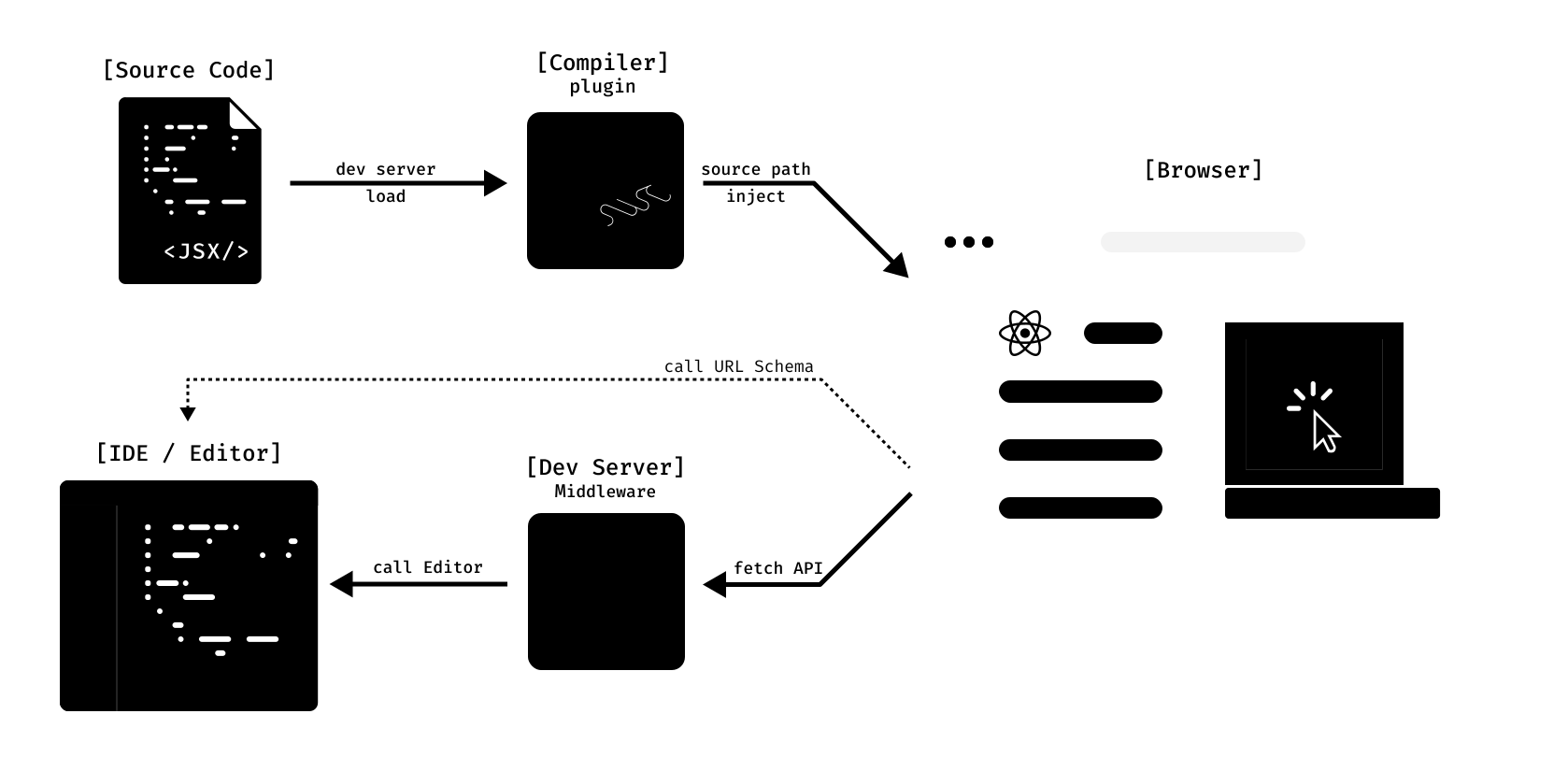
0. Inject JSX Source
The compiler's plugin
records source path info into React components during development stage.
Note: The 0 of Part.0 implies that this section is generally OPTIONAL. Most React frameworks offer this feature out-of-the-box, which means you usually don't need to manually configure it additionally.
1. Inspector Component
The react-dev-inspector provide a <Inspector/> component to reads the source info,
and sends it to the dev-server when you inspect elements on browser.
2. Dev Server Middleware
The react-dev-inspector provide some middlewares for dev-server in most frameworks to receives source path info from API, then call your local IDE/Editor to open the source file.
Articles about it
- [Chinese] 🎉 我点了页面上的元素,VSCode 乖乖打开了对应的组件?原理揭秘
License
Thanks for @zthxxx @sonacy @sl1673495
Explorer des projets similaires
Chargement…